


When you run a simple write,
…it may look simple, but under the hood, MySQL’s InnoDB engine kicks off a pretty complex sequence to ensure your data stays safe, consistent, and crash-recoverable.
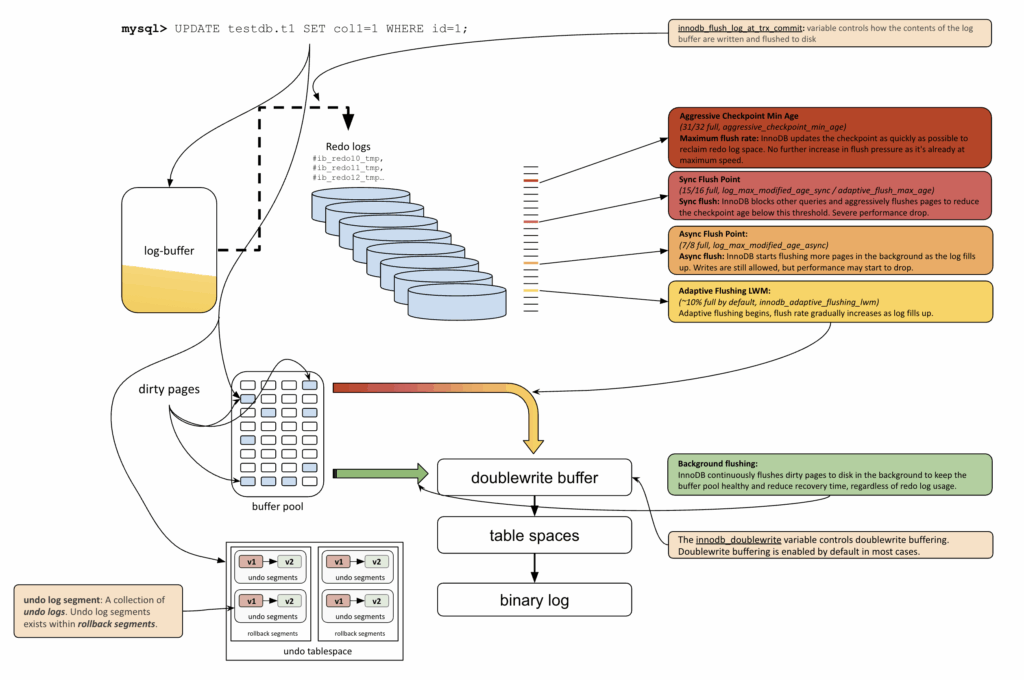
In the top-left corner of the diagram, we see exactly where this begins — the moment the query is executed:
|
1 |
mysql> UPDATE testdb.t1 SET col1=1 WHERE id=1; |
As soon as the update hits InnoDB, the change is written to the log buffer in memory, not to disk. This is fast, but temporary.
Shortly after, InnoDB flushes these changes from the log buffer to the redo logs (center-top of the diagram), which are physical files like #ib_redo0, #ib_redo1, etc. These logs are critical for crash recovery; they guarantee that even if MySQL crashes, it can replay what happened and restore the last consistent state.
While redo logs are about recovery, actual data lives in the buffer pool. This is where your table pages sit in memory. The updated page is now a dirty page, meaning it has changes that haven’t been written to disk yet.
In the diagram’s lower left section, dirty pages accumulate in the buffer pool. These will be flushed as soon as possible because background flushing continuously flushes dirty pages to disk.
As shown in green on the bottom-right, InnoDB constantly flushes dirty pages even if the redo logs aren’t full. This helps keep the buffer pool healthy and recovery times short, regardless of pressure from log usage.
Whenever an UPDATE or DELETE is executed, InnoDB doesn’t just store the new value — it also records the old value in the undo log. These logs serve two critical purposes:
Undo logs are stored in undo segments, which are grouped inside rollback segments. This structure makes it possible for multiple transactions to safely maintain their own undo information simultaneously.
Over time, once transactions are committed and older versions are no longer needed, the purge thread removes undo records in the background, preventing tablespace bloat and reclaiming space.
Here’s where things get tricky: redo logs aren’t infinite. As they fill up, InnoDB has to start flushing dirty pages to make space. The middle-right part of the diagram shows the four flushing thresholds that control this:
These thresholds, shown in the diagram with different colors, represent how aggressively InnoDB responds when redo space runs low.
Eventually, dirty pages are written from the buffer pool to the actual table space files (bottom-center of the diagram). This can happen during forced flushes or via ongoing background activity.
Once the transaction is ready to commit, InnoDB doesn’t just stop at the redo logs.
It also writes a statement or row change event to the binary log (a separate file used for replication and recovery). This is shown in the diagram as a separate arrow from table space to the binary log.
This log is used for:
All these log buffers and flushes are coordinated by a very important setting: innodb_flush_log_at_trx_commit
This variable controls when InnoDB flushes the log buffer to the redo log files on disk. It determines the tradeoff between durability and performance:
| Value | Behavior |
| 0 | Write once per second. Fast but less durable (may lose last second on crash). |
| 1 | (Default) Write and flush to disk on every commit. Most durable, but slower. |
| 2 | Write on every commit, flush once per second. A middle ground. |
So even if your redo logs are fast, the actual moment they’re flushed to disk depends on this setting. If you want true ACID guarantees, keep this set to 1.
The MySQL with Diagrams series continues to grow:
Resources
RELATED POSTS





> Once the transaction is ready to commit, InnoDB doesn’t just stop at the redo logs.
>
> It also writes a statement or row change event to the binary log […]
Heeeuu… I am not sure this is accurate (from what I understand, the statement never reaches InnoDB, and SBR is done in the Server, not the Storage Engine), and the diagram is definitely wrong here. Shown on the diagram, binary logging happens as part of flushing, but IMHO this is not the case. A page could still be dirty after a trx has committed, so flushing did not happen yet, but binary logging definitely happened.
Also and IMHO, things missing from this diagram:
Thanks for pointing this out — you’re correct that binary logging is not part of InnoDB itself, and the current diagram can give that impression. In reality, the server coordinates binary logging with InnoDB redo logging through the two-phase commit (XA):
https://dev.mysql.com/doc/refman/8.4/en/binary-log.html
The challenge is that showing all of this precisely makes the diagram much more complex and harder to follow. To keep the visualization readable, I simplified some aspects — but as you noted, that risks blurring the line between InnoDB internals and server-level binary log handling. I’ll add a note so readers aren’t misled.
Also, I’m trying to prepare a presentation about it to explain it in small, focused portions.