

MySQL 5.7 comes with a new set of features and multi-source replication is one of them. In few words this means that one slave can replicate from different masters simultaneously.
During the last couple of months I’ve been playing a lot with this trying to analyze its potential in a real case that I’ve been facing while working with a customer.
This was motivated because my customer is already using multi-sourced slaves with Tungsten Replicator and I wanted to do a side-by-side comparison between Tungsten Replicator and Multi-source Replication in MySQL 5.7
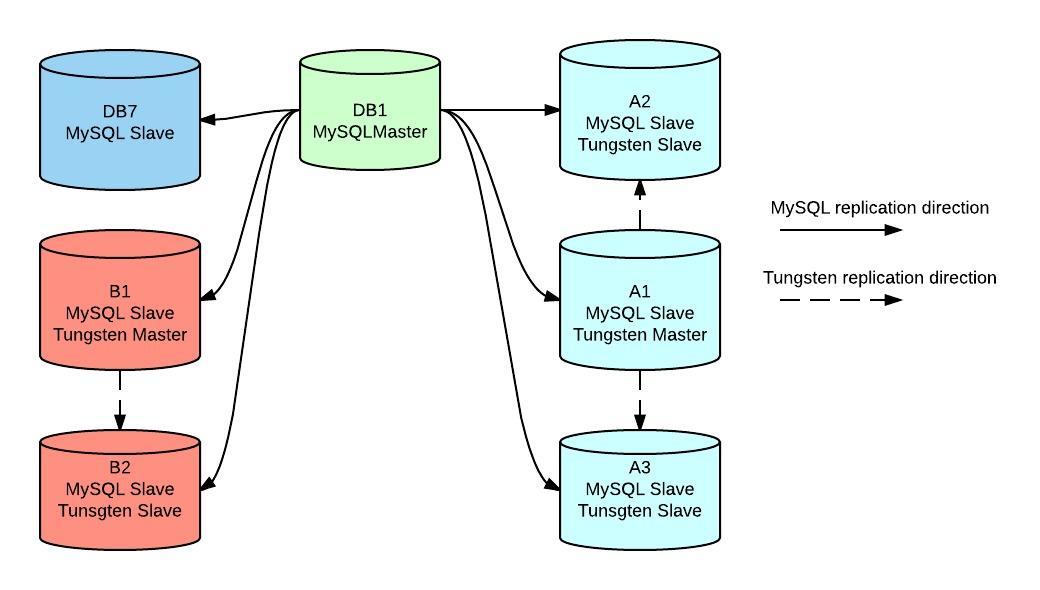
DB1 is our main master attending mostly writes from several applications, it also needs to serve read traffic which is putting it’s capacity close to the limit. It has attached 6 replication slaves using regular replication.
A1, A2, A3, B1, B2 and DB7 are reporting slaves used to offload some reads from master and also woking on some offline ETL processes.
Since they had some idle capacity customer decided to go further and set a different architecture:
A1 and B1 became also masters of other slaves using Tungsten Replicator, in this case group A is a set of servers for a statistics application and B is attending a finance application, so A2, A3 and B2 became multi sourced slaves.
New applications writes directly to A1 and B1 without impacting write capacity of main master.
Pros
Cons
With all this in mind we moved a step forward and started to test if we can move this architecture to use legacy replication only.
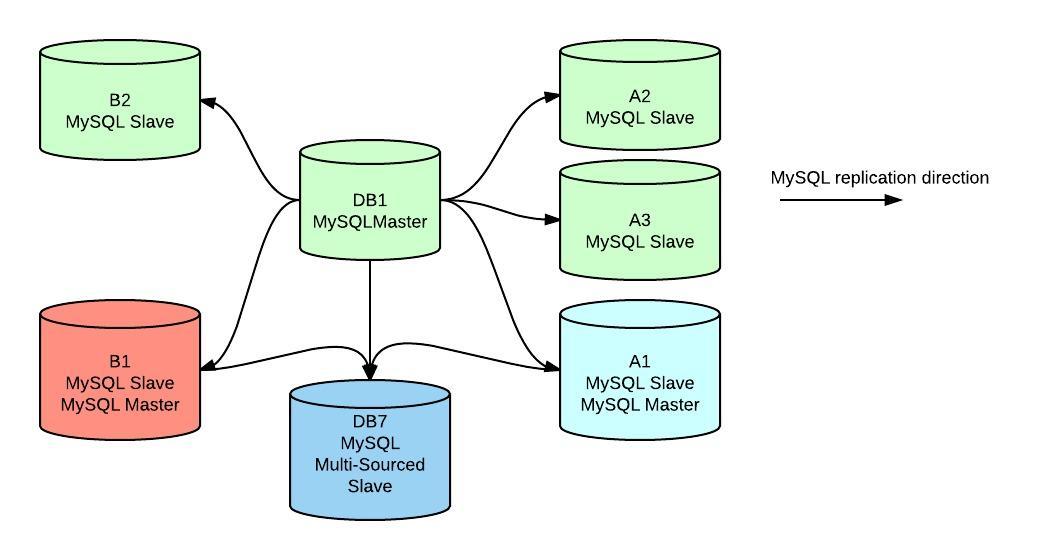
We added some storage capacity to DB7 for our testing purposes and the goal here is to replace all Tungsten replicated slaves by a single server where all databases are consolidated.
For some data dependency we weren’t able to completely separate A1 and B1 servers to become master-only so they are currently acting as masters of DB7 and slaves of DB1 By data dependency I mean DB1 replicates it’s schemas to all of it’s direct slaves, including DB7. DB7 also gets replication of the finance DB running locally to B1 and stats DB running locally to A1.
master_info_repository andrelay_log_info_repository variables needs to be set to TABLE
log_slave_updates needs to be disabled in A1 and B2 to avoid having duplicate data in DB7 due replication flow.
Pros
Cons
sql_slave_skip_counter is a global command still which means you can’t easily skip a statement in a particular channel.
It was easier than you think. First of all we needed to start from a backup of data coming from our masters. Due to versions used in production (main master is 5.5, A1 and B1 are 5.6) we started from a logical dump so we avoided to deal with mysql_upgrade issues.
Disclaimer: this does not pretend to be a guide on how to setup multi-source replication
For the matter of our case we did the backup/restore using mydumper/myloader as follow:
|
1 2 3 4 5 |
[root@db1]$ mydumper -l 600 -v 3 -t 8 --outputdir /mnt/backup_db1/20150708 --less-locking --regex="^(database1.|database2.|database3.)" [root@a1]$ mydumper -l 600 -v 3 -t 8 --outputdir /mnt/backup_a1/20150708 --less-locking --regex="^(tungsten_stats.|stats.)" [root@b1]$ mydumper -l 600 -v 3 -t 8 --outputdir /mnt/backup_b1/20150708 --less-locking --regex="^(tungsten_finance.|finance.)" |
Notice each command was run in each master server, now the restore part:
|
1 2 3 4 5 |
[root@db7]$ myloader -d /mnt/backup_db1/20150708 -o -t 8 -q 10000 -h localhost [root@db7]$ myloader -d /mnt/backup_a1/20150708 -o -t 8 -q 10000 -h localhost [root@db7]$ myloader -d /mnt/backup_b1/20150708 -o -t 8 -q 10000 -h localhost |
So at this point we have a new slave with a copy of databases from 3 different masters, just for context we need to dump/restore tungsten* databases because they are constantly updated by Replicator (which at this point is still in use). Pretty easy right?
Now the most important part of this whole process, setting up replication. The procedure is very similar than regular replication but now we need to consider which binlog position is necessary for each replication channel, this is very easy to get from each backup by reading in this case the metadata file created by mydumper. In known backup methods (either logical or physical) you have a way to get binlog coordinates, for example –master-data=2 in mysqldump or xtrabackup_binlog_info file in xtrabackup.
Once we get the replication info (and created a replication user in master) then we only need to run the known CHANGE MASTER TO and START SLAVE commands, but here we have our new way to do it:
|
1 2 3 4 5 6 |
db7:information_schema> change master to master_host='db1', master_user='rep', master_password='rep', master_log_file='db1-bin.091487', master_log_pos=74910596 FOR CHANNEL 'main_master'; Query OK, 0 rows affected (0.02 sec) db7:information_schema> change master to master_host='a1', master_user='rep', master_password='rep', master_log_file='a1-bin.394460', master_log_pos=56004 FOR CHANNEL 'a1_slave'; Query OK, 0 rows affected (0.02 sec) db7:information_schema> change master to master_host='b1', master_user='rep', master_password='rep', master_log_file='b1-bin.1653245', master_log_pos=2563356 FOR CHANNEL 'b1_slave'; Query OK, 0 rows affected (0.02 sec) |
Replication is set and now we are good to go:
|
1 2 3 4 5 6 |
db10:information_schema> START SLAVE FOR CHANNEL 'main_master'; Query OK, 0 rows affected (0.00 sec) db10:information_schema> START SLAVE FOR CHANNEL 'a1_slave'; Query OK, 0 rows affected (0.00 sec) db10:information_schema> START SLAVE FOR CHANNEL 'b1_slave'; Query OK, 0 rows affected (0.00 sec) |
New commands includes the FOR CHANNEL 'channel_name' option to handle replication channels independently
At this point we have a slave running 3 replication channels from different sources, we can check the status of replication with our known command SHOW SLAVE STATUS (TL;DR)
|
1 2 3 4 5 6 7 8 9 10 11 12 13 14 15 16 17 18 19 20 21 22 23 24 25 26 27 28 29 30 31 32 33 34 35 36 37 38 39 40 41 42 43 44 45 46 47 48 49 50 51 52 53 54 55 56 57 58 59 60 61 62 63 64 65 66 67 68 69 70 71 72 73 74 75 76 77 78 79 80 81 82 83 84 85 86 87 88 89 90 91 92 93 94 95 96 97 98 99 100 101 102 103 104 105 106 107 108 109 110 111 112 113 114 115 116 117 118 119 120 121 122 123 124 125 126 127 128 129 130 131 132 133 134 135 136 137 138 139 140 141 142 143 144 145 146 147 148 149 150 151 152 153 154 155 156 157 158 159 160 161 162 163 164 165 166 167 168 169 170 171 172 173 |
db10:information_schema> show slave statusG *************************** 1. row *************************** Slave_IO_State: Waiting for master to send event Master_Host: db1 Master_User: rep Master_Port: 3306 Connect_Retry: 60 Master_Log_File: db1-bin.077011 Read_Master_Log_Pos: 15688468 Relay_Log_File: db7-relay-main_master.000500 Relay_Log_Pos: 18896705 Relay_Master_Log_File: db1-bin.076977 Slave_IO_Running: Yes Slave_SQL_Running: Yes Replicate_Do_DB: Replicate_Ignore_DB: Replicate_Do_Table: Replicate_Ignore_Table: Replicate_Wild_Do_Table: Replicate_Wild_Ignore_Table: mysql.%,temp.% Last_Errno: 0 Last_Error: Skip_Counter: 0 Exec_Master_Log_Pos: 18896506 Relay_Log_Space: 2260203264 Until_Condition: None Until_Log_File: Until_Log_Pos: 0 Master_SSL_Allowed: No Master_SSL_CA_File: Master_SSL_CA_Path: Master_SSL_Cert: Master_SSL_Cipher: Master_SSL_Key: Seconds_Behind_Master: 31047 Master_SSL_Verify_Server_Cert: No Last_IO_Errno: 0 Last_IO_Error: Last_SQL_Errno: 0 Last_SQL_Error: Replicate_Ignore_Server_Ids: Master_Server_Id: 1004 Master_UUID: 65107c0c-7ab5-11e4-a85a-bc305bf01f00 Master_Info_File: mysql.slave_master_info SQL_Delay: 0 SQL_Remaining_Delay: NULL Slave_SQL_Running_State: System lock Master_Retry_Count: 86400 Master_Bind: Last_IO_Error_Timestamp: Last_SQL_Error_Timestamp: Master_SSL_Crl: Master_SSL_Crlpath: Retrieved_Gtid_Set: Executed_Gtid_Set: Auto_Position: 0 Replicate_Rewrite_DB: Channel_Name: main_master *************************** 2. row *************************** Slave_IO_State: Waiting for master to send event Master_Host: a1 Master_User: slave Master_Port: 3306 Connect_Retry: 60 Master_Log_File: a1-bin.072336 Read_Master_Log_Pos: 10329256 Relay_Log_File: db7-relay-db3_slave.000025 Relay_Log_Pos: 10329447 Relay_Master_Log_File: a1-bin.072336 Slave_IO_Running: Yes Slave_SQL_Running: Yes Replicate_Do_DB: Replicate_Ignore_DB: Replicate_Do_Table: Replicate_Ignore_Table: Replicate_Wild_Do_Table: Replicate_Wild_Ignore_Table: mysql.%,temp.% Last_Errno: 0 Last_Error: Skip_Counter: 0 Exec_Master_Log_Pos: 10329256 Relay_Log_Space: 10329697 Until_Condition: None Until_Log_File: Until_Log_Pos: 0 Master_SSL_Allowed: No Master_SSL_CA_File: Master_SSL_CA_Path: Master_SSL_Cert: Master_SSL_Cipher: Master_SSL_Key: Seconds_Behind_Master: 0 Master_SSL_Verify_Server_Cert: No Last_IO_Errno: 0 Last_IO_Error: Last_SQL_Errno: 0 Last_SQL_Error: Replicate_Ignore_Server_Ids: Master_Server_Id: 4000 Master_UUID: 0f061ec4-6fad-11e4-a069-a0d3c10545b0 Master_Info_File: mysql.slave_master_info SQL_Delay: 0 SQL_Remaining_Delay: NULL Slave_SQL_Running_State: Slave has read all relay log; waiting for more updates Master_Retry_Count: 86400 Master_Bind: Last_IO_Error_Timestamp: Last_SQL_Error_Timestamp: Master_SSL_Crl: Master_SSL_Crlpath: Retrieved_Gtid_Set: Executed_Gtid_Set: Auto_Position: 0 Replicate_Rewrite_DB: Channel_Name: a1_slave *************************** 3. row *************************** Slave_IO_State: Waiting for master to send event Master_Host: b1.las1.fanops.net Master_User: slave Master_Port: 3306 Connect_Retry: 60 Master_Log_File: b1-bin.093214 Read_Master_Log_Pos: 176544432 Relay_Log_File: db7-relay-db8_slave.000991 Relay_Log_Pos: 176544623 Relay_Master_Log_File: b1-bin.093214 Slave_IO_Running: Yes Slave_SQL_Running: Yes Replicate_Do_DB: Replicate_Ignore_DB: Replicate_Do_Table: Replicate_Ignore_Table: Replicate_Wild_Do_Table: Replicate_Wild_Ignore_Table: mysql.%,temp.% Last_Errno: 0 Last_Error: Skip_Counter: 0 Exec_Master_Log_Pos: 176544432 Relay_Log_Space: 176544870 Until_Condition: None Until_Log_File: Until_Log_Pos: 0 Master_SSL_Allowed: No Master_SSL_CA_File: Master_SSL_CA_Path: Master_SSL_Cert: Master_SSL_Cipher: Master_SSL_Key: Seconds_Behind_Master: 0 Master_SSL_Verify_Server_Cert: No Last_IO_Errno: 0 Last_IO_Error: Last_SQL_Errno: 0 Last_SQL_Error: Replicate_Ignore_Server_Ids: Master_Server_Id: 1001 Master_UUID: Master_Info_File: mysql.slave_master_info SQL_Delay: 0 SQL_Remaining_Delay: NULL Slave_SQL_Running_State: Slave has read all relay log; waiting for more updates Master_Retry_Count: 86400 Master_Bind: Last_IO_Error_Timestamp: Last_SQL_Error_Timestamp: Master_SSL_Crl: Master_SSL_Crlpath: Retrieved_Gtid_Set: Executed_Gtid_Set: Auto_Position: 0 Replicate_Rewrite_DB: Channel_Name: b1_slave 3 rows in set (0.00 sec) |
Yeah I know, output is too large and the Oracle guys noticed it, too, so they have created a set of new tables in performance_schema DB to help us retrieving this information in a friendly manner, check this link for more information. We could also run SHOW SLAVE STATUS FOR CHANNEL 'b1_slave' for instance
Conclusions
So far this new feature looks very nice and provides some extra flexibility to slaves which helps to reduce architecture complexity when we want to consolidate databases from different sources into a single server. After some time testing it I’d say that I prefer this type of replication over Tungsten Replicator in this kind of scenarios due it’s simplicity for administration, i.e. pt-table-checksum and pt-table-sync will work without proper limitations of Tungsten.
With the exception of some limitations that need to be addressed, I believe this new feature is game changing and will definitely make DBA’s life easier. I still have a lot to test still but that is material for a future post.
Resources
RELATED POSTS





I noticed that you are not running with GTID.
Thus, you have replaced a system that offers integrated GTID, much better and clearer monitoring, and the ability of doing filters by channel with a system that has none of the above.
Please see these two articles for a deeper analysis of MySQL 5.7 multi-source.
http://datacharmer.blogspot.com.es/2015/08/mysql-replication-in-action-part-3-all.html
http://datacharmer.blogspot.com.es/2015/08/mysql-replication-in-action-part-2-fan.html
Francisco,
Nice work.
Quick question: In your first graph, A2 and A3 were slaves, acting as readonly / standby and B2 slave of B1. It looks like in your second graph, A1 only replicates to DB7 and so does B1. (not easy to see with multiple arrows pointing to same point).
Which server is acting as DB1 Master Standby (Passive) ?
‘@Giuseppe, actually I didn’t replace Tungsten replicator here. This was an exercise we ran along with customer that is already running replicator and the goal was to test if legacy multi-source replication in 5.7 was able to hold this workload. Final goal is to simplify architecture by removing 3rd party tools. As described in the post we have some good results but still 5.7 is not GA and there is a lot of work to do before consider multi-source as production ready in this specific scenario.
Indeed GTID is not in use here because our main master is still 5.5 but is not being used either with current tungsten deployment. Also I’ve pointed about the lack of per-channel filtering as one of limitations, I’m planning to do a feature request once I spent some more time into my tests.
Thanks for your feedback, really appreciated.
‘@Franck in 1st graph both A1 and B1 are mysql slaves from DB1 (main master) and tungsten masters for A2/3 and B2 respectively.
In second graph we eliminated Tungsten replicator and made A1 and B1 mysql slaves and also mysql masters of DB7 which became a multi-sourced slave from A1, B1 and DB1.
I noticed that arrows could be confusing, apologizes for that (it was more clear in my mind 🙂 ), DB1 is still our main master, no stand by masters in this PoC (actually we have but I didn’t include them here).
Hopefully this clarifies the idea, if not, don’t hesitate to ask.
Cheers.
Francisco,
I have used mysql multi-source in mysql 5.7. But I encounter a problem about a week ago. One channel can’t catch up with it’s master any more. The Seconds_Behind_Master is getting bigger and bigger. The slave status for this channel is much like the main_master in your post. it has Slave_SQL_Running_State: System lock state in the status shown. I don’t know why. Could you give me some advise?
Gao, sorry for the late reply but I was out of work last few weeks.
I’d try to see what’s the sql thread doing by checking output of show processlist, some messages in Slave_SQL_Running_State are not clear enough but I’d consider some DDL operation causing locks that is preventing sql_thread to move ahead in replication.
Does it makes any sense?
Hi Franciso,
As you updated that “if you have 2 replication channels failing with a duplicate key error then is not easy to predict which even you will skip when running set global sql_slave_skip_counter=1″…I think we can find out by error that which error belong to which server/channel and if we stop one specific channel replication and execute global slave_skip_counter=1 then it will apply on stopped channel replication only as we can’t execute this command if slave is running and in our case other channel replication is already running….please confirm if it is true or else.
Zafar, actually I should re state it because as a matter of fact it’s easy to know which channel will be affected by sql_slave_skip_counter command: the answer is “the first you issue START SLAVE”, basically this command is applied when you start a replication channel and there is a rule that says “if sql_slave_skip_counter >0 then you can’t start both channels together”
Does it helps?