

I still remember upgrading a Kubernetes cluster for the first time. Despite taking great care and following all the documentation, I managed to break some applications. Luckily, the impact was minimal, and the issue was solved quickly. The most interesting part is that the same set of steps worked perfectly in upgrading non-production clusters, but Murphy’s law struck, and things went south only in the production cluster due to the running of old versions of applications.
This post will cover some high-level processes for upgrading a Kubernetes cluster rather than documenting the detailed steps involved.
At a high level, there are four main components that need to be considered before upgrading the cluster.
Official documentation mentions the following order for the upgrade.
The order mentioned is fine, but there are some more details that need to be considered before the upgrade. Let’s examine each of the sections below.
Imagine upgrading your Kubernetes cluster, and after performing the upgrade, some applications start crashing. You have also updated the manifests and Helm charts to match your new Kubernetes cluster version, but the applications still crash :(.
An important point to note is that, in addition to the manifests where you specify the API object versions, many applications’ code invokes certain Kubernetes APIs with specific versions. If the versions used by your applications are removed in the upgraded version of Kubernetes, there is a very good chance that your applications will fail.
To prevent this, always go through the Changelogs. It is advisable to go through the changelogs in detail to understand the changes that have gone in. However, Changelogs are cumbersome to read. Thankfully, to make our lives easier, documentation has a section called “Urgent Upgrade Notes” ( Ex 1.31 release notes). Kubernetes team has really tried to get your attention by having a warning: “No, really, you MUST read this before you upgrade.” The user cannot miss this section before the cluster upgrade. This section highlights some key removals that can make or break your cluster and depreciations that need to be addressed sooner or later.
For example:
All the essential software components that ensure the proper functioning of the cluster can be classified as critical cluster applications(for the lack of good naming 🙂 ). If any of these critical applications fail, the entire cluster’s functionality might be compromised.
For example, if CoreDNS fails, name resolution across the entire cluster will fail. Similarly, if the kube-proxy running as a DaemonSet fails, routing within the cluster will be disrupted.
List all the critical cluster applications and ensure they are compatible with the upgraded Kubernetes cluster. Applications and Kubernetes are generally designed so that an upgrade by a single version increment should not have any impact. However, if any applications cannot run on the upgraded Kubernetes version, a version compatible with both the older and newer Kubernetes versions needs to be installed before the upgrade.
Users should go through the application documentation for the supported versions of kubernetes (Ex, Cluster autoscaler compatibility ), deploy the applications in a test environment, and test the functionalities thoroughly.
So, what is the major difference between regular applications and critical cluster applications? The short answer is the impact when things fail. When critical cluster applications break, it might break the entire cluster, which could potentially mean all the applications running on the cluster may break. If your regular applications break, the impact is limited to the specific application that breaks and some co-related applications.
Similar to how the critical cluster applications are validated, all the applications need to be checked for compatibility with the upgraded version of Kubernetes.
If the control plane is self-managed, the upgrade of the different components should be done in a specific order. Version skew between components are also documented and it is advisable to upgrade components ensuring both order and version compatibility. The control plane should always be upgraded in increments of one version, For example, never upgrade directly from 1.24 to 1.27, the upgrade should follow the path of 1.24-> 1.25->1.26->1.27( Worker nodes also need to be upgraded which we will talk in next section).
For the managed or hosted control plane, upgrades are easy; it’s just a click of a button or an API call. However, many of the hosted control plane upgrades are irreversible, which means if you upgrade your control plane and something goes wrong, there is no way to reverse the changes. Either you have to recreate the environment in a different kubernetes cluster, or the issue needs to be fixed.
Kubelet running on the node can be up to three minor versions older than the Kube API server (control plane). Although upgrading the nodes during a cluster upgrade is not mandatory, it is still advised to upgrade them once the control plane has been upgraded. This ensures that components like Kubelet are also upgraded.
One of the approaches to upgrading nodes is to use a strategy similar to rolling upgrades.
The following are the steps:
Despite all the efforts and the precautions taken, things might break and it can cause issues. Always plan for disaster recovery scenarios and have a business continuity plan for your applications.
Tools like Velero help backup and restore applications running on Kubernetes. Do test runs of application restore before doing the actual migration. If there is an option for backup and restore provided in your Kubernetes application, test it out as application-specific recovery could be more accurate and efficient.
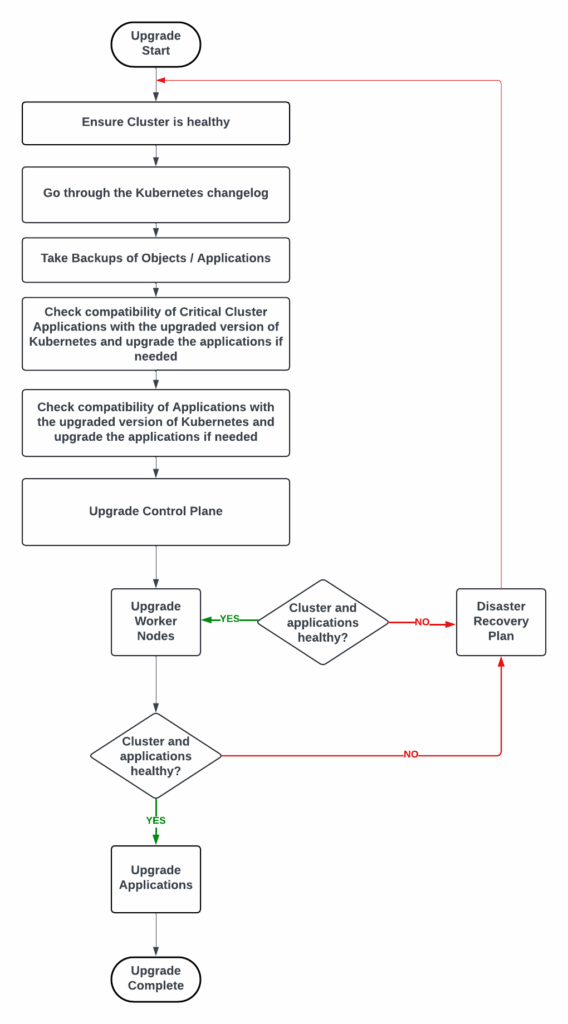
The below chart indicates the process involved.
Ready to elevate your Kubernetes management? Check out Percona Everest for seamless database control on Kubernetes, offering automated scaling, unified management, and open source flexibility.
The main components involved in upgrading a Kubernetes cluster are the Control Plane, Nodes, Critical Cluster Applications, and Applications running on the Kubernetes cluster. The order of upgrading these components is crucial because it ensures system stability and minimizes downtime. Typically, the Control Plane should be upgraded first, followed by the nodes, then critical cluster applications, and finally, regular applications. This order allows for a smooth transition and helps maintain compatibility between different parts of the system during the upgrade process.
Pre-upgrade checks are essential in preventing potential issues during a Kubernetes cluster upgrade. These checks should focus on several key areas:
By thoroughly examining these areas, you can identify and address potential problems before they occur during the upgrade process, significantly reducing the risk of unexpected issues and downtime.
A common strategy for upgrading nodes in a Kubernetes cluster is to use a rolling upgrade approach. This involves:
Precautions to take during this process include:
Disaster recovery planning is crucial when upgrading a Kubernetes cluster because, despite all precautions, unforeseen issues can still arise. A solid disaster recovery plan ensures that you can quickly restore your applications and data if something goes wrong during the upgrade process.
Tools like Velero can assist in disaster recovery planning by:
It’s important to not only have these tools in place but also to regularly test your disaster recovery procedures to ensure they work as expected when needed.
Managing API version changes during a Kubernetes upgrade requires careful planning and execution. Some best practices include:
To mitigate potential issues:
Resources
RELATED POSTS




