

I want to take a closer look at MySQL performance with binary logs enabled on different filesystems, especially as MySQL 8.0 comes with binary logs enabled by default.
As part of my benchmarks of the MyRocks storage engine, I’ve noticed an unusual variance in throughput for the InnoDB storage engine, even though we spent a lot of time making it as stable as possible in Percona Server for MySQL. In the end, the culprit was enabled binary logs. There is also always the question, “If there is a problem with EXT4, does XFS perform differently?” To answer that, I will repeat the same benchmark on the EXT4 and XFS filesystems.
You can find our previous experiments with binary logs here.
A short overview of the benchmark setup:
For the first run, let’s check the results without binary logs vs. with binary log enabled, but with sync_binlog=0:
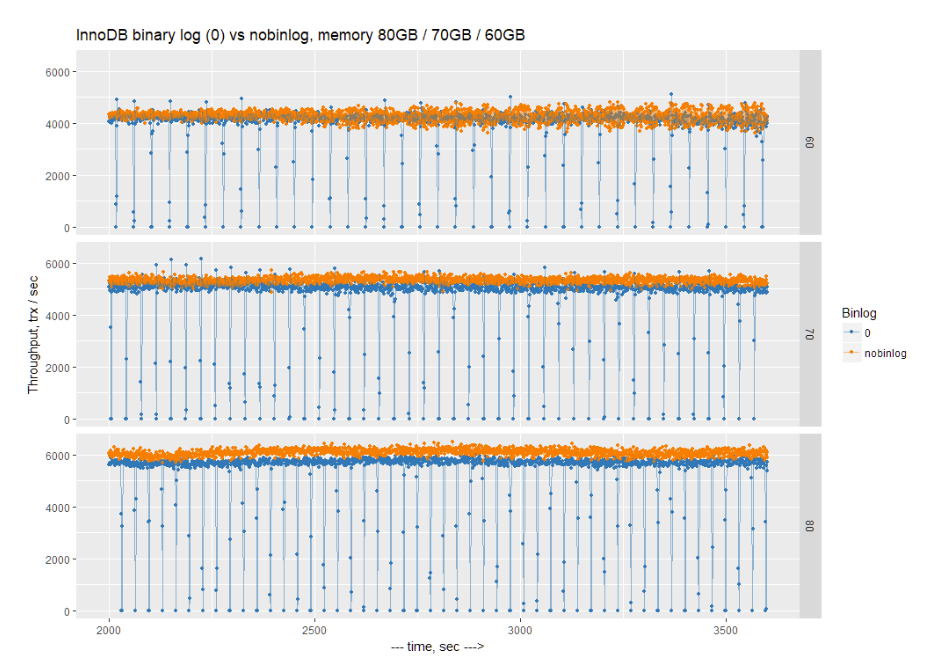
We can see that results without binary logs are generally better, but we can also see that with binary logs enabled and sync_binglog=0, there are regular drops to 0 for 1-2 seconds. This basically results in stalls in any connected application.
So, enabling binary logs may result in regular application stalls. The reason for this is that there is a limit on the size of the binary log file (max_binlog_size), which is 1GB. When the limit is reached, MySQL has to perform a binary log rotation. With sync_binlog=0, all previous writes to the binary log are cached in the OS cache, and during rotation, MySQL forces synchronous flushing of all changes to disk. This results in complete stalls every ~40 seconds (the amount of time it takes to fill 1GB of binary log in the above tests).
How can we deal with this? The obvious solution is to enable more frequent sync writes of binary logs. This can be achieved by setting sync_binlog > 0. The popular choice is the most strict, sync_binlog=1, providing the most guarantees. The strict setting also comes with noted performance penalties. I will also test sync_binlog=1000 and sync_binlog=10000, which means perform synchronous writes of binary logs every 1000 and 10000 transactions, respectively.
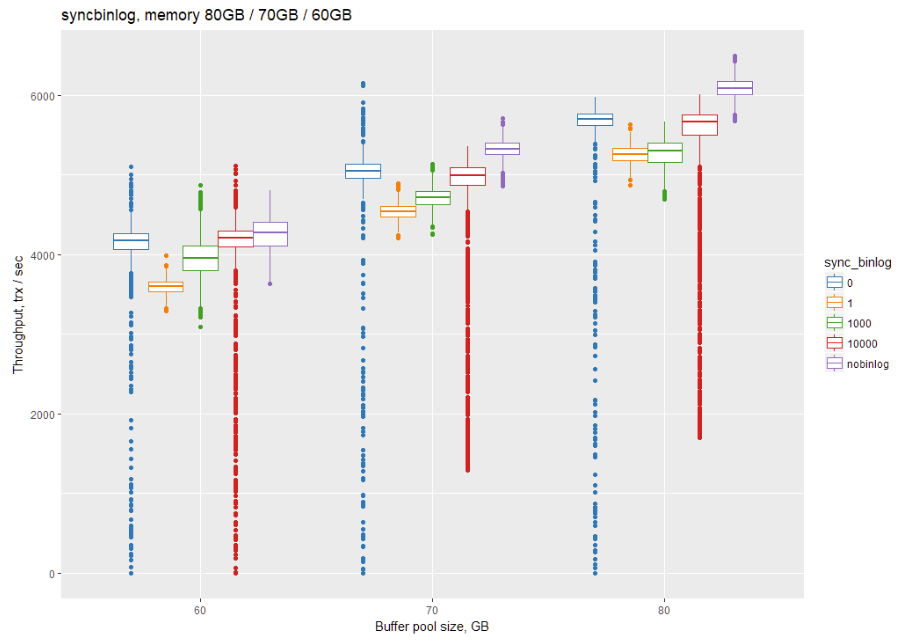
The same results in a tabular format with median throughput (tps, more is better)
| Bp sync_binlog | 0 | 1 | 1000 | 10000 | nobinlog |
| 60 GB | 4174.945 | 3598.12 | 3950.19 | 4205.165 | 4277.955 |
| 70 GB | 5053.11 | 4541.985 | 4714 | 4997.875 | 5328.96 |
| 80 GB | 5701.985 | 5263.375 | 5303.145 | 5664.155 | 6087.925 |
Some conclusions we can make:
So what value should we use? This is probably a choice between sync_binlog=1 or some value like 1000. It depends on your use case and your storage solution. In the case of slow storage, sync_binlog=1 may show a bigger penalty compared to what I can see on my enterprise SATA SSD SAMSUNG SM863.
All of the above results were on an EXT4 filesystem. Let’s compare to XFS. Will it show different throughput and variance?
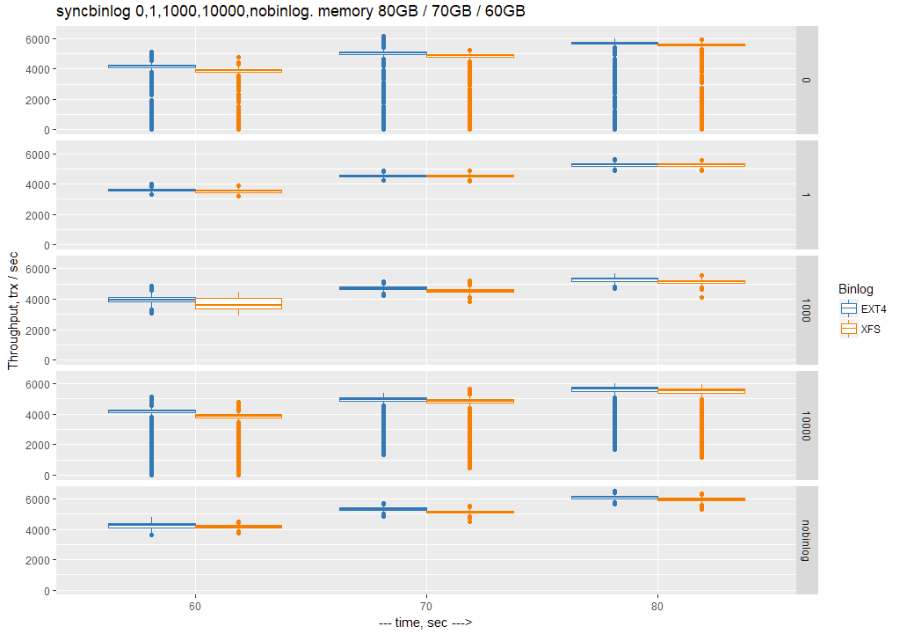
The median throughput in tabular format:
| sync_binlog | Buffer pool (GB) | EXT4 | XFS |
| 0 | 60 | 4174.945 | 3902.055 |
| 0 | 70 | 5053.11 | 4884.075 |
| 0 | 80 | 5701.985 | 5596.025 |
| 1 | 60 | 3598.12 | 3526.545 |
| 1 | 70 | 4541.985 | 4538.455 |
| 1 | 80 | 5263.375 | 5255.38 |
| 1000 | 60 | 3950.19 | 3620.05 |
| 1000 | 70 | 4714 | 4526.49 |
| 1000 | 80 | 5303.145 | 5150.11 |
| 10000 | 60 | 4205.165 | 3874.03 |
| 10000 | 70 | 4997.875 | 4845.85 |
| 10000 | 80 | 5664.155 | 5557.61 |
| No binlog | 60 | 4277.955 | 4169.215 |
| No binlog | 70 | 5328.96 | 5139.625 |
| No binlog | 80 | 6087.925 | 5957.015 |
We can observe the general trend that median throughput on XFS is a little worse than with EXT4, with practically identical variance.
The difference in throughput is minimal. You can use either XFS or EXT4.
Supermicro server:
My goal is to provide fully repeatable benchmarks. To that effect, I’ve shared all the scripts and settings I used in the following GitHub repo:
https://github.com/Percona-Lab-results/201805-sysbench-tpcc-binlog-fs
Resources
RELATED POSTS





sync_binlog=X where X > 0 seems like another source of variance as the 1 in X transactions now must wait while binlog writes from the last X transactions are synced. The stalls will be shorter than with sync_binlog=0, but they will be more frequent.
Vadim, what about using custom sysctl.conf settings? I usually change:
vm.dirty_background_bytes = 41943040

vm.dirty_bytes = 167772160

vm.dirty_writeback_centisecs = 100
Vadim, what about using custom sysctl.conf settings? I usually change:
vm.dirty_writeback_centisecs=100
vm.dirty_background_bytes=41943040
vm.dirty_bytes=167772160
No raid? Curious to see results with a raid configuration and writeback enabled.
What about write cache setting for SSD? SM863 have at least 1Gb of DDR3 DRAM protected with capacitor, thus it should acts like as writeback cache on RAID controller during buffer flush load. IO saturation graph would be useful in such test.
> With sync_binlog=0, all previous writes to the binary log are cached in the OS cache, and during rotation, MySQL forces synchronous flushing of all changes to disk. This results in complete stalls every ~40 seconds (the amount of time it takes to fill 1GB of binary log in the above tests).
Is this saying that, even with sync_binlog=0, MySQL does an fsync of the binary log during rotation? Or is there some other mechanism forcing synchronous flushing?