

This blog was originally published in 2021 and updated in 2025.
Running PostgreSQL in production means balancing high availability, disaster recovery, and scalability without adding unnecessary complexity. Kubernetes helps by providing a consistent way to orchestrate these needs, and with the Percona Operator for PostgreSQL, you can deploy and manage enterprise-ready clusters with minimal manual work.
This post discusses the key areas you need to consider—high availability, scaling, and disaster recovery—and how our Operator simplifies each step.
Our default custom resource manifest deploys a highly available (HA) PostgreSQL cluster. Key components of the HA setup are:
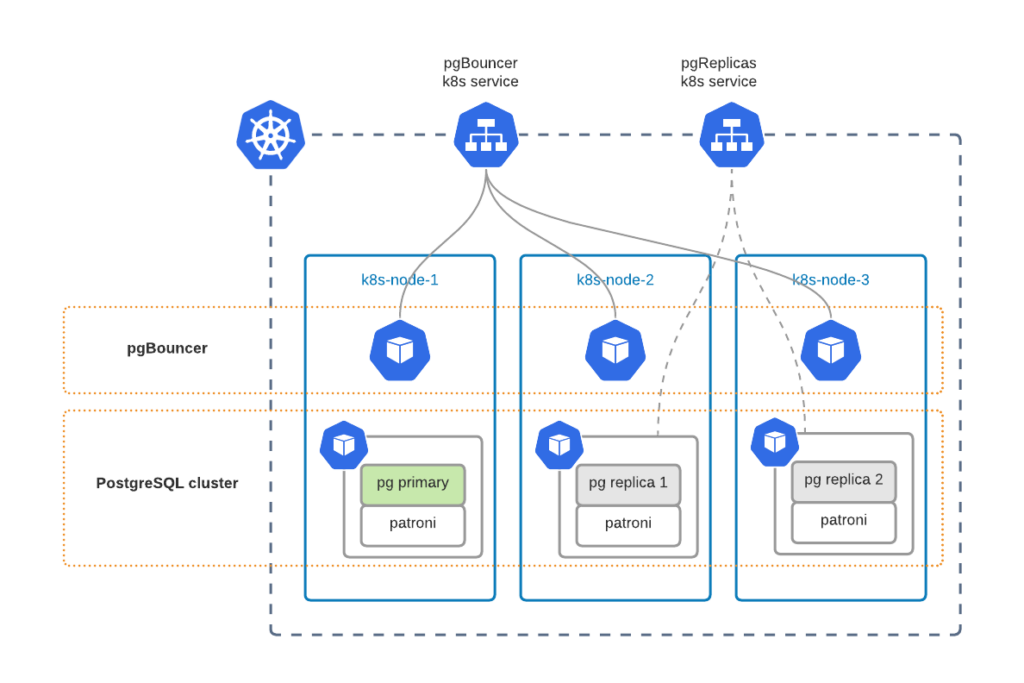
Kubernetes Service is the way to expose your PostgreSQL cluster to applications or users. We have two services:
By default, we use ClusterIP service type, but you can change it in pgBouncer.expose.serviceType or pgReplicas.hotStandby.expose.serviceType, respectively.
Every PostgreSQL container has Patroni running. Patroni monitors the state of the cluster and, in case of Primary node failure, switches the role of the Primary to one of the Replica nodes. PgBouncer always knows where the Primary is.
As you can see, we distribute PostgreSQL cluster components across different Kubernetes nodes. This is done with Affinity rules, which are applied by default to ensure that a single node failure does not cause database downtime.
Good architecture design is to run your Kubernetes cluster across multiple datacenters. Public clouds have a concept of availability zones (AZ) which are data centers within one region with a low-latency network connection between them. Usually, these data centers are at least 100 kilometers away from each other to minimize the probability of a regional outage. You can leverage a multi-AZ Kubernetes deployment to run cluster components in different data centers for better availability.
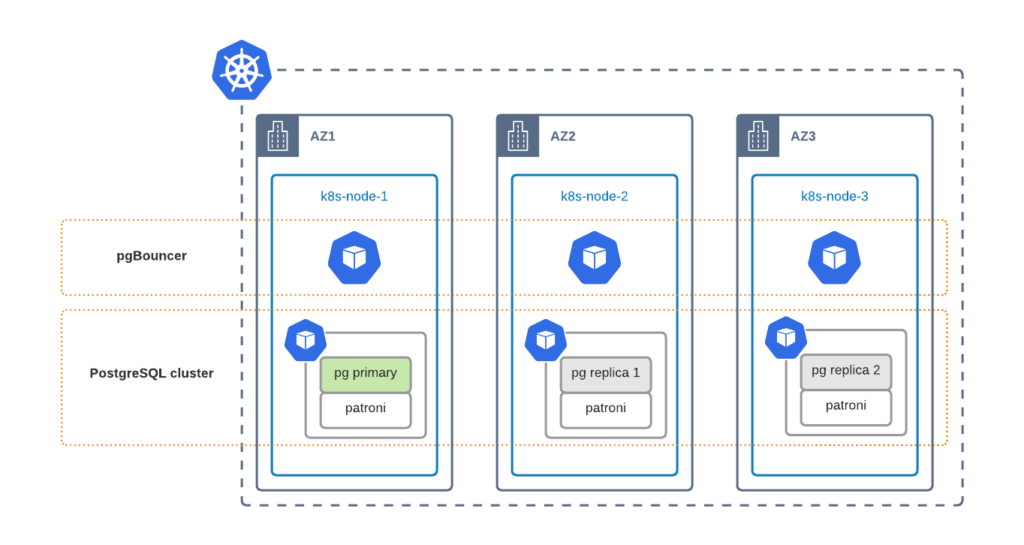
To ensure that PostgreSQL components are distributed across availability zones, you need to tweak affinity rules. Now it is only possible through editing the Deployment resources directly:
|
1 2 3 4 |
$ kubectl edit deploy cluster1-repl2 … - topologyKey: kubernetes.io/hostname + topologyKey: topology.kubernetes.io/zone |
Scaling PostgreSQL to meet the demand at peak hours is crucial for high availability. Our Operator provides you with tools to scale PostgreSQL components both horizontally and vertically.
Scaling vertically is all about adding more power to a PostgreSQL node. The recommended way is to change resources in the Custom Resource (instead of changing them in Deployment objects directly). For example, change the following in the cr.yaml to get 256 MB of RAM for all PostgreSQL Replica nodes:
|
1 2 3 4 5 6 |
pgReplicas: hotStandby: resources: requests: - memory: "128Mi" + memory: "256Mi" |
Apply cr.yaml:
|
1 |
$ kubectl apply -f cr.yaml |
Use the same approach to tune other components in their corresponding sections.
You can also leverage Vertical Pod Autoscaler (VPA) to react to load spikes automatically. We create a Deployment resource for Primary and each Replica node. VPA objects should target these deployments. The following example will track one of the replicas Deployment resources of cluster1 and scale automatically:
|
1 2 3 4 5 6 7 8 9 10 11 12 |
apiVersion: autoscaling.k8s.io/v1 kind: VerticalPodAutoscaler metadata: name: pxc-vpa spec: targetRef: apiVersion: "apps/v1" kind: Deployment name: cluster1-repl1 namespace: pgo updatePolicy: updateMode: "Auto" |
Please read more about VPA and its capabilities in its documentation.
Adding more replica nodes or pgBouncers can be done by changing size parameters in the Custom Resource. Do the following change in the default cr.yaml:
|
1 2 3 4 |
pgReplicas: hotStandby: - size: 2 + size: 3 |
Apply the change to get one more PostgreSQL Replica node:
|
1 |
$ kubectl apply -f cr.yaml |
Starting from release 1.1.0, it is also possible to scale our cluster using the kubectl scale command. Execute the following to have two PostgreSQL replica nodes in cluster1:
|
1 2 |
$ kubectl scale --replicas=2 perconapgcluster/cluster1 perconapgcluster.pg.percona.com/cluster1 scaled |
In the latest release, it is not possible to use Horizontal Pod Autoscaler (HPA) yet, and we will have it supported in the next one. Stay tuned.
It is important to understand that Disaster Recovery (DR) is not High Availability. DR’s goal is to ensure business continuity in the case of a massive disaster, such as a full region outage. Recovery in such cases can, of course, be automated, but not necessarily—it strictly depends on the business requirements.
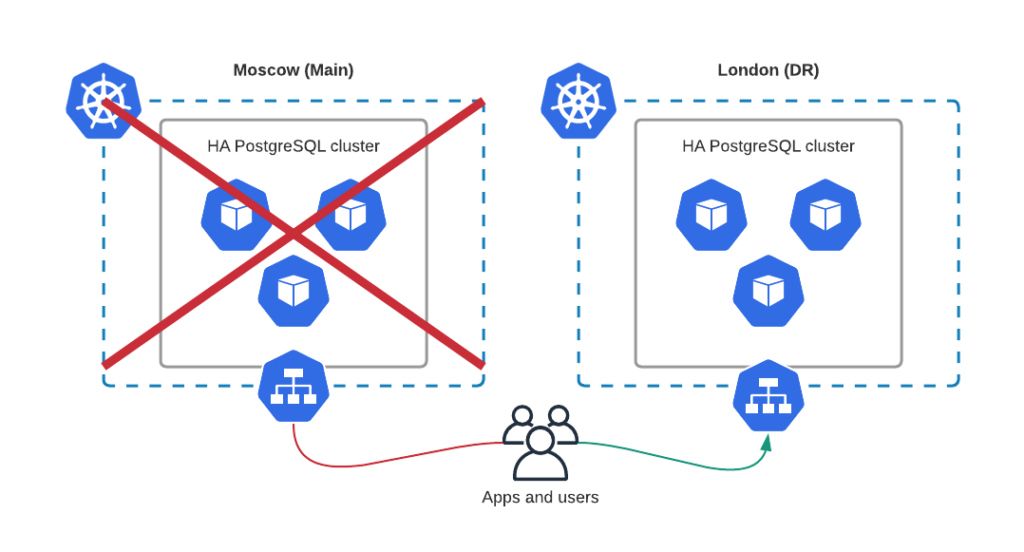
I think it is the most common Disaster Recovery protocol: take the backup, store it in a third-party premises, and restore it to another datacenter if needed.
This approach is simple but requires a long recovery time, especially if the database is large. Use this method only if it meets your Recovery Time Objectives (RTO).
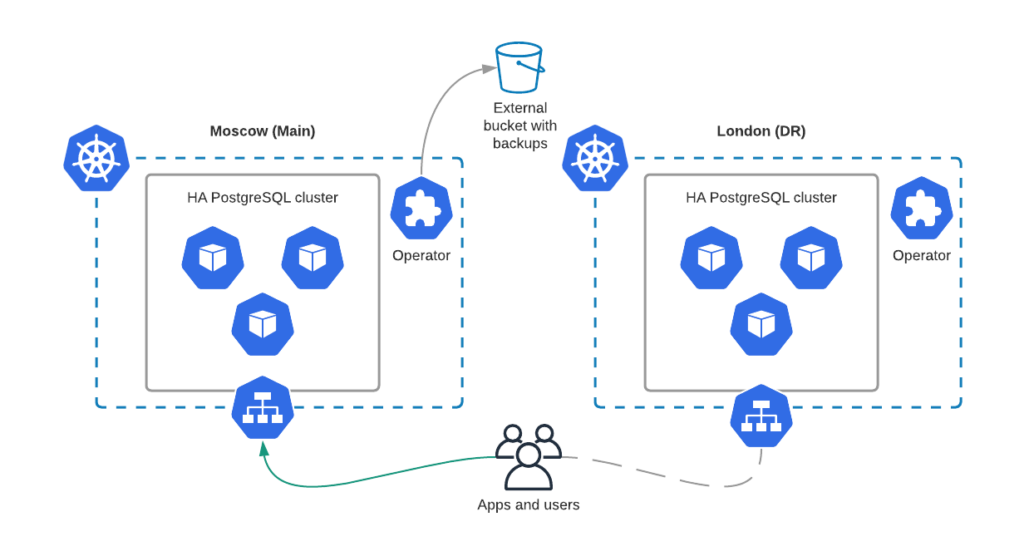
Our Operator handles backup and restore for PostgreSQL clusters. The disaster recovery is built around pgBackrest and looks like the following:
|
1 2 3 4 |
spec: standby: true backup: # same config as on original cluster |
Once data is recovered, the user can turn off standby mode and switch the application to the DR cluster.
This approach is quite similar to the above: pgBackrest instances continuously synchronize data between two clusters through object storage. This approach minimizes RTO and allows you to switch the application traffic to the DR site almost immediately.
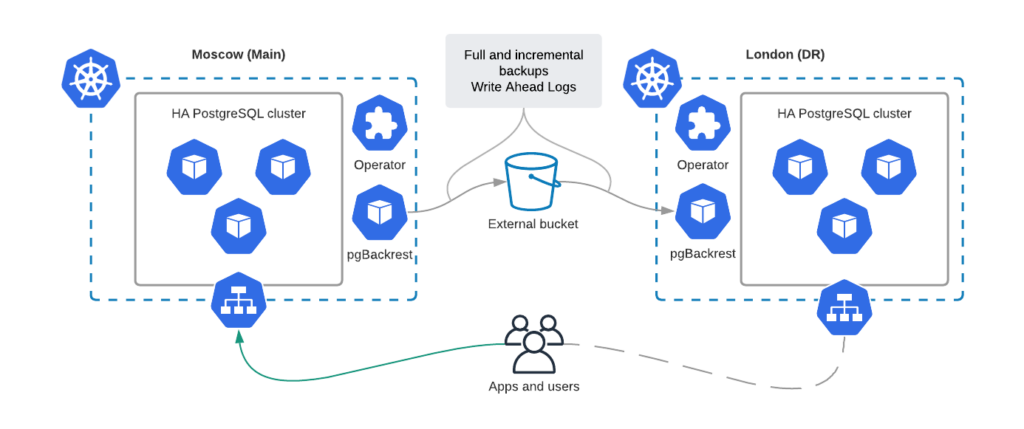
Configuration here is similar to the previous case, but we always run a second PostgreSQL cluster in the Disaster Recovery data center. In case of main site failure, just turn off the standby mode:
|
1 2 |
spec: standby: false |
You can use a similar setup to migrate the data to and from Kubernetes. Read more about it in the Migrating PostgreSQL to Kubernetes blog post.
Kubernetes gives you the building blocks, but building a truly production-grade PostgreSQL environment takes more than YAML changes. You need confidence that your clusters can scale, recover fast, and stay secure no matter where you deploy.
That’s exactly why we created our collection of PostgreSQL resources for IT leaders. It covers everything from deployment best practices to security, observability, and cost control so you can run enterprise-grade PostgreSQL without tradeoffs.
Explore enterprise-grade PostgreSQL resources
We encourage you to try out our operator. See our GitHub repository and check out the documentation.
Found a bug or have a feature idea? Feel free to submit it to JIRA.
For general questions, please raise the topic in the community forum.
Are you a developer and looking to contribute? Please read our CONTRIBUTING.md and send the Pull.




