

This is the second part of the series of blog posts unmasking the complexity of MongoDB cluster exposure in Kubernetes with Percona Operator for MongoDB. In the first part, we focused heavily on split horizons and a single replica set.
In this part, we will expose a sharded cluster and a single replica set with Istio, a service mesh utility that simplifies exposure, security, and observability in Kubernetes. We will focus on its ingress capability.
Prerequisites
First, we need to deploy Istio and its components.
CRDs extend the Kubernetes API and enable users to create Istio Custom Resources as regular k8s primitives.
|
1 |
helm install istio-base istio/base -n istio-system --set defaultRevision=default --create-namespace |
Istiod provides service discovery, configuration, and certificate management. Make sure that Istiod is up and running before you proceed with Ingress installation.
|
1 |
helm install istiod istio/istiod -n istio-system --wait |
This component manages the exposure, similar to other ingress controllers. It works on the L4 or L7 layer.
|
1 |
helm install istio-ingressgateway istio/gateway -n istio-ingress --create-namespace |
Istio gateway is exposed with a LoadBalancer service. We will need to edit this service later on to expose the database. The EXTERNAL_IP address of a service is the one that will be used to connect to the database:
|
1 2 3 4 |
% kubectl -n istio-ingress get service NAME TYPE CLUSTER-IP EXTERNAL-IP PORT(S) AGE istio-ingressgateway LoadBalancer 10.32.205.77 XXX.XXX.XXX.XX 15021:30655/TCP,80:30781/TCP,443:32347/TCP 9m23s |
Two resources should be created to expose anything with Istio – Gateway and Virtual Service. Gateway is a balancer, whereas Virtual Service defines the routing rules.
Skip this part and read below if you are interested in a single replica set exposure.
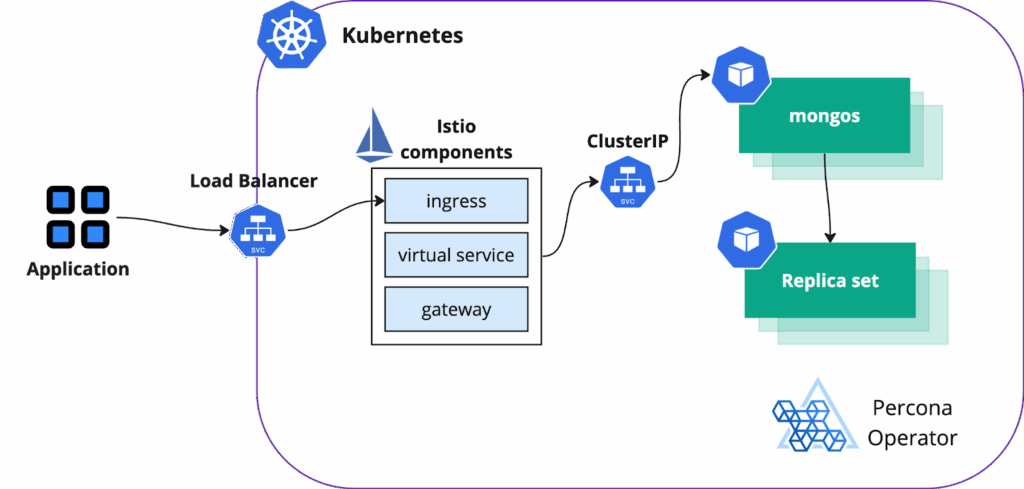
The sharded cluster has a single point of entry – mongos. We will expose it through the Istio ingress controller.
|
1 |
kubectl apply -f https://raw.githubusercontent.com/spron-in/blog-data/master/mongo-k8s-expose-rs/05-sh-expose-istio.yaml |
|
1 2 3 4 5 6 7 8 9 10 |
$ kubectl -n istio-ingress edit service istio-ingress ... spec: ports: ... - name: mongos port: 27017 protocol: TCP targetPort: 27017 ... |
|
1 |
kubectl apply -f https://raw.githubusercontent.com/spron-in/blog-data/master/mongo-k8s-expose-rs/06-sh-istio-gateway.yaml |
We created a gateway that uses istio-ingress and handles port 27017.
|
1 |
kubectl apply -f https://raw.githubusercontent.com/spron-in/blog-data/master/mongo-k8s-expose-rs/07-sh-istio-virtual-svc.yaml |
Mongos is now exposed, and you can connect to it using the IP address of an istio-ingress service.
Get the user and password from the Secret as described in our documentation.
Your connection string will look like this:
|
1 |
mongosh "mongodb://databaseAdmin:<databaseAdminPassword>@%INGRESS_IP_ADDRESS%/admin |
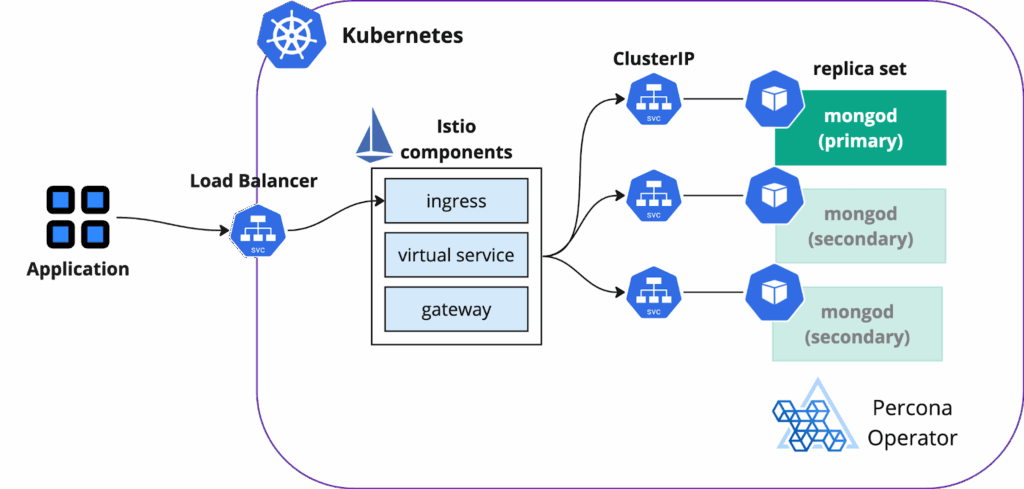
It might be counterintuitive, but exposing a single replica set is more complicated than a sharded cluster. It involves additional configuration for split horizon and TLS certificate generation. We strongly encourage you to read the previous blog post in the series that covers split horizons.
We will execute the following steps:
There are two ways to approach this:
For both options, we need to point domain names to EXTERNAL_IP address that we obtained for Istio ingress above.
Going forward, we will use a single domain option in our examples.
We went very deep into details of split horizons in the previous blog post. Have a look. For a single domain splitHorizons section looks like this:
|
1 2 3 4 5 6 7 |
splitHorizons: rs-expose-demo-rs0-0: external: rs.spron.in:27018 rs-expose-demo-rs0-1: external: rs.spron.in:27019 rs-expose-demo-rs0-2: external: rs.spron.in:27020 |
It is important to note, that as we use Istio, replica set nodes will be exposed using ClusterIPs only.
Also, please note that splitHorizons supports port setting starting from version 1.16 of the Operator. You can see more information in K8SPSMDB-1004.
We will use the script that we created in the previous blog post, which mimics the behavior described in the documentation. It will generate Certificate Authority and server certificate with a key. We will need these to connect to the cluster with mongosh. Split horizons will not work without TLS certificates in place.
Deploy 08-b-rs-expose-istio.yaml manifest:
|
1 |
kubectl apply -f https://raw.githubusercontent.com/spron-in/blog-data/master/mongo-k8s-expose-rs/08-b-rs-expose-istio.yaml |
Edit istio-ingress service
For each replica set node, we will have a separate TCP port. We need to edit the istio-ingress service to have it exposed. You can also pre-configure it in the values.yaml when deploying with helm.
|
1 2 3 4 5 6 7 8 9 10 11 12 13 14 15 16 17 18 |
$ kubectl -n istio-ingress edit service istio-ingress ... spec: ports: ... - name: rs0-0 port: 27018 protocol: TCP targetPort: 27018 - name: rs0-1 port: 27019 protocol: TCP targetPort: 27019 - name: rs0-2 port: 27020 protocol: TCP targetPort: 27020 ... |
Istio gateway and virtual service
Create Gateway resource in the database’s namespace (09-rs-istio-gateway.yaml):
|
1 |
kubectl apply -f https://raw.githubusercontent.com/spron-in/blog-data/master/mongo-k8s-expose-rs/09-rs-istio-gateway.yaml |
Create a virtual service that points to the replica set nodes (10-rs-istio-virtual-svc.yaml):
|
1 |
kubectl apply -f https://raw.githubusercontent.com/spron-in/blog-data/master/mongo-k8s-expose-rs/10-rs-istio-virtual-svc.yaml |
Let’s try to connect:
|
1 |
mongosh 'mongodb://databaseAdmin:[email protected]:27018,rs.spron.in:27019,rs0.spron.in:27020/admin?authSource=admin&replicaSet=rs0' --tls --tlsCAFile ca.pem --tlsCertificateKeyFile server-cert.pem |
Explanation:
|
1 |
rs.spron.in:27018,rs.spron.in:27019,rs0.spron.in:27020 |
It is also possible to expose MongoDB using TLS SNI (Server Name Indication), where all the connections are going through regular HTTPS port 443. We are leaving it out of this blog post for two reasons:
In this second part of our series, we’ve taken the next step in mastering MongoDB cluster exposure in Kubernetes by leveraging Istio. We demonstrated how Istio simplifies the exposure process for both sharded clusters and single replica sets, while also enhancing security and observability. By combining Istio’s powerful features with the Percona Operator for MongoDB, you can achieve a more robust and manageable MongoDB deployment in your Kubernetes environment.




