

 In real life, there are frequent cases where getting a running application to work correctly is strongly dependent on consistent write/read operations. This is no issue when using a single data node as a provider, but it becomes more concerning and challenging when adding additional nodes for high availability and/or read scaling.
In the MySQL dimension, I have already described it here in my blog Dirty Reads in High Availability Solution.
We go from the most loosely-coupled database clusters with primary-replica async replication, to the fully tightly-coupled database clusters with NDB Cluster (MySQL/Oracle).
Adding components like ProxySQL to the architecture can, from one side, help in improving high availability, and from the other, it can amplify and randomize the negative effect of a stale read. As such it is crucial to know how to correctly set up the environment to reduce the risk of stale reads, without reducing the high availability.
This article covers a simple HOW-TO for Percona XtraDB Cluster 8.0 (PXC) and ProxySQL, providing an easy to follow guide to obtain no stale reads, without the need to renounce at read, scaling or a high grade of HA thanks to PXC8.
The covered architecture is based on:
And finally, set the virtual IP as illustrated in the article mentioned above. It is now the time to do the first step towards the non-stale read solution.
With PXC, we can easily prevent stale reads by setting the parameter to one of the following values wsrep-sync-wait = 1 – 3 – 5 or 7 (default = 0). We will see what changes in more detail in part two of the blog to be published soon. For now, just set it to wsrep-sync-wait = 1 ;.
The cluster will ensure consistent reads no matter from which node you will write and read.
This is it. So simple!
The second step is to be sure we set up our ProxySQL nodes to use:
Now here we have a problem; ProxySQL v2 comes with very interesting features like SSL Frontend/backend, support for AWS Aurora …and more. But it also comes with a very poor native PXC support. I have already raised this in my old article on February 19, 2019, and raised other issues with discussions and bug reports.
In short, we cannot trust ProxySQL for a few factors:
In the end, the reality is that in order to support PXC/Galera, the use of an external script using the scheduler is more flexible, solid, and trustworthy. As such, the decision is to ignore the native Galera support, and instead focus on the implementation of a more robust script.
For the scope of this article, I have reviewed, updated, and extended my old script.
Percona had also developed a Galera checker script that was part of the ProxySQL-Admin-Tools suite, but that now has been externalized and available in the PerconaLab GitHub.
The setup for this specific case will be based on:
The final architecture will look like this:
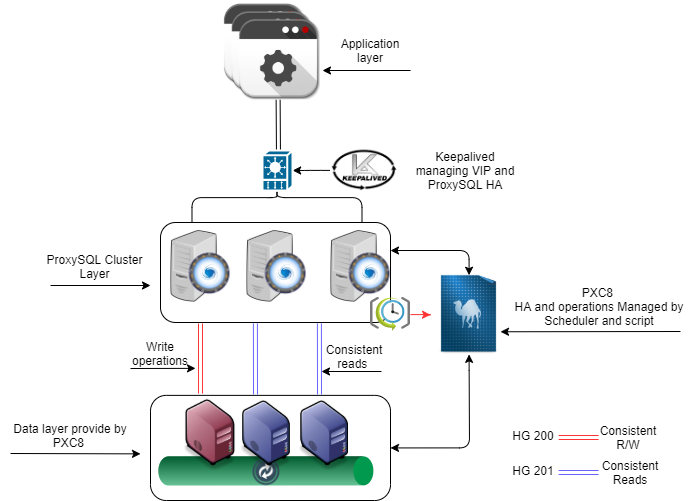
ProxySQL Nodes:
Node1 192.168.4.191 public ip
10.0.0.191 internal ip
Node1 192.168.4.192 public ip
10.0.0.192 internal ip
Node1 192.168.4.193 public ip
10.0.0.193 internal ip
VIP 192.168.4.194 public ip
PXC8 Nodes:
pxc1 10.0.0.22
pxc2 10.0.0.23
pxc3 10.0.0.33
Let us configure PXC8 first. Operation one is to create the users for ProxySQL and the script to access the PXC cluster for monitoring.
|
1 2 3 |
CREATE USER monitor@'10.0.%' IDENTIFIED BY '<secret>'; GRANT USAGE ON *.* TO monitor@'10.0.%'; GRANT SELECT ON performance_schema.* TO monitor@'10.0.%'; |
The second step is to configure ProxySQL as a cluster:
Add a user able to connect from remote. This is will require ProxySQL nodes to be restarted.
|
1 2 3 4 |
update global_variables set Variable_Value='admin:admin;cluster1:clusterpass' where Variable_name='admin-admin_credentials'; SAVE ADMIN VARIABLES TO DISK; systemctl restart proxysql. |
On rotation, do all ProxySQL nodes.
The third part is to set the variables below.
Please note that the value for admin-cluster_mysql_servers_diffs_before_sync is not standard and is set to 1.
|
1 2 3 4 5 6 7 8 9 10 11 12 13 14 15 16 17 18 19 20 21 22 23 24 25 26 27 28 29 30 31 |
update global_variables set variable_value='cluster1' where variable_name='admin-cluster_username'; update global_variables set variable_value='clusterpass' where variable_name='admin-cluster_password'; update global_variables set variable_value=200 where variable_name='admin-cluster_check_interval_ms'; update global_variables set variable_value=100 where variable_name='admin-cluster_check_status_frequency'; update global_variables set variable_value='true' where variable_name='admin-cluster_mysql_query_rules_save_to_disk'; update global_variables set variable_value='true' where variable_name='admin-cluster_mysql_servers_save_to_disk'; update global_variables set variable_value='true' where variable_name='admin-cluster_mysql_users_save_to_disk'; update global_variables set variable_value='true' where variable_name='admin-cluster_proxysql_servers_save_to_disk'; update global_variables set variable_value=3 where variable_name='admin-cluster_mysql_query_rules_diffs_before_sync'; update global_variables set variable_value=1 where variable_name='admin-cluster_mysql_servers_diffs_before_sync'; update global_variables set variable_value=3 where variable_name='admin-cluster_mysql_users_diffs_before_sync'; update global_variables set Variable_Value=500 where Variable_name='mysql-max_stmts_per_connection'; update global_variables set variable_value="33554432" where variable_name='mysql-max_allowed_packet'; update global_variables set Variable_Value=0 where Variable_name='mysql-hostgroup_manager_verbose'; update global_variables set Variable_Value='true' where Variable_name='mysql-query_digests_normalize_digest_text'; update global_variables set Variable_Value='8.0.19' where Variable_name='mysql-server_version'; update global_variables set Variable_Value='utf8' where Variable_name='mysql-default_charset'; update global_variables set Variable_Value=500 where Variable_name='mysql-tcp_keepalive_time'; update global_variables set Variable_Value='true' where Variable_name='mysql-use_tcp_keepalive'; update global_variables set Variable_Value='true' where Variable_name='mysql-verbose_query_error'; update global_variables set Variable_Value=50000 where Variable_name='mysql-max_stmts_cache'; update global_variables set Variable_Value=1 where Variable_name='mysql-show_processlist_extended'; LOAD ADMIN VARIABLES TO RUN;SAVE ADMIN VARIABLES TO DISK; LOAD MYSQL VARIABLES TO RUN;SAVE MYSQL VARIABLES TO DISK; |
It is now time to define the ProxySQL cluster nodes:
|
1 2 3 4 |
INSERT INTO proxysql_servers (hostname,port,weight,comment) VALUES('192.168.4.191',6032,100,'PRIMARY'); INSERT INTO proxysql_servers (hostname,port,weight,comment) VALUES('192.168.4.192',6032,100,'SECONDARY'); INSERT INTO proxysql_servers (hostname,port,weight,comment) VALUES('192.168.4.193',6032,100,'SECONDARY'); LOAD PROXYSQL SERVERS TO RUN;SAVE PROXYSQL SERVERS TO DISK; |
Check the ProxySQL logs and you should see that the nodes are now linked:
|
1 2 |
2020-05-25 09:24:30 [INFO] Cluster: clustering with peer 192.168.4.192:6032 . Remote version: 2.1.0-159-g0bdaa0b . Self version: 2.1.0-159-g0bdaa0b 2020-05-25 09:24:30 [INFO] Cluster: clustering with peer 192.168.4.193:6032 . Remote version: 2.1.0-159-g0bdaa0b . Self version: 2.1.0-159-g0bdaa0b |
Once this is done let us continue the setup, adding the PXC nodes and all the different host groups to manage the architecture:
|
1 2 3 4 5 6 7 8 9 10 11 12 13 14 |
delete from mysql_servers where hostgroup_id in (200,201); INSERT INTO mysql_servers (hostname,hostgroup_id,port,weight,max_connections,comment) VALUES ('10.0.0.22',200,3306,10000,2000,'default writer'); INSERT INTO mysql_servers (hostname,hostgroup_id,port,weight,max_connections,comment) VALUES ('10.0.0.23',201,3306,10000,2000,'reader'); INSERT INTO mysql_servers (hostname,hostgroup_id,port,weight,max_connections,comment) VALUES ('10.0.0.33',201,3306,10000,2000,'reader'); LOAD MYSQL SERVERS TO RUNTIME; SAVE MYSQL SERVERS TO DISK; delete from mysql_servers where hostgroup_id in (8200,8201); INSERT INTO mysql_servers (hostname,hostgroup_id,port,weight,max_connections,comment) VALUES ('10.0.0.22',8200,3306,1000,2000,'Writer preferred'); INSERT INTO mysql_servers (hostname,hostgroup_id,port,weight,max_connections,comment) VALUES ('10.0.0.23',8200,3306,999,2000,'Second preferred'); INSERT INTO mysql_servers (hostname,hostgroup_id,port,weight,max_connections,comment) VALUES ('10.0.0.33',8200,3306,998,2000,'Thirdh and last in the list'); INSERT INTO mysql_servers (hostname,hostgroup_id,port,weight,max_connections,comment) VALUES ('10.0.0.22',8201,3306,1000,2000,'reader setting'); INSERT INTO mysql_servers (hostname,hostgroup_id,port,weight,max_connections,comment) VALUES ('10.0.0.23',8201,3306,1000,2000,'reader setting'); INSERT INTO mysql_servers (hostname,hostgroup_id,port,weight,max_connections,comment) VALUES ('10.0.0.33',8201,3306,1000,2000,'reader setting'); LOAD MYSQL SERVERS TO RUNTIME; SAVE MYSQL SERVERS TO DISK; |
You can see that as mentioned we have two host groups to manage the cluster 8200 and 8201. Those two host groups work as templates and they will change only by us manually.
The 8200 host group weight defines the order of the writers from higher to lower. Given that node 10.0.0.22 with weight 1000 is the preferred writer. At the moment of writing, I chose to NOT implement automatic fail-back. I will illustrate later how to trigger that manually.
Once we have all the servers up, lets’ move on and create the users:
|
1 2 3 |
insert into mysql_users (username,password,active,default_hostgroup,default_schema,transaction_persistent,comment) values ('app_test2','test',1,200,'mysql',1,'application test user'); insert into mysql_users (username,password,active,default_hostgroup,default_schema,transaction_persistent,comment) values ('dba','dbapw',1,200,'mysql',1,'generic dba for application'); LOAD MYSQL USERS TO RUNTIME;SAVE MYSQL USERS TO DISK; |
And the query rules to have Read/Write split:
|
1 2 3 4 |
insert into mysql_query_rules (rule_id,proxy_port,destination_hostgroup,active,retries,match_digest,apply) values(1040,6033,200,1,3,'^SELECT.*FOR UPDATE',1); insert into mysql_query_rules (rule_id,proxy_port,destination_hostgroup,active,retries,match_digest,apply) values(1042,6033,201,1,3,'^SELECT.*$',1); LOAD MYSQL QUERY RULES TO RUN;SAVE MYSQL QUERY RULES TO DISK; |
The final step is to set the scheduler:
|
1 2 3 |
INSERT INTO scheduler (id,active,interval_ms,filename,arg1) values (10,0,2000,"/var/lib/proxysql/galera_check.pl","-u=cluster1 -p=clusterpass -h=192.168.4.191 -H=200:W,201:R -P=6032 --main_segment=2 --debug=0 --log=/var/lib/proxysql/galeraLog --active_failover=1 --single_writer=1 --writer_is_also_reader=0"); LOAD SCHEDULER TO RUNTIME;SAVE SCHEDULER TO DISK; |
Let analyze the script parameters:
Given the scheduler limitation to five arguments, we collapse all the parameters in one and let the script then parse them. arg1: -u=cluster1 -p=clusterpass -h=192.168.4.191 -H=200:W,201:R -P=6032 –retry_down=2 –retry_up=1 –main_segment=2 –debug=0 –log=/var/lib/proxysql/galeraLog –active_failover=1 –single_writer=1 –writer_is_also_reader=0
The parameters we pass here are:
Once we are confident our settings are right, let us put the script in production:
|
1 2 |
update scheduler set active=1 where id=10; LOAD SCHEDULER TO RUNTIME; |
 Warning
One important thing to keep in mind is that ProxySQL scheduler IS NOT part of the cluster synchronization, as such we must manually configure that part on each node. Once the script runs, any change done inside ProxySQL to the mysql_server table will be kept in sync by the ProxySQL cluster. It is strongly recommended to not mix ProxySQL nodes in the cluster and sparse one, as this may cause unexpected behavior.
At this point, your PXC8 cluster architecture is fully running and will provide you with a very high level of HA and write isolation while preserving the read scaling capabilities.
In part two of this post, we will see the cluster in action and how it behaves in case of standard operations like backup or emergency cases like node crashes.
Percona XtraDB Cluster is a cost-effective and robust clustering solution created to support your business-critical data. It gives you the benefits and features of MySQL along with the added enterprise features of Percona Server for MySQL.
Resources
RELATED POSTS





Hi Marco & thank you for your continuous support of mysql HA solutions. Up until now I have believed, that proxysql is naturally capable of automatic failover in case of backend node crash. I’m still unable to prove, that it can reroute client connection to alive backend node without interrupting the query, instantly and without any downtime. So am I wrong in this and really it can’t do this by default?