

 The latest 1.7.0 release of Percona Operator for MongoDB came out just recently and enables users to:
Today we will look into these new features, the use cases, and highlight some architectural and technical decisions we made when implementing them.
The 1.6.0 release of our Operator introduced single shard support, which we highlighted in this blog post and explained why it makes sense. But horizontal scaling is not possible without support for multiple shards.
A new shard is just a new ReplicaSet which can be added under spec.replsets in cr.yaml:
|
1 2 3 4 5 6 7 8 9 |
spec: ... replsets: - name: rs0 size: 3 .... - name: rs1 size: 3 ... |
Read more on how to configure sharding.
In the Kubernetes world, a MongoDB ReplicaSet is a StatefulSet with a number of pods specified in spec.replsets.[].size variable.
Once pods are up and running, the Operator does the following:
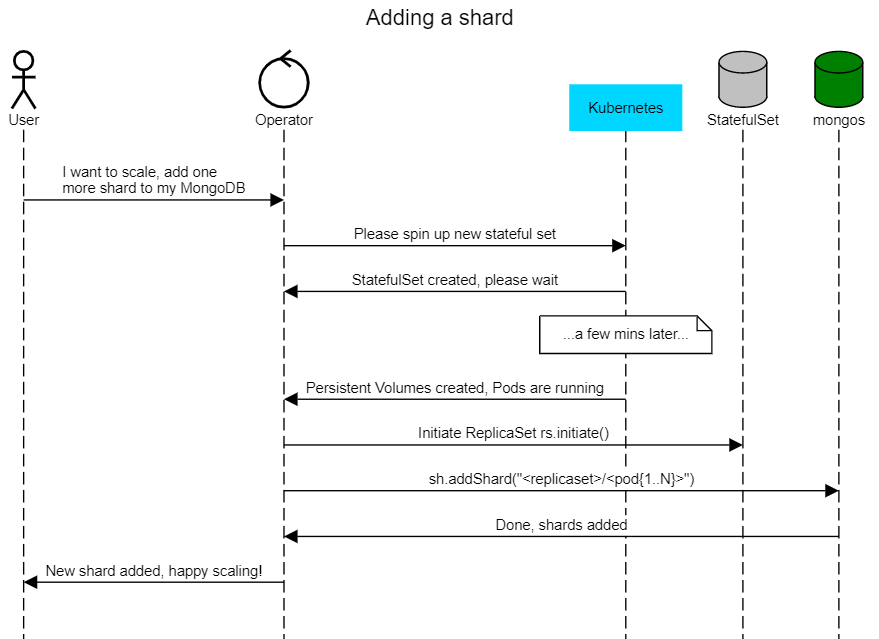
Then the output of db.adminCommand({ listShards:1 }) will look like this:
|
1 2 3 4 5 6 7 8 9 10 11 12 |
"shards" : [ { "_id" : "replicaset-1", "host" : "replicaset-1/percona-cluster-replicaset-1-0.percona-cluster-replicaset-1.default.svc.cluster.local:27017,percona-cluster-replicaset-1-1.percona-cluster-replicaset-1.default.svc.cluster.local:27017,percona-cluster-replicaset-1-2.percona-cluster-replicaset-1.default.svc.cluster.local:27017", "state" : 1 }, { "_id" : "replicaset-2", "host" : "replicaset-2/percona-cluster-replicaset-2-0.percona-cluster-replicaset-2.default.svc.cluster.local:27017,percona-cluster-replicaset-2-1.percona-cluster-replicaset-2.default.svc.cluster.local:27017,percona-cluster-replicaset-2-2.percona-cluster-replicaset-2.default.svc.cluster.local:27017", "state" : 1 } ], |
Percona Operators are built to simplify the deployment and management of the databases on Kubernetes. Our goal is to provide resilient infrastructure, but the operator does not manage the data itself. Deleting a shard requires moving the data to another shard before removal, but there are a couple of caveats:
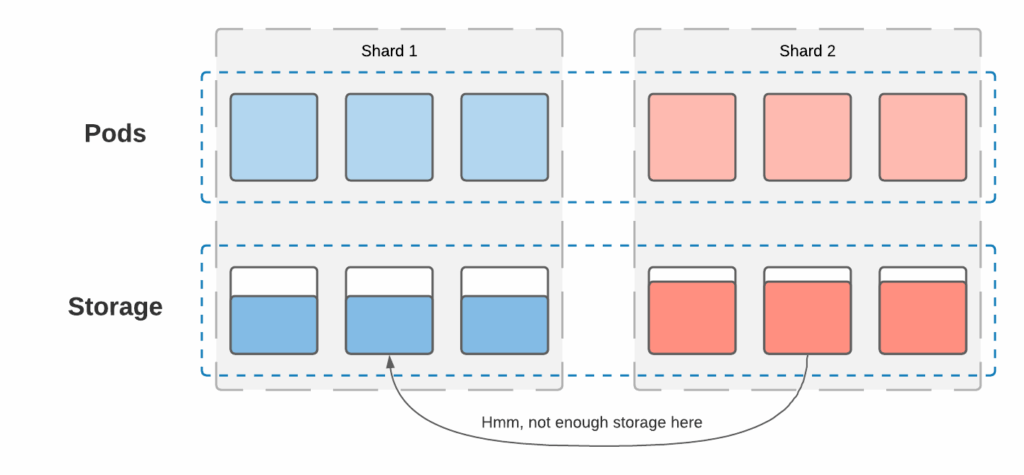
There are a few choices:
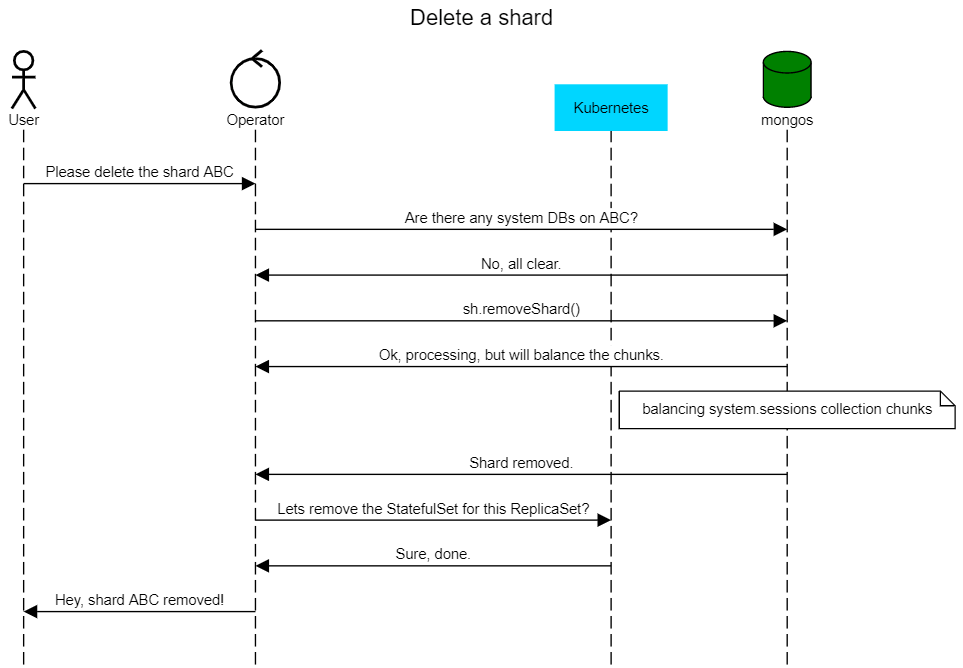
For now, we decided to pick option #1 and won’t touch the data, but in future releases, we would like to work with the community to introduce fully-automated shard removal.
When the user wants to remove the shard now, we first check if there are any non-system databases present on the ReplicaSet. If there are none, the shard can be removed:
|
1 2 3 4 5 6 |
func (r *ReconcilePerconaServerMongoDB) checkIfPossibleToRemove(cr *api.PerconaServerMongoDB, usersSecret *corev1.Secret, rsName string) error { systemDBs := map[string]struct{}{ "local": {}, "admin": {}, "config": {}, } |
The sidecar container pattern allows users to extend the application without changing the main container image. They leverage the fact that all containers in the pod share storage and network resources.
Percona Operators have built-in support for Percona Monitoring and Management to gain monitoring insights for the databases on Kubernetes, but sometimes users may want to expose metrics to other monitoring systems. Lets see how mongodb_exporter can expose metrics running as a sidecar along with ReplicaSet containers.
1. Create the monitoring user that the exporter will use to connect to MongoDB. Connect to mongod in the container and create the user:
|
1 2 3 4 5 6 7 8 |
> db.getSiblingDB("admin").createUser({ user: "mongodb_exporter", pwd: "mysupErpassword!123", roles: [ { role: "clusterMonitor", db: "admin" }, { role: "read", db: "local" } ] }) |
2. Create the Kubernetes secret with these login and password. Encode both the username and password with base64:
|
1 2 3 4 |
$ echo -n mongodb_exporter | base64 bW9uZ29kYl9leHBvcnRlcg== $ echo -n 'mysupErpassword!123' | base64 bXlzdXBFcnBhc3N3b3JkITEyMw== |
Put these into the secret and apply:
|
1 2 3 4 5 6 7 8 9 10 |
$ cat mongoexp_secret.yaml apiVersion: v1 kind: Secret metadata: name: mongoexp-secret data: username: bW9uZ29kYl9leHBvcnRlcg== password: bXlzdXBFcnBhc3N3b3JkITEyMw== $ kubectl apply -f mongoexp_secret.yaml |
3. Add a sidecar for mongodb_exporter into cr.yaml and apply:
|
1 2 3 4 5 6 7 8 9 10 11 12 13 14 15 16 17 18 19 20 21 22 23 24 25 26 |
replsets: - name: rs0 ... sidecars: - image: bitnami/mongodb-exporter:latest name: mongodb-exporter env: - name: EXPORTER_USER valueFrom: secretKeyRef: name: mongoexp-secret key: username - name: EXPORTER_PASS valueFrom: secretKeyRef: name: mongoexp-secret key: password - name: POD_IP valueFrom: fieldRef: fieldPath: status.podIP - name: MONGODB_URI value: "mongodb://$(EXPORTER_USER):$(EXPORTER_PASS)@$(POD_IP):27017" args: ["--web.listen-address=$(POD_IP):9216" $ kubectl apply -f deploy/cr.yaml |
All it takes now is to configure the monitoring system to fetch the metrics for each mongod Pod. For example, prometheus-operator will start fetching metrics once annotations are added to ReplicaSet pods:
|
1 2 3 4 5 6 |
replsets: - name: rs0 ... annotations: prometheus.io/scrape: 'true' prometheus.io/port: '9216' |
Running CICD pipelines that deploy MongoDB clusters on Kubernetes is a common thing. Once these clusters are terminated, the Persistent Volume Claims (PVCs) are not. We have now added automation that removes PVCs after cluster deletion. We rely on Kubernetes Finalizers – asynchronous pre-delete hooks. In our case we hook the finalizer to the Custom Resource (CR) object which is created for the MongoDB cluster.
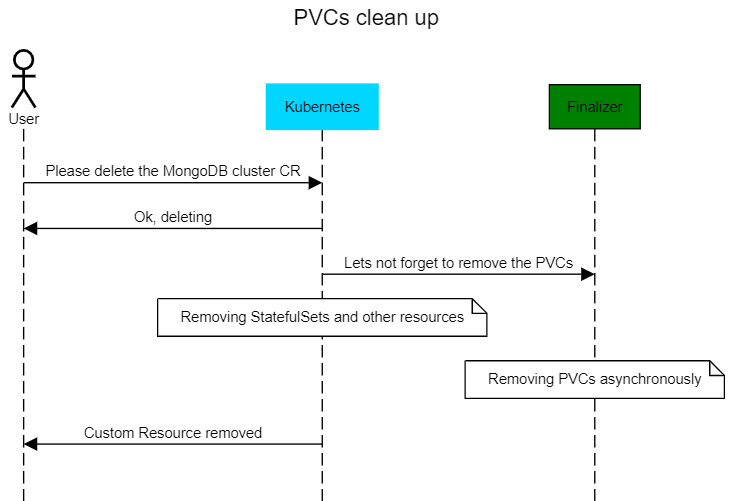
A user can enable the finalizer through cr.yaml in the metadata section:
|
1 2 3 4 |
metadata: name: my-cluster-name finalizers: - delete-psmdb-pvc |
Percona is committed to providing production-grade database deployments on Kubernetes. Our Percona Operator for MongoDB is a feature-rich tool to deploy and manage your MongoDB clusters with ease. Our Operator is free and open source. Try it out by following the documentation here or help us to make it better by contributing your code and ideas to our Github repository.




