

 Mysqlpump is a client program that was released with MySQL 5.7.8 and is used to perform logical backups in a better way. Mysqlpump supports parallelism and it has the capability of creating compressed output. Pablo already wrote a blog about this utility (The mysqlpump Utility), and in this blog, I am going to explore the available compression techniques in the Mysqlpump utility.
Mysqlpump has three options to perform the compression backup.
–compress: Used to compress all the information sent between client and server.
–compression-algorithm: It was added in MySQL 8.0.18. Used to define the compression algorithm for all incoming connections to the server. (available options: zlib, zstd, uncompressed )
–compress-output: Used to define the compression algorithm for the backup file (available options: lz4, zlib)
Here, “–compress-output” is the option used to define the compression algorithm for the backup file. Which has two algorithms.
Lz4: LZ4 is a lossless data compression algorithm that is focused on compression and decompression speed.
Zlib: zlib is a software library used for data compression. zlib compressed data are typically written with a gzip or a zlib wrapper.
To experiment with both compression techniques, I have installed the MySQL (8.0.22) server in my local environment. I also created the table “percona_test.mp_test” which has an 11GB size.
|
1 2 3 4 5 6 7 8 9 10 11 12 |
[root@localhost]# mysql -e "select @@version, @@version_commentG" *************************** 1. row *************************** @@version: 8.0.22 @@version_comment: MySQL Community Server - GPL [root@localhost]# mysql -e "select count(*) from percona_test.mp_testG" *************************** 1. row *************************** count(*): 70698024 [root@localhost percona_test]# ls -lrth total 11G -rw-r-----. 1 mysql mysql 11G Oct 23 11:20 mp_test.ibd |
Now, I am going to experiment with both compression algorithms.
I am going to take the backup (table: mp_test) using the lz4 compression algorithm.
|
1 2 3 4 5 6 7 8 9 |
[root@localhost]# time mysqlpump --set-gtid-purged=off --compress --compress-output=lz4 percona_test mp_test > percona_test.mp_test.lz4 Dump progress: 0/1 tables, 250/70131715 rows Dump progress: 0/1 tables, 133000/70131715 rows Dump progress: 0/1 tables, 278500/70131715 rows ... ... Dump progress: 0/1 tables, 70624000/70131715 rows Dump completed in 540824 real 9m0.857s |
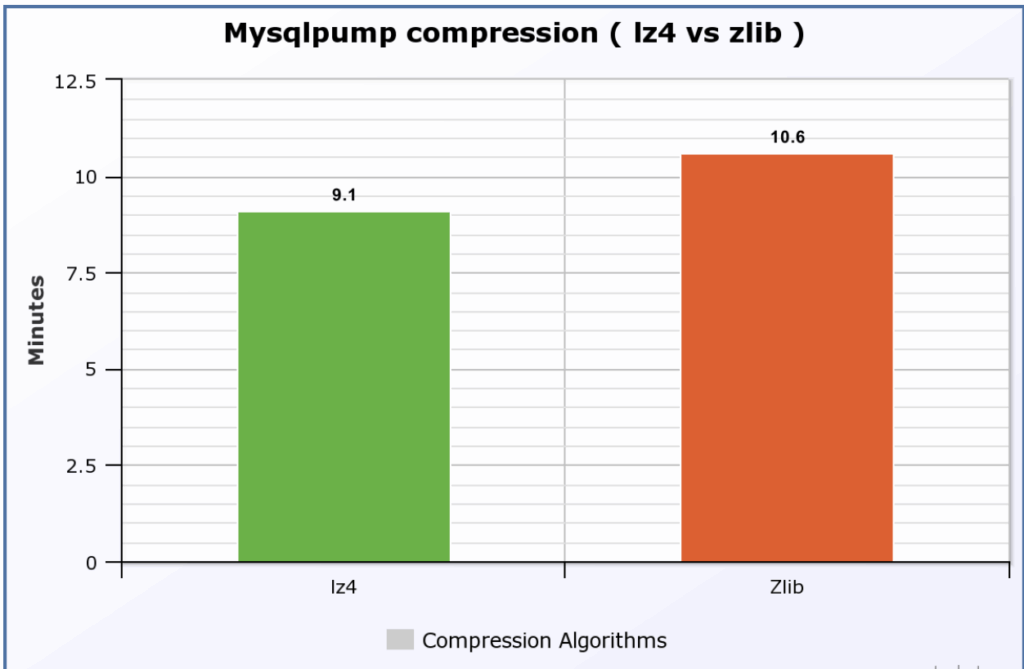
It took 9.1 minutes to complete. And, the file size is 1.1 GB, looks like 10x compression.
|
1 2 3 |
[root@dc1 percona_test]# ls -lrth | grep lz4 -rw-r--r--. 1 root root 1.1G Oct 23 12:47 percona_test.mp_test.lz4 |
Now, I am going to start the backup with “zlib” algorithm.
|
1 2 3 4 5 6 7 8 9 10 |
[root@dc1]# time mysqlpump --set-gtid-purged=off --compress --compress-output=zlib percona_test mp_test > percona_test.mp_test.zlib Dump progress: 0/1 tables, 250/70131715 rows Dump progress: 0/1 tables, 133250/70131715 rows Dump progress: 0/1 tables, 280250/70131715 rows Dump progress: 0/1 tables, 428750/70131715 rows ... ... Dump progress: 0/1 tables, 70627000/70131715 rows Dump completed in 546249 real 10m6.436s |
It took 10.6 minutes to complete the process. And the file size is the same 1.1 GB (10x compression).
|
1 2 3 |
[root@dc1]# ls -lrth | grep -i zlib -rw-r--r--. 1 root root 1.1G Oct 23 13:06 percona_test.mp_test.zlib |
MySQL community provides two utilities to decompress the backups.
lz4_decompress
|
1 2 3 4 5 6 |
[root@dc1]# time lz4_decompress percona_test.mp_test.lz4 percona_test.mp_test.sql real 0m45.287s user 0m1.114s sys 0m6.568s [root@dc1]# ls -lrth | grep percona_test.mp_test.sql -rw-r--r--. 1 root root 9.1G Oct 23 13:30 percona_test.mp_test.sql |
lz4 took 45 seconds to decompress the backup file.
zlib_decompress
|
1 2 3 4 5 6 |
[root@dc1]# time zlib_decompress percona_test.mp_test.zlib percona_test.mp_test.sql real 0m35.553s user 0m6.642s sys 0m7.105s [root@dc1]# ls -lrth | grep percona_test.mp_test.sql -rw-r--r--. 1 root root 9.1G Oct 23 13:49 percona_test.mp_test.sql |
zlib took 36 seconds to decompress the backup file.
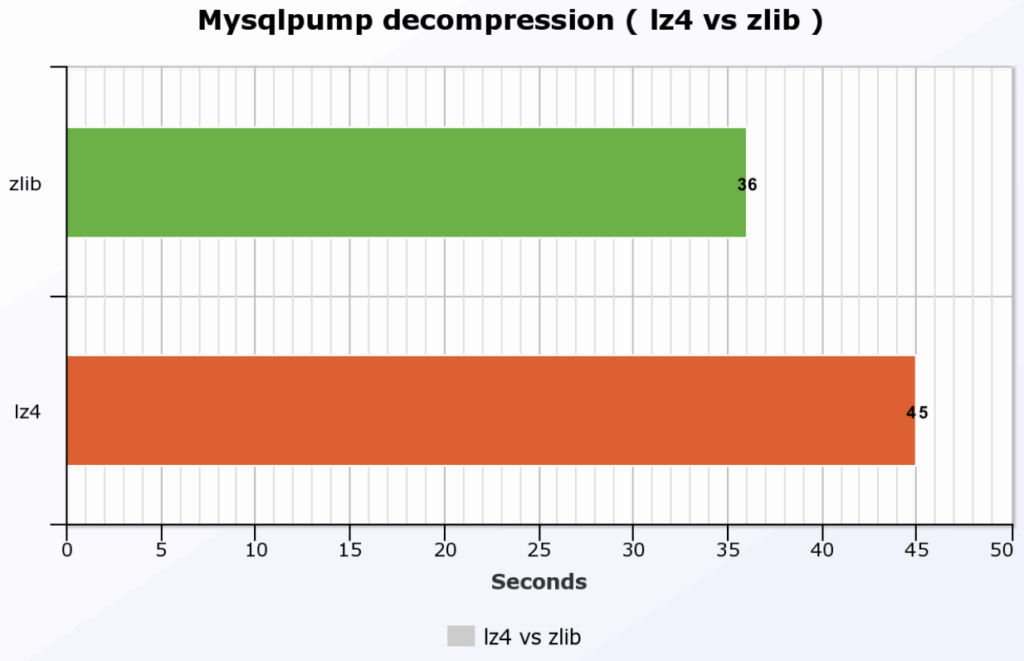
This is the procedure we have to compress/decompress the backups with Mysqlpump. It seems both the algorithms provide the 10x compression. Also, there is not much difference in the execution time as well, but it may be the big one with a large dataset.
Resources
RELATED POSTS





This is nice. I would like to see you testing also the MySQL Shell dump, compared to mysqldump, mydumper, and mysqlpump. https://mysqlserverteam.com/mysql-shell-dump-load-part-1-demo/
don’t waste your time anymore with mysqldump or mysqlpump, use MySQL Shell dump & load utilities: https://dev.mysql.com/doc/mysql-shell/8.0/en/mysql-shell-utilities-dump-instance-schema.html