

 If you are using large EBS GP2 volumes for MySQL (i.e. 10TB+) on AWS EC2, you can increase performance and save a significant amount of money by moving to local SSD (NVMe) instance storage. Interested? Then read on for a more detailed examination of how to achieve cost-benefits and increase performance from this implementation.
We have heard from customers that large EBS GP2 volumes can be affected by short term outages—IO “stalls” where no IO is going in or out for a couple of minutes. Statistically, with so many disks in disk arrays (which back EBS volumes) we can expect frequent disk failures. If we allocate a very large EBS GP2 volume, i.e. 10Tb+, hitting such failure events can be common.
In the case of MySQL/InnoDB, such an IO “stall” will be obvious, particularly with the highly loaded system where MySQL needs to do physical IO. During the stall, you will see all write queries are waiting, or “hang”. Some of the writes may error out with “Error 1030” (MySQL error code 1030 (ER_GET_ERRNO): Got error %d from storage engine). There is nothing MySQL can do here – if the IO subsystem is not available, it will need to wait for it.
The good news is: many of the newer EC2 instances (i.e. i3, m5d, etc) have local SSD disks attached (NVMe). Those disks are local to the physical server and should not suffer from the EBS issues described above. Using local disks can be a very good solution:
Please note, however, that local storage does not guarantee persistence. More about this below.
Another potential option will be to use IO1 volumes with provisional IOPS. However, it will be significantly more expensive for the large volumes and high traffic.
To estimate the costs, I’ve used the AWS simple monthly calculator. Estimated costs are based on 1 year reserved instances. Let’s imagine we will need to use 14TB volume (to store ~10Tb of MySQL data including binary logs). The pricing estimates will look like this:
r4.4xlarge, 122GB RAM, 16 vCPUs + EBS, 14TB volume (this is what we are presumably using now)
|
1 2 3 |
Amazon EC2 Service (US East (N. Virginia)) $ 1890.56 / month Compute: $ 490.56 EBS Volumes: $1400.00 |
Local storage price estimate:
i3.4xlarge, 122GB RAM, 16 vCPUs, 3800 GiB disk (2 x 1900 NVMe SSD)
|
1 2 |
Amazon EC2 Service (US East (N. Virginia)) $ 627.21 / month Compute: $ 625.61 |
i3.8xlarge, 244GB RAM, 32 vCPUs, 7600 GiB disk (4 x 1900 NVMe SSD)
|
1 2 |
Amazon EC2 Service (US East (N. Virginia)) $1252.82 / month Compute: $ 1251.22 |
As we can see, even if we switch to i3.8xlarge and get 2x more RAM and 2x more virtual CPUs, faster storage, 10 gigabit network we can still pay 1.5x less per box what we are presumably paying now. Include replication, then that’s paying 1.5x less per each of the replication servers.
But wait … there is a catch.
Well, we have some challenges here to migrate from EBS to local instance NVMe storage.
To fit i3.8xlarge we only need 2x compression. This can be done with InnoDB row compression (row_format=compressed) or InnoDB page compression, which requires sparse file and hole punching support. However, InnoDB compression may be slower and will only compress ibd files—it does not compress binary logs, frm files, etc.
Another option: use the ZFS filesystem. ZFS will compress all files, including binary logs and frm. That can be very helpful if we use a “schema per customer” or “table per customer” approach and need to store 100K – 200K tables in a single MySQL instance. If the data is compressible, or new tables were provisioned without much data in those, ZFS can give a significant disk savings.
I’ve used ZFS (followed Yves blog post, Hands-On Look at ZFS with MySQL). Here are the results of data compression with ZFS (this is real data, not a generated data):
|
1 2 3 4 |
# du -sh --apparent-size /mysqldata/mysql/data 8.6T /mysqldata/mysql/data # du -sh /mysqldata/mysql/data 3.2T /mysqldata/mysql/data |
Compression ratio:
|
1 2 3 4 5 6 7 8 |
# zfs get all | grep -i compress ... mysqldata/mysql/data compressratio 2.42x - mysqldata/mysql/data compression gzip inherited from mysqldata/mysql mysqldata/mysql/data refcompressratio 2.42x - mysqldata/mysql/log compressratio 3.75x - mysqldata/mysql/log compression gzip inherited from mysqldata/mysql mysqldata/mysql/log refcompressratio 3.75x - |
As we can see, the original 8.6Tb of data was compressed to 3.2Tb, the compression ratio for MySQL tables is 2.42x, for binary logs 3.75x. That will definitely fit i3.8xlarge.
(For another test, I’ve generated 40 million tables spread across multiple schemas (databases). I’ve added some data only to one schema, leaving others blank. For that test I achieved ~10x compression ratio.)
Conclusion: ZFS can provide you with very good compression ratio, will allow you to use different EC2 instances on AWS, and save you a substantial amount of money. Although compression is not free performance-wise, and ZFS can be slower for some workloads, using local NVMe storage can compensate.
You can find some performance testing for ZFS on linux in this blog post: About ZFS Performance. Some benchmarks comparing EBS and local NVMe SSD storage (i3 instances) can be found in this blog post: Percona XtraDB Cluster on Amazon GP2 Volumes
Another option for compression would be using the MyRocks storage engine in Percona Server for MySQL, which provides compression.
As the local instance storage is ephemeral we need redundancy: we can use MySQL replication or Percona XtraDB cluster (PXC). In addition, we can use one replication slave—or we can attach a replication slave to PXC—and have it use EBS storage.
Local storage is not durable. If you stop the instance and then start it again, the local storage will probably disappear. (Though reboot is an exception, you can reboot the instance and the local storage will be fine.) In addition if the local storage disappears we will have to recreate MySQL local storage partition (for ZFS, i.e. zpool create or for EXT4/XFS, i.e. mkfs)
For example, using MySQL replication:
|
1 2 3 4 |
master - local storage (AZ 1, i.e. 1a) -> slave1 - local storage (AZ 2, i.e. 1b) -> slave2 - ebs storage (AZ 3, i.e. 1c) (other replication slaves if needed with local storage - optional) |
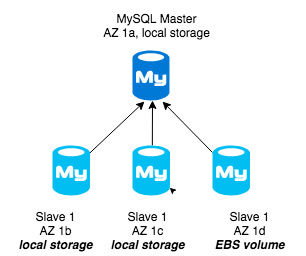
Then we can use slave2 for ebs snapshots (if needed). This slave will be more expensive (as it is using EBS) but it can also be used to either serve production traffic (i.e. we can place smaller amount of traffic) or for other purposes (for example analytical queries, etc).
For Percona XtraDB cluster (PXC) we can just use 3 nodes, 1 in each AZ. PXC uses auto-provisioning with SST if the new node comes back blank. For MySQL replication we need some additional things:
Here are some totally different options we could consider:
That may not work for everyone as it requires additional changes to the existing server provisioning: failover from master to a slave, ability to clone replication slaves (or use PXC), ability to setup a new MySQL local storage partition, using compression.
If your company’s database is experiencing an increased workload, our solution brief on how to set up your Amazon RDS database environment to meet increase scale and workloads can provide insight into incorporating your current database architecture with Percona open source software, such as XtraDB Cluster, to optimize your data environment.
The brief is ideal for companies who need to maintain uptime. PagerDuty, for example, came to Percona looking for better database performance and availability. Our experts optimized their environment by using Percona XtraDB Cluster to create a three-node cluster in Amazon EC2. For more information on our other open source solutions, download their case study.





How compression (InnoDB row, InnoDB page and ZFS respectively) affect query performance (INSERT, SELECT, etc.) on i3.4x instance?
From what I saw so far from that case (very limited test) both writes and selects are actually faster on ZFS compared to EXT4. But it needs to be further tested.
That is quite surprising since ZFS doesn’t allow direct I/O (unless using a ZVOL). Anecdotally, having used ZFS on my workstation for quite a while, it seems any fsync() heavy workload – dpkg being a prime example – is significantly slower.
FWIW, I have also seen I/O delay spikes on i3 type instances. It may be that the NVMe devices are doing some housekeeping every once in a while, but Amazon is pretty opaque when it comes to questions about their infrastructure so I haven’t gotten any real help from their support.
Surprised you didn’t include Tokudb as one of the compression options. As it’s owned by Percona
How did you configure the OS to mount the nvme volume and get the expected characteristics?
I’m getting the same performance from nvme as from EBS, What has to be done? I’ve actually asked that already on EC2 group but no answer yet. https://forums.aws.amazon.com/thread.jspa?threadID=287515&tstart=0
Could you share that detail?
I have prepared a larger answer on the AWS forums but currently can’t post there. Here’s the gist: Since the local instance store devices are partitioned, you’ll only get a fraction of the throughput of a full device. On a c5d.9xlarge this will be a little less than 1600mb/s. The numbers you see are normal since you only get a slice of that full 900 GiB Device. You however get all the latency benefits.
“hitting such failure events can be common.”
I’m wondering what your definition of ‘common’ is…this seems a tad bit open-ended.
I see now where you define how you’re measuring these drops.
Does anyone publish numbers on QoS — p99 response times, stall frequency?