

Some years ago, Peter Z wrote a blogpost about using MySQL Sandbox to deploy multiple server versions. Last February, Giuseppe introduced us to its successor: dbdeployer. In this blogpost we will demonstrate how to use it. There is a lot of information in Giuseppe’s post, so head there if you want a deeper dive.
First step is to install it, which is really easy to do now since it’s developed in Go, and standalone executables are provided. You can get the latest version here.
|
1 2 3 |
shell> wget https://github.com/datacharmer/dbdeployer/releases/download/1.5.0/dbdeployer-1.5.0.linux.tar.gz shell> tar xzf dbdeployer-1.5.0.linux.tar.gz shell> mv dbdeployer-1.5.0.linux ~/bin/dbdeployer |
If you have your ~/bin/ directory in the path, you should now be able to run dbdeployer commands.
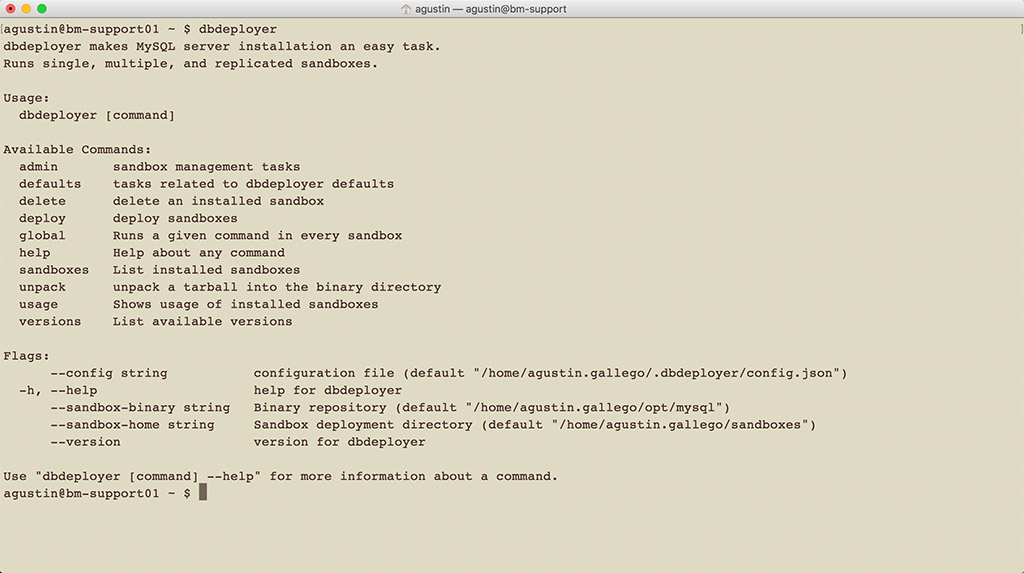
Let’s start with deploying a latest version vanilla MySQL sandbox.
In the Support Team, we extensively use MySQL Sandbox (the predecessor to dbdeployer) to easily run different flavours and versions of MySQL so that we can test with the same versions our customers present us with. We store MySQL binaries in /opt/, so we can all share them and avoid wasting disk space on duplicated binaries.
The first step to using dbdeployer is getting the binary we want to run, and then unpacking it into the binaries directory.
|
1 2 |
shell> wget https://dev.mysql.com/get/Downloads/MySQL-8.0/mysql-8.0.11-linux-glibc2.12-x86_64.tar.gz shell> dbdeployer --sandbox-binary=/opt/mysql/ unpack mysql-8.0.11-linux-glibc2.12-x86_64.tar.gz |
This command will extract and move the files to the appropriate directory, which in this case is under /opt/mysql/ as overridden with the --sandbox-binary argument, so we can use them with the deploy command.
To create a new standalone MySQL sandbox with the newly extracted binary, we can use the following command.
|
1 2 3 4 5 |
shell> dbdeployer --sandbox-binary=/opt/mysql/ deploy single 8.0.11 Creating directory /home/vagrant/sandboxes Database installed in $HOME/sandboxes/msb_8_0_11 run 'dbdeployer usage single' for basic instructions' .. sandbox server started |
You can read the dbdeployer usage output to have even more information on how the tool works. Next, let’s connect to it.
|
1 2 3 4 5 6 7 8 9 10 11 12 13 14 15 16 17 18 19 20 21 |
shell> cd sandboxes/msb_8_0_11/ shell> ./use Welcome to the MySQL monitor. Commands end with ; or g. Your MySQL connection id is 9 Server version: 8.0.11 MySQL Community Server - GPL Copyright (c) 2000, 2018, Oracle and/or its affiliates. All rights reserved. Oracle is a registered trademark of Oracle Corporation and/or its affiliates. Other names may be trademarks of their respective owners. Type 'help;' or 'h' for help. Type 'c' to clear the current input statement. mysql [localhost] {msandbox} ((none)) > select @@version, @@port; +-----------+--------+ | @@version | @@port | +-----------+--------+ | 8.0.11 | 8011 | +-----------+--------+ 1 row in set (0.00 sec) |
And that was it! When creating the new instance, dbdeployer will try to use the same port as the version numbers concatenated. If that port is in use, it will try another one, or we can manually override it with the --port argument.
We can also easily setup a replication environment with just one command.
|
1 2 3 4 5 6 7 8 9 10 11 12 |
shell> dbdeployer --sandbox-binary=/opt/mariadb/ deploy replication 10.2.15 Installing and starting master . sandbox server started Installing and starting slave1 . sandbox server started Installing and starting slave2 . sandbox server started $HOME/sandboxes/rsandbox_10_2_15/initialize_slaves initializing slave 1 initializing slave 2 Replication directory installed in $HOME/sandboxes/rsandbox_10_2_15 run 'dbdeployer usage multiple' for basic instructions' |
Again, you should run the recommended command to get more insight into what can be done. We can use the ./m script to connect to the master, and ./s1 to connect to the first slave. The ./use_all* scripts can come in handy to run commands in many servers at a time.
Finally, we will see how to create multiple sandboxes with the same version at the same time.
|
1 2 3 4 5 6 7 8 9 |
shell> dbdeployer --sandbox-binary=/opt/percona_server/ deploy multiple 5.7.21 Installing and starting node 1 . sandbox server started Installing and starting node 2 . sandbox server started Installing and starting node 3 . sandbox server started multiple directory installed in $HOME/sandboxes/multi_msb_5_7_21 run 'dbdeployer usage multiple' for basic instructions' |
This could be useful for setting up environments that are not already covered by the tool, like Galera clusters or semi-sync replication. With this approach, we will at least have a base to start from, and then can use our own custom scripts. dbdeployer now has templates, which would allow extending functionality to support this, if needed. I have not yet tried to do so, but sounds like an interesting project for the future! Let me know if you would be interested in reading more about it.
Resources
RELATED POSTS





Thanks for sharing this.
I have used this and also got some error. If possible please have a look upon this
Using centos 6.8 on amazon azure.
[root@vm1 home]# dbdeployer –sandbox-binary=/opt/mysql/ –sandbox-home=/home/mysql8 deploy single 8.0.11
Database installed in /home/mysql8/msb_8_0_11
run ‘dbdeployer usage single’ for basic instructions’
err: exit status 1
cmd: &exec.Cmd{Path:”/home/mysql8/msb_8_0_11/start”, Args:[]string{“/home/mysql8/msb_8_0_11/start”, “”}, Env:[]string(nil), Dir:””, Stdin:io.Reader(nil), Stdout:(*bytes.Buffer)(0x1927bb00), Stderr:(*exec.prefixSuffixSaver)(0x1939aea0), ExtraFiles:[]*os.File(nil), SysProcAttr:(*syscall.SysProcAttr)(nil), Process:(*os.Process)(0x19118c90), ProcessState:(*os.ProcessState)(0x1910aba0), ctx:context.Context(nil), lookPathErr:error(nil), finished:true, childFiles:[]*os.File{(*os.File)(0x19378b98), (*os.File)(0x19378bb8), (*os.File)(0x19378bd8)}, closeAfterStart:[]io.Closer{(*os.File)(0x19378b98), (*os.File)(0x19378bb8), (*os.File)(0x19378bd8)}, closeAfterWait:[]io.Closer{(*os.File)(0x19378bb0), (*os.File)(0x19378bd0)}, goroutine:[]func() error{(func() error)(0x813d2b0), (func() error)(0x813d2b0)}, errch:(chan error)(0x1932f900), waitDone:(chan struct {})(nil)}
stdout: …………………………………………………………………………………………………………………………………………………………….. sandbox server not started yet
Hi Anil,
First, let me say that the correct place to send these kinds of questions is https://www.percona.com/forums/
Regarding the errors you are getting, you should check the mysql error log located in /home/mysql8/msb_8_0_11/data/msandbox.err
Hi Agustin,
I had earlier tried using mysql sandbox for some replication topology testing,
Also tried out some time back, the DB deployer but never found a way to install in my local MAC machine as there is no binary available for Percona Server on Mac OS.
A *BINARY* TARBALL of Percona Server 5.7.22 for Mac OS, is required in order to test with DB deployer, on a MAC OS.
As DB Deployer does not quite work with the source tar-balls.,
Below is the ERROR when I run for the Percona server 5.7.22 source tarball :-
bpanigrahi$ dbdeployer deploy single ps5.7.22
——————————————————————————–
Looking for *darwin* binaries
——————————————————————————–
# Found the following:
/Users/bpanigrahi/opt/mysql/ps5.7.22/sql/table.h – tarball type: ‘source’ (flavor: any)
THIS IS A SOURCE TARBALL. YOU NEED TO USE A *BINARY* TARBALL
——————————————————————————–
Could not find any of the expected files for darwin server: [lib/libperconaserverclient.dylib lib/libmysqlclient.dylib]
MySQL 5.7, 8.0 provide the tar ball binary for Mac OS,
Is there a way where we can get the Percona Server tar ball binaries for Mac?
Last update on tarball binaries was seen for PS server 5.5 as posted by Vadim Tkachenko
https://www.percona.com/blog/2011/05/02/percona-server-and-xtrabackup-for-macos-experimental-binaries/
Thanks,
Bajrang
Hi Bajrang!
Yes, you will need to have a binary tarball for the OS you are using. Unfortunately, we don’t ship MacOS images for Percona Server, so you will have to use the Linux ones. This will mean you will have to install a VM with Linux, and use dbdeployer inside it, if you want to try out Percona Server images. Another option here is for you to use Percona Server for Docker, which will work nicely in your MacOS, too: https://www.percona.com/doc/percona-server/5.7/installation/docker.html
Best,
Agustín.
Sorry for seeing this article that late after publication.
Thanks for covering the tool.
Regarding your assertion “useful for setting up environments that are not already covered by the tool, like Galera clusters or semi-sync replication”, be aware that dbdeployer can run semi-synchronous replication out of the box
$ dbdeployer deploy replication 5.7 –semi-sync –concurrent
# 5.7 => 5.7.25
$HOME/sandboxes/rsandbox_5_7_25/initialize_slaves
initializing slave 1
initializing slave 2
Replication directory installed in $HOME/sandboxes/rsandbox_5_7_25
run ‘dbdeployer usage multiple’ for basic instructions’
$ ~/sandboxes/rsandbox_5_7_25/test_replication
# master log: mysql-bin.000001 – Position: 10577 – Rows: 20
# Testing slave #1
ok – slave #1 acknowledged reception of transactions from master
ok – slave #1 IO thread is running
ok – slave #1 SQL thread is running
ok – Table t1 found on slave #1
ok – Table t1 has 20 rows on #1
# Testing slave #2
ok – slave #2 acknowledged reception of transactions from master
ok – slave #2 IO thread is running
ok – slave #2 SQL thread is running
ok – Table t1 found on slave #2
ok – Table t1 has 20 rows on #2
# Tests : 10
# failed: 0 ( 0.0%)
# PASSED: 10 (100.0%)
# exit code: 0
$ ~/sandboxes/rsandbox_5_7_25/m -e ‘show status like “%yes%”‘
+—————————–+——-+
| Variable_name | Value |
+—————————–+——-+
| Rpl_semi_sync_master_yes_tx | 23 |
+—————————–+——-+
Thanks for pointing this out, Giuseppe!