

In this blog, we’ll examine how CPU governor performance affects MySQL.
It’s been a while since we looked into CPU governors and with the new Intel CPUs and new Linux distros, I wanted to check how CPU governors affect MySQL performance.
Before jumping to results, let’s review what drivers manage CPU frequency. Traditionally, the default driver was “acpi-cpufreq”, but for the recent Intel CPUs and new Linux kernel it was changed to “intel_pstate”.
To check what driver is being used, run the command cpupower frequency-info .
|
1 2 3 4 5 6 7 8 9 10 11 12 13 14 15 16 17 |
cpupower frequency-info analyzing CPU 0: driver: acpi-cpufreq CPUs which run at the same hardware frequency: 0 CPUs which need to have their frequency coordinated by software: 0 maximum transition latency: 10.0 us. hardware limits: 1.20 GHz - 2.00 GHz available frequency steps: 2.00 GHz, 2.00 GHz, 1.90 GHz, 1.80 GHz, 1.70 GHz, 1.60 GHz, 1.50 GHz, 1.40 GHz, 1.30 GHz, 1.20 GHz available cpufreq governors: conservative, ondemand, userspace, powersave, performance current policy: frequency should be within 1.20 GHz and 2.00 GHz. The governor "ondemand" may decide which speed to use within this range. current CPU frequency is 1.20 GHz (asserted by call to hardware). cpufreq stats: 2.00 GHz:29.48%, 2.00 GHz:0.00%, 1.90 GHz:0.00%, 1.80 GHz:0.00%, 1.70 GHz:0.00%, 1.60 GHz:0.00%, 1.50 GHz:0.00%, 1.40 GHz:0.00%, 1.30 GHz:0.37%, 1.20 GHz:70.15% (7) boost state support: Supported: yes Active: yes |
In this case, we can see that the driver is “acpi-cpufreq”, and the governor is “ondemand”.
On my server (running Ubuntu 16.04, running “Intel(R) Xeon(R) CPU E5-2683 v3 @ 2.00GHz” CPUs), I get following output by default settings:
|
1 2 3 4 5 6 7 8 9 10 11 12 13 14 |
analyzing CPU 0: driver: intel_pstate CPUs which run at the same hardware frequency: 0 CPUs which need to have their frequency coordinated by software: 0 maximum transition latency: 0.97 ms. hardware limits: 1.20 GHz - 3.00 GHz available cpufreq governors: performance, powersave current policy: frequency should be within 1.20 GHz and 3.00 GHz. The governor "performance" may decide which speed to use within this range. current CPU frequency is 1.50 GHz (asserted by call to hardware). boost state support: Supported: yes Active: yes |
So, it’s interesting to see that “intel_pstate” with the “performance” governor is chosen by default, and the CPU frequency range is 1.20GHz to 3.00GHz (even though the CPU specification is 2.ooGHz). If we check CPU specification page, it says that 2.00GHz is the “base frequency” and “3.00GHz” is the “Max Turbo” frequency.
In contrast to “intel_pstate”, “acpi-cpufreq” says “frequency should be within 1.20 GHz and 2.00 GHz.”
Also, “intel_pstate” only supports “performance” and “powersave” governors, while “acpi-cpufreq” has a wider range. For this blog, I only tested “ondemand” and “performance”.
Switching between CPU drivers is not easy, as it requires a server reboot — you need to pass a parameter to the kernel startup line. In Ubuntu, you can do this in /etc/default/grub by changing GRUB_CMDLINE_LINUX_DEFAULT to GRUB_CMDLINE_LINUX_DEFAULT="intel_pstate=disable", which will disable intel_pstate and will load acpi-cpufreq.
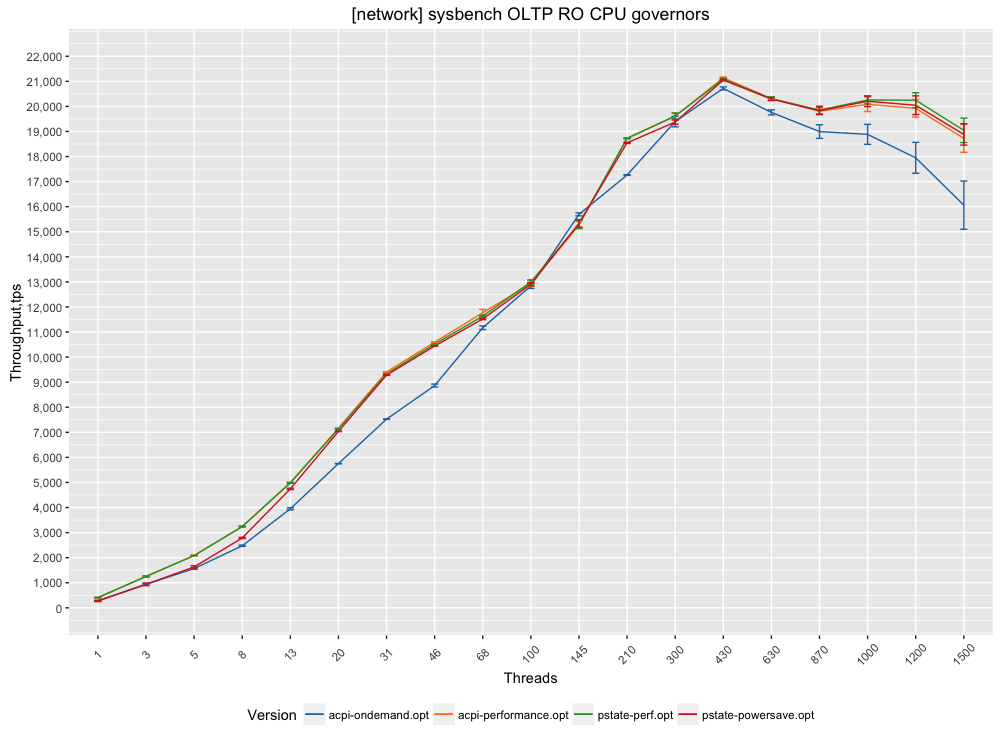
Is there a real difference in performance between different CPU drivers and CPU governors? To check , I took a sysbench OLTP read-only workload over a 10Gb network, where the data fits into memory (so it is CPU-burning workload).
The results are as follows. This is a chart for absolute throughput:
And to better understand relative performance, here is a chart on how other governors perform compared to “intel-pstate” with the performance governor. In this case, I showed relative performance to “PSTATE performance”, which equals “1”. In the chart, the orange bar is “PSTATE powersave” and shows the relative difference between “PSTATE powersave” and “PSTATE performance” (=1):
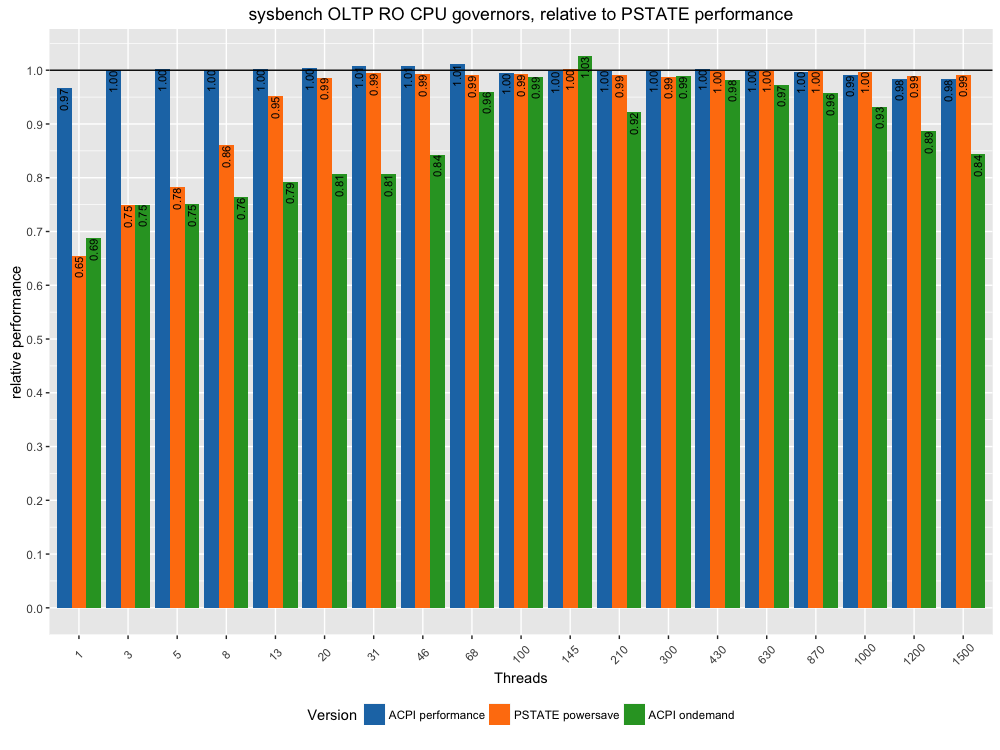
Here are the takeaways I see:





If the workload is bursty, so has times when CPUs are idle and brief periods when CPU demand is very high, then I would expect a greater performance difference (measured over the bursts of load and not the idle times) between a powersave or ondemand profile compared to a performance one, because more of the work would be performed while CPUs are at lower frequencies. Collecting the time spent in each state per CPU can provide insight into how CPU load (bursty workloads) influences CPU frequency for different CPU frequency policies.
The switching between low and high speed states is pretty fast these days.
One thing that would have been nice to see in this article is measurements of server power use as the load ramps up. Also on the TPS graphs it would be nice to know how many cores were in use to produce the results.
Do you know how to measure power use?
sysstat can be used to record instantaneous CPU clock frequency:
INTERVAL=1 COUNT=10 /usr/lib64/sa/sadc -S POWER $INTERVAL $COUNT sa.out
/usr/bin/sar -f sa.out -m CPU -P ALL
…
12:20:42 PM CPU MHz
12:20:43 PM all 2388.70
12:20:43 PM 0 1903.02
12:20:43 PM 1 1331.34
12:20:43 PM 2 3300.78
12:20:43 PM 3 1249.02
and then report it in a format that can easily be ingested by a relational database system:
> /usr/bin/sadf -d -P ALL sadc.out — -m CPU | head
# hostname;interval;timestamp;CPU;MHz
deva01;1;2016-05-10 16:20:43 UTC;-1;2388.70
deva01;1;2016-05-10 16:20:43 UTC;0;1903.02
deva01;1;2016-05-10 16:20:43 UTC;1;1331.34
deva01;1;2016-05-10 16:20:43 UTC;2;3300.78
deva01;1;2016-05-10 16:20:43 UTC;3;1249.02
turbostat (when run as root) will report processor frequency, idle power-state statistics, temperature and power on modern X86 processors.
PkgWatt Watts consumed by the whole package.
RAMWatt Watts consumed by the DRAM DIMMS — available only on server processors.
> turbostat -i 1
Package Core CPU Avg_MHz %Busy Bzy_MHz TSC_MHz SMI CPU%c1 CPU%c3 CPU%c6 CPU%c7 CoreTmp PkgTmp Pkg%pc2 Pkg%pc3 Pkg%pc6 Pkg%pc7 PkgWatt RAMWatt PKG_% RAM_%
– – – 1 0.03 2389 2500 0 0.09 0.72 99.15 0.00 38 44 0.00 0.00 0.00 0.00 76.08 63.66 0.00 0.00
0 0 0 2 0.08 2275 2500 0 0.08 0.00 99.83 0.00 33 40 0.00 0.00 0.00 0.00 39.57 31.89 0.00 0.00
0 0 24 0 0.01 2473 2500 0 0.15
0 1 2 0 0.01 2594 2500 0 0.04 0.00 99.95 0.00 35
0 1 26 0 0.01 2001 2500 0 0.04
0 2 4 0 0.02 2416 2500 0 0.03 0.00 99.95 0.00 32
…
Also see powertop, i7z.
Apart from benchmarks, the Intel Pstate is sensitive to config Hz= 300 issue thats done in Arch kernel, its less affected with 200 and 1000 which is default in other distros like Ubuntu and Fedora. As per my experiments, intel_pstate generates more heat and power consumption on certain CPUs like Haswell Refresh than cpu-freq. This issue is less in older Sandybridge.