

Migrate to Percona software for MySQL – an open source, production-ready, and enterprise-grade MySQL alternative.

In this blog post, we compare virtual columns in MySQL and MariaDB.
Virtual columns are one of the standout features in MySQL 5.7. They allow you to store a value derived from one or more columns in the same table. This is a powerful way to build functional indexes. The feature has been available in MariaDB for some time, so it’s worth comparing the implementations.
The MariaDB documentation is easy to find.
MySQL 5.7 documentation is less obvious, but the best reference is here.
MariaDB documentation does not clearly explain when to use persistent vs virtual columns. Indexes are only supported on persistent columns, but trade-offs could be better documented.
MySQL documentation suggests using virtual columns by default unless computation cost is high. Stored columns are not required for indexing in most cases.
Creating a virtual column is similar in both systems:
|
1 |
ALTER TABLE sbtest1 ADD reverse_pad char(60) GENERATED ALWAYS AS (reverse(pad)) VIRTUAL; |
However, NOT NULL is not supported in MariaDB:
|
1 2 3 4 5 6 7 |
# MariaDB 10.0 MariaDB [db1]> ALTER TABLE sbtest1 ADD reverse_pad char(60) GENERATED ALWAYS AS (reverse(pad)) VIRTUAL NOT NULL; ERROR 1064 (42000): syntax error # MySQL 5.7 mysql> ALTER TABLE sbtest1 ADD reverse_pad char(60) GENERATED ALWAYS AS (reverse(pad)) VIRTUAL NOT NULL; Query OK |
Materialized columns also differ:
PERSISTENTSTOREDMySQL 5.7:
|
1 2 3 |
# MySQL 5.7 ALTER TABLE sbtest1 ADD reverse_pad char(60) GENERATED ALWAYS AS (reverse(pad)) VIRTUAL NOT NULL; Query OK |
This is a metadata-only change and executes instantly.
MariaDB:
|
1 2 3 |
# MariaDB 10.0 ALTER TABLE sbtest1 ADD reverse_pad char(60) GENERATED ALWAYS AS (reverse(pad)) VIRTUAL; Query OK, 0 rows affected (7 min) |
This requires a full table rebuild and is not online. Writes may stall during the operation.
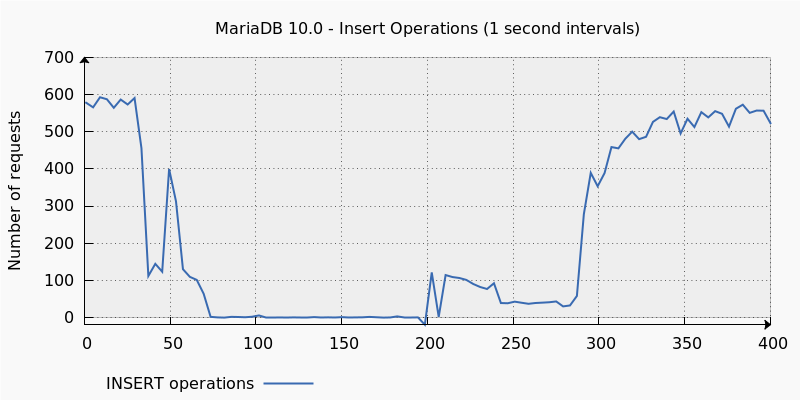
MariaDB requires virtual columns to be PERSISTENT to be indexed.
MySQL 5.7 allows indexing virtual columns without storing them, except when used as a primary key.
Example:
|
1 2 3 4 5 |
# MySQL 5.7 ALTER TABLE sbtest1 ADD INDEX k_rev (k, reverse_pad); # MariaDB 10.0 ALTER TABLE sbtest1 ADD INDEX k_rev (k, reverse_pad); |
Differences:
While MySQL 5.7 and MariaDB 10 appear similar in supporting virtual columns, their implementations differ significantly in syntax, performance, and operational impact.
MySQL 5.7 provides a more production-friendly implementation, especially for large tables and high-traffic environments.
Resources
RELATED POSTS




There is one more important difference as described (by me) here:
http://blog.webyog.com/2015/11/09/beware-virtual-columns-may-render-backups-unusable/
It is a little bit hard for understanding, but thank you for the article. I am going to try it with MySQL. Hope, everything will be OK!
Hi
Thank you for your nice article.
I translated this into Japanese for users in Japan.
Translated one is as follows
https://yakst.com/ja/posts/3836
If there is any problem, please get in touch with me.
thank you.
Thank you, but it defeats itself in the examples; you cannot just throw around things like
“ALTER TABLE sbtest1 ADD reverse_pad char(60) GENERATED ALWAYS AS (reverse(pad)) VIRTUAL;”
What is reverse, what is pad?
Actually once you get past the facts that “reverse” is a rarely used function in mysql, and “pad” is an example column name, this is quite good.
Indexes of virtual columns in Mysql 8.0 and likely older is seriously bugged.
Not recommended.
Performance will degrade over time as it doesn’t refresh content with every update resulting in partial fulltable scans.
You can verify that using EXPLAIN syntax and compare the counters with count()