

Percona XtraBackup is a 100% open-source backup solution for Percona Server for MySQL and MySQL®. It is designed for high-availability environments, performing online, non-blocking, and highly secure backups of transactional systems without interrupting your production traffic.
While full backups work for small databases, large-scale systems rely on incremental backups to save space and time. However, the “prepare” stage, required to make the incremental backups consistent, was slow because XtraBackup processed the .delta files serially. The .delta files are generated per table and store only the modifications since the last backup.
Great news! In XtraBackup versions 8.0.35-33 and 8.4.0-3 and later, we’ve added support for the --parallel option during the prepare stage. This option lets XtraBackup process multiple .delta files simultaneously, significantly reducing the preparation time, especially when you have a large number of IBD files.
Please add --parallel=X, with the number of threads to use, to the xtrabackup --prepare --apply-log-only command to speed up the incremental prepare operation.
Before we dive into the performance gains, it’s important to understand how Incremental backups work.
The process starts with a full backup followed by a backup that captures the changes since the last backup. This smaller backup is called an incremental backup. XtraBackup creates .delta files during incremental backups. Let’s review an example.
For more detailed steps/commands, please check the documentation here: https://docs.percona.com/percona-xtrabackup/8.0/create-incremental-backup.html
To restore the data to the latest point, you must merge these changes back into the full backup. The “prepare” phase works differently here:
--apply-log-only option. In this step, XtraBackup applies the .delta files and the redo logs, but does not apply the Undo logs--apply-log-only option. XtraBackup applies the .delta files and the Redo logs but skips the Undo logs.More detailed steps to prepare an incremental backup are described here: https://docs.percona.com/percona-xtrabackup/8.0/prepare-incremental-backup.html
We have improved the Incremental Delta Apply phase. These are “Prepare inc1” and “Prepare inc2” phases as described above. --parallel option should be used along with the --apply-log-only to apply the .delta files in parallel.
We completed this essential improvement as part of [PXB-3427].
In previous versions, XtraBackup applied the .delta files as soon as a file was discovered in the incremental backup directory. Starting with versions 8.0.35-33 and 8.4.0-3, to apply the .delta files, XtraBackup scans the backup directory and builds a queue of delta files. Multiple threads (defined by --parallel ) consume this queue simultaneously. Each thread reads a .delta file and writes its pages to the corresponding InnoDB Data File (.ibd file).
This benchmark is created using the scripts, and the instructions are in JIRA: PXB-3427
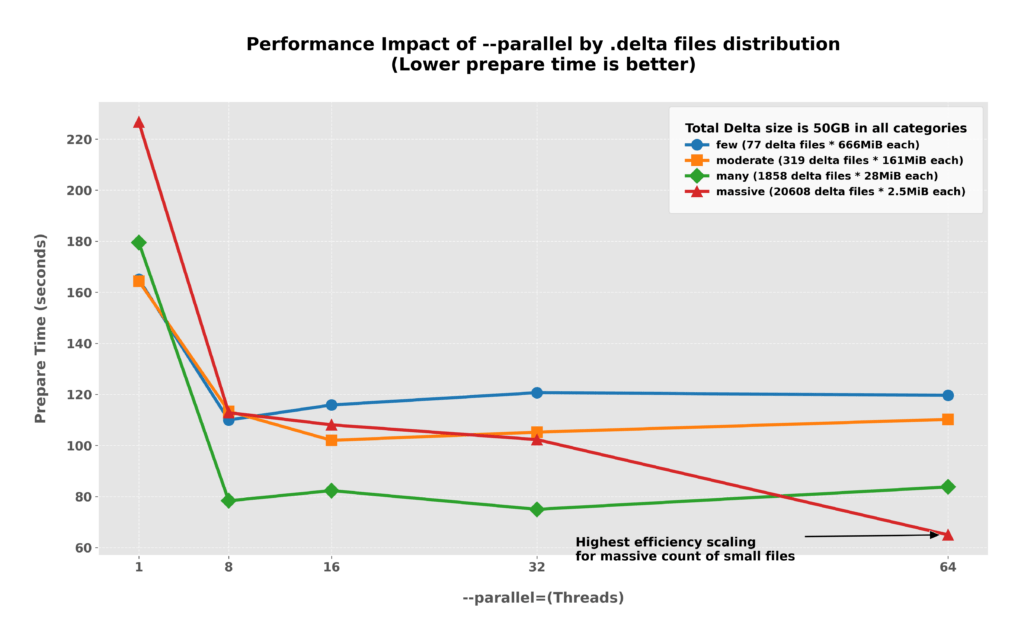
When your backup contains a large number of small .delta files, increasing the --parallel value can drastically reduce the time taken to prepare the incremental backup by distributing the high per-file overhead across more threads. However, for other categories with fewer or larger files, performance typically plateaus after 16 threads, and pushing higher can even lead to slight regressions due to thread management overhead. While there is no single “golden value” to recommend for every scenario, we recommend starting with a value of 8 to find the optimal balance for your specific environment.
--parallel=1 vs --parallel=64The PMM graphs below show the Disk IOPs used by the XtraBackup prepare command. The graph is generated when XtraBackup applies the incremental backup to a full backup directory. Incremental backup directory that has 20,608 .delta files, each of which is 2.5 MB.
--parallel=1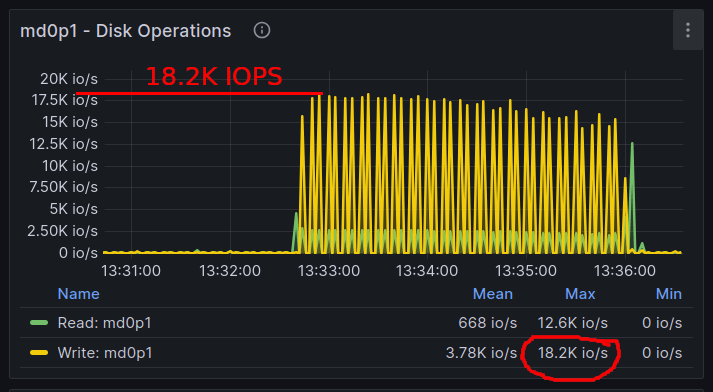
With --parallel=1, max Disk IOPs utilized is 18.2 K, and the XtraBackup prepare operation finished in 3.76 minutes.
--parallel=64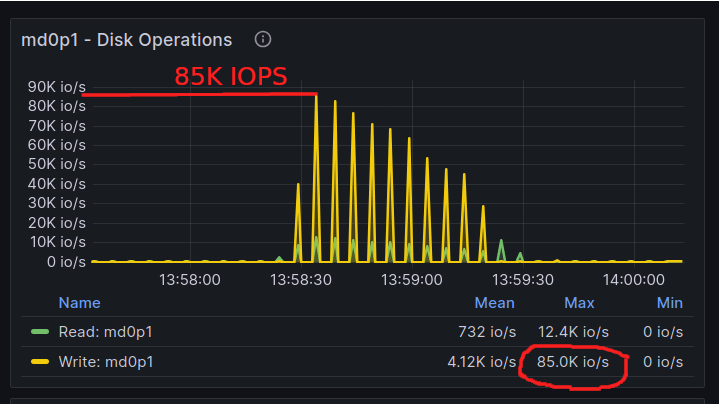
With --parallel=64, the max Disk Write IOPs utilized is 85K, and the XtraBackup prepare operation finished in around a minute. XtraBackup utilized 4.67x more disk IOPS and finished 3.49x faster.
We saw some amazing results shared by the reporter on PXB-3427. The time required for XtraBackup prepare command (--prepare --apply-log-only) to complete, reduced from 237 minutes to just 6 minutes. That’s an incredible 40X speed-up!
Here are the details from their setup:
We hear you! This specific feature came to us from a post on the community forum. We reached out, asked them to create a JIRA ticket, and then implemented the improvement. We wanted to share this story as a demonstration of our commitment to listening to and acting on community feedback!




