
Percona Everest has always aimed to simplify running databases on Kubernetes. Previously, importing existing data into a new Everest database cluster required doing some tasks outside the platform, as there was no built-in way to handle it. That changes with Data Importers, a new, extensible framework introduced in Percona Everest 1.8.0 that lets you define how to bootstrap your database cluster using externally stored backups.
Whether you’re using pg_dump, mysqldump, or a custom internal script, Data Importers let you plug your own import logic into Everest cleanly, securely, and without any hacks.
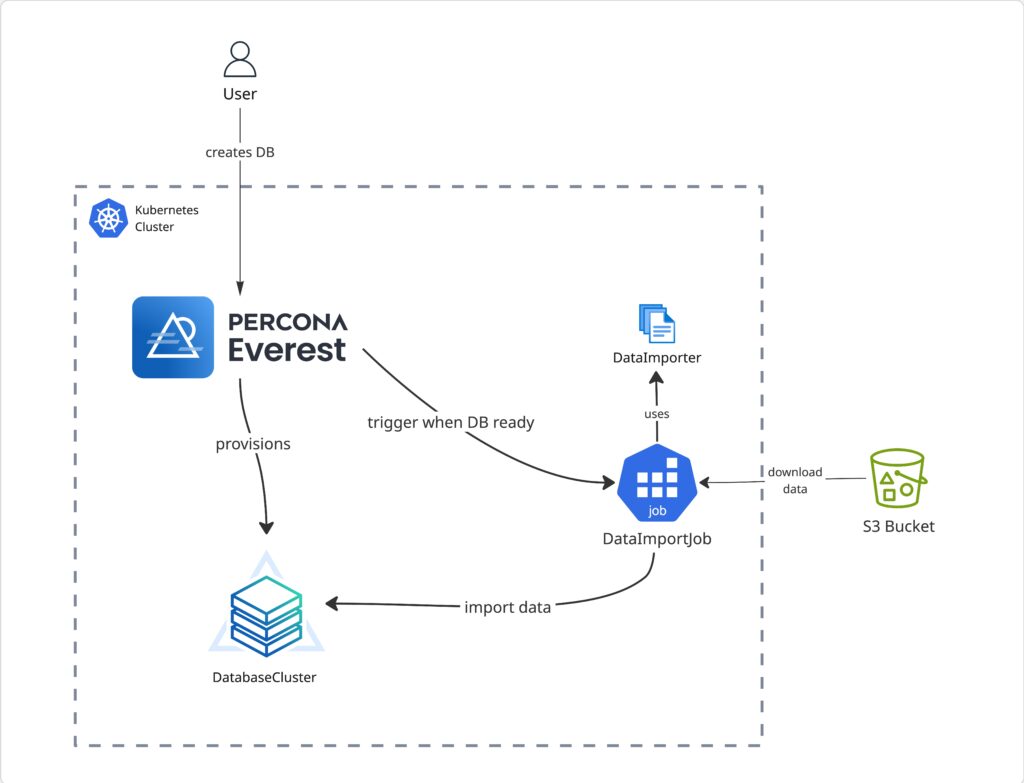
DataImporters are custom resources in Everest that describe how to set up a database cluster with data from an external source.
Think of them as plugins that run once cluster components are ready. They are:
Each Data Importer packages your restore logic inside a Docker image, which Everest runs as a Kubernetes Job.
This makes your backup tooling and restore process a first-class citizen in the Everest workflow, treated with the same level of automation and integration as native backups and restores.
We built this feature to unlock several important use cases:
Until now, Everest’s restore options were tightly coupled to the backup tools supported by the underlying Percona operators (like pgBackRest, pbm, etc.). That was fine for some workflows, but limiting for teams with:
pg_dump, mysqldump, etc.We didn’t want Everest to make assumptions about how you back up or migrate your data. Instead, we wanted to empower you to bring your own logic and make Everest run it reliably.
Here’s what this framework provides:
You write a restore script using a language of your choice, package it in a container, and register it in Everest as a DataImporter custom resource.
When creating a new cluster, you can select a DataImporter and provide the following details about your backup:
Once the cluster is ready, Everest runs your container as a Kubernetes Job which imports all your external data into the newly provisioned cluster.
To make the interface between Everest and your restore logic clean and predictable, every importer receives a well-defined JSON file (you can find the schema here).
When Everest runs your data importer container, it passes the path to this file as the first argument. The file contains all necessary context, including:
Your script just needs to:
This contract means you can build importers in any language — Bash, Python, Go, etc. and still have a consistent integration point with Everest.
Let’s understand these concepts better using an example. Say you’d like Everest to support importing backups taken using pg_dump .
Typically, you’d start by writing a script that parses the JSON object provided as a part of the contract and uses that information to perform a restore. Here’s a minimal example using a shell script
|
1 2 3 4 5 6 7 8 9 10 11 12 13 14 15 16 17 18 19 20 21 22 23 24 |
<code class="language-bash">#!/bin/bash set -e # parse the config file CONFIG_FILE="$1" CONFIG=$(cat "$CONFIG_FILE") # extract the required information BUCKET=$(echo "$CONFIG" | jq -r '.source.s3.bucket') PATH=$(echo "$CONFIG" | jq -r '.source.path') REGION=$(echo "$CONFIG" | jq -r '.source.s3.region') ENDPOINT=$(echo "$CONFIG" | jq -r '.source.s3.endpointURL') HOST=$(echo "$CONFIG" | jq -r '.target.host') PORT=$(echo "$CONFIG" | jq -r '.target.port') USER=$(echo "$CONFIG" | jq -r '.target.username') PASS=$(echo "$CONFIG" | jq -r '.target.password') export PGPASSWORD="$PASS" # copy backup from S3 aws s3 cp "s3://$BUCKET/$PATH" backup.sql --region "$REGION" --endpoint-url "$ENDPOINT" # restore psql -h "$HOST" -p "$PORT" -U "$USER" -f backup.sql </code> |
Next, you’d package your import script into a Docker container and provide all the necessary tools and packages for your script to execute its tasks.
Now that you have your Docker image ready, you need to tell Everest how to run it. To do this, we create a DataImporter custom resource:
|
1 2 3 4 5 6 7 8 9 10 11 12 13 14 15 |
<code class="language-yaml">apiVersion: everest.percona.com/v1alpha1 kind: DataImporter metadata: name: my-pgdump-importer spec: displayName: "pg_dump" description: | Data Importer for importing backups using pg_dump supportedEngines: - postgresql jobSpec: image: "my-repo/my-data-importer-image:latest" command: ["/bin/sh", "import.sh"] </code> |
Finally, you can use this DataImporter to bootstrap a new cluster in Everest using your backup data:
|
1 2 3 4 5 6 7 8 9 10 11 12 13 14 15 16 17 18 19 20 21 22 23 24 25 26 27 28 29 |
<code class="language-yaml">apiVersion: everest.percona.com/v1alpha1 kind: DatabaseCluster metadata: name: my-pg-cluster spec: dataSource: dataImport: dataImporterName: my-pgdump-importer source: path: /path/to/my/backup.sql bucket: my-s3-bucket region: us-west-2 endpointURL: <https://s3.us-west-2.amazonaws.com> credentialsSecretName: my-s3-secret accessKeyId: myaccesskeyid secretAccessKey: mysecretaccesskey engine: replicas: 1 resources: cpu: "1" memory: 2G storage: size: 25Gi type: postgresql version: "17.4" proxy: type: pgbouncer </code> |
As of 1.8.0, we’re already planning many improvements, like:
But even today, Data Importers give you a clean and powerful foundation for migrating data into Everest without it needing to know the internal details.
As of now, Percona Everest comes pre-installed with three DataImporters, each of which allows you to import backups taken using the Percona operators for MySQL (based on XtraDB), MongoDB, and PostgreSQL, respectively. However, we plan to add support for many more tools in the future.
What makes this system powerful is that Percona Everest doesn’t need to know your tools ahead of time. You can write your own import logic in any scripting language, using the formats and steps you already know and trust. Everest runs it as part of your cluster; clean, simple, and Kubernetes-native.
You can share these import workflows across teams and environments, so restoring data stays consistent and repeatable everywhere.
If you’ve been waiting to use Everest but your backup and restore tools didn’t fit, this solves that. Your import process is now a first-class part of how Everest works, not an afterthought.
No hacks, no vendor lock-in. Just a clear, flexible way to connect your world to Percona Everest.
Do you have questions or feedback? Let us know in the Percona Community Forum. We’d love to hear your thoughts on this.
Resources
RELATED POSTS