

A quick configuration change may do the trick in improving the performance of your AWS RDS for MySQL instance. Here, we will discuss a notable new feature in Amazon RDS, the Dedicated Log Volume (DLV), that has been introduced to boost database performance. While this discussion primarily targets MySQL instances, the principles are also relevant to PostgreSQL and MariaDB instances.
A Dedicated Log Volume (DLV) is a specialized storage volume designed to house database transaction logs separately from the volume containing the database tables. This separation aims to streamline transaction write logging, improving efficiency and consistency. DLVs are particularly advantageous for databases with large allocated storage, high I/O per second (IOPS) requirements, or latency-sensitive workloads.
DLVs are currently supported for Provisioned IOPS (PIOPS) storage, with a fixed size of 1,000 GiB and 3,000 Provisioned IOPS. Amazon RDS extends support for DLVs across various database engines:
The documentation doesn’t say much about additional charges for the Dedicated Log Volumes, but I reached out to AWS support, who responded exactly as follows:
Please note that there are no additional costs for enabling a dedicated log volume (DLV) on Amazon RDS. By default, to enable DLV, you must be using PIOPS storage, sized at 1,000 GiB with 3,000 IOPS, and you will be priced according to the storage type.
UPDATE: We have been reached by AWS and provided with updated information noted as follows. TL;DR – there is definitely cost associated with DLV.
Dedicated Log Volumes are priced the same as a data volume with 1,000 GiB and 3,000 IOPS and by storage type. Dedicated Log Volumes are only supported in Provisioned IOPS storage. For example, in US East (N. Virginia), an io1 Dedicated Log Volume attached to a Single-AZ instance in RDS for MySQL would cost $0.125 x 1,000 GiB plus $0.10 x 3,000 IOPS, or $425/month. If you were to run an io1 Dedicated Volume in the same AWS Region attached to Multi-AZ with one standby, it would cost you $0.25 x 1,000 GiB plus $0.20 x 3,000 IOPS, or $850/month.
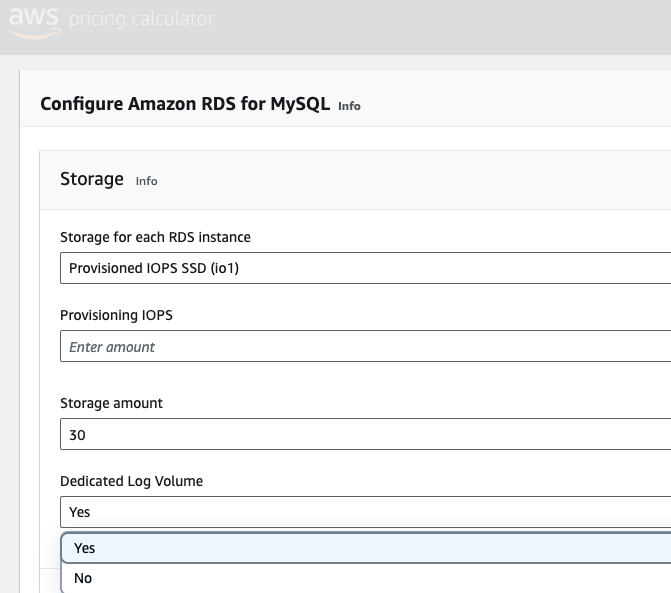
You may use AWS Pricing Calculator to get a cost estimate: “Storage” > choose appropriate “Provisioned IOPS” > adjust required values > Set “Dedicated Log Volume=yes”.
Refer: https://aws.amazon.com/rds/mysql/pricing/#dedicated_log_volume
Implementing dedicated mounts for components such as binlogs and datadir is a recommended standard practice. It becomes more manageable and efficient by isolating logs and data to a dedicated mount. This segregation facilitates optimized I/O operations, preventing potential bottlenecks and enhancing overall system performance. Overall, adopting this practice promotes a structured and efficient storage strategy, fostering better performance, manageability, and, ultimately, a more robust database environment.
Thus, using Dedicated Log Volumes (DLVs), though new in AWS RDS, has been one of the recommended best practices and is a welcome setup improvement for your RDS instance.
We performed a standard benchmarking test using the sysbench tool to compare the performance of a DLV instance vs a standard RDS MySQL instance, as shared in the following section.
Setup
| 2 RDS Single DB instances | 1 EC2 Instance | ||
| Regular | DLV Enabled | Sysbench | |
| db.m6i.2xlarge | c5.2xlarge | ||
| MySQL 8.0.31 | CentOS 7 | ||
| 8 Core / 32G | 8 Core / 16G | ||
| Data Size: 32G | |||
– Default RDS configuration was used with binlogs enabled having full ACID compliance configurations.
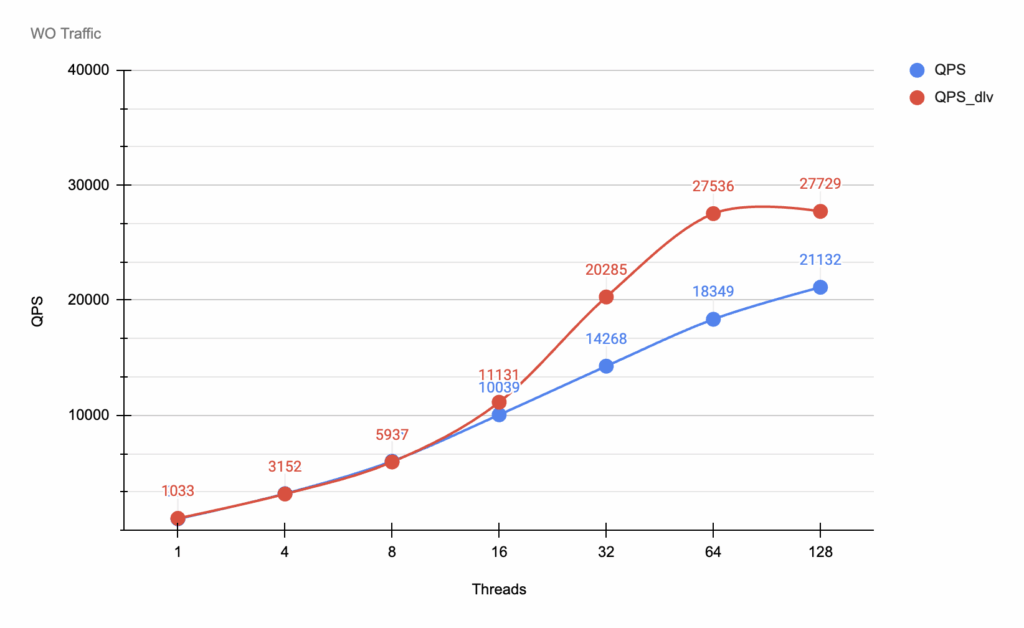
Write-only traffic
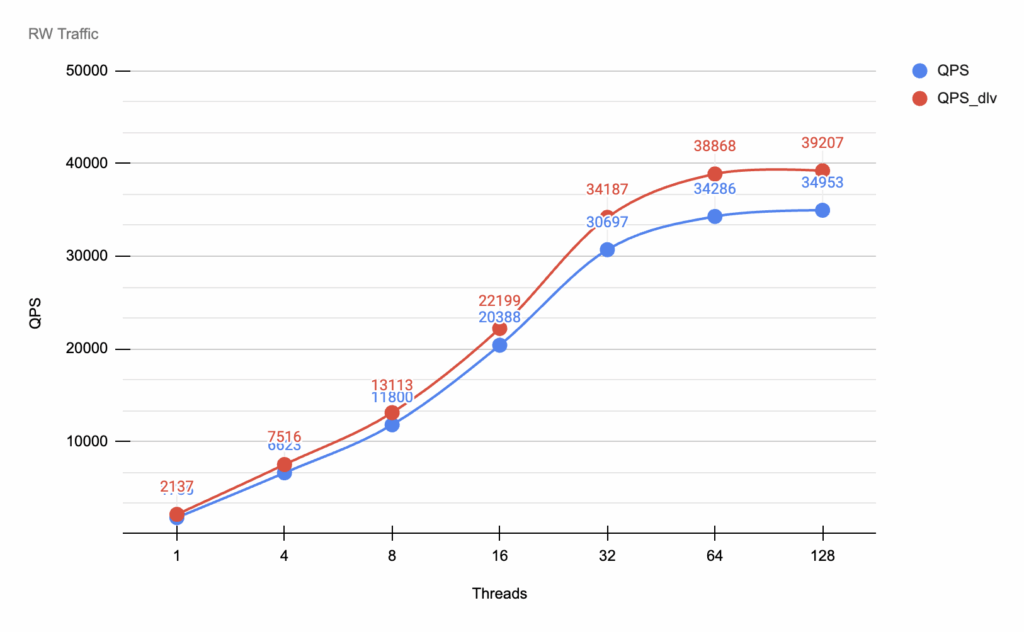
Read-write traffic
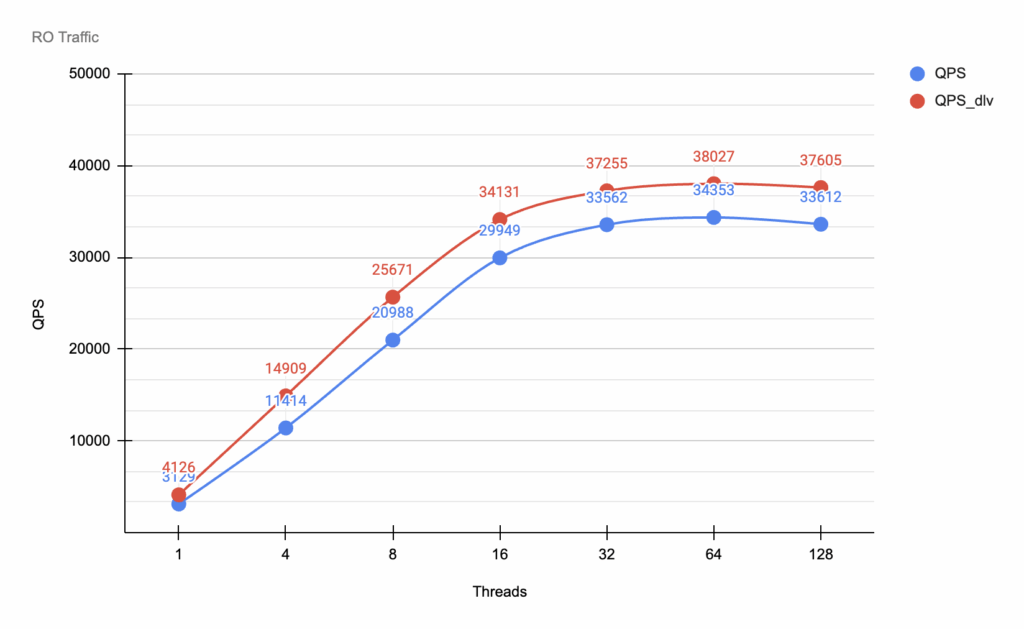
Read-only traffic
Benchmarking analysis
Benchmarking outcome
Based on the sysbench benchmark results in the specified environment, it is strongly advised to employ DLV for a standard RDS instance. DLV demonstrates superior performance across most sysbench workloads, particularly showcasing notable enhancements in write-intensive scenarios.
When opting for DLVs, it’s crucial to be aware of the following considerations:
DLV in Multi-AZ deployments
Amazon RDS seamlessly integrates DLVs with Multi-AZ deployments. Whether you’re modifying an existing Multi-AZ instance or creating a new one, DLVs are automatically created for both the primary and secondary instances. This ensures that the advantages of DLV extend to enhanced availability and reliability in Multi-AZ configurations.
DLV with read replicas
DLV support extends to read replicas. If the primary DB instance has DLV enabled, all read replicas created after DLV activation inherit this feature. However, it’s important to note that read replicas created before DLV activation will not have it enabled by default. Explicit modification is required for pre-existing read replicas to leverage DLV benefits.
Dedicated Log Volumes have emerged as a strong option for optimizing Amazon RDS performance. By segregating transaction logs and harnessing the power of dedicated storage, DLVs contribute to enhanced efficiency and consistency. Integrating DLVs into your database strategy will help you toward your efforts in achieving peak performance and reliability.
Percona is a trusted partner for many industry-leading organizations across the globe that rely on us for help in fully utilizing their AWS RDS environment. Here’s how Percona can enhance your AWS RDS experience:
Expert configuration: RDS works well out of the box, but having Percona’s expertise ensures optimal performance. Our consultants will configure your AWS RDS instances for the best possible performance, ensuring minimal TCO.
Decades of experience: Our consultants bring decades of experience in solving complex database performance issues. They understand your goals and objectives, providing unbiased solutions for your database environment.
Blog resources: Percona experts are actively contributing to the community through knowledge sharing via forums and blogs. For example, here are two blogs on this subject:
Discover how our expert support, services, and enterprise-grade open source database software can make your business run better.
Resources
RELATED POSTS





The fact that RO benchmark shows 10% improvement, mirroring RW improvement, makes the WO/RW results somewhat questionable. Any observations on why this might be the case?
I am very surprised to see better read-only results with DLV. After all, a RO workload should not write anything, so having dedicated logs should not improve results. So for me, there is something weird with these results.
Hello Jean and Mike,
I’d completely agree with you that it is not clear why RO benchmarking has shown an improvement. Since the improvements should only impact the transaction logs and improving writes, we are not expected to see improvement in RO workload.
That said, my benchmarking results did show me that. Please find my approach, and commands:
Thank you,
Kedar.
I need to clear this up. Our support org did not give you the correct information. I will be getting to them about that.
DLV doesn’t require a particular storage size for the data volume. We recommend that it be used on volumes of 5,000 GiB or larger. The DLV is an io1 volume with a fixed size of 1,000 GiB and 3,000 PIOPS, and is priced like an io1 volume of that size/PIOPS. E.g, $425 for a Single-AZ instance in IAD.
This is documented on our pricing page: https://aws.amazon.com/rds/mysql/pricing/
Thanks for pointing this out, Scott. We have updated the pricing section in the article.
Does “RDS Single DB instances” mean each RDS instance was configured without multi-AZ? I ask because single-AZ and multi-AZ RDS [1] have different write performance, and multi-AZ is (or, should be) the norm in production because there’s no HA without it.
[1] By “multi-AZ” I mean what AWS now calls “Multi-AZ with one standby”, not its relatively newer three-AZ RDS cluster (“Multi-AZ with two readable standbys”).