MongoDB v4.2 was released in August 2019. And like previous versions, there is a time to go — and that End of Life (EOL) date approaches.
MongoDB v4.2 EOL is set for April 30, 2023. Since Percona Server for MongoDB (PSMDB) is a fully compatible replacement for the upstream MongoDB Community Edition, we try to follow the same EOL date as the upstream vendor. So let’s discuss why you should upgrade MongoDB, what the upgrade process looks like, and some of the potential gotchas that you may run into along the way.
You may think that everything is fine, your application is humming along, you have had no major problems with this version, and you don’t really see a reason to upgrade. And that’s exactly why you want to upgrade; you want to keep it that way. There are multiple very good reasons to upgrade MongoDB.
Those reasons include the following:
The goal is always to ensure that your PSMDB/MongoDB environment stays as stable, secure, and performant as possible.
According to Percona’s Software Release Lifecycle Overview, after a version has gone EOL, no new builds or updates will be provided. We will continue to offer Operation Support on Supported Platforms.
Don’t leave your database vulnerable because this version has gone on to the database software wasteland. Plan and execute your upgrade ASAP.
With new versions come new features that may be beneficial to your application. And some just like shiny new things. Some of the major new features that are available in more recent versions of MongoDB are Time Series Collections and Live Resharding in v5.0.
Those include more resilient chunk migrations and the ability to at least refine your shard keys in v4.4, the above-mentioned v5.0 new features, and many changes under the hood to support those major new features. Then with v6.0, you get sync improvements, mandatory use of the new mongosh shell, many enhancements and tweaks to all of the major changes that v5.0 brought about, and a new default chunk size of 128M to help handle some of the recent changes to the auto-splitter, chunk migration, and balancer processes.
But there are quite a few hops between v4.2 and v6.0. So let’s debunk some of the reasons that you may have for NOT upgrading.
Those main potential blockers could include:
But really, the danger of not having support or bug fixes for your business-critical databases and applications is generally a very good reason to overcome all of those blockers sooner rather than later.
Let’s look at the steps required to upgrade MongoDB and the different types of environments that you may have running.
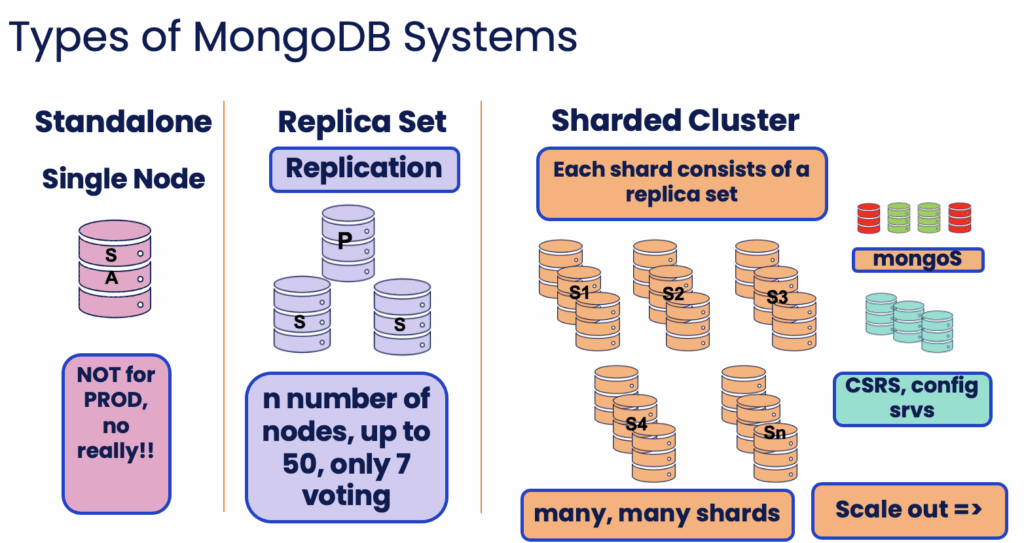
The types of systems include:
Those systems or architectures look like the below:
Now look at the components that make up those systems.
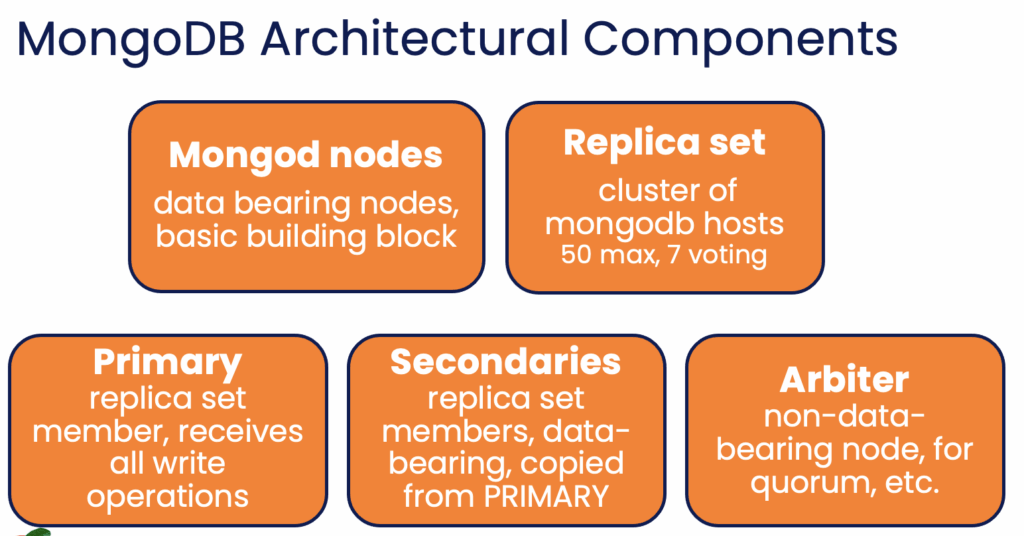
That gives us an idea of what we will need to upgrade.
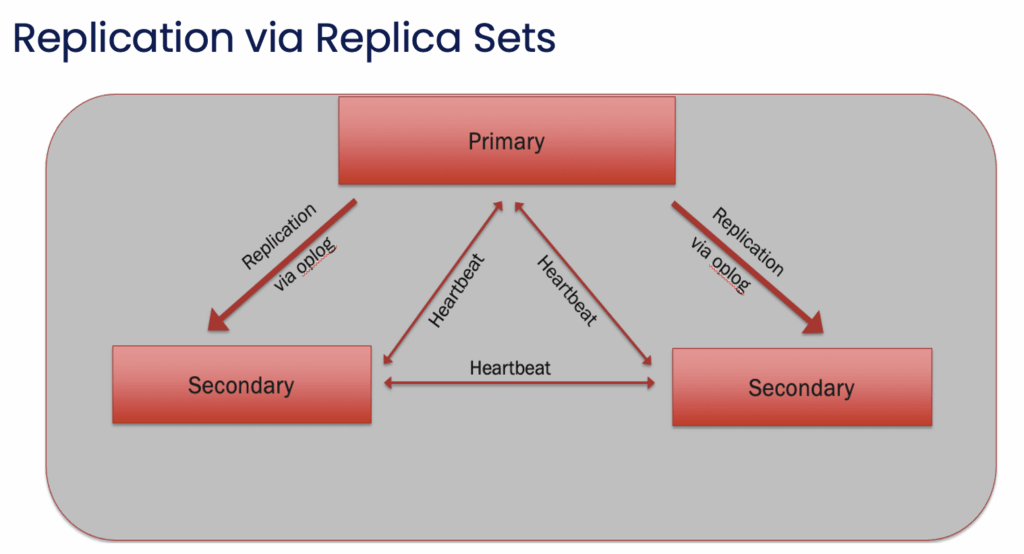
But we also have to consider the built-in Replication that MongoDB has. That, too, will impact our upgrade process.
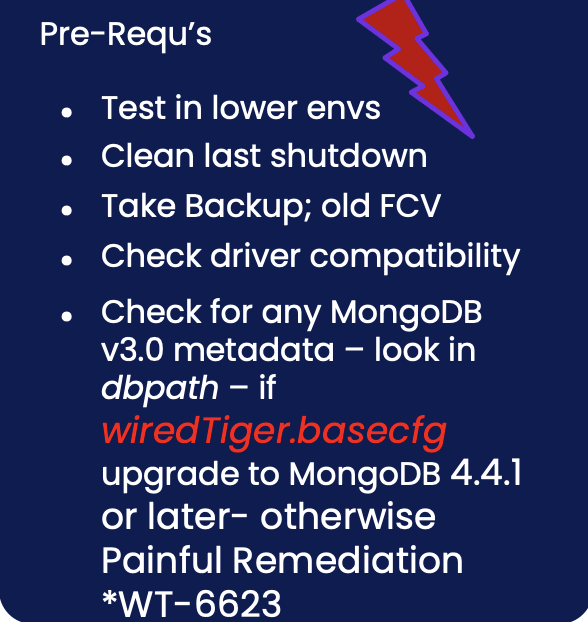
The Pre-Req Checks generally look like this:
Once those are done, begin the upgrade for the standalone system type.
It’s a single host or node with one process, so do the following:
Now let’s look at the steps for the other two system types.
First, the Replica Set upgrade steps:
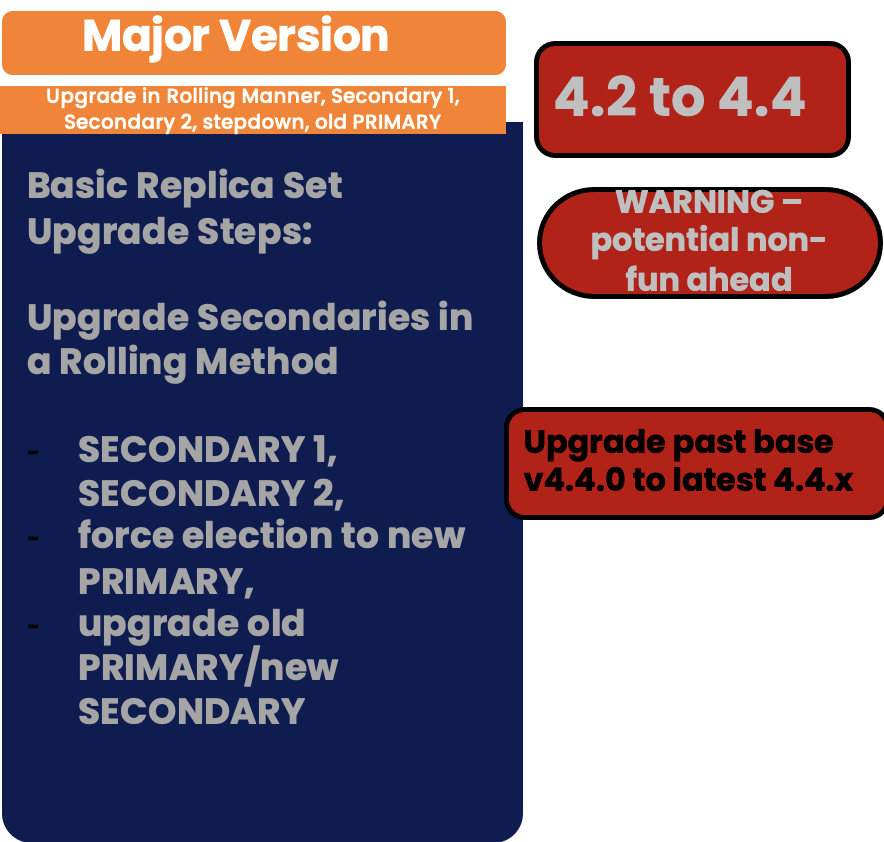
*Note* that there is a warning there.
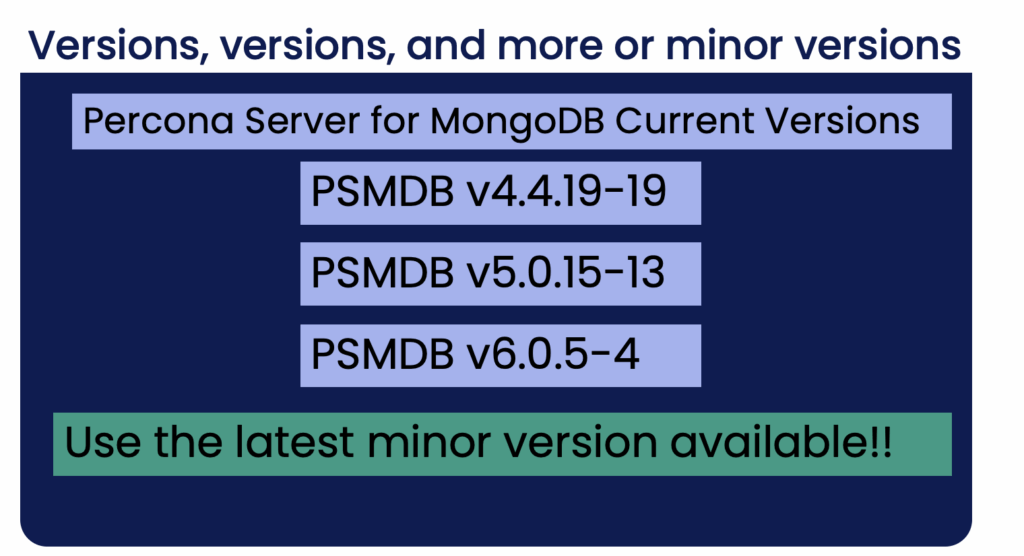
You ALWAYS want to upgrade MongoDB to the latest version available – well, after checking the bug list, of course. We’ll review that warning when discussing the “Gotchas” later.
For Replica Set upgrades – upgrade binaries in a rolling manner. Start with the secondaries, then force the election of a new PRIMARY, and then upgrade the binary for the former PRIMARY.
Upgrade Secondaries in a Rolling Method – SECONDARY 1, SECONDARY 2, force election to new PRIMARY, upgrade old PRIMARY/new SECONDARY.
Step 1 – Upgrade SECONDARY 1
– Shutdown Secondary 1
– Take Secondary 1 out of the replica set by restarting it with another port number (ex. port 3333)
– Change Binaries to new version
– Start Secondary 1 back up with its original replica set port number (ex. 27017)
Step 2 – Upgrade SECONDARY 2 – repeat that process with Secondary 2
Shutdown Secondary 2
– Take Secondary 2 out of the replica set by restarting it with another port number (ex. port 3333)
– Change Binaries to new version
– Start Secondary 2 back up with its original replica set port number (ex. 27017)
Step 3 – Upgrade the current PRIMARY
Step Down the current Primary – force election of a new PRIMARY – make sure state is good
Upgrade old PRIMARY, now new Secondary
Shut down old PRIMARY, now new Secondary 3
– Take new Secondary 3 out of the replica set by restarting it with another port number (ex. port 3333)
– Change Binaries to new version
– Start new Secondary 3 backup with its original replica set port number (ex. 27017)
Wait, check the data and logs. If there are no problems, update FCV to the new version
Done.
Now move on to the Sharded Cluster Upgrade process, where there are more components to consider and upgrade.
Reminder – those components are:
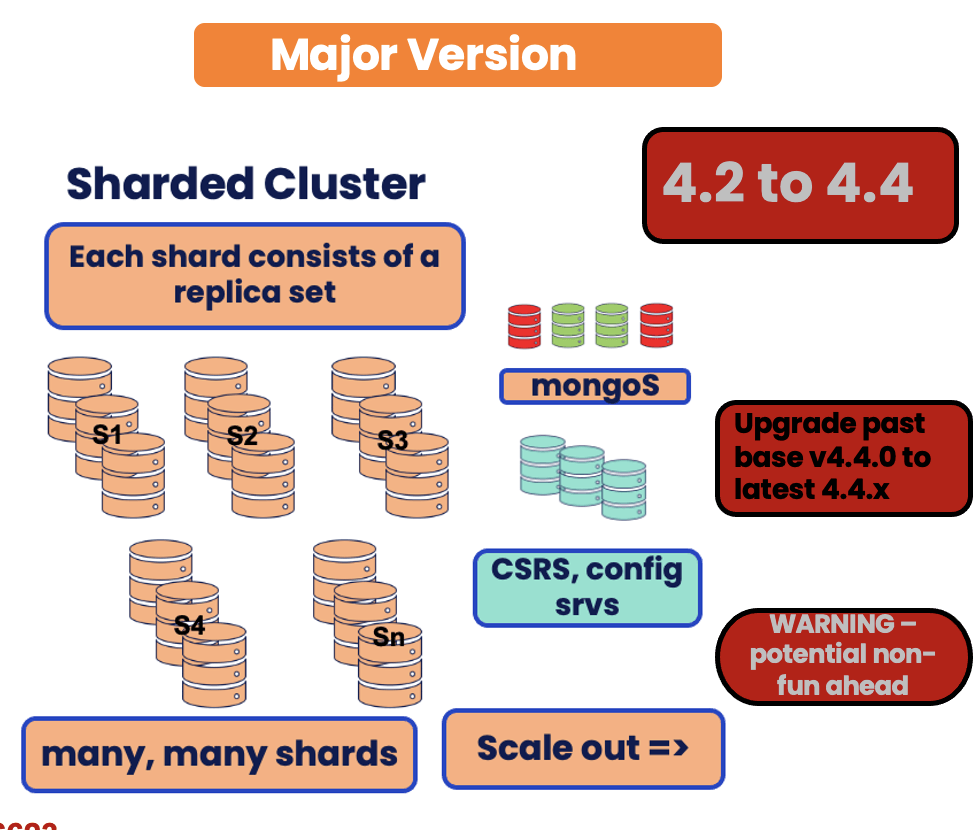
*Note* When Upgrading a Sharded Cluster, the order in which you upgrade the components matters.
You have the additional components (the balancer, config server replica set, the main data bearing mongod shard nodes, and the query router process mongoS’s.)
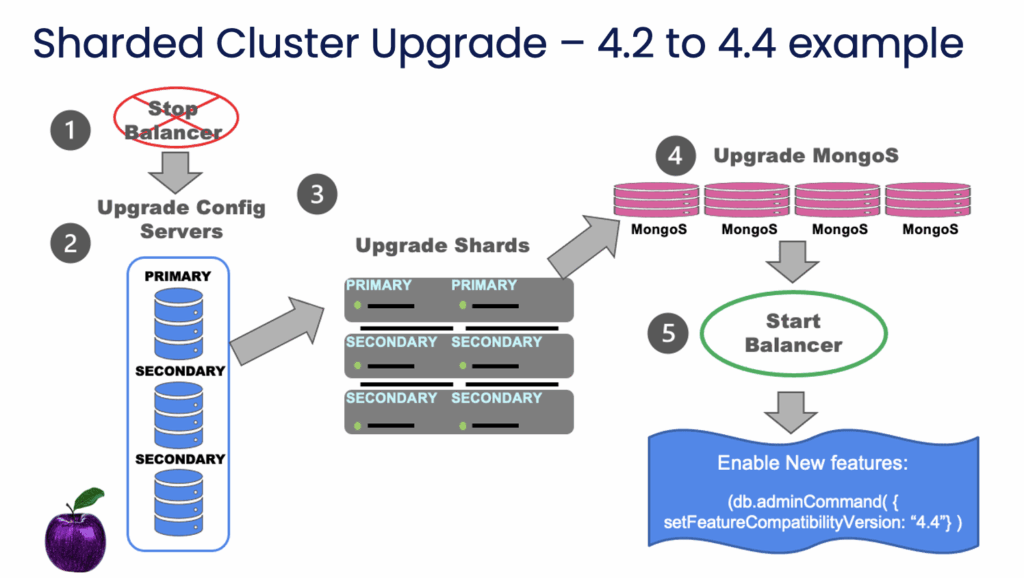
Order Matters … with this system type upgrade.
Stop Balancer
Start Balancer
Below is an infogram to show that order when upgrading a sharded cluster:
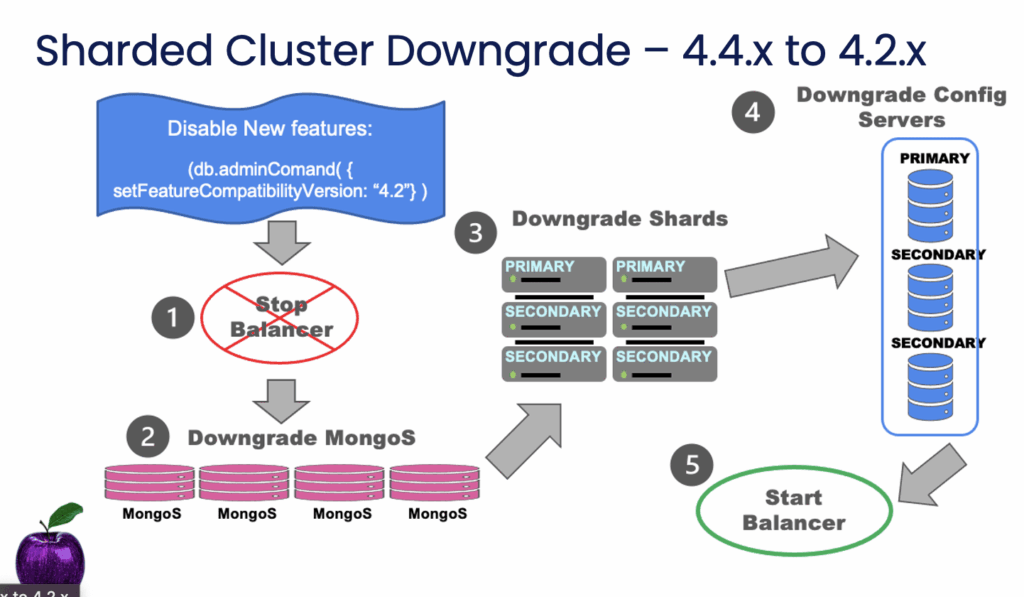
If, for whatever reason, you run into any problem, you can perform a downgrade.
Downgrades basically go in reverse order – more applicable to sharded clusters.
Stop Balancer
ReStart Balancer
* This happens all in a rolling manner at the replset level again.
That covers the basic steps.
I will do a more technical series of blogs in the coming months covering running MongoDB in Kubernetes and using the Percona Operator for MongoDB. Those blogs will contain commands, example results, etc., used when managing in that containerized environment. One of the planned blogs will cover upgrades to that environment.
For now, you can see the actual commands used when upgrading a Percona Server for MongoDB replica set or a sharded cluster in Sudhir’s blog.
Now let’s take a look at some of the potential gotchas.
Whenever you are changing versions via an upgrade, there are different groups of things to watch out for or be aware of.
Those general buckets are:
Below are some specific examples for those buckets.
Deprecated – Simple Network Management Protocol (SNMP) v6.0
Starting in MongoDB 6.0, SNMP is deprecated and will be removed in the next release.
Deprecated – old mongo shell “mongo” in v5.0
– Some legacy methods unavailable or replaced …
– mongosh uses the same syntax as old mongo shell
– Beware –check your code
v4.2 –Faster stepdowns
Autosplitter process moved from mongos to the PRIMARY member of the replica set. This led to knowing more truth about chunk balance, so more chunk splits and more chunk migrations. Many more. It caused added write pressure.
v4.4 –Adjustments to the management of jumbo chunks – no longer getting stuck forever due to memory usage limit. Started adding in some of the changes that would be needed for v5.0 when Live Resharding would be hitting.
v5.0 – Deprecated old shell; major changes to the WiredTiger engine and Core Server to support Live ReSharding and Time Series Collections. It took a while for this major release to be fully baked. 😉
v6.0 – Default chunk size increased to 128M to help against too frequent chunk splitting and chunk moves by the Balancer. Removed the old shell. Changes to Initial sync and resync. New Operators; New Functions.
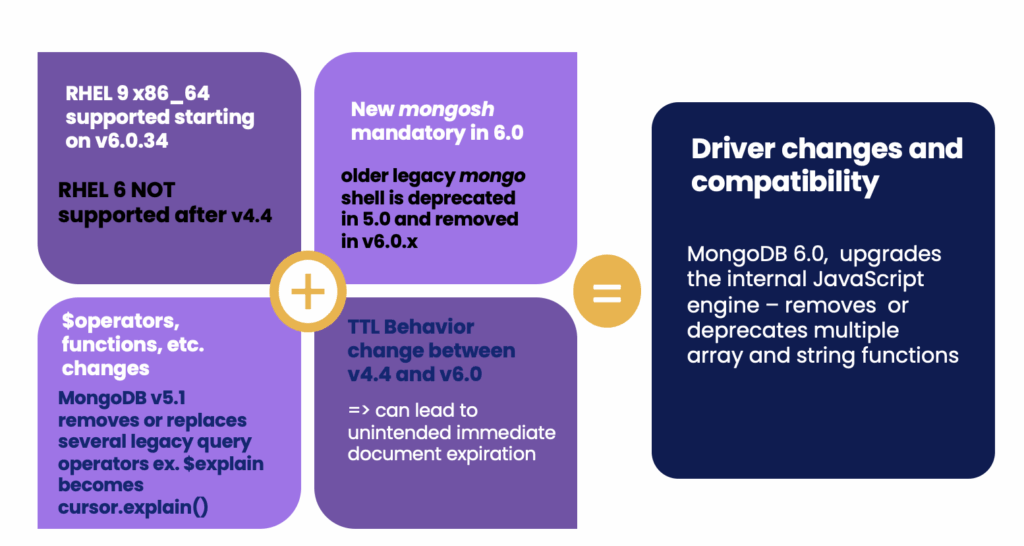
Those are just some of the changes.
More about some of the negative impacts.
Along with all of the major changes that went into v5.0, there were many bugs for quite a while. Making this even more impactful – the v5.0 changes were backported in v4.4.
So early on for v5.0.x, the same bugs also broke versions of 4.4 from 4.4.1 up through v4.4.8 but really up into v4.9 and v4.10 if you look at the JIRA tickets closely.
Compatibility for Supported Life Cycle and OS Host Software – ex. MongoDB v5.0.x Community Edition drops support for RHEL/CentOS/Oracle 6 on x86_64 and other OS support changes
Here are some screenshots that I took along the way during the many releases for the version.
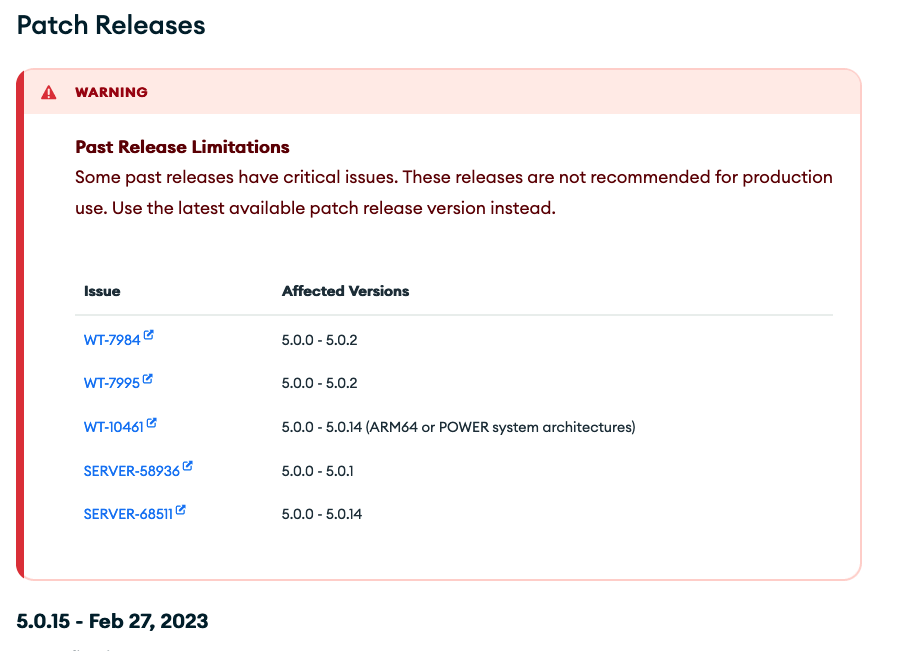
For v4.4
These various bugs last pretty much ALL the way Through 4.4.8 – Serious bugs that cause checkpoint issues, possible data inconsistencies, missing documents/data loss, duplicate unique key, problems restarting, omitting a page or pages of data, unclean restarts, data loss, etc.
Examples: SERVER-61483 SERVER-61633 SERVER-61945 SERVER-61950 – problems restarting nodes WT-8104 WT-8204 – race conditions, memory leaks. WT-8395 – upgrade related –data in an “inconsistent state”, missing documents WT-8534 WT-8551
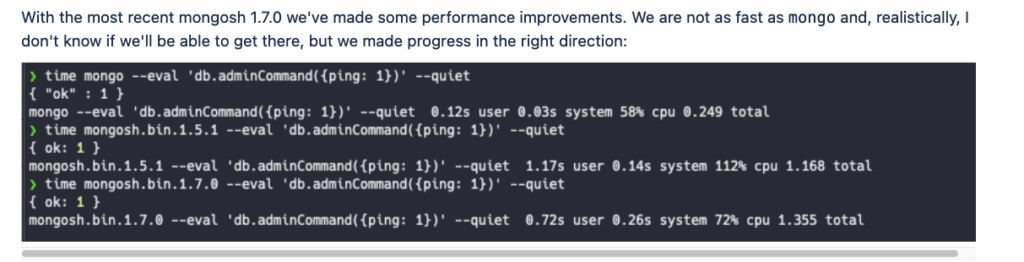
Performance impact? There are also a few postings online talking about the newer versions possibly having a negative impact on performance.
There was a recently reported slowdown due to the new mongosh shell and a bug there, but seems to be with certain combinations and using a ruby driver …? Below are links for that issue and bug:
Ok, enough of that. What should we do?
Upgrade of course!
Slow and Steady wins the race!

And what else?
Migrations!
Consider moving over to Percona Server for MongoDB
That migration — it’s really just a lift and shift.
Normally a binary change between PSMDB and MGDB CE will take care of it. No need for data type changes, and no loss of triggers and procedures to deal with.
Remember, tick-tock … Plan your MongoDB upgrade and migrations today.
Thanks all!
Resources
RELATED POSTS