
PMM (Percona Monitoring and Management) is a free and open-source platform for managing and monitoring MySQL, MongoDB, and PostgreSQL performance. You can run PMM in your own environment for maximum security and reliability. It provides thorough time-based analysis for MySQL® and MongoDB® servers to ensure that your data works as efficiently as possible.

While much of the team is working on longer-term projects, we were able to provide the following feature:
We addressed 11 new features and improvements, and fixed 21 bugs.
You’re now able to connect PMM Server to your MySQL and PostgreSQL instances, whether they run in a cloud DBaaS environment, or you simply want Database metrics without the OS metrics. This can help you get up and running with PMM using minimal configuration and zero client installation, however be aware there are limitations – there won’t be any host-level dashboards populated for these nodes since we don’t attempt to connect to the provider’s API nor are we granted access to the instance in order to deploy an exporter.
Using the PMM Add Instance screen, you can now add instances from any cloud provider (AWS RDS and Aurora, Google Cloud SQL for MySQL, Azure Database for MySQL) and benefit from the same dashboards that you are already accustomed to. You’ll be able to collect Metrics and Queries from MySQL, and Metrics from PostgreSQL. You can add remote instances by selecting the PMM Add Instance item in a PMM group of the system menu:
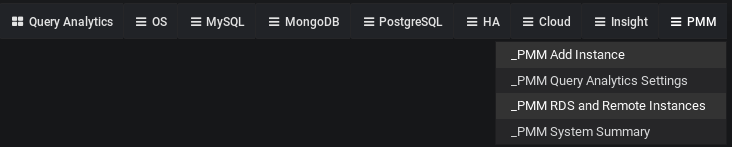
where you will then have the opportunity to add a Remote MySQL or Remote PostgreSQL instance:
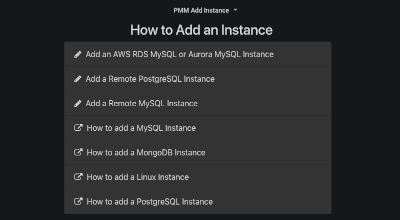
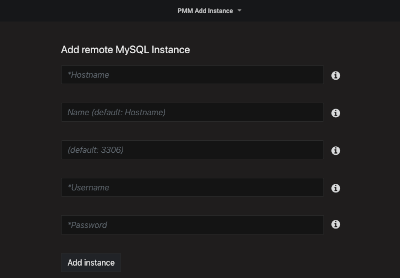
You’ll add the instance by supplying just the Hostname, database Username and Password (and optional Port and Name):
Also new as part of this release is the ability to display nodes you’ve added, on screen RDS and Remote Instances:

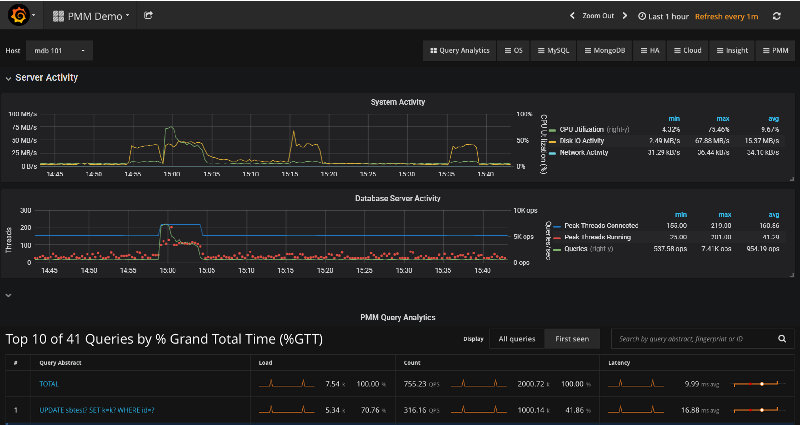
The Query Analytics dashboard now shows a summary of the selected host and database activity metrics in addition to the top ten queries listed in a summary table. This brings a view of System Activity (CPU, Disk, and Network) and Database Server Activity (Connections, Queries per Second, and Threads Running) to help you better pinpoint query pileups and other bottlenecks:
While PMM provides an excellent solution for system monitoring, sometimes you may have the need for a metric that’s not present in the list of node_exporter metrics out of the box. There is a simple method to extend the list of available metrics without modifying the node_exporter code. It is based on the textfile collector. We’ve enabled this collector as on by default, and is deployed as part of linux:metrics in PMM Client.
The default directory for reading text files with the metrics is /usr/local/percona/pmm-client/textfile-collector, and the exporter reads files from it with the .prom extension. By default it contains an example file example.prom which has commented contents and can be used as a template.
You are responsible for running a cronjob or other regular process to generate the metric series data and write it to this directory.
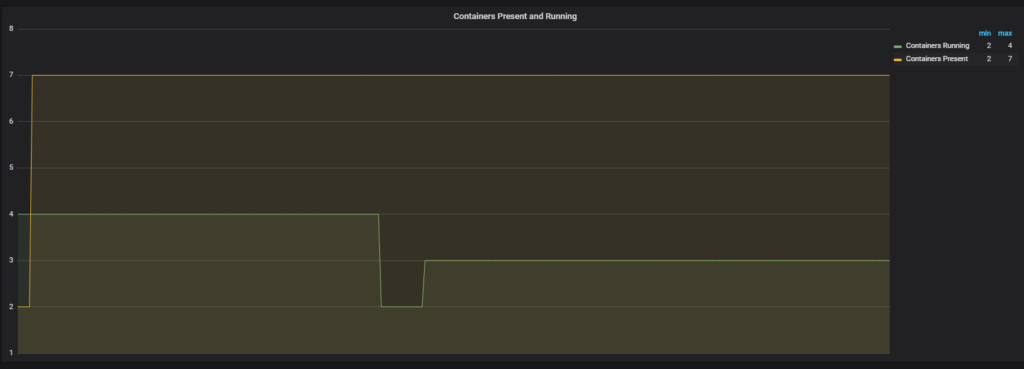
This example will show you how to collect the number of running and stopped docker containers on a host. It uses a crontab task, set with the following lines in the cron configuration file (e.g. in /etc/crontab):
|
1 2 |
*/1* * * * root echo -n "" > /tmp/docker_all.prom; docker ps -a -q | wc -l | xargs echo node_docker_containers_total >> /usr/local/percona/pmm-client/docker_all.prom; */1* * * * root echo -n "" > /tmp/docker_running.prom; docker ps | wc -l | xargs echo node_docker_containers_running_total >> /usr/local/percona/pmm-client/docker_running.prom; |
The result of the commands is placed into the docker_all.prom and docker_running.prom files and read by exporter and will create two new metric series named node_docker_containers_total and node_docker_containers_running_total, which we’ll then plot on a graph:
PMM is available for installation using three methods:
docker pull percona/pmm-server – DocumentationHelp us improve our software quality by reporting any Percona Monitoring and Management bugs you encounter using our bug tracking system.
Resources
RELATED POSTS