

 Percona has a long tradition of performance investigation and benchmarking. Peter Zaitsev, CEO and Vadim Tkachenko, CTO, led their crew into a series of experiments with MySQL in this space. The discussion that always follows on the results achieved is well known and praised even by the PostgreSQL community. So when Avi joined the team and settled at Percona just enough to get acquainted with my colleagues, sure enough one of the first questions they asked him was: “did you know sysbench-tpcc also works with PostgreSQL now ?!“.
sysbench is “a scriptable multi-threaded benchmark tool based on LuaJIT (…) most frequently used for database benchmarks“, created and maintained by Alexey Kopytov. It’s been around for a long time now and has been a main reference for MySQL benchmarking since its inception. One of the favorites of Netflix’ Brendan Gregg, we now know. You may remember Sveta Smirnova and Alexander Korotkov’s report on their experiments in Millions of Queries per Second: PostgreSQL and MySQL’s Peaceful Battle at Today’s Demanding Workloads here. In fact, that post may serve as a nice prelude for the tests we want to show you today. It provides a good starting point as a MySQL vs PostgreSQL performance comparison.
The idea behind Sveta and Alexander’s experiments was “to provide an honest comparison for the two popular RDBMSs“, MySQL and PostgreSQL, using “the same tool, under the same challenging workloads and using the same configuration parameters (where possible)“. Since neither pgbench nor sysbench would work effectively with MySQL and PostgreSQL for both writes and reads they attempted to port pgbench‘s workload as a sysbench benchmark.
More recently, Vadim came up with an implementation of the famous TPC-C workload benchmark for sysbench, sysbench-tpcc. He has since published a series of tests using Percona Server and MySQL, and worked to make it compatible with PostgreSQL too. For real now, hence the request that awaited us.
Our goal this time was less ambitious than Sveta and Alexander’s. We wanted to show you how we setup PostgreSQL to perform optimally for sysbench-tpcc, highlighting the settings we tuned the most to accomplish this. We ran our tests on the same box used by Vadim in his recent experiments with Percona Server for MySQL and MySQL.
Before we present our results we shall note there are several ways to speed up database performance. You may for example disable full_page_writes, which would make a server crash unsafe, and use a minimalistic wal_level mode, which would block replication capability. These would speed things up but at the expense of reliability, making the server inappropriate for production usage.
For our benchmarks, we made sure we had all the necessary parameters in place to satisfy the following:
When we initially prepared sysbench-tpcc with PostgreSQL 10.3 the database size was 118 GB. By the time we completed the test, i.e. after 36000 seconds, the DB size had grown up to 335 GB. We have a total of “only” 256 GB of memory available in this server, however, based on the observations from pg_stat_database, pg_statio_user_tables and pg_statio_user_indexes 99.7% of the blocks were always in-memory:
|
1 2 3 4 5 |
postgres=# select ((blks_hit)*100.00)/(blks_hit+blks_read) AS "perc_mem_hit" from pg_stat_database where datname like 'sbtest'; perc_mem_hit --------------------- 99.7267224322546 (1 row) |
Hence, we consider it to be an in-memory workload with the whole active data set in RAM. In this post we explain how we tuned our PostgreSQL Instance for an in-memory workload, as was the case here.
In order to run a sysbench-tpcc, we must first prepare the database to load some data. In our case, as mentioned above, this initial step resulted in a 118 GB database:
|
1 2 3 4 5 |
postgres=# select datname, pg_size_pretty(pg_database_size(datname)) as "DB_Size" from pg_stat_database where datname = 'sbtest'; datname | DB_Size ---------+--------- sbtest | 118 GB (1 row) |
This may change depending on the arguments used. Here is the actual command we used to prepare the PostgreSQL Database for sysbench-tpcc:
|
1 |
$ ./tpcc.lua --pgsql-user=postgres --pgsql-db=sbtest --time=120 --threads=56 --report-interval=1 --tables=10 --scale=100 --use_fk=0 --trx_level=RC --db-driver=pgsql prepare |
While we were loading the data, we wanted to see if we could speed-up the process. Here’s the customized PostgreSQL settings we used, some of them directly targeted to accelerate the data load:
|
1 2 3 4 5 6 7 8 9 10 11 12 |
shared_buffers = 192GB maintenance_work_mem = '20GB' wal_level = 'minimal' autovacuum = 'OFF' wal_compression = 'ON' max_wal_size = '20GB' checkpoint_timeout = '1h' checkpoint_completion_target = '0.9' random_page_cost = 1 max_wal_senders = 0 full_page_writes = ON synchronous_commit = ON |
We’ll discuss most of these parameters in the sections that follow, but we would like to highlight two of them here. We increased maintenance_work_mem to speed up index creation and max_wal_size to delay checkpointing further, but not too much — this is a write-intensive phase after all. Using these parameters it took us 33 minutes to complete the prepare stage compared with 55 minutes when using the default parameters.
If you are not concerned about crash recovery or ACID, you could turn off full_page_writes, fsync and synchrnous_commit. That would speed up the data load much more.
Once we had prepared the database, as it is a newly created DB Instance, we ran a manual VACUUM ANALYZE on the database (in parallel jobs) using the command below. We employed all the 56 vCPUs available in the server since there was nothing else running in the machine:
|
1 |
$ /usr/lib/postgresql/10/bin/vacuumdb -j 56 -d sbtest -z |
Having run a vacuum for the entire database we restarted PostgreSQL and cleared the OS cache before executing the benchmark in “run” mode. We repeated this process after each round.
When we ran sysbench-tpcc for the first time, we observed a resulting TPS of 1978.48 for PostgreSQL with the server not properly tuned, running with default settings. We used the following command to run sysbench-tpcc for PostgreSQL for 10 hours (or 36000 seconds) for all rounds:
|
1 |
./tpcc.lua --pgsql-user=postgres --pgsql-db=sbtest --time=36000 --threads=56 --report-interval=1 --tables=10 --scale=100 --use_fk=0 --trx_level=RC --pgsql-password=oracle --db-driver=pgsql run |
After getting an initial idea of how PostgreSQL performed with the default settings and the actual demands of the sysbench-tpcc workload, we began making progressive adjustments in the settings, observing how they impacted the server’s performance. After several rounds we came up with the following list of parameters (all of these satisfy ACID properties):
|
1 2 3 4 5 6 7 8 9 10 11 12 13 14 15 16 17 18 19 20 21 22 23 |
shared_buffers = '192GB' work_mem = '4MB' random_page_cost = '1' maintenance_work_mem = '2GB' wal_level = 'replica' max_wal_senders = '3' synchronous_commit = 'on' seq_page_cost = '1' max_wal_size = '100GB' checkpoint_timeout = '1h' synchronous_commit = 'on' checkpoint_completion_target = '0.9' autovacuum_vacuum_scale_factor = '0.4' effective_cache_size = '200GB' min_wal_size = '1GB' bgwriter_lru_maxpages = '1000' bgwriter_lru_multiplier = '10.0' logging_collector = 'ON' wal_compression = 'ON' log_checkpoints = 'ON' archive_mode = 'ON' full_page_writes = 'ON' fsync = 'ON' |
Let’s discuss our reasoning behind the tuning of the most important settings:
Defines the amount of memory PostgreSQL uses for shared memory buffers. It’s arguably its most important setting, often compared (for better or worse) to MySQL’s innodb_buffer_pool_size. The biggest difference, if we dare to compare shared_buffers to the Buffer Pool, is that InnoDB bypasses the OS cache to directly access (read and write) data in the underlying storage subsystem whereas PostgreSQL do not.
Does this mean PostgreSQL does “double caching” by first loading data from disk into the OS cache to then make a copy of these pages into the shared_buffers area? Yes.
Does this “double caching” makes PostgreSQL inferior to InnoDB and MySQL in terms of memory management? No. We’ll discuss why that is the case in a follow up blog post. For now it suffice to say the actual performance depends on the workload (mix of reads and writes), the size of the “hot data” (the portion of the dataset that is most accessed and modified) and how often checkpointing takes place.
Due to these factors, the documented suggested formula of setting shared_buffers to 25% of RAM or the magic number of “8GB” is hardly ideal. What seems to be good reasoning, though, is this:
For this benchmark, considering the options we used, we found that dedicating 75% of all the available memory to shared_buffers is ideal. It is enough to fit the entire “hot data” and still leave sufficient memory for the OS to operate, handle connections and everything else.
This setting defines the amount of memory that can be used by each query (not session) for internal sort operations (such as ORDER BY and DISTINCT), and hash tables (such as when doing hash-based aggregation). Beyond this, PostgreSQL moves the data into temporary disk files. The challenge is usually finding a good balance here. We want to avoid the use of temporary disk files, which slow down query completion and in turn may cause contention. But we don’t want to over-commit memory, which could even lead to OOM; working with high values for work_mem may be destructive when it is not really needed.
We analyzed the workload produced by sysbench-tpcc and found with some surprise that work_mem doesn’t play a role here, considering the queries that were executed. So we kept the default value of 4MB. Please note that this is seldom the case in production workloads, so it is important to always keep an eye on that parameter.
This setting stipulates the cost that a non-sequentially-fetched disk page would have, and directly affects the query planner’s decisions. Going with a conservative value is particularly important when using high latency storage, such as spinning disks. This wasn’t our case, hence we could afford to equalize random_page_cost to seq_page_cost. So, we set this parameter to 1 as well, down from the default value of 4.
To set up streaming replication wal_level needs to be set to at least “replica” and archive_mode must be enabled. This means the amount of WAL data produced increases significantly compared to when using default settings for these parameters, which in turn impacts IO. However, we considered these with a production environment in mind.
For this workload, we observed total WALs produced of size 3359 GB with wal_compression disabled and 1962 GB with wal_compression. We enabled wal_compression to reduce IO — the amount (and, most importantly, the rate) of WAL files being written to disk — at the expense of some additional CPU cycles. This proved to be very effective in our case as we had a surplus of CPU available.
We set the checkpoint_timeout to 1 hour and checkpoint_completion_target to 0.9. This means a checkpoint is forced every 1 hour and it has 90% of the time before the next checkpoint to spread the writes. However, a checkpoint is also forced when max_wal_size of WAL’s have been generated. With these parameters for a sysbench-tpcc workload, we saw that there were 3 to 4 checkpoints every 1 hour. This is especially because of the amount of WALs being generated.
In production environments we would always recommend you perform a manual CHECKPOINT before shutting down PostgreSQL in order to allow for a faster restart (recovery) time. In this context, issuing a manual CHECKPOINT took us between 1 and 2 minutes, after which we were able to restart PostgreSQL in just about 4 seconds. Please note that in our testing environment, taking time to restart PostgreSQL was not a concern, so working with this checkpoint rate benefited us. However, if you cannot afford a couple of minutes for crash recovery it is always suggested to force checkpointing to take place more often, even at the cost of some degraded performance.
We set all of these parameters to ON to satisfy ACID properties.
We enabled autovacuum and other vacuum settings to ensure vacuum is being performed in the backend. We will discuss the importance of maintaining autovacuum enabled in a production environment, as well as the danger of doing otherwise, in a separate post.
Before we start to discuss the numbers it is important to highlight that we enabled wal_compression before starting sysbench. As we mentioned above, the amount of WALs generated with wal_compression set to OFF was more than twice the amount of WALs generated when having compression enabled. We observed that enabling wal_compression resulted in an increase in TPS of 21%. No wonder, the production of WALs has an important impact on IO: so much so that it is very common to find PostgreSQL servers with a dedicated storage for WALs only. Thus, it is important to highlight the fact wal_compression may benefit write-intensive workloads by sparing IO at the expense of additional CPU usage.
To find out the total amount of WALs generated after 10 Hours, we took note at the WAL offset from before we started the test and after the test completed:
|
1 2 |
WAL Offset before starting the sysbench-tpcc ⇒ 2C/860000D0 WAL Offset after 10 hours of sysbench-tpcc ⇒ 217/14A49C50 |
and subtracted one from the other using pg_wal_lsn_diff, as follows:
|
1 2 3 4 5 6 |
postgres=# SELECT pg_size_pretty(pg_wal_lsn_diff('217/14A49C50','2C/860000D0')); pg_size_pretty ---------------- 1962 GB (1 row) |
1962 GB of WALs is a fairly big amount of transaction logs produced over 10 hours, considering we had enabled wal_compression .
We contemplated making use of a separate disk to store WALs to find out by how much more a dedicated storage for transaction logs would benefit overall performance. However, we wanted to keep using the same hardware Vadim had used for his previous tests, so decided against this.
Setting full_page_writes, fsync and synchronous_commit to OFF may speed up the performance but it is always crash unsafe unless we have enough backup in place to consider these needs. For example, if you are using a COW FileSystem with Journaling, you may be fine with full_page_writes set to OFF. This may not be true 100% of the time though.
However, we still want to share the results with the crash unsafe parameters mentioned in the paragraph above as a reference.
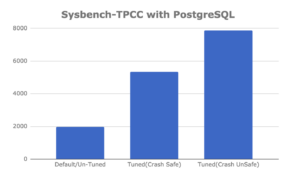
Here are the final numbers we obtained after running sysbench-tpcc for 10 hours considering each of the scenarios above:
| Parameters |
TPS |
| Default / Untuned |
1978.48 |
| Tuned (crash safe) |
5736.66 |
| Tuned (crash unsafe) |
7881.72 |
Did we expect to get these numbers? Yes and no.
Certainly we expected a properly tuned server would outperform one running with default settings considerably but we can’t say we expected it to be almost three times better (2.899). With PostgreSQL making use of the OS cache it is not always the case that tuning shared_buffers in particular will make such a dramatic difference. By comparison, tuning MySQL’s InnoDB Buffer Pool almost always makes a difference. For PostgreSQL high performance it depends on the workload. In this case for sysbench-tpcc benchmarks, tuning shared_buffers definitely makes a difference.
On the other hand experiencing an additional order of magnitude faster (4x), when using crash unsafe settings, was not much of a surprise.
Here’s an alternative view of the results of our PostgreSQL insert performance tuning benchmarks:
What did you think about this experiment? Please let us know in the comments section below and let’s get the conversation going.
Want to learn more about optimizing PostgreSQL performance? In this webinar on ‘PostgreSQL High-Performance Tuning and Optimization’, we will cover advanced techniques to enhance your PostgreSQL server’s performance, including crucial tuning and optimization strategies.

Resources
RELATED POSTS




Excellent post. I hope you include Linkbench when you have time. There is support for it in https://github.com/mdcallag/linkbench
And while the insert benchmark doesn’t support Postgres, I assume the changes would be trivial.
https://github.com/mdcallag/mytools/tree/master/bench/ibench
Thank You Mark. We would surely look into Linkbench.
Great post, thanks! The detailed steps and the tool are very helpful. One question though: We have been running this tool on PostgreSQL version 12 on a hardware configuration similar to the one in this post, following the steps and settings in this post. We observe that there is a high variance in the tps (order of magnitude difference between maximum and minimum tps) in the ‘run’ phase. Consequentially, its been hard to get a consistent result between multiple runs, even with a run time as long as an hour. Is that to be expected? Any suggestions/pointers are welcome.