

 In this blog, we’ll discuss how Percona XtraDB Cluster handled a high latency network environment.
Recently I was working in an environment where Percona XtraDB Cluster was running over a 10GB network, but one of the nodes was located in a distant location and the ping time was higher than what you would typically expect.
For example, the following shows the ping time between nodes in my local cluster:
|
1 2 3 4 5 6 |
ping 172.16.0.1 -s 1024 PING 172.16.0.1 (172.16.0.1) 1024(1052) bytes of data. 1032 bytes from 172.16.0.1: icmp_seq=1 ttl=64 time=0.144 ms 1032 bytes from 172.16.0.1: icmp_seq=2 ttl=64 time=0.110 ms 1032 bytes from 172.16.0.1: icmp_seq=3 ttl=64 time=0.109 ms 1032 bytes from 172.16.0.1: icmp_seq=4 ttl=64 time=0.125 ms |
Generally speaking, you can say that the ping time was 0.1ms.
Now let’s say one node has a ping time of 7ms. Percona XtraDB Cluster with the default settings does not handle this case very well. There is, however, some good news: a small configuration change can improve things dramatically – you just need to know what to change!
Let’s review this case, and for the test I’ll use following sysbench:
|
1 |
sysbench --test=tests/db/oltp.lua --oltp_tables_count=100 --oltp_table_size=1000000 --num-threads=50 --mysql-host=172.16.0.4 --mysql-user=sbtest --oltp-read-only=off --max-time=3600 --max-requests=0 --report-interval=10 --rand-type=uniform --rand-init=on run |
For the first example, all the nodes have equal latency (0.1ms), and for the second example we’ll introduce a 7ms latency to one of the nodes. You can easily do this in Linux with the following command:
|
1 2 3 4 |
# Add 7ms delay for network packets tc qdisc add dev eno2 root netem delay 7ms # to remove delay use: # tc qdisc del dev eno2 root netem |
So now let’s compare both the throughput and the response time for both cases:
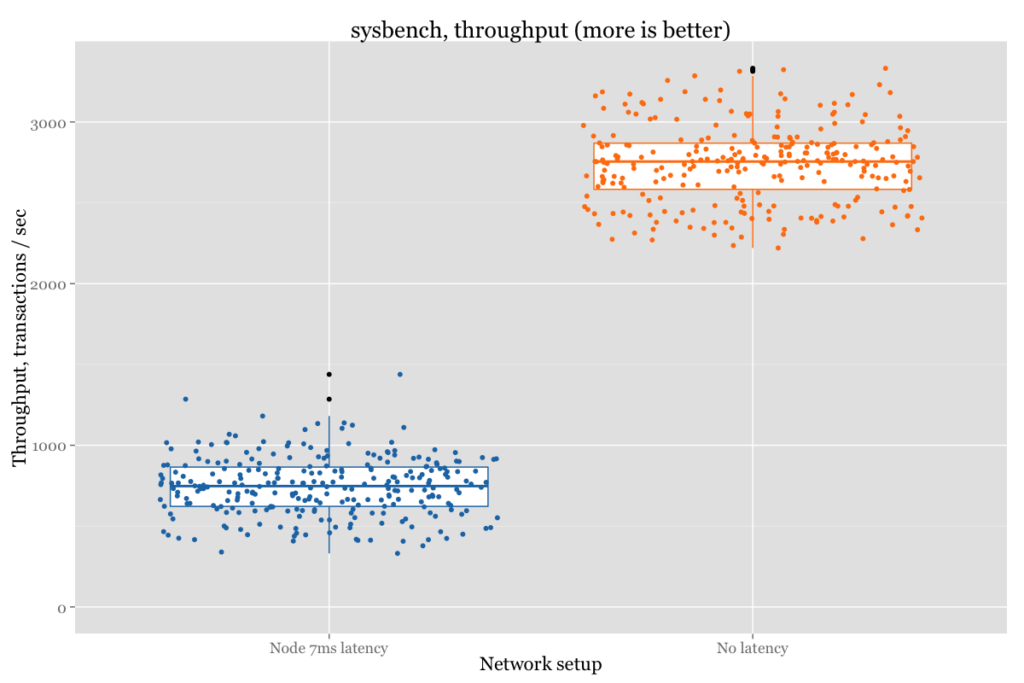
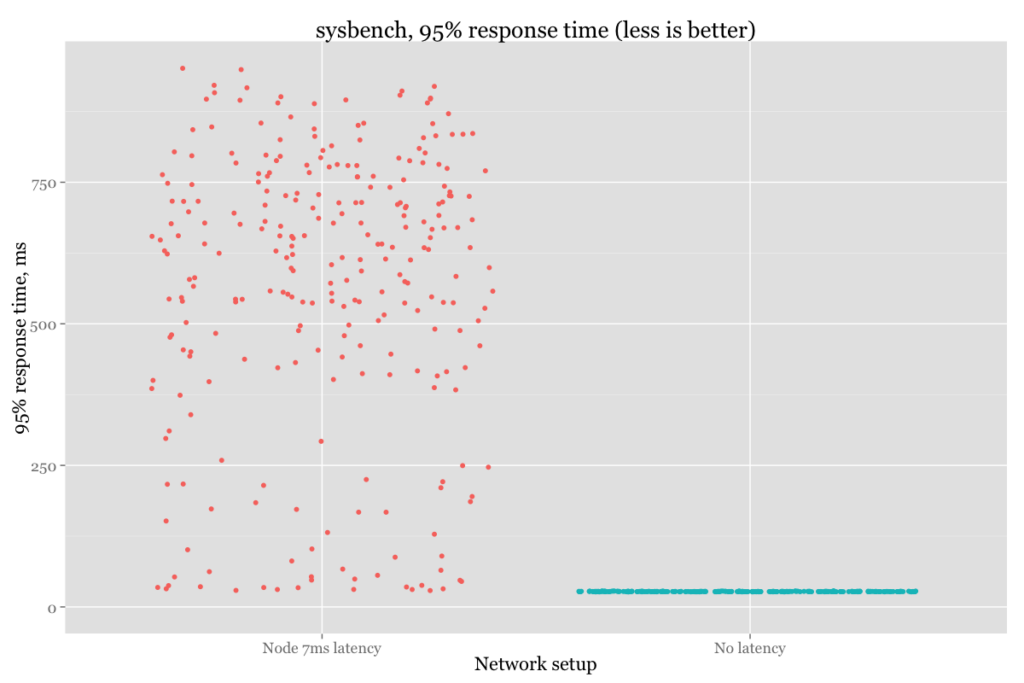
Or in numbers:
| Setup | Throughput (average), tps | 95% response time (average), ms |
| No latency | 2698 | 27.43 |
| 7ms latency | 739 | 571.40 |
As you can see, that is a huge difference! The variance in throughput and response time is also significant. Apparently there are two variables responsible for that:
The evs.send_window variable defines the maximum number of data packets in replication at a time. For WAN setups, the variable can be set to a considerably higher value than the default (for example, 512).
So now let’s start a cluster with --wsrep_provider_options="evs.send_window=512;evs.user_send_window=512" in the 7ms node case.
How do the throughput and response time change? Let’s see:
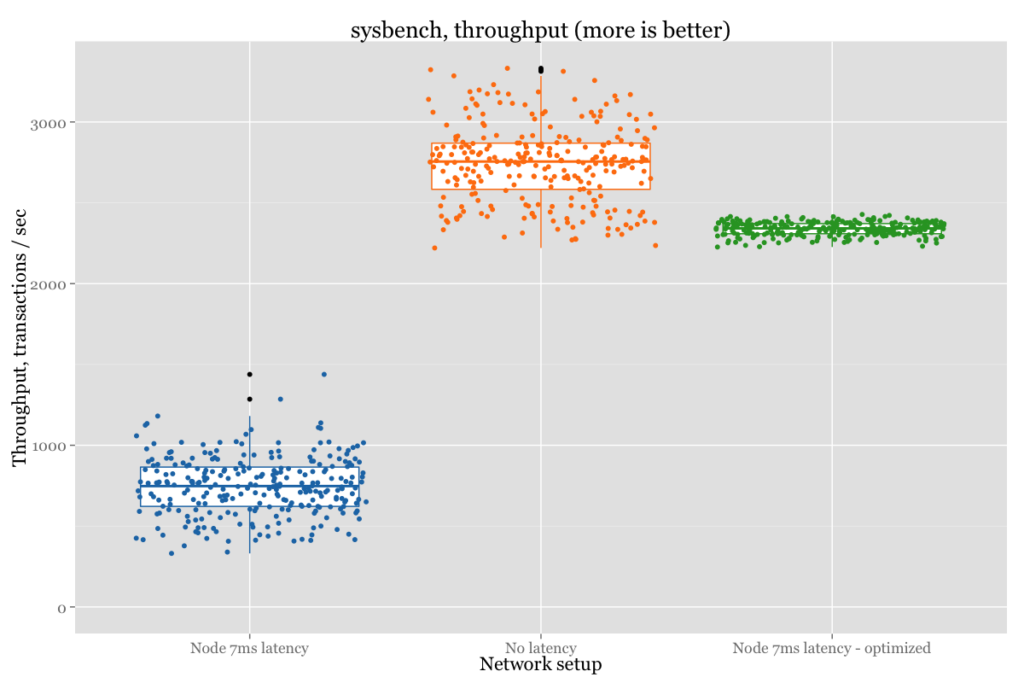
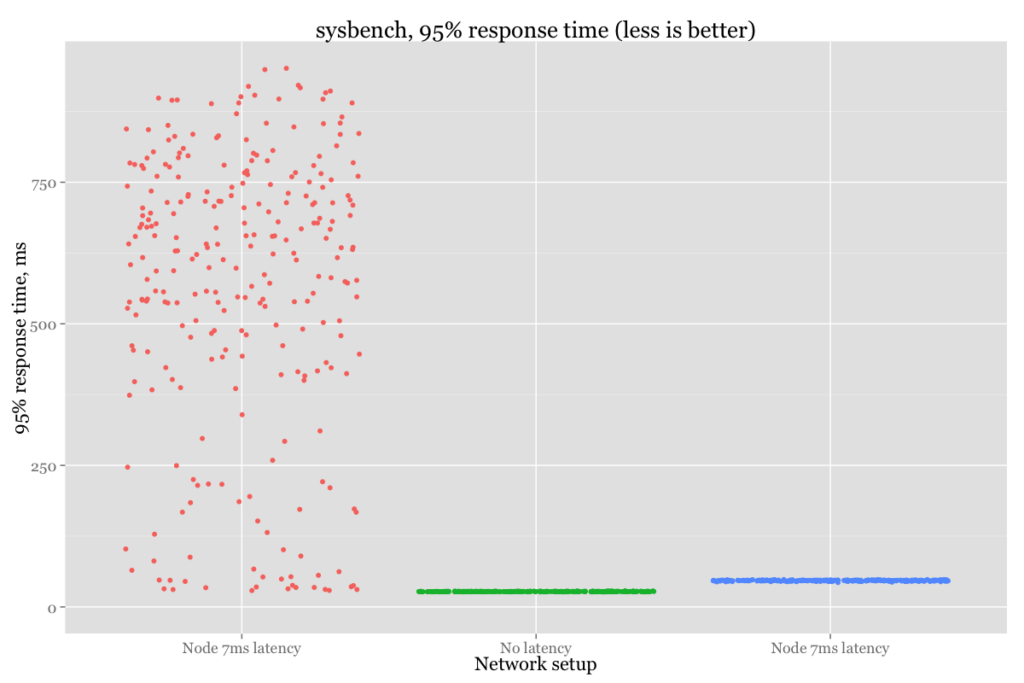
Or in numeric format:
| Setup | Throughput (average), tps | 95% response time(average), ms |
| No latency | 2698 | 27.43 |
| 7ms latency | 739 | 571.40 |
| 7ms latency – Optimized | 2346 | 46.85 |
We can see that there is still some performance penalty. In the end, it is impossible to mitigate the high response time from one node,
but that’s a big improvement compared to default settings.
So if you have a high-bandwidth network with a node that shows a high ping time, consider changing evs.send_window and evs.user_send_window.





Thank you for the article.
I translated this article into Japanese for uses in Japan.
Translated one is as follows
https://yakst.com/ja/posts/3858
If there is any problem, please notice me.
Thank you again.
For me, unfortunately, send_window variables weren’t helped much.
Performance of inserts/updates with big latency node was too poor comparing to single-node or cluster without big latency node included.
Joining inserts/updates into transactions (100-300 updates per transaction) + send_window variables made performance almost the same as single-node!
I have a question about changing send_window variables and auto_eviction: How does it affect, if at all, the increased size on the send_window to the auto_eviction traffic?
I’m asking because we have a WAN setup and I’d like to know if changing the send_window increasing the values affects the response time of the auto_eviction mechanisms.
Thanks a lot for useful article.
Currently we test cluster 4 nodes in one data center (Hetzner, located Germany) and 3 in another data center (OVH, located France) ping between DC less than 8ms and quite stable. I spoke with Sveta Smirnova at РИТ++, and she not recommend use more then 7 nodes and strongly not recommend use Percona XtraDB Cluster between DC because of latency and possible connection lost. Our application no so sensitive to “write” operation like insert instead we more “read” like select. HA much more need for us then high-performance.
Can you please recommend or not recommend this architecture for production use ?
Thanks for any comment.