

Kubernetes is becoming a popular choice for running containerized applications. While the core idea is to have a single container running the application in a Pod, there are many cases where one or more containers need to run alongside the application container, such as containers for capturing logs, metrics, etc. This approach is typically referred to as the sidecar pattern.
Kubernetes offers Init Containers and the newly introduced Sidecar containers, which will reach GA in the Kubernetes 1.33 release, to implement the sidecar pattern. In this blog post, we will explore the need for and advantages of sidecar containers. We will also cover the container lifecycle and demonstrate their functionality with real-world use cases.
Before the introduction of sidecar containers, containers were classified as either Init Containers or Main Application Containers (regular containers). Init Containers start first and perform a set of initialization tasks. Once these tasks are completed, the regular containers are started.
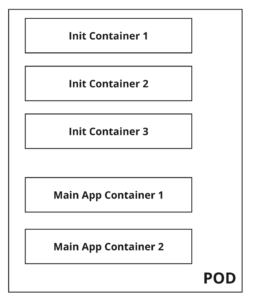
The following table outlines the differences between Init and Regular containers:
| Init Containers | Regular Containers |
| Init containers always run to completion. | Regular containers can be an infinitely running container and it starts only after all the init containers have run to completion. |
| Init containers always run sequentially. | Regular containers running order cannot be guaranteed. |
| Init containers do not have support for fields like resources, probes. | Regular containers have support for fields like probes, resources etc |
The timeline of the running containers would look like the following.
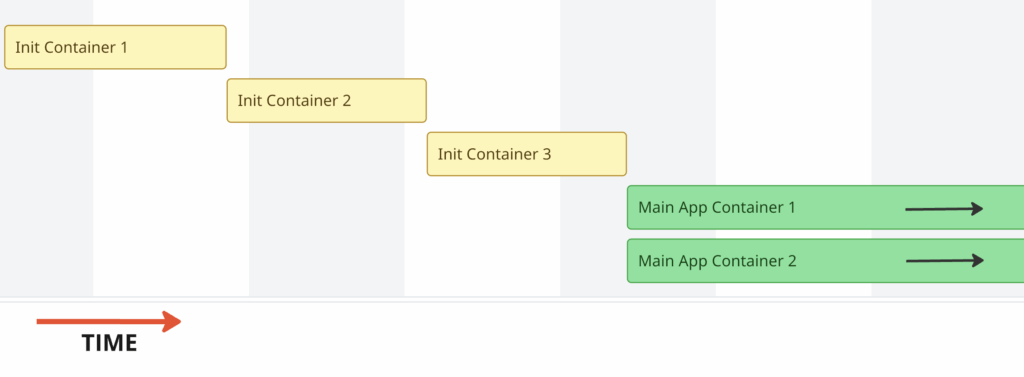
The above pattern of running containers works well for the majority of users; however, it doesn’t work for some users.
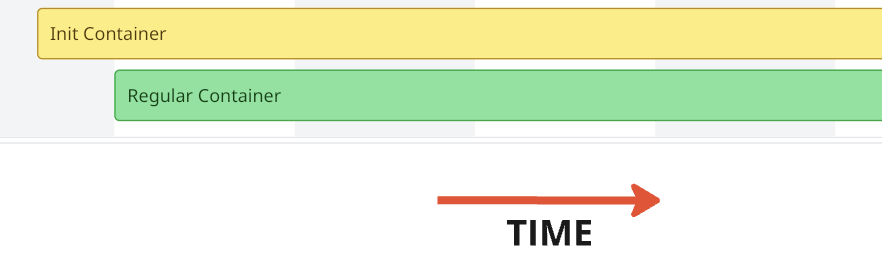
This case cannot be solved with either an init container or a regular container.
If an init container is used, it will be completed before the main container starts. This means it is impossible for the init container to keep running until the main container is completed/terminated.
If a regular container is used (say, container A and container B), it cannot be guaranteed that container A will start before container B.
2. A pod has a primary container (A) and a secondary container (B). Container B’s lifecycle is dependent on container A and it must run concurrently and terminate when container A terminates.
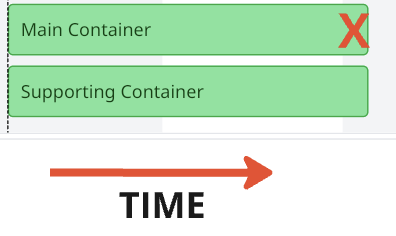
Cases like the above cannot be solved either with regular containers/init containers. Users need to use hacks or custom scripts to achieve it, but it’s not something that they can do with the tools available out of the box. Some more use cases are described in the Kubernetes Enhancement Proposal. To address the above issues, native sidecar containers were introduced as an alpha feature in k8s 1.28 and will be a GA feature in 1.33. With the k8s 1.33 release around the corner, let’s dig more into what a sidecar is and how it can be useful.
Kubernetes treats init containers that have the restartPolicy set to Always as sidecar containers.
|
1 2 3 4 5 6 |
initContainers: - name: init-container-1 image: alpine:latest restartPolicy: Always # Indicates SideCar Container - name: init-container-2 image: alpine:latest # Init Container |
Any Init container can be changed to a sidecar container by adding a statement restartPolicy: Always. For the init container’s restartPolicy field, Always is the only accepted value. restartPolicy: OnFailure or restartPolicy: Never are not accepted, and any attempt to create pods with unsupported values will fail.
restartPolicy: Always of a sidecar, the container will override the pod’s restart policy.
Following are the feature differences between sidecar containers and init containers:
Sidecar containers can have resources and probes specified like regular containers. In this post,we will concentrate on the lifecycle of a sidecar container. Before we dig into the startup and terminating order of a sidecar container, let’s understand the different states of a container.
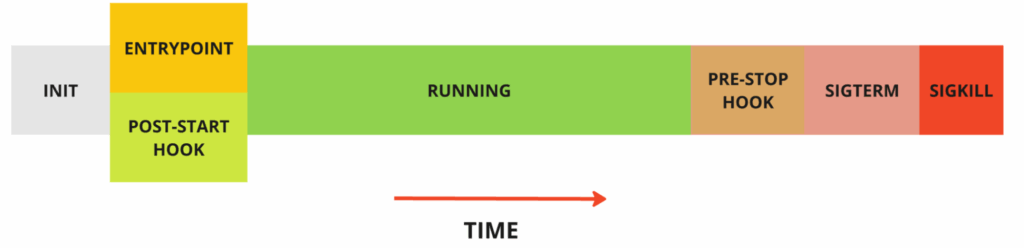
PostStart hooks, if configured, will be triggered together with the EntryPoint script. However, there is no guarantee of which one of the post-start hooks or the entrypoint will run first.PreStop hook is called when the liveness/startup probe fails or if the pod is being terminated by the user/control plane.Sidecar containers start like any init container; however, a sidecar will continue to run until the main container stops running. The main container or other init container(if any) succeeding the sidecar will start as soon as the sidecar has started.
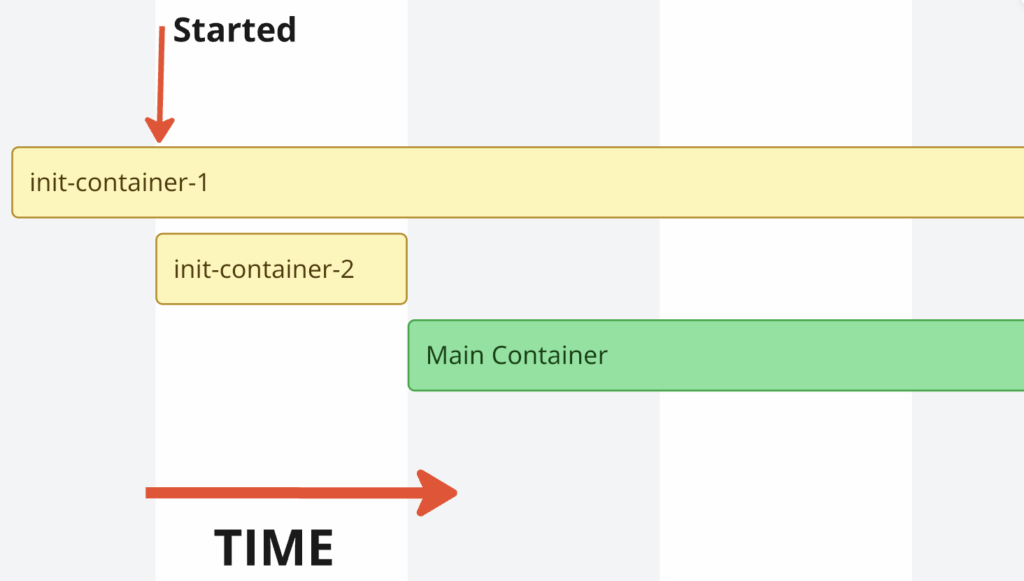
As seen above, as soon as the init-container-1 is started, init-container-2 gets started. The main container starts only after the init-container-2 finishes, as init-container-2 is not a sidecar container.
When a Pod is terminated by either a user or the control plane, the Kubelet begins terminating the main containers. Once all the main containers have terminated, the sidecar containers are terminated in the reverse order of their startup. If container termination is not completed before the terminationGracePeriodSeconds, SIGKILL will be sent to both the main and sidecar containers. If the containers terminate before the terminationGracePeriodSeconds, the preStop hook will be invoked first, followed by the issuance of SIGTERM.
Let’s take an example below,
|
1 2 3 4 5 6 7 |
initContainers: - name: init-container-1 image: alpine:latest restartPolicy: Always # Sidecar Container - name: init-container-2 image: alpine:latest restartPolicy: Always. # Sidecar Container |
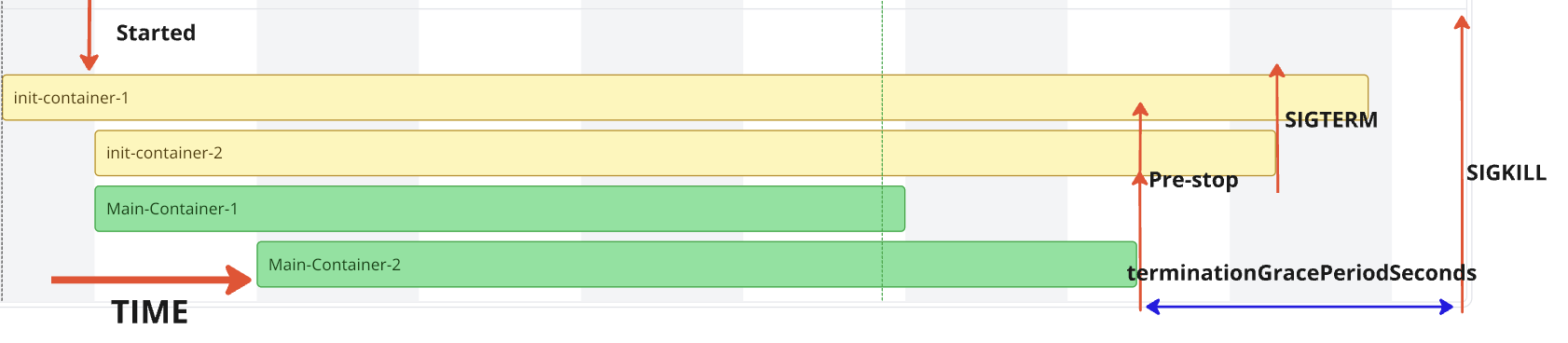
The best way to confirm the above thesis is to write some YAML and run some containers. For the tests, the Kubernetes version 1.33.0-beta.0 is set up. To capture the flow, we will use the good old date command to print timestamps.
|
1 2 3 4 5 |
% kubectl version Client Version: v1.32.0 Kustomize Version: v5.5.0 Server Version: v1.33.0-beta.0 |
Case-1 is an example of a simple Init and Main container. Init container starts and once the init container is completed, Main container starts running.
Let’s check the pod status after creating the pod.As seen below, pod is running and status indicates 1/1 container running. Init container is not counted.
|
1 2 3 4 5 6 |
$ kubectl apply -f case-1.yaml pod/demo-pod created $ kubectl get po NAME READY STATUS RESTARTS AGE demo-pod 1/1 Running 0 15s |
Checking the logs of both init and main container, we can see that a message is printed at 17:10:46 in the init container and there is message printed in Main container which starts around 17:10:54 , accommodating a 5 seconds sleep in init container and some delay in starting the main container.Main container runs forever as there is an infinite loop.
|
1 2 3 4 5 6 7 8 |
$ kubectl logs -f demo-pod -c init Init Container at 17:10:46 $ kubectl logs -f demo-pod -c main Main Container at 17:10:54 Main Container at 17:10:59 Main Container at 17:11:04 ... |
Case-2 is an example where the init container has an infinite loop, meaning the init container never completes, blocking the start of the main container. The created Pod remains in the Init state indefinitely.
|
1 2 3 4 5 6 |
$ kubectl apply -f case-2.yaml pod/demo-pod created $ kubectl get po NAME READY STATUS RESTARTS AGE demo-pod 0/1 Init:0/1 0 2m45s |
Case 3 is an example where both the init container and the main container are complete. Due to the default restartPolicy of Always, the main container keeps restarting continuously.
|
1 2 3 4 5 6 7 8 9 10 11 12 13 14 15 16 17 |
$ kubectl apply -f case-3.yaml pod/demo-pod created $ kubectl get po --watch NAME READY STATUS RESTARTS AGE demo-pod 0/1 Init:0/1 0 6s demo-pod 0/1 PodInitializing 0 8s demo-pod 1/1 Running 0 11s demo-pod 0/1 Completed 0 17s demo-pod 1/1 Running 1 (4s ago) 20s demo-pod 0/1 Completed 1 (9s ago) 25s demo-pod 0/1 CrashLoopBackOff 1 (13s ago) 37s demo-pod 1/1 Running 2 (16s ago) 40s demo-pod 0/1 Completed 2 (21s ago) 45s demo-pod 0/1 CrashLoopBackOff 2 (15s ago) 59s demo-pod 1/1 Running 3 (30s ago) 74s demo-pod 0/1 Completed 3 (35s ago) 79s |
restartPolicy set to NeverCase-4 is an example where both the init container and the main container complete. Since the restartPolicy is set to Never, the container completes and does not restart, unlike the previous case.
|
1 2 3 4 5 6 7 8 9 |
$ kubectl apply -f case-4.yaml pod/demo-pod created $ kubectl get po --watch NAME READY STATUS RESTARTS AGE demo-pod 0/1 Init:0/1 0 4s demo-pod 0/1 PodInitializing 0 8s demo-pod 1/1 Running 0 11s demo-pod 0/1 Completed 0 16s demo-pod 0/1 Completed 0 17s |
In Case-2, the init container never completed, which blocked the main container from running. Let’s add restartPolicy: Always to the init container to make it a sidecar container.
In Case-5, the main container starts as soon as the sidecar container starts due to the presence of restartPolicy: Always.
|
1 2 3 4 5 6 |
$ kubectl apply -f case-5.yaml pod/demo-pod created $ kubectl get po NAME READY STATUS RESTARTS AGE demo-pod 2/2 Running 0 17s |
Notice that the number of containers is displayed as 2/2 instead of 1/1, unlike init containers.Let’s check the timestamps printed in the init and main containers, as well as the container status.
|
1 2 3 4 5 6 7 8 9 10 11 12 13 14 15 16 17 18 19 20 21 22 |
$ kubectl logs -f demo-pod -c init Init Container at 07:45:54 Init Container at 07:45:59 ... $ kubectl logs -f demo-pod -c main Main Container at 07:45:58 Main Container at 07:46:03 ... # Container Status $ kubectl get po demo-pod -oyaml | yq .status.initContainerStatuses ... name: init ready: true restartCount: 0 started: true state: running: startedAt: "2025-03-24T07:45:54Z" ... |
As per the official documentation,
After a sidecar-style init container is running (the kubelet has set the started status for that init container to true), the kubelet then starts the next init container from the ordered .spec.initContainers list.
In this case, there is only one init container, so the startup order extends to the main container. Even if there were multiple init containers, the order would be similar.
As seen above, the main container’s first message was printed at 07:45:58. The main container started after the sidecar container was started at 2025-03-24T07:45:54Z.
PreStop lifecycle hook to the main container that completesLet’s add PreStop hooks to better understand container termination behavior in detail. preStop hooks do not print messages to stdout, so we will simulate this by sending the logs to the stdout file descriptor of PID 1 in the container (/proc/1/fd/1).
In Case-6, there are two sidecar containers and one main container, which prints a message, sleeps for 10 seconds, and then completes. As seen below, once the main container completes, the Kubelet waits for terminationGracePeriodSeconds, which defaults to 30 seconds and then initiates SIGKILL to forcefully terminate all running containers.
|
1 2 3 4 5 6 7 8 9 10 11 12 13 14 15 16 17 18 19 |
$ kubectl logs -f demo-pod -c init-1 Init-Container-1 at 14:08:30 Init-Container-1 at 14:08:35 Init-Container-1 at 14:08:40 Init-Container-1 at 14:08:45 PreStop in Init-1 at 14:08:47 Init-Container-1 at 14:08:50 Init-Container-1 at 14:08:55 ... $ kubectl logs -f demo-pod -c init-2 Init-Container-2 at 14:08:33 Init-Container-2 at 14:08:38 Init-Container-2 at 14:08:43 PreStop in Init-2 at 14:08:47 Init-Container-2 at 14:08:48 Init-Container-2 at 14:08:53 Init-Container-2 at 14:08:58 ... |
When the logs of the main container are checked, there is no invocation of the PreStop hook, as the container has completed rather than being terminated.
|
1 2 3 |
$ kubectl logs -f demo-pod -c main Main Container at 14:08:37 $ |
In Case-7, the main container runs in an infinite loop, and the pod is manually killed to force termination. A similar result is observed if the pod termination is initiated by the control plane, such as when a node hosting the pod is being terminated.
|
1 2 3 4 5 6 |
$ kubectl apply -f case-7.yaml pod/demo-pod created $ kubectl get po NAME READY STATUS RESTARTS AGE demo-pod 3/3 Running 0 81s |
Let’s delete the pod
|
1 2 |
$ kubectl delete pod demo-pod pod "demo-pod" deleted |
Checking the logs of all the containers, we can see that PreStop hooks are called for both the main and init containers, and they are all invoked at the same time.
|
1 2 3 4 5 6 7 8 9 10 11 12 13 14 15 16 17 18 19 20 21 22 23 24 |
$ kubectl logs -f demo-pod -c init-1 Init-Container-1 at 14:37:20 Init-Container-1 at 14:37:25 Init-Container-1 at 14:37:30 Init-Container-1 at 14:37:35 PreStop in Init-1 at 14:37:37 Init-Container-1 at 14:37:40 Init-Container-1 at 14:37:45 $ kubectl logs -f demo-pod -c init-2 Init-Container-2 at 14:37:26 Init-Container-2 at 14:37:31 Init-Container-2 at 14:37:36 PreStop in Init-2 at 14:37:37 Init-Container-2 at 14:37:41 Init-Container-2 at 14:37:46 $ kubectl logs -f demo-pod -c main Main Container at 14:37:30 Main Container at 14:37:35 PreStop in Main at 14:37:37 Main Container at 14:37:40 Main Container at 14:37:45 Main Container at 14:37:50 |
In Case-8, the trap command is used to capture the SIGTERM signal. The main container runs for a short duration and then completes, initiating the pod termination process since the restartPolicy is set to Never.
|
1 2 3 4 5 6 |
$ kubectl apply -f case-8.yaml pod/demo-pod created $ kubectl get po NAME READY STATUS RESTARTS AGE demo-pod 0/3 Completed 0 50s |
Let’s check the logs of all the containers.
|
1 2 3 4 5 6 7 8 9 10 |
$ kubectl logs -f demo-pod -c init-1 Init-Container-1 at 16:16:53 Init-Container-1 at 16:16:58 Init-Container-1 at 16:17:03 Init-Container-1 at 16:17:08 Init-Container-1 at 16:17:13 PreStop in Init-1 at 16:17:14 Init-Container-1 at 16:17:18 Init-Container-1 at 16:17:23 SIGTERM received in Init-container-1 at 16:17:28 |
|
1 2 3 4 5 6 7 8 |
$ kubectl logs -f demo-pod -c init-2 Init-Container-2 at 16:16:59 Init-Container-2 at 16:17:04 Init-Container-2 at 16:17:09 Init-Container-2 at 16:17:14 PreStop in Init-2 at 16:17:14 Init-Container-2 at 16:17:19 SIGTERM received in Init-container-2 at 16:17:24 |
|
1 2 |
$ kubectl logs -f demo-pod -c main Main Container at 16:17:03 |
Sidecar containers provide greater control over the ordering and execution of containers, unlocking numerous use cases for end users.
For databases on Kubernetes, sidecars can be used as database configurators or auto-tuners. Sidecar containers can leverage historical data and usage patterns to tune and configure the database even before it starts. Since the sidecar continues running as long as the database runs, tuning can be performed dynamically throughout the database’s lifecycle.
Let us know if any of your use cases have been unlocked with sidecars! 🙂
The Percona Kubernetes Operators lets you easily create and manage highly available, enterprise-ready MySQL, PostgreSQL, and MongoDB clusters on Kubernetes. Experience hassle-free database management and provisioning without the need for manual maintenance or custom in-house scripts.
Resources
RELATED POSTS




