

An application down due to not being able to write into a table anymore due to a maximum allowed auto-increment value may be one of the worst nightmares of a DBA. Typical errors related to this problem in MySQL will look like this:
|
1 |
ERROR 1062 (23000): Duplicate entry '2147483647' for key 'my_table.PRIMARY' |
or
|
1 |
ERROR 1467 (HY000): Failed to read auto-increment value from storage engine |
While the solution could be easy and fairly quick for small tables, it may be a really daunting one for big ones. A common table reaching two billion rows may have sizes ranging from few to hundreds of gigabytes, depending on the number and size of columns.
Given your big table reached maximum auto-increment for int (of default signed type), you’d think the immediate fix would be to change the type to unsigned and thus extend the available value range twice without even changing the column space requirements. So, for a simple example table:
|
1 2 3 4 5 6 7 8 9 |
mysql > show create table t1G *************************** 1. row *************************** Table: t1 Create Table: CREATE TABLE `t1` ( `id` int NOT NULL AUTO_INCREMENT, `a` int DEFAULT NULL, PRIMARY KEY (`id`) ) ENGINE=InnoDB AUTO_INCREMENT=2147483647 DEFAULT CHARSET=utf8mb4 COLLATE=utf8mb4_0900_ai_ci 1 row in set (0.00 sec) |
We try to quickly change it using the online method:
|
1 2 3 4 5 |
mysql > ALTER TABLE t1 MODIFY id int UNSIGNED NOT NULL AUTO_INCREMENT, ALGORITHM=INPLACE, LOCK=NONE; ERROR 1846 (0A000): ALGORITHM=INPLACE is not supported. Reason: Cannot change column type INPLACE. Try ALGORITHM=COPY. mysql > ALTER TABLE t1 MODIFY id int UNSIGNED NOT NULL AUTO_INCREMENT, ALGORITHM=INSTANT; ERROR 1846 (0A000): ALGORITHM=INSTANT is not supported. Reason: Need to rebuild the table to change column type. Try ALGORITHM=COPY/INPLACE. |
That’s right, a seemingly simple operation, which we could expect to be a small metadata change only, is not allowed in a non-blocking manner in MySQL, and this limitation still applies in version 8.4.2. It is handled as a general column data type change hence the operation will rebuild the whole table and will not allow any writes before it’s done:
When you decide to run the ALTER anyway, all writes will wait with a status similar to this:
|
1 2 3 4 5 6 7 8 9 10 11 12 13 14 15 16 17 18 19 |
mysql > show processlistG *************************** 1. row *************************** Id: 11 User: msandbox Host: localhost db: db1 Command: Query Time: 28 State: copy to tmp table Info: alter table t1 modify id int unsigned NOT NULL AUTO_INCREMENT *************************** 2. row *************************** Id: 24 User: msandbox Host: localhost db: db1 Command: Query Time: 27 State: Waiting for table metadata lock Info: update t1 set a=2 where id=100 |
An improvement request has been made by the community a long time ago, but it’s yet to be addressed: https://bugs.mysql.com/bug.php?id=86695
And similar work is planned for MariaDB: https://jira.mariadb.org/browse/MDEV-16291
This certainly can be a huge problem in a situation where the ALTER command is going to take many hours.
So, if your application depends on the ability to insert data, exhausting auto-increment values virtually means the system is down. Given the lack of a quick and online ALTER feature to extend the data type, there is no quick way out!
Will pt-online-schema-change or gh-ost help to get the table back into production quickly? These tools could be helpful only if the application can function without INSERTs but would still benefit from the ability to run UPDATE and DELETE queries or when the affected table can be taken offline for a while. This is because using one of these tools would give better control over the overall performance impact as both can pause in case of high load or replication lag.

The two most popular approaches during this hopeless situation are to declare downtime and simply run ALTER TABLE to extend the datatype or switch to a new table.
The second solution typically involves creating a new table with an extended auto-increment column and swapping the original one via the RENAME command. This assumes the production can work for some time without the historical data. Example commands to do the swap can look like the ones below. Given the example original table:
|
1 2 3 4 5 6 |
CREATE TABLE `t2` ( `id` mediumint NOT NULL AUTO_INCREMENT, `a` int DEFAULT NULL, `b` varchar(100) DEFAULT NULL, PRIMARY KEY (`id`) ) ENGINE=InnoDB AUTO_INCREMENT=8388607 DEFAULT CHARSET=utf8mb4 COLLATE=utf8mb4_0900_ai_ci |
We need to give the new one a starting auto increment point higher to avoid data conflict:
|
1 2 3 |
create table t_2 like t2; alter table t_2 modify id int unsigned NOT NULL AUTO_INCREMENT, AUTO_INCREMENT=8388608; rename table t2 to t2_old, t_2 to t2; |
Now, the next step is to sync the data from the old table. I highly discourage doing this:
|
1 |
INSERT INTO t2 SELECT * FROM t2_old; |
It would create a huge transaction, causing all possible performance problems and likely even failing, depending on the table size and environment. Convenient tools let you do it in a more controlled way.
This tool will allow you to import the table rows very fast by utilizing bulk export and import via a non-SQL format (TSV) and automatically splitting the data into configurable chunks for fast multi-threaded processing. This is one of the fastest logical dump and restore tools out there, so it’s a great candidate for syncing the data from an old table as fast as possible.
An example export and import sessions may look like this:
|
1 2 3 4 5 6 7 8 9 10 11 12 13 14 15 16 17 18 19 20 21 22 23 24 25 26 27 28 |
MySQL 127.0.0.1:3306 ssl db1 JS > util.dumpTables("db1",["t2_old"],"/tmp/t2_old_copy",{compression: "zstd", showProgress: true, consistent: true}) Acquiring global read lock Global read lock acquired Initializing - done 1 tables and 0 views will be dumped. Gathering information - done All transactions have been started Locking instance for backup Global read lock has been released Writing global DDL files Running data dump using 4 threads. NOTE: Progress information uses estimated values and may not be accurate. Writing schema metadata - done Writing DDL - done Writing table metadata - done Starting data dump 102% (8.39M rows / ~8.18M rows), 2.43M rows/s, 140.41 MB/s uncompressed, 49.45 MB/s compressed Dump duration: 00:00:03s Total duration: 00:00:03s Schemas dumped: 1 Tables dumped: 1 Uncompressed data size: 504.99 MB Compressed data size: 177.99 MB Compression ratio: 2.8 Rows written: 8388182 Bytes written: 177.99 MB Average uncompressed throughput: 134.90 MB/s Average compressed throughput: 47.55 MB/s |
And import to the new table:
|
1 2 3 4 5 6 7 8 9 10 11 12 13 14 15 |
MySQL 127.0.0.1:3306 ssl db1 JS > util.importTable ("/tmp/t2_old_copy/db1@t2_old@*.tsv.zst", { schema: "db1", table: "t2", threads: 4}); Importing from multiple files to table `db1`.`t2` in MySQL Server at 127.0.0.1:3306 using 4 threads [Worker001] db1@t2_old@2.tsv.zst: Records: 932067 Deleted: 0 Skipped: 0 Warnings: 0 [Worker000] db1@t2_old@0.tsv.zst: Records: 932067 Deleted: 0 Skipped: 0 Warnings: 0 [Worker002] db1@t2_old@1.tsv.zst: Records: 932067 Deleted: 0 Skipped: 0 Warnings: 0 [Worker003] db1@t2_old@3.tsv.zst: Records: 932067 Deleted: 0 Skipped: 0 Warnings: 0 [Worker000] db1@t2_old@5.tsv.zst: Records: 932067 Deleted: 0 Skipped: 0 Warnings: 0 [Worker001] db1@t2_old@4.tsv.zst: Records: 932067 Deleted: 0 Skipped: 0 Warnings: 0 [Worker001] db1@t2_old@@9.tsv.zst: Records: 1 Deleted: 0 Skipped: 0 Warnings: 0 [Worker002] db1@t2_old@6.tsv.zst: Records: 932067 Deleted: 0 Skipped: 0 Warnings: 0 [Worker003] db1@t2_old@7.tsv.zst: Records: 932067 Deleted: 0 Skipped: 0 Warnings: 0 [Worker000] db1@t2_old@8.tsv.zst: Records: 931645 Deleted: 0 Skipped: 0 Warnings: 0 100% (177.99 MB / 177.99 MB), 2.81 MB/s 10 files (504.99 MB uncompressed, 177.99 MB compressed) were imported in 39.0958 sec at 12.92 MB/s uncompressed, 4.55 MB/s compressed Total rows affected in db1.t2: Records: 8388182 Deleted: 0 Skipped: 0 Warnings: 0 |
This method is very fast, but there is no option to avoid causing too much load or replication lag in a production database. Therefore, I submitted this feature request: https://bugs.mysql.com/bug.php?id=116886
With this tool from the Percona Toolkit suite, you can not only archive old data but also migrate it. In this case, we can copy old table rows to the newly recreated table:
|
1 2 3 4 5 6 7 8 9 10 11 12 13 14 15 16 17 18 19 20 21 22 23 24 25 26 27 28 29 30 31 32 33 34 35 36 |
# time pt-archiver --source "h=127.0.0.1,u=root,p=P3rc0na#,D=db1,t=t2_old" --dest "h=127.0.0.1,u=root,p=P3rc0na#,D=db1,t=t2" --commit-each --nosafe-auto-increment --progress=500000 --statistics --where="id not in (select id from t2)" --no-delete --limit 900000 --bulk-insert --buffer TIME ELAPSED COUNT 2024-12-05T20:56:06 0 0 2024-12-05T20:56:13 7 500000 2024-12-05T20:56:28 22 1000000 2024-12-05T20:56:34 28 1500000 2024-12-05T20:56:52 46 2000000 2024-12-05T20:56:59 53 2500000 2024-12-05T20:57:13 67 3000000 2024-12-05T20:57:20 74 3500000 2024-12-05T20:57:34 88 4000000 2024-12-05T20:57:41 95 4500000 2024-12-05T20:57:55 109 5000000 2024-12-05T20:58:10 124 5500000 2024-12-05T20:58:16 130 6000000 2024-12-05T20:58:32 146 6500000 2024-12-05T20:58:39 152 7000000 2024-12-05T20:58:54 168 7500000 2024-12-05T20:59:00 174 8000000 2024-12-05T20:59:11 185 8388182 Started at 2024-12-05T20:56:06, ended at 2024-12-05T20:59:13 Source: D=db1,h=127.0.0.1,p=...,t=t10,u=root Dest: D=db1,h=127.0.0.1,p=...,t=t100,u=root SELECT 8388182 INSERT 8388182 DELETE 0 Action Count Time Pct bulk_inserting 10 46.6701 24.93 select 11 27.7823 14.84 commit 22 4.1037 2.19 print_bulkfile 8388182 -3.0898 -1.65 other 0 111.7260 59.69 real 3m7.420s user 1m38.797s sys 0m6.907s |
This tool does the job in a single thread, so it is slower, but it can monitor the replication lag and pause importing if needed. To allow this, use –check-slave-lag pointing to the replica coordinates.
It is always better to avoid the problem rather than fight with a system-down situation under time pressure!
You can quickly check how close your tables are to reaching the maximum auto integer value with one query (credits to the openark.org blog). I verified that it works on MySQL 5.7, 8.0, and 8.4, as well as MariaDB 10.x and 11.x. Unfortunately, such a query can be quite expensive if there are many tables in the database instance, like hundreds of thousands or more.
The query and an example result are as follows:
|
1 2 3 4 5 6 7 8 9 10 11 12 13 14 15 16 17 18 19 20 21 22 23 24 25 26 27 28 29 30 31 32 33 34 35 |
mysql> SELECT TABLE_SCHEMA, TABLE_NAME, COLUMN_NAME, COLUMN_TYPE, IF( LOCATE('unsigned', COLUMN_TYPE) > 0, 1, 0 ) AS IS_UNSIGNED, ( CASE DATA_TYPE WHEN 'tinyint' THEN 255 WHEN 'smallint' THEN 65535 WHEN 'mediumint' THEN 16777215 WHEN 'int' THEN 4294967295 WHEN 'bigint' THEN 18446744073709551615 END >> IF(LOCATE('unsigned', COLUMN_TYPE) > 0, 0, 1) ) AS MAX_VALUE, AUTO_INCREMENT, AUTO_INCREMENT / ( CASE DATA_TYPE WHEN 'tinyint' THEN 255 WHEN 'smallint' THEN 65535 WHEN 'mediumint' THEN 16777215 WHEN 'int' THEN 4294967295 WHEN 'bigint' THEN 18446744073709551615 END >> IF(LOCATE('unsigned', COLUMN_TYPE) > 0, 0, 1) ) AS RATIO FROM INFORMATION_SCHEMA.COLUMNS INNER JOIN INFORMATION_SCHEMA.TABLES USING (TABLE_SCHEMA, TABLE_NAME) WHERE TABLE_SCHEMA NOT IN ('mysql', 'INFORMATION_SCHEMA', 'performance_schema') AND EXTRA='auto_increment'; +--------------+------------+-------------+--------------------+-------------+------------+----------------+--------+ | TABLE_SCHEMA | TABLE_NAME | COLUMN_NAME | COLUMN_TYPE | IS_UNSIGNED | MAX_VALUE | AUTO_INCREMENT | RATIO | +--------------+------------+-------------+--------------------+-------------+------------+----------------+--------+ | db1 | t10 | id | mediumint | 0 | 8388607 | 8388607 | 1.0000 | | db1 | t100 | id | int unsigned | 1 | 4294967295 | 8398718 | 0.0020 | | db1 | t2 | id | mediumint unsigned | 1 | 16777215 | 84783 | 0.0051 | | db2 | sbtest1 | id | int | 0 | 2147483647 | 10001 | 0.0000 | | db2 | sbtest2 | id | int | 0 | 2147483647 | 2147483647 | 1.0000 | | db2 | sbtest3 | id | int | 0 | 2147483647 | 10010000 | 0.0047 | | db2 | sbtest4 | id | int | 0 | 2147483647 | 10001 | 0.0000 | +--------------+------------+-------------+--------------------+-------------+------------+----------------+--------+ 7 rows in set (0.0179 sec) |
The ratio value allows us to see how close it is to reaching the maximum value. In the above example, two tables have already reached it.
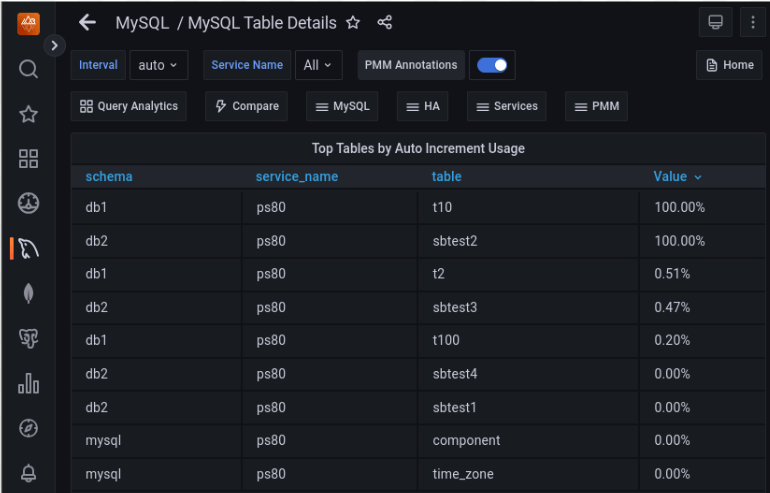
It is a good idea to set up continuous monitoring of the same and, ideally, alerting. Percona Monitoring and Management (PMM) has already a dashboard showing the auto-increment usage:
The default increment step for traditional MySQL replication is 1. But when MySQL Group Replication is used in multi-master mode, it is 7! Check the group_replication_auto_increment_increment variable for details. This is another of the many reasons for using the single-primary mode. Auto-increment values will get depleted insanely quickly in multiple writers mode:
|
1 2 3 4 5 6 7 8 9 10 11 12 13 14 15 16 17 18 19 20 21 22 23 24 25 |
mysql > select @@group_replication_single_primary_mode,@@group_replication_auto_increment_increment,@@auto_increment_increment,@@auto_increment_offsetG *************************** 1. row *************************** @@group_replication_single_primary_mode: 0 @@group_replication_auto_increment_increment: 7 @@auto_increment_increment: 7 @@auto_increment_offset: 100 1 row in set (0.00 sec) mysql > create table test.t1 (id int auto_increment primary key); Query OK, 0 rows affected (0.05 sec) mysql > insert into test.t1 values (null),(null),(null),(null); Query OK, 4 rows affected (0.01 sec) Records: 4 Duplicates: 0 Warnings: 0 mysql > select * from test.t1; +----+ | id | +----+ | 7 | | 14 | | 21 | | 28 | +----+ 4 rows in set (0.00 sec) |
Similarly, in PXC / Galera, the auto-increment value gets automatically adjusted to the number of cluster nodes. As there is no built-in single-primary mode, you have to turn off this automation and set the increment to 1 explicitly whenever using a single writer scenario, like via external proxy, for instance.
|
1 2 3 4 5 6 7 8 9 |
node1 > show variables like '%auto_inc%'; +------------------------------+-------+ | Variable_name | Value | +------------------------------+-------+ | auto_increment_increment | 3 | | auto_increment_offset | 1 | | wsrep_auto_increment_control | ON | +------------------------------+-------+ 3 rows in set (0.01 sec) |
When the auto-increment column is referenced in other tables via foreign key constraints, the situation gets way more complicated. MySQL will not allow you to have even slightly different data types between referrals, and an attempt to modify it on one table triggers an error:
|
1 2 |
mysql > ALTER TABLE parent MODIFY id INT UNSIGNED; ERROR 3780 (HY000): Referencing column 'parent_id' and referenced column 'id' in foreign key constraint 'child_ibfk_1' are incompatible. |
The ALTER command does not support changing multiple tables simultaneously either.
To address this problem, you will need to:
Resources
RELATED POSTS





After seeing this mentioned somewhere (might have been a Percona blog article, actually) I went through our tables. Or, rather, checked out the PMM MySQL Table Details page, that lists “Top. Tables by Auto Increment Usage”.
We had a candidate for becoming an issue, but rather than being a ‘huge’ table, it was one that had a high turnover of rows – over time things are constantly being added, and expiring. So while the table itself wasn’t that large, it was chewing through the available number-space at a fairly consistent rate.
Because of that consistency we could predict fairly accurately when it was going to fall down, and get in well ahead of that. We were fortunate that the online schema change was short enough that the application running on top of the database could cope without writing to the table for the duration.
So, yeah, definitely need to monitor this, even on tables that aren’t ever going to get anywhere near max(auto_inc) in terms of row count!
Monitoring this is easy.
MySQL by default installs
sys, andsys.schema_auto_increment_columnsgives you all of the systems a_i columns. Theauto_increment_ratiovalue in that view will tell you the percentage of values used already.Collecting this daily and extrapolating depletion is then trivial for any tooling used.
Indeed, this is a good point, this sys schema view uses a very similar query, so it’s pretty handy!