

 Following up on my recent benchmark posts on MySQL and MariaDB, MySQL and MariaDB on Enterprise SSD Storage and How MySQL and MariaDB Perform on NVMe Storage, I wanted to dig a little deeper and understand how different MySQL parameters affect performance.
One of the obscure MySQL Parameters (in my opinion) is innodb_buffer_pool_instances. In particular, I do not have a feel for how many you need and how to understand if a chosen value is a good or a bad one.
In our articles MySQL 5.7 Performance Tuning After Installation and MySQL 101: Parameters to Tune for MySQL Performance we recommended to use value “8”, but I can’t really say if this is a good enough value. So let’s see what results we will get with different innodb_buffer_pool instances, under the following scenario:
I will use the sysbench oltp_read_write benchmark with pareto distribution. I will set innodb_buffer_pool_size=25GB for a database 100 GB in size, so there will be a competition for buffer_pool space and this will be an IO-bound scenario.
The hardware I use is:
|
1 2 3 4 5 6 7 8 9 10 11 12 13 14 |
System | Supermicro; SYS-F619P2-RTN; v0123456789 (Other) Platform | Linux Release | Ubuntu 18.04.4 LTS (bionic) Kernel | 5.3.0-42-generic Architecture | CPU = 64-bit, OS = 64-bit Threading | NPTL 2.27 SELinux | No SELinux detected Virtualized | No virtualization detected # Processor ################################################## Processors | physical = 2, cores = 40, virtual = 80, hyperthreading = yes Models | 80xIntel(R) Xeon(R) Gold 6230 CPU @ 2.10GHz Caches | 80x28160 KB # Memory ##################################################### Total | 187.6G |
With the storage on SATA SSD INTEL SSDSC2KB960G8 (Intel Enterprise-grade SSD D3-S4510).
The short settings overview:
The benchmark command line is:
|
1 |
sysbench oltp_read_write --threads=150 --time=10000 --tables=40 --table_size=10000000 --mysql-host=127.0.0.1 --mysql-user=sbtest --mysql-password=sbtest --max-requests=0 --report-interval=1 --mysql-db=sbtest --mysql-ssl=off --create_table_options=DEFAULT CHARSET=utf8mb4 --report_csv=yes --rand-type=pareto run |
This means that the benchmark will run for three hours with reporting throughput every 1 sec. I will use a three-hour time frame for a reason which will be apparent later from the results.
Let’s see what results I’ve got individually for each of innodb_buffer_pool_instances:
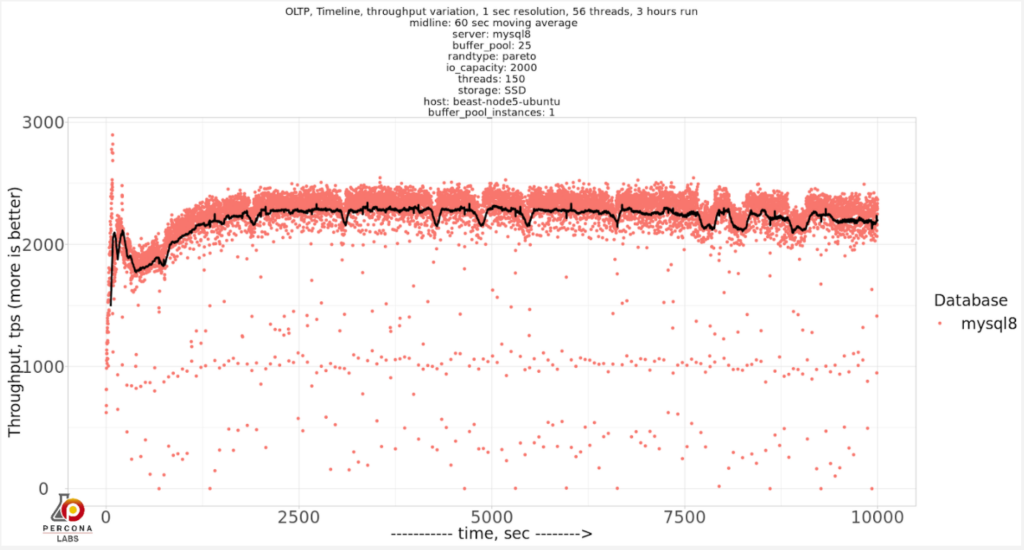
innodb_buffer_pool_instances=1
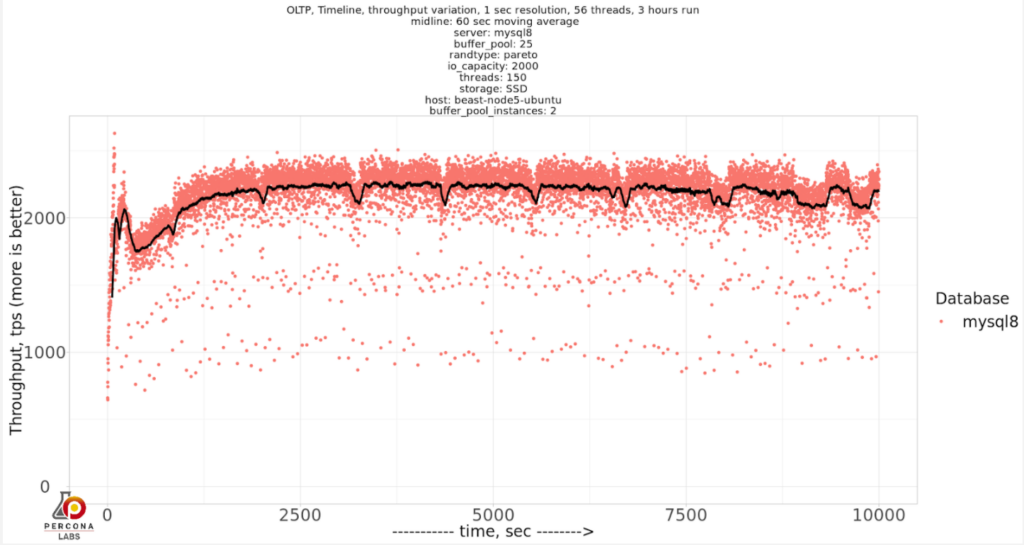
innodb_buffer_pool_instances=2
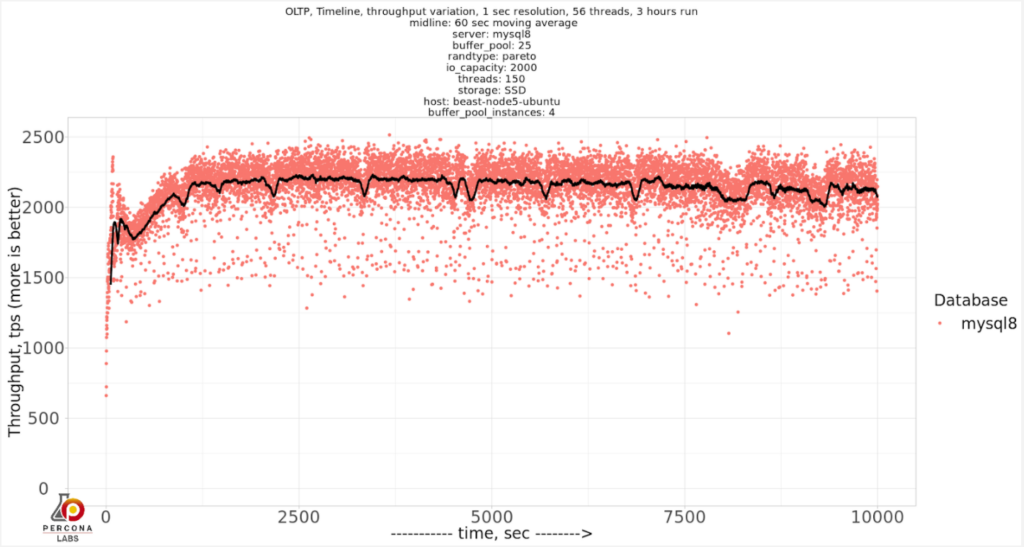
innodb_buffer_pool_instances=4
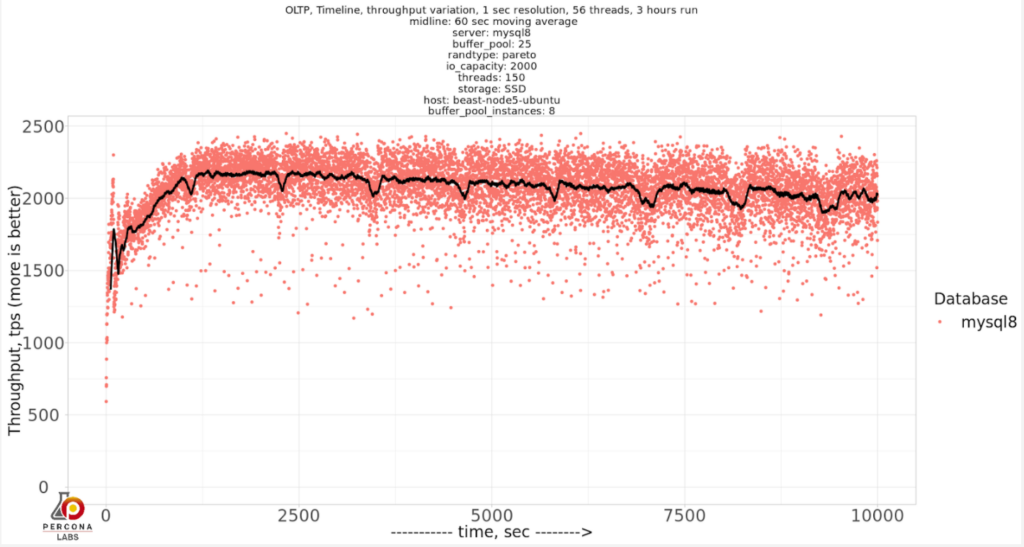
innodb_buffer_pool_instances=8
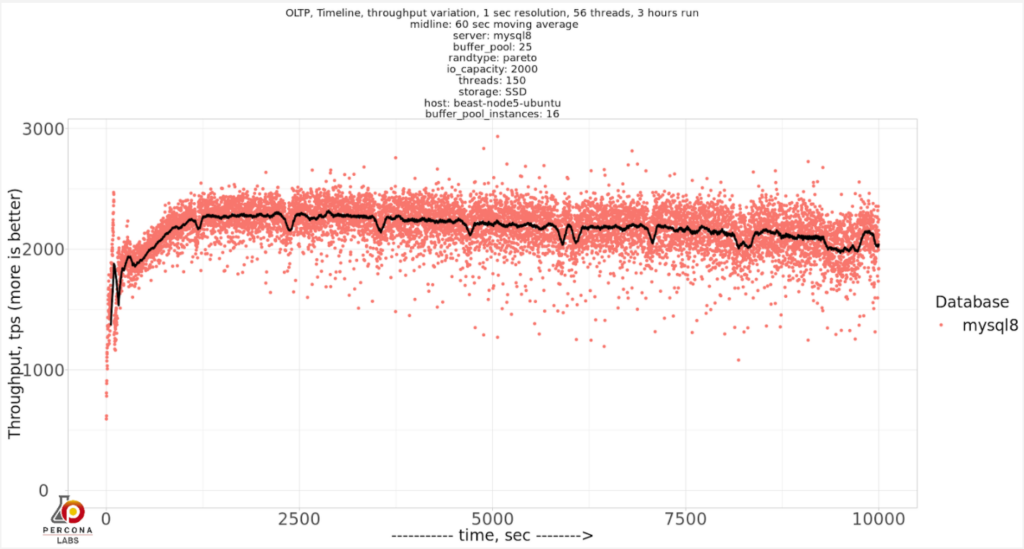
innodb_buffer_pool_instances=16
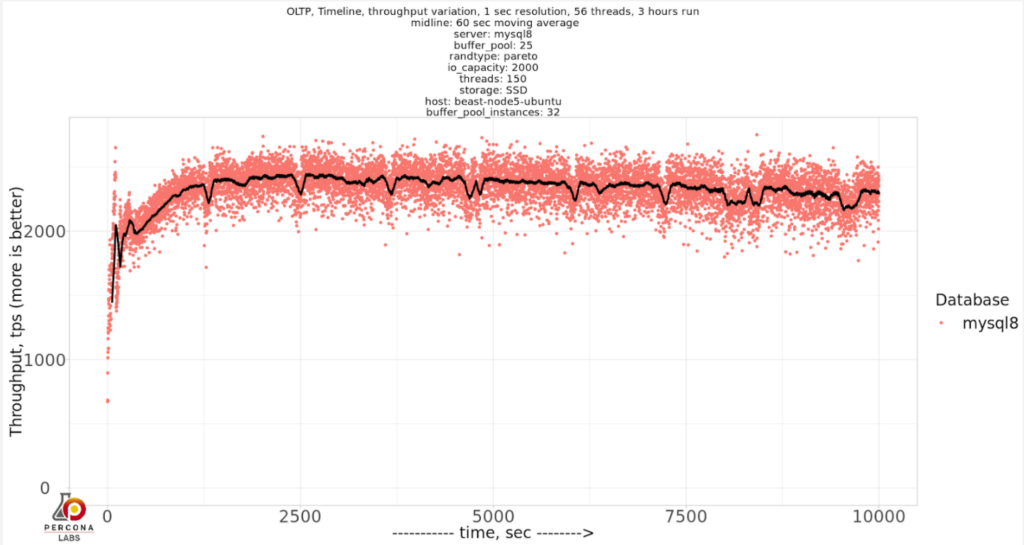
innodb_buffer_pool_instances=32
innodb_buffer_pool_instances=64
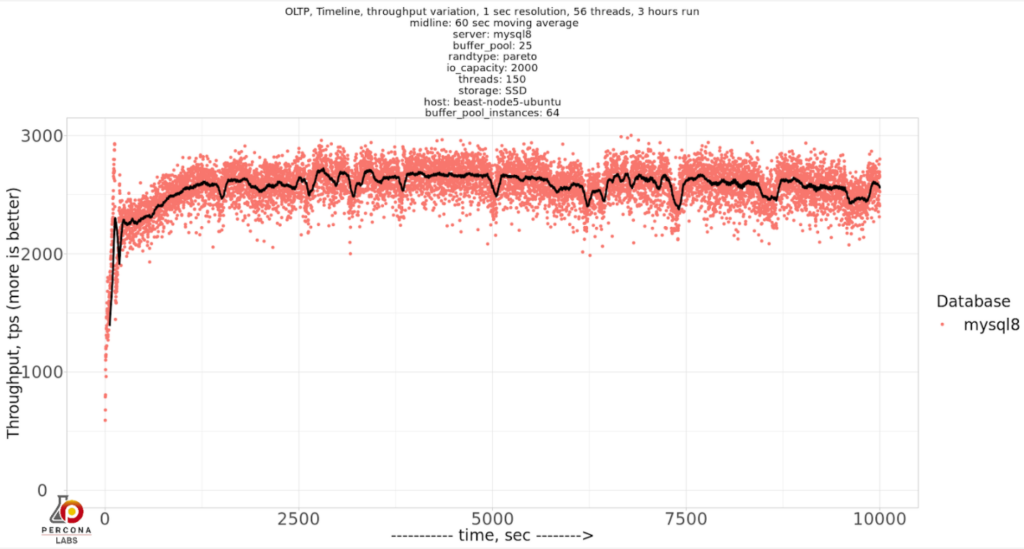
What seems apparent is that as we increase innodb_buffer_pool_instances, it has a positive effect on variation in the throughput. We can condense the results in a single chart to see it closely:
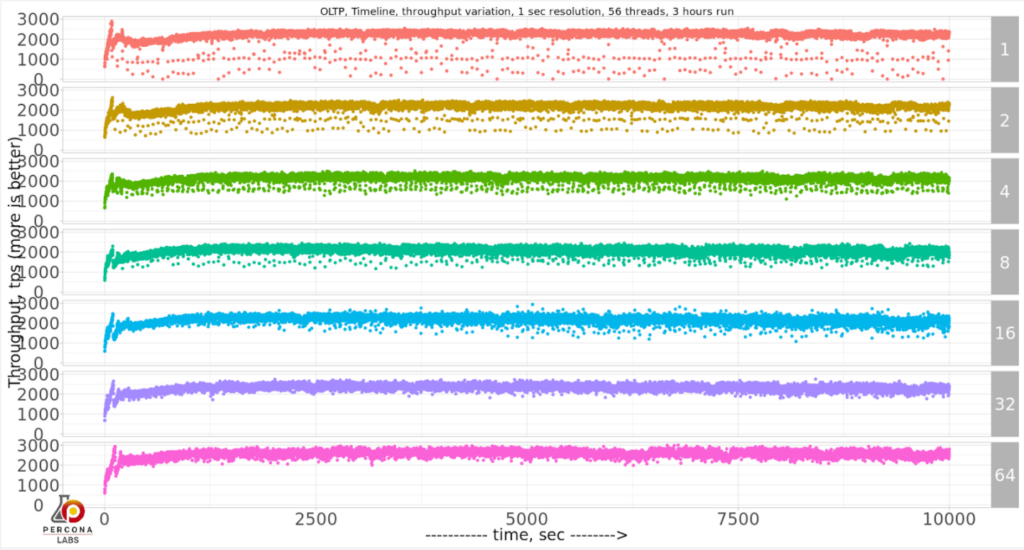
And if we want to compare the throughput and deviation, let’s compare the results for the last 2500 sec:
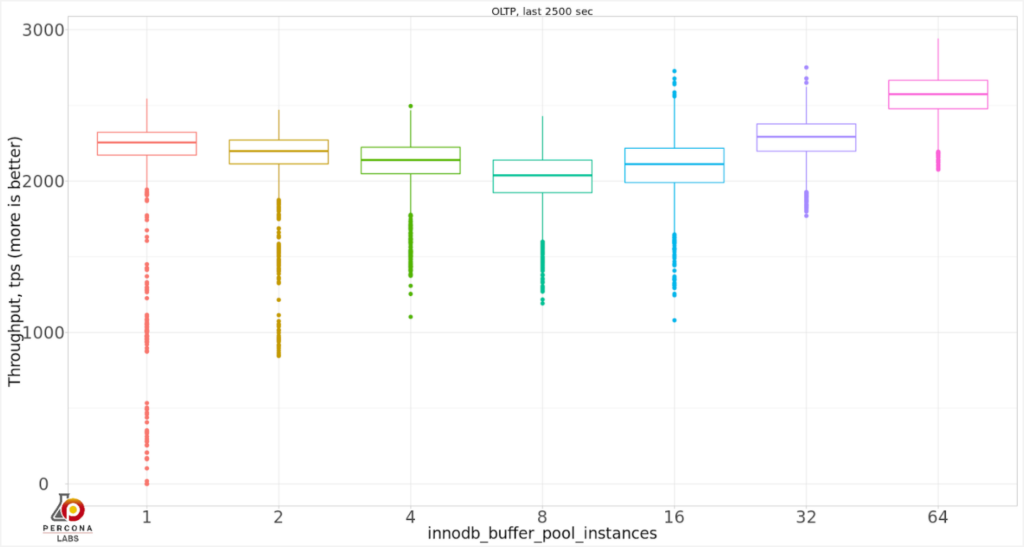
So actually, innodb_buffer_pool_instances=64 showed the best throughput and less variability. Recommended innodb_buffer_pool_instances=8 seems better compared to 1-4 values in a sense of variability, but it does not produce the best throughput.
For this particular case, innodb_buffer_pool_instances=64 was the best choice, but I still can’t recommend a reliable way to find what the optimal value is. Small values 1-4 seems to produce a lot of variability or even stalls, so starting from 8 is a good choice.
Part Two of this series can be found here: How Many innodb_buffer_pool_instances Do You Need in MySQL 8 With a CPU-Bound Workload?
Resources
RELATED POSTS





Some people recommend one instance per buffer pool gigabyte, in this case would be 25.
Would be nice to know what happens if it fits on memory, maybe there’s more contention and a more pronounced effect.
Thanks a lot for these posts btw!
Ivan,
https://www.percona.com/blog/2020/08/14/part-two-how-many-innodb_buffer_pool_instances-do-you-need-in-mysql-8-with-a-cpu-bound-workload/
Most optimization guides tell you 1 instance per 1 GB of you innodb buffer pool.
I haven’t run sysbench recently. With pareto distribution will there be storage reads for 25G buffer pool and 100G database?
Even not as intensive as with random distribution, there still will be a good amount of storage reads with pareto distribution. Marco posted distribution charts here https://www.percona.com/blog/2020/03/26/sysbench-and-the-random-distribution-effect/. Even it approximates to zero, it is not zero hits for pareto as we exceed memory.
What is the bottleneck that is made better by using 64 instances?
Mark,
I do not have an exact answer on what is the bottleneck. The current IO subsystem in MySQL 8.0 is a very complex set of page flushing and page evictions threads which are interdependent on each other and some of the work in parallel on multiple buffer_pool_instances.
If it isn’t easy for you then I feel better about my struggles explaining results for not-yet-published benchmarks
Is there any tie between the number of buffer pool instances and the number of CPUs? It would be interesting to see if a system with 8 or 16 CPUs (and so 8 or 16 threads running concurrently) benefited from having a similar number of buffer pool instances. Similarly does the number of buffer pool instances interact with innodb_thread_concurrency at all?