Percona Operator for MySQL 1.2.0 is out, and it closes three gaps that platform teams hit once a MySQL deployment grows past a single cluster. Picture a fleet that has outgrown one region: you want a warm replica cluster in a second data center, backups in object storage that pass an auditor’s encryption check, and volumes that grow before they fill at 3 a.m. Until now, each of those meant scripting around the operator. This release brings all three into the custom resource.
The three headline features are cross-site replication for Group Replication, encrypted backups, and automatic storage scaling. Each one turns a manual, error-prone procedure into a declarative field you set once and let the operator reconcile.
The operator is open source and runs on any CNCF-certified Kubernetes distribution. Many of the changes in this release come straight from what users asked for on forums.percona.com and in the public issue tracker, from disaster-recovery topologies to backup encryption to storage that keeps up with data growth.
In this post, you’ll learn about:
Group Replication gives you a self-healing, multi-primary-capable cluster inside one Kubernetes cluster. What it does not give you on its own is a second site. If the region hosting your cluster goes down, Group Replication cannot fail over to hardware it does not know about. Teams have solved this by hand-wiring asynchronous replication between clusters and babysitting it, which is exactly the kind of stateful glue an operator should own.
A disaster-recovery topology is only useful if it is reproducible and observable. Hand-built replication links drift: someone changes a credential, a channel stalls, and nobody notices until the failover that was supposed to save you does not work. Declaring the topology as a Kubernetes object means the operator reconciles it continuously, and the same manifest recreates it in staging, in a runbook test, and in the real event.
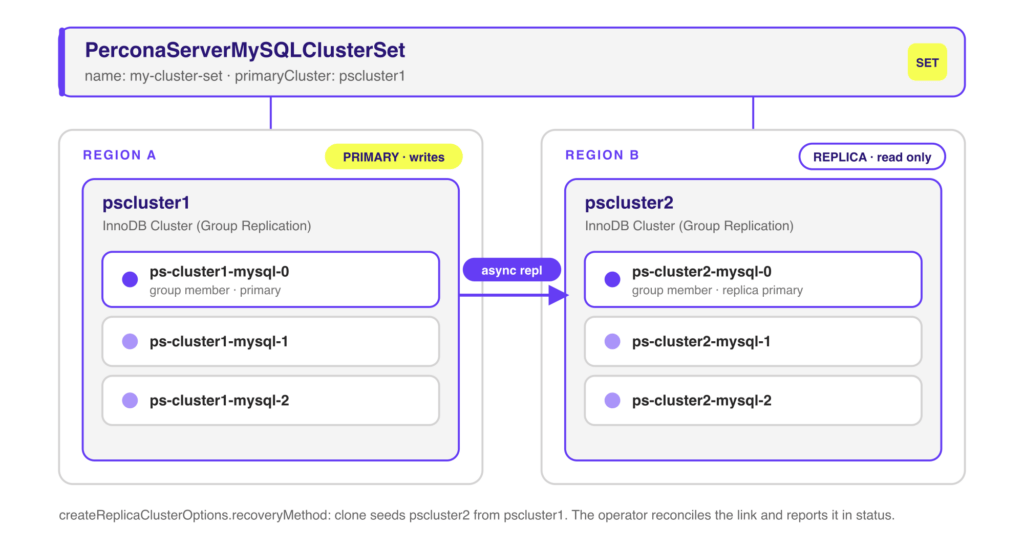
The operator adds a new custom resource, PerconaServerMySQLClusterSet, that groups two or more Group Replication clusters into a single set with one primary. The operator drives MySQL Shell to build the InnoDB ClusterSet, wires the replica clusters to the primary, and tracks the topology in the resource’s status. A replica cluster provisions from the primary using a chosen recovery method, so you do not stage data manually.
|
1 2 3 4 5 6 7 8 9 10 11 12 13 14 15 16 17 18 19 20 21 22 23 24 25 26 |
apiVersion: ps.percona.com/v1 kind: PerconaServerMySQLClusterSet metadata: name: my-cluster-set finalizers: - percona.com/clusterset-dissolve spec: # unsafeFlags: # forcedFailover: false # forcedClusterRemoval: false primaryCluster: pscluster1 credentialsSecret: name: ps-cluster1-secrets key: clusterset sslMode: AUTO createReplicaClusterOptions: recoveryMethod: clone clusters: - innodbClusterName: pscluster1 endpoints: - host: ps-cluster1-mysql-primary.default.svc.cluster.local - innodbClusterName: pscluster2 endpoints: - host: ps-cluster2-mysql-0.ps-cluster2-mysql.default.svc.cluster.local mysqlshellRunner: image: percona/percona-server:8.4.10-10.1 |
primaryCluster names the source of truth. Each entry under clusters points at a Group Replication cluster by its InnoDB cluster name and reachable endpoints, so the clusters can live in separate namespaces or separate Kubernetes clusters joined by routable DNS. createReplicaClusterOptions.recoveryMethod: clone tells the replica to seed itself with a full clone. The percona.com/clusterset-dissolve finalizer ensures the operator tears the ClusterSet down cleanly instead of leaving orphaned replication channels behind.
Once the set exists, the operator keeps the replica clusters attached to the primary and surfaces the topology in the resource’s status, so you can see which cluster is primary and whether every replica is connected without shelling into MySQL Shell. A planned switchover promotes a replica to primary. The unsafeFlags block gates the disruptive paths for when the primary is already gone.
Note: The unsafeFlags block gates disruptive operations such as forced failover and forced cluster removal. Leave these off for normal operation and reach for them only in a controlled recovery, since a forced failover can diverge history if the old primary comes back.
Backups are the copy of your data most likely to leave the cluster’s security boundary. They land in an object-storage bucket, get replicated across a provider’s regions, and often live longer than the database that produced them. If they are not encrypted before they leave the pod, a bucket misconfiguration or a leaked credential exposes the whole dataset. This release lets the operator encrypt backup data as it is
Backups in the operator run on Percona XtraBackup. XtraBackup encrypts the stream with its xbcrypt component before uploading, so the data is ciphertext at rest in the bucket and stays that way until you restore it with the same key. You supply the key through a Kubernetes Secret and reference that Secret from the backup configuration. The operator never bakes the key into a manifest or an image.
Point a storage target at an encryption-key Secret with encryptionKeySecret:
|
1 2 3 4 5 6 7 8 9 10 11 12 13 14 15 16 |
apiVersion: ps.percona.com/v1 kind: PerconaServerMySQL metadata: name: cluster1 spec: backup: storages: s3-us-west: type: s3 encryptionKeySecret: key: encryptionKey name: my-s3-encryption-key-secret s3: bucket: S3-BACKUP-BUCKET-NAME-HERE credentialsSecret: cluster1-s3-credentials region: us-west-2 |
The same encryptionKeySecret field works under S3, GCS, and Azure storage targets, so a multi-cloud backup policy uses one consistent mechanism. You can also set an encryptionKeySecret at the backup level to apply one key across every storage target instead of repeating it per bucket. The referenced Secret holds the key under the encryptionKey data field.
Encryption is transparent on the way back in. When you restore, the operator reads the same Secret, hands the key to XtraBackup, and decrypts the stream before it prepares the data directory. The only hard requirement is that the key still exists: the restore fails fast if the Secret is missing or holds a different key than the one that produced the backup. Encryption also composes with backup compression, so you keep the smaller footprint and the ciphertext-at-rest guarantee at the same time.
Note: Keep the encryption key safe and versioned outside the cluster. A backup encrypted with a key you have lost is not recoverable. Treat the key with the same care as the backups themselves.
Running out of disk is one of the fastest ways to take a database down, and it rarely happens at a convenient hour. The operator has supported manual volume expansion since an earlier release: you raise resources.requests.storage, apply, and the operator grows the PersistentVolumeClaim for you. That still requires a human to notice the trend and act. Version 1.2.0 adds automatic scaling that watches usage and grows the volume on its own.
Storage growth is predictable in aggregate and unpredictable in timing. A batch import, a retention change, or an unexpected traffic spike can eat headroom faster than an on-call engineer can respond. Letting the operator resize before the volume fills turns a page someone at 3 a.m. incident into a log line, as long as your storage class supports online expansion.
You enable volume expansion, then define an autoscaling policy. The operator monitors each data PVC and, when usage crosses the threshold, grows the volume by a fixed step up to a ceiling you set. Because it builds on the Kubernetes volume-expansion API, the underlying storage class must have AllowVolumeExpansion: true.
|
1 2 3 4 5 6 7 8 9 10 11 12 13 |
apiVersion: ps.percona.com/v1 kind: PerconaServerMySQL metadata: name: cluster1 spec: enableVolumeExpansion: true storageScaling: enableVolumeScaling: true autoscaling: enabled: true growthStep: 2Gi maxSize: 10Gi triggerThresholdPercent: 80 |
triggerThresholdPercent is the fill level that triggers a resize (default 80, allowed range 50 to 95). growthStep is how much capacity each resize adds (default 2Gi), and maxSize caps total growth so a runaway workload cannot expand a volume without bound. The operator validates the relationship between these fields: autoscaling cannot be enabled unless enableVolumeScaling is on. For teams that prefer an external controller to own resizing, enableExternalAutoscaling hands that responsibility off instead.
The operator records each resize in the cluster status under storageAutoscaling, including the count of resizes and the timestamp of the last one. That gives you an audit trail and a signal worth alerting on: a volume that keeps hitting its growthStep is telling you the workload has changed, and a volume approaching maxSize is telling you to plan capacity before the ceiling stops the next resize.
Note: PVC expansion is one-way. Kubernetes can grow a volume but cannot shrink it, so set maxSize deliberately. Confirm your storage class allows expansion before you rely on this in production.
Beyond the three headline features, 1.2.0 ships a set of enhancements that smooth day-two operations:
For the full list, including bug fixes, see the release notes linked below.
Percona Operator for MySQL 1.2.0 extends the operator across the parts of the lifecycle that used to need custom glue: replication across sites, encryption of data that leaves the cluster, and storage that keeps up with growth. Platform teams running MySQL fleets on Kubernetes get declarative control over disaster recovery, a cleaner path through a security review, and one less 3 a.m. page. If there is a topology or a control you still have to script around, tell us on the forum, since that feedback is where releases like this one come from.
Resources
RELATED POSTS