

 My colleague Miguel wrote about ways to audit login attempts in MySQL over 13 years ago, and this is still a relevant subject. I decided to refresh this topic to include some important changes since then.
Very often, it is important to track login attempts to our databases due to security reasons as well as to catch application misconfigurations. I’ll focus here on the most convenient ways to log authentication attempts. While auditing all client connections is usually pointless on busy production systems, when even thousands of new client sessions may be authenticating per second, let’s concentrate especially on the failed ones.
All MySQL and MariaDB variants have an easy way of logging failed authentication attempts in the standard error log via elevated log verbosity. To enable it, in older MySQL versions up to 5.7, as well as in all MariaDB versions, set log_warnings = 2 (or higher).
In MySQL 5.7+, the role of setting the error log talkativeness was moved to the new variable: log_error_verbosity. MySQL 8.0+ no longer recognizes log_warnings. To log failed logins, set log_error_verbosity = 3 instead.
An example log entry when login credentials were incorrect may look like this:
|
1 |
2026-02-24T20:36:09.186218Z 22 [Note] [MY-010926] [Server] Access denied for user 'myuser2'@'192.168.121.12' (using password: YES) |
Another error occurs when user credentials are fine, but the user does not have privileges to access a given database:
|
1 |
2026-02-24T23:12:19.600451Z 35 [Note] [MY-010914] [Server] Access denied for user 'myuser'@'192.168.46.%' to database 'test1' |
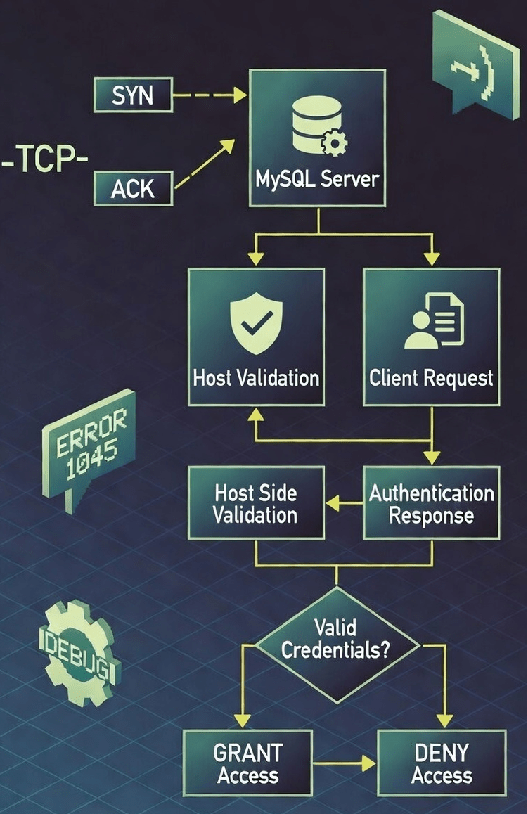
Now, the problem with this is that the above note will only be printed when there is a system user allowing the source hostname, IP address, or subnet, and the actual username authentication phase is engaged. When the host is rejected early, we will not find anything in the error log! Only the client side will receive a rejection message, like this one:
|
1 2 |
$ mysql -h192.168.46.20 -uuser ERROR 1130 (HY000): Host '192.168.46.13' is not allowed to connect to this MySQL server |
Therefore, the error log cannot provide the complete information about failed login attempts if some are incoming from undefined hosts. Btw, the general log does not log these either.
The traditional Audit Log Plugin feature, available in all recent MySQL variants, allows us to limit logging for connection activities, while we can ignore other queries. Unfortunately, we cannot log only failed logins, so the log may grow very fast when applications actively open new connections, and further filtering for failed attempts has to be done externally.
In Percona Audit Log Plugin, it can be done via the policy setting: audit_log_policy = LOGINS.
An example of a netcat TCP probe will result in the following audit log entry:
|
1 2 3 4 5 6 7 8 9 10 11 12 13 14 15 16 17 |
tail -1 /var/lib/mysql/audit.log |jq { "audit_record": { "name": "Connect", "record": "2138_2026-02-26T09:32:27", "timestamp": "2026-02-26T09:33:54Z", "connection_id": "13", "status": 1158, "user": "", "priv_user": "", "os_login": "", "proxy_user": "", "host": "test-host1", "ip": "192.168.46.12", "db": "" } } |
The entry provides a status error code:
|
1 2 |
$ perror 1158 MySQL error code MY-001158 (ER_NET_READ_ERROR): Got an error reading communication packets |
Interestingly, the corresponding error log entry has the same message with a different code:
|
1 |
2026-02-26T09:33:54.917323Z 13 [Note] [MY-010914] [Server] Got an error reading communication packets |
Another example of an unknown user login attempt:
|
1 2 3 4 5 6 7 8 9 10 11 12 13 14 15 16 |
{ "audit_record": { "name": "Connect", "record": "2142_2026-02-26T09:32:27", "timestamp": "2026-02-26T09:39:45Z", "connection_id": "17", "status": 1045, "user": "wronguser", "priv_user": "", "os_login": "", "proxy_user": "", "host": "test-host1", "ip": "192.168.46.12", "db": "" } } |
Here, we can determine that the user part is wrong, as the priv_user field is empty.
A typical legit client session will have two entries, with status “0”, i.e:
|
1 2 |
{"audit_record":{"name":"Connect","record":"2145_2026-02-26T09:32:27","timestamp":"2026-02-26T09:42:27Z","connection_id":"19","status":0,"user":"myuser","priv_user":"myuser","os_login":"","proxy_user":"","host":"test-host1","ip":"192.168.46.13","db":""}} {"audit_record":{"name":"Quit","record":"2146_2026-02-26T09:32:27","timestamp":"2026-02-26T09:42:27Z","connection_id":"19","status":0,"user":"myuser","priv_user":"myuser","os_login":"","proxy_user":"","host":"test-host1","ip":"192.168.46.13","db":""}} |
In the MariaDB Audit Plugin, connection events can be logged via the server_audit_events = CONNECT setting. An example logging attempt with the wrong password would be seen as:
|
1 2 |
20260226 10:52:48,test-host1,root,localhost,8,0,FAILED_CONNECT,,,1045 20260226 10:52:48,test-host1,root,localhost,8,0,DISCONNECT,,,0 |
The new audit log functionality comes as a plugin in versions 8.0.x or a component in versions 8.4+, and provides way higher flexibility and finer-grained control on what and when is logged.
With Audit Log Filter, to minimize noise and overhead, it is possible to log only failed login attempts, so legitimate application sessions won’t flood the log.
Here is an example of how to enable such a filter rule:
|
1 2 3 4 5 6 7 8 9 10 11 12 13 14 15 16 17 18 19 20 |
mysql› SELECT audit_log_filter_set_filter( 'failed_logins_only', '{ "filter": { "log": false, "class": { "name": "connection", "event": { "name": "connect", "log": { "not": { "field": { "name": "status", "value": "0" } } } } } } }' ); mysql› SELECT audit_log_filter_set_user('%', 'failed_logins_only'); |
The above rules set logging for the connection class, for all events that resulted in an error (status is not success).
An example entry for a client trying to authenticate with the wrong user credentials may look like this (if JSON format is used):
|
1 2 3 4 5 6 7 8 9 10 11 12 13 14 15 16 17 18 19 20 21 22 |
{ "timestamp": "2026-03-05 11:31:12", "id": 8, "class": "connection", "event": "connect", "connection_id": 31, "account": { "user": "wronguser", "host": "" }, "login": { "user": "wronguser", "os": "", "ip": "192.168.121.16", "proxy": "" }, "connection_data": { "connection_type": "ssl", "status": 1045, "db": "" }, "connection_attributes": { "_pid": "3608615", "_platform": "x86_64", "_os": "Linux", "_client_name": "libmysql", "os_user": "przemek", "_client_version": "8.4.7-7" } } |
And a simple TCP probe (netcat) may look like this:
|
1 2 3 4 5 6 7 8 9 10 11 12 13 14 |
{ "timestamp": "2026-03-05 11:31:26", "id": 9, "class": "connection", "event": "connect", "connection_id": 32, "account": { "user": "", "host": "test-host1" }, "login": { "user": "", "os": "", "ip": "192.168.46.13", "proxy": "" }, "connection_data": { "connection_type": "tcp/ip", "status": 1158, "db": "" } } |
Unfortunately, again, connections from unknown hosts are not logged. Logging attempts aborted early on the host validation phase, do not reach the audit log or any other log! This is because the validation occurs at the very beginning of the handshake workflow, and if it returns failure, the connection is terminated before reaching the logging capabilities.
To workaround this limitation and make all unsuccessful login attempts be logged, we need to create a catch-all user account. However, we don’t want to extend the possible attack surface at the same time, so let’s disable authentication entirely for such an account. We will need the no-login plugin first:
|
1 |
INSTALL PLUGIN mysql_no_login SONAME 'mysql_no_login.so'; |
Now, the following user entry will allow auditing connection attempts from any host/IP:
|
1 |
CREATE USER ''@'%' IDENTIFIED WITH mysql_no_login; |
Now, specific port knocking may still not be logged, like with nmap, as the client sends a RST packet even before the initial MySQL “hello” packet. So, we will not see this session anywhere in the MySQL logs:
|
1 2 3 4 5 6 7 |
$ nmap 192.168.46.20 -sT -p 3306 Starting Nmap 7.94SVN ( https://nmap.org ) at 2026-03-11 07:24 CET Nmap scan report for 192.168.46.20 (192.168.46.20) Host is up (0.00021s latency). PORT STATE SERVICE 3306/tcp open mysql Nmap done: 1 IP address (1 host up) scanned in 0.02 seconds |
The only way to capture the above would be to watch the wire protocol, i.e., with tcpdump.
The error log entries can be viewed in a more structured manner, with the P_S table, so the entry:
|
1 |
2026-02-25T20:46:40.779435Z 66 [Note] [MY-010926] [Server] Access denied for user 'wronguser'@'test-host1' (using password: YES) |
Will have equivalent in:
|
1 2 3 4 5 6 7 8 9 |
mysql› select * from performance_schema.error_log order by LOGGED desc limit 1⧵G *************************** 1. row *************************** LOGGED: 2026-02-25 20:46:40.779435 THREAD_ID: 66 PRIO: Note ERROR_CODE: MY-010926 SUBSYSTEM: Server DATA: Access denied for user 'wronguser'@'test-host1' (using password: YES) 1 row in set (0.00 sec) |
And it allows SQL queries against the log, like aggregations:
|
1 2 3 4 5 6 7 |
mysql› select count(*) from performance_schema.error_log where ERROR_CODE='MY-010926'; +----------+ | count(*) | +----------+ | 11 | +----------+ 1 row in set (0.00 sec) |
Also, MySQL keeps track of connection attempts from external hosts in the host cache structure, which can be observed via performance_schema.host_cache view. The view provides statistics on the number of failed connections grouped by reason categories, together with success and failure timestamps. This view provides information only about source hosts’ connection events, but not users. An example output may look like this:
|
1 2 3 4 5 6 7 8 9 10 11 12 13 14 15 16 17 18 19 20 21 22 23 24 25 26 27 28 29 30 31 32 |
mysql› select * from performance_schema.host_cache⧵G *************************** 1. row *************************** IP: 192.168.46.12 HOST: test-host1 HOST_VALIDATED: YES SUM_CONNECT_ERRORS: 2 COUNT_HOST_BLOCKED_ERRORS: 0 COUNT_NAMEINFO_TRANSIENT_ERRORS: 0 COUNT_NAMEINFO_PERMANENT_ERRORS: 0 COUNT_FORMAT_ERRORS: 0 COUNT_ADDRINFO_TRANSIENT_ERRORS: 0 COUNT_ADDRINFO_PERMANENT_ERRORS: 0 COUNT_FCRDNS_ERRORS: 0 COUNT_HOST_ACL_ERRORS: 0 COUNT_NO_AUTH_PLUGIN_ERRORS: 0 COUNT_AUTH_PLUGIN_ERRORS: 3 COUNT_HANDSHAKE_ERRORS: 2 COUNT_PROXY_USER_ERRORS: 0 COUNT_PROXY_USER_ACL_ERRORS: 0 COUNT_AUTHENTICATION_ERRORS: 5 COUNT_SSL_ERRORS: 0 COUNT_MAX_USER_CONNECTIONS_ERRORS: 0 COUNT_MAX_USER_CONNECTIONS_PER_HOUR_ERRORS: 0 COUNT_DEFAULT_DATABASE_ERRORS: 2 COUNT_INIT_CONNECT_ERRORS: 0 COUNT_LOCAL_ERRORS: 0 COUNT_UNKNOWN_ERRORS: 0 FIRST_SEEN: 2026-02-25 20:41:57 LAST_SEEN: 2026-02-26 09:02:35 FIRST_ERROR_SEEN: 2026-02-25 20:42:17 LAST_ERROR_SEEN: 2026-02-26 09:02:38 1 row in set (0.00 sec) |
Depending on what was wrong with the connection or authentication attempt, a different counter will increment. For instance, when a user tries to log in with the default database, it does not have the privilege to, the COUNT_DEFAULT_DATABASE_ERRORS will increase. When an unknown user tries to log in without a password, the COUNT_AUTH_PLUGIN_ERRORS is used, but when any user (existing or not) tries a wrong password, the COUNT_AUTHENTICATION_ERRORS gets used instead.
Some cases of port probing, for example, using telnet or netcat, will increment COUNT_HANDSHAKE_ERRORS. Interestingly, though, the nmap probe does not increment any of them.
Also, when there is no catch-all user and no user entry matching the source IP/host/network, the host_cache table will allow us to at least observe statistics about failed logins per source IP, as each connection refused on the host validation phase will increment the COUNT_HOST_ACL_ERRORS counter.
Some limited visibility into failed login attempts can be available via the Connection Control Plugin. However, this plugin’s main purpose is not auditing, but rather slowing down brute force attacks against MySQL user accounts. Still, when installed, failed attempt counts are visible via the following view:
|
1 2 3 4 5 6 7 8 9 10 |
mysql› select * from information_schema.CONNECTION_CONTROL_FAILED_LOGIN_ATTEMPTS; +---------------------+-----------------+ | USERHOST | FAILED_ATTEMPTS | +---------------------+-----------------+ | ''@'test-host1' | 10 | | ''@'192.168.121.13' | 4 | | 'root'@'localhost' | 3 | | ''@'%' | 10 | +---------------------+-----------------+ 4 rows in set (0.01 sec) |
Finally, another per-user view was added in recent Percona Server versions, which shows how many failed login attempts are left until the account gets locked. This feature is active (tracking active) only for the accounts that have the FAILED_LOGIN_ATTEMPTS and PASSWORD_LOCK_TIME limitations:
|
1 2 3 4 5 6 7 8 9 10 11 12 13 |
mysql› select * from performance_schema.account_failed_login_lock_status; +-------------------+-----------+--------------------+--------------+--------------------+-----------+--------------------+-----------------------+ | USER | HOST | IS_TRACKING_ACTIVE | MAX_ATTEMPTS | PASSWORD_LOCK_DAYS | IS_LOCKED | REMAINING_ATTEMPTS | REMAINING_DAYS_LOCKED | +-------------------+-----------+--------------------+--------------+--------------------+-----------+--------------------+-----------------------+ | mysql.infoschema | localhost | NO | 0 | 0 | NULL | NULL | NULL | | mysql.session | localhost | NO | 0 | 0 | NULL | NULL | NULL | | mysql.sys | localhost | NO | 0 | 0 | NULL | NULL | NULL | | percona.telemetry | localhost | NO | 0 | 0 | NULL | NULL | NULL | | root | localhost | NO | 0 | 0 | NULL | NULL | NULL | | user1 | % | YES | 100 | 1 | NO | 96 | 0 | | NULL | % | NO | 0 | 0 | NULL | NULL | NULL | +-------------------+-----------+--------------------+--------------+--------------------+-----------+--------------------+-----------------------+ 7 rows in set (0.00 sec) |
There are multiple ways to monitor MySQL or MariaDB login attempts, but only the Audit Log Filter allows you to specify exactly what you want to log, like only failed logins, for instance. Due to MySQL connection handling behavior, in order to log authentication attempts from undefined hosts, a secure catch-all user account may be needed, though.
As for the TCP scanners, MySQL may not be able to log all such connection attempts, depending on how fast the connection is terminated.
The article was created by a human.
Resources
RELATED POSTS




