

At Percona Live last week, someone showed me a graph from their Cacti monitoring system, using the templates that I wrote. It was the buffer pool pages read, written, and created. He asked me if the graph was okay. Shouldn’t there be a lot more pages read than written, he asked? It’s a great question.
I’ve blogged before about the danger of trying to interpret ratios. Ratios are not good ways to discover whether systems are healthy. So, why graph them, then?
First, let me say that the graph actually doesn’t show a ratio — it just shows the absolute values of the reads, writes, and creates per second, stacked on top of each other. The person was mentally comparing them and creating a ratio from them. But there’s no ratio on the graph itself:
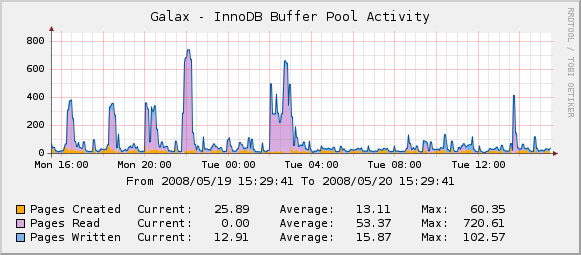
Regardless of that, some systems ought to have more reads than writes, and vice versa. So if you’re looking at your graph wondering what it should look like, the answer is probably “it should look exactly as it looks!”
I’ve gotten a lot of questions over time about how to interpret the Cacti graphs, and this person helped me to understand what the questions were really about. People were asking me “when I look at these graphs, how can I tell if anything is wrong with my system?” But that’s not really the most useful way to approach the graphs.
It really comes down to the difference between discovery and diagnosis. In general, it’s best to use the graphs for diagnosing problems that you already know about, not for trying to discover problems. Your monitoring and alerting system (Nagios?) should be trying to discover whether there is a problem. The graphs are there for quickly showing you what has changed. If the website suddenly starts responding very slowly, for example, then you can look at the graphs and see if any of them have sharp increases or decreases. You can use that information to help you diagnose.
But in general, I wouldn’t spend very much time looking at the graphs from day to day. I’d just check them once in a while — maybe once a week I’d look at the monthly view — to see if there were any sharp changes during the past week; I’d ensure that I know why those changes happened if I see any (maybe I deployed a new release); and I’d want to make sure that the graphs are still working, and haven’t gotten broken due to some problem like privileges or firewall rules.
In the ideal world, I’d like to simply collect everything, and not even define any graphs for the metrics. Then I’d like an easy way to make graphs on an ad-hoc basis. But Cacti is designed to have defined graphs, and that makes it tempting for people to spend a lot of time looking at them 
Resources
RELATED POSTS





I’m a huge fan of splunk. We’ve got some scripted inputs pulling out status variables and other things and ingesting into splunk and we’ve built some dashboards around it. [Basically a splunk version of the cacti graphs, one of which is in this blog]
The best thing about splunk is that you can build alerting off scheduled reports – around deltas. Eg last week the buffer pool page read was X and today its Y and its 20% bigger so there should be some investigation understanding the discrepancy. (The delta should be related to any traffic growth or reduction so alerting on anything outside that boundary is a start).
Graphs are nice to see things over time but like you wrote, they’re difficult to use for discovery. What is really interesting is when you compare with the previous day and previous week and see a big delta.
Dave and Baron: I personally think the MySQL Enterprise Monitor does set a good benchmark for being user friendly. Sure, Baron has long since passed the point where a tool could guide him about what to do. But most MySQL users out there benefit a lot. And notice that the usefullness of some of the MEM advisors are trivially true, for instance when it tells you that there is a root account without password and which SQL command can be used to set a password – there is no question this is always good advice.
Even for the more savvy user I always liked that the advisors have the needed SQL handy for me. If I disagree with the advice I can ignore it, or execute the fix with some other parameters, but at least I don’t have to pour the manual to find the right syntax first.
It’s also worth checking out collectd. Doesn’t really do correlation but has a boatload of plugins, including a MySQL one.
“In the ideal world, I’d like to simply collect everything, and not even define any graphs for the metrics. Then I’d like an easy way to make graphs on an ad-hoc basis.” – definitely check out http://opentsdb.net , that’s exactly what it does. Way better for correlation than Cacti.
I don’t really believe in any automated tools suggesting changes to configuration… see http://www.mysqlperformanceblog.com/2008/08/18/the-ultimate-tool-for-generating-optimal-mycnf-files-for-mysql/
Agreed – I have used the Cacti graphs several times to do post mortem diagnoses. Typically I’ll see spikes in the suspected time window and coupled with the slow query log and mk-query-digest, you have a good set of tools to get a handle on what happend.
Baron – what is your opinion of the payed MySQL Enterprise Monitor thats offered. That tool, I believe, offers suggestions on making “tweaks” to the server.