

Failover of the logical replication slot has always been the pain point while using the logical replication in PostgreSQL. This lack of feature undermined the use of logical replication and acted as one of the biggest deterrents. The stake and impact were so high that many organizations had to discard their plans around logical replication, and it affected many plans for migrations to PostgreSQL. It was painful to see that many had to opt for proprietary/vendor-specific solutions instead.
At Percona, we have written about this in the past: Missing Piece: Failover of the Logical Replication Slot. In that post, we discussed one of the possible approaches to solve this problem, but there was no reliable mechanism to copy the slot information to a Physical standby and maintain it.
The problem, in nutshell, is: the replication slot will be always maintained on the Primary node. If there is a switchover/failover to promote one of the standby, the new primary won’t have any idea about the replication slot maintained by the previous primary node. This breaks the logical replication from the downstream systems or if a new slot is created, it becomes unsafe to use.
The good news is that Patroni developers and maintainers addressed this problem from Version 2.1.0 and provided a working solution without any invasive methods/extensions. For me, this is a work that deserves a big round of applause from the Patroni community and that is the intention of this blog post and to make sure that a bigger crowd is aware of it.
A ready-to-use Patroni package is available from the Percona repository. But you are free to use Patroni from any source.
In case you are excited about this and want to try it, the following steps might be helpful.
The entire discussion is about logical replication. So the minimum requirement is to have a wal_level set to “logical”. If the existing Patroni configuration is having wal_level set to “replica” and if you want to use this feature, you may just edit the Patroni configuration.
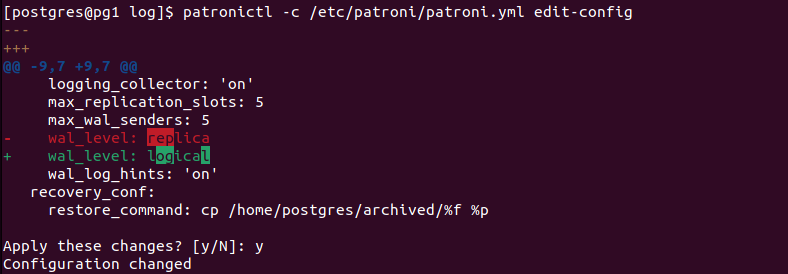
However, this change requires the PostgreSQL restart:
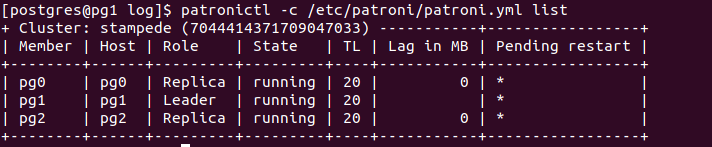
“Pending restart” with * marking indicates the same.
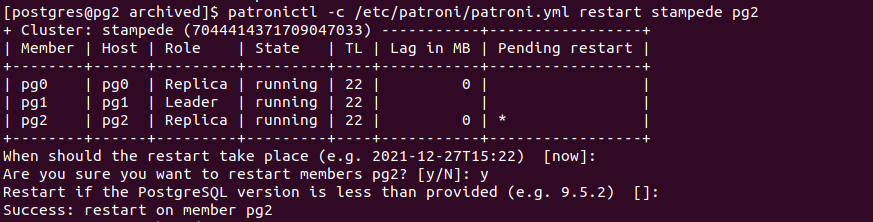
You may use Patroni’s “switchover” feature to restart the node to make the changes into effect because the demoted node goes for a restart.

If there are any remaining nodes, they can be restarted later.
Now we can add a permanent logical replication slot to PostgreSQL which will be maintained by Patroni.
Edit the patroni configuration:
|
1 |
$ patronictl -c /etc/patroni/patroni.yml edit-config |
A slot specification can be added as follows:
|
1 2 3 4 5 6 7 |
… slots: logicreplia: database: postgres plugin: pgoutput type: logical … |
The “slots:” section defines permanent replication slots. These slots will be preserved during switchover/failover. “pgoutput” is the decoding plugin for PostgreSQL logical replication.

Once the change is applied, the logical replication slot will be created on the primary node. Which can be verified by querying:
|
1 |
select * from pg_replication_slots; |
The following is a sample output:
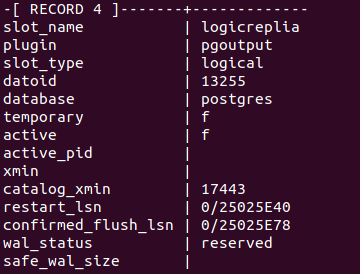
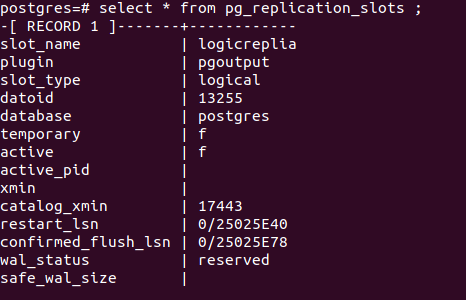
Now here is the first level of magic! The same replication slot will be created on the standbys, also. Yes, Patroni does it. Patroni internally copies the replication slot information from the primary to all eligible standby nodes!.
We can use the same query on the pg_replication_slots on the standby and see similar information.
The following is an example showing the same replication slot reflecting on the standby side:
This slot can be used by the subscription by explicitly specifying the slot name while creating the subscription.
|
1 |
CREATE SUBSCRIPTION sub2 CONNECTION '<connection_string' PUBLICATION <publication_name> WITH (copy_data = true, create_slot=false, enabled=true, slot_name=logicreplia); |
Alternatively, an existing subscription can be modified to use the new slot which I generally prefer to do.
For example:
|
1 |
ALTER SUBSCRIPTION name SET (slot_name=logicreplia); |
Corresponding PostgreSQL log entries can confirm the slot name change:
|
1 2 |
2021-12-27 15:56:58.294 UTC [20319] LOG: logical replication apply worker for subscription "sub2" will restart because the replication slot name was changed 2021-12-27 15:56:58.304 UTC [20353] LOG: logical replication apply worker for subscription "sub2" has started |
From the publisher side, We can confirm the slot usage by checking the active_pid and advancing LSN for the slots.
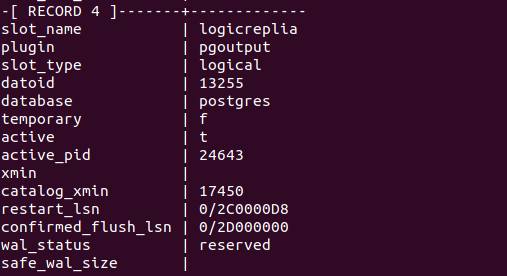
The second level of Surprise! The Replication Slot information in all the standby nodes of the Patroni cluster is also advanced as the logical replication progresses from the primary side
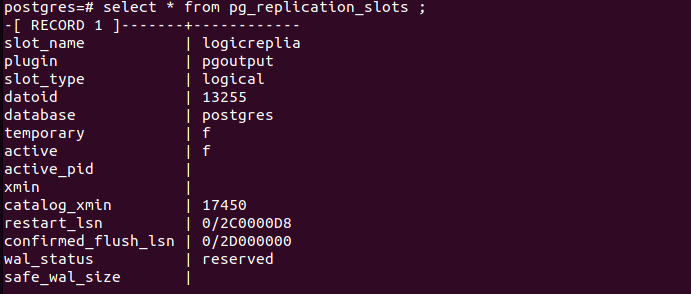
At a higher level, this is exactly what this feature is doing:
In the event of a switchover or failover, we are not losing any slot information as they are already maintained on the standby nodes.
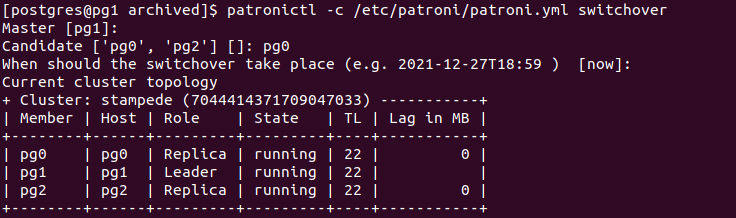
After the switchover, the topology looks like this:
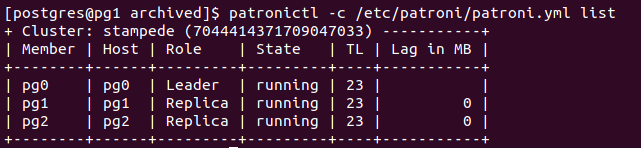
Now, any downstream logical replica can be repointed to the new primary.
|
1 2 |
postgres=# ALTER SUBSCRIPTION sub2 CONNECTION 'host=192.168.50.10 port=5432 dbname=postgres user=postgres password=vagrant'; ALTER SUBSCRIPTION |
This continues the replication, and pg_replication_slot information can confirm this.
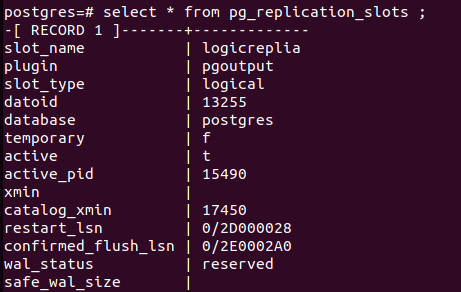
The logical replication slot is conceptually possible only on the primary Instance because that is where the logical decoding happens. Now with this improvement, Patroni makes sure that the slot information is available on standby also and it will be ready to take over the connection from the subscriber.
rewind or superuser credentials. Patroni uses the pg_read_binary_file() function to read the slot information. Source code Reference.You’ve chosen PostgreSQL for its flexibility, performance, and cost savings—but even experienced IT leaders can hit avoidable pitfalls along the way. Here’s what to look out for.
Resources
RELATED POSTS





Good to know this development by Patroni. Thanks for sharing in such detail. Could there be a scenario where the primary goes down before the slot is advanced on standby?
You are welcome 🙂 . No need to worry even if slot on the standby lags.
because it is the subscriber who makes the request so the slot will be automatically advanced.
Sorry, I realised that my query was not what I actually wanted to ask.
Let me re-ask: so the standby needs to be a synchronous (streaming replication) standby. A change on primary, that is acknowledged to the client (application), will definitely be available on the standby and because the slot is maintained on the standby too, the subscriber can request the standby from the point till which replication was done. Correct?
Conceptually Yes, Standby can serve the request. But If you are thinking about leveraging standby as a publisher, it won’t be possible now because logical decoding is not yet allowed on standby.
Great post! Do you know whether it is possible to write all the hostnames into the subscriber connection string and target_session_attrs=read-write, so that the subscription would be reset to the new primary automatically?
Sorry @Michael Rikmas for being late. Yes Thats indeed a great idea. That can eliminate use of HAProxy
Being a libpq connection that should work 🙂 . But I am yet to test
I had setup like this but my logical replication is not working .Reason being ,Patorni’s physical slot already in place .
Please note I have already set all parameters like wal_levle= logical and shared_preload_lib as well to logical and created extension as well but still logical replication is not working . Whenever i’m trying to create table on STANDBY ,its saying can’t create d/table in read only transaction
Hi Deepak, In this post, I am discussing about built-in native logical replication in PostgreSQL and slot maintenance for replication to downstream systems. No need to create any extension for it.
hi Jobin, I followed your steps and added the below but i still don’t see the logical slot in the database. Is there anything i am missing?
slots:
logicreplica:
database: test1
plugin: pgoutput
type: logical
test1=# select * from pg_replication_slots;
-[ RECORD 1 ]——-+———————–
slot_name | patroni_pgcluster_qa02
plugin |
slot_type | physical
datoid |
database |
temporary | f
active | t
active_pid | 38817
xmin |
catalog_xmin |
restart_lsn | 0/9898D90
confirmed_flush_lsn |
wal_status | reserved
safe_wal_size |
two_phase | f
-[ RECORD 2 ]——-+———————–
slot_name | patroni_pgcluster_qa03
plugin |
slot_type | physical
datoid |
database |
temporary | f
active | t
active_pid | 38815
xmin |
catalog_xmin |
restart_lsn | 0/9898D90
confirmed_flush_lsn |
wal_status | reserved
safe_wal_size |
two_phase | f
below comment can be ignored and removed.
It’s a nice feature! Using this feature requires adding slot information to the patroni.yml configuration file in advance. If the user add a subscription(include slot) without pre-creating replication slot in this way,What’s a good way for me to find it in time and add it to the configuration file to avoid the loss of replication slot information after switching.Thanks!
Great post! I have set up a new Postgres cluster on my openshift cluster with 1 master and 2 replicas according to this recommendation. I have also configured 1 replication slot. Now I would like to monitor the health of the cluster. Therefore I have created an alert to fire if pg_exporter_last_scrape_error returns a value greater than 0. This metric works on the master as expected but all replicas return 1 instead of 0. Is this intended? Am I making a mistake in my thinking? Are there any tips on how and what is best to monitor in this scenario?
I’m stuck on an issue with Patroni and logical replication. I’ve been able to set all this up but now when logical replication starts I get a “publication does not exist” error. The publication does exist, in fact! The same case is documented here by someone else: https://postgrespro.com/list/thread-id/2492943 But there is no solution on the post. From what I understand, if you create the slot before your create the publication, then the slot does not know about the existence of the publication. I do not have control on when Patroni creates the slot and everything I have tried so far creates the publication after the slot is created, because I deploy the table/publication creation scripts after starting a new Patroni cluster on Kubernetes. Does anyone know how to resolve this?