

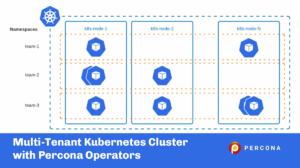
 There are cases where multiple teams, customers, or applications run in the same Kubernetes cluster. Such an environment is called multi-tenant and requires some preparation and management. Multi-tenant Kubernetes deployment allows you to utilize the economy of scale model on various levels:
In this blog post, we are going to review multi-tenancy best practices, recommendations and see how Percona Operators can be deployed and managed in such Kubernetes clusters.
Multi-tenancy usually means a lot of Pods and workloads in a single cluster. You should always remember that there are certain limits when designing your infrastructure. For vanilla Kubernetes, these limits are quite high and hard to reach:
Managed Kubernetes services have their own limits that you should keep in mind. For example, GKE allows a maximum of 110 Pods per node on a standard cluster and only 32 on GKE Autopilot nodes.
The older AWS EKS CNI plugin was limiting the number of Pods per node to the number of IP addresses EC2 can have. With the prefix assignment enabled in CNI, you are still going to hit a limit of 110 pods per node.
Kubernetes Namespaces provides a mechanism for isolating groups of resources within a single cluster. The scope of k8s objects can either be cluster scope or namespace scoped. Objects which are accessible across all the namespaces like ClusterRole are cluster scoped and those which are accessible only in a single namespace like Deployments are namespace scoped.
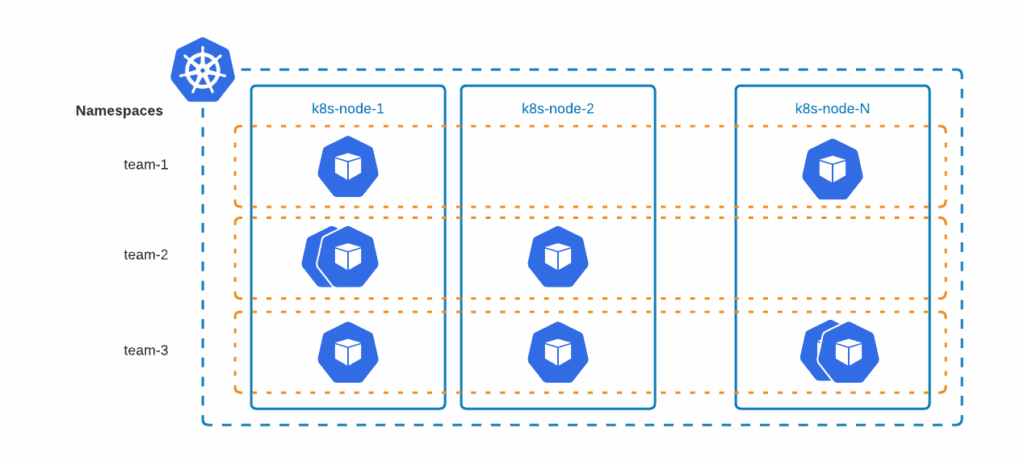
Deploying a database with Percona Operators creates pods that are namespace scoped. This provides interesting opportunities to run workloads on different namespaces for different teams, projects, and potentially, customers too.
Example: Percona Operator for MongoDB and Percona Server for MongoDB can be run on two different namespaces by adding namespace metadata fields. Snippets are as follows:
|
1 2 3 4 5 6 7 8 9 10 11 12 13 14 15 16 17 18 19 20 21 22 23 24 25 26 27 28 |
# Team 1 DB running in team1-db namespace apiVersion: psmdb.percona.com/v1-11-0 kind: PerconaServerMongoDB metadata: name: team1-server namespace: team1-db # Team 1 deployment running in team1-db namespace apiVersion: apps/v1 kind: Deployment metadata: name: percona-server-mongodb-operator-team1 namespace: team1-db # Team 2 DB running in team2-db namespace apiVersion: psmdb.percona.com/v1-11-0 kind: PerconaServerMongoDB metadata: name: team2-server namespace: team2-db # Team 2 deployment running in team2-db namespace apiVersion: apps/v1 kind: Deployment metadata: name: percona-server-mongodb-operator-team2 namespace: team2-db |
Suggestions:
Namespaces can be used per team, per application environment, or any other logical structure that fits the use case.
The biggest problem in any multi-tenant environment is this – how can we ensure that a single bad apple doesn’t spoil the whole bunch of apples?
Thanks to Resource Quotas, we can restrict the resource utilization of namespaces. ResourceQuotas also allows you to restrict the number of k8s objects which can be created in a namespace.
Example of the YAML manifest with resource quotas:
|
1 2 3 4 5 6 7 8 9 10 11 12 13 14 15 16 17 |
apiVersion: v1 kind: ResourceQuota metadata: name: team1-quota namespace: team1-db # Namespace where operator is deployed spec: hard: requests.cpu: "10" # Cumulative CPU requests of all k8s objects in the namespace cannot exceed 10vcpu limits.cpu: "20" # Cumulative CPU limits of all k8s objects in the namespace cannot exceed 20 vcpu requests.memory: 10Gi # Cumulative memory requests of all k8s objects in the namespace cannot exceed 10Gi limits.memory: 20Gi # Cumulative memory limits of all k8s objects in the namespace cannot exceed 20Gi requests.ephemeral-storage: 100Gi # Cumulative ephemeral storage request of all k8s objects in the namespace cannot exceed 100Gi limits.ephemeral-storage: 200Gi # Cumulative ephemeral storage limits of all k8s objects in the namespace cannot exceed 200Gi requests.storage: 300Gi # Cumulative storage requests of all PVC in the namespace cannot exceed 300Gi persistentvolumeclaims: 5 # Maximum number of PVC in the namespace is 5 count/statefulsets.apps: 2 # Maximum number of statefulsets in the namespace is 2 # count/psmdb: 2 # Maximum number of PSMDB objects in the namespace is 2, replace the name with proper Custom Resource |
Please refer to the Resource Quotas documentation and apply quotas that are required for your use case.
If resource quotas are applied to a namespace, it is required to set containers’ requests and limits, otherwise, you are going to have an error similar to the following:
|
1 |
Error creating: pods "my-cluster-name-rs0-0" is forbidden: failed quota: my-cpu-memory-quota: must specify limits.cpu,requests.cpu |
All Percona Operators provide the capability to fine-tune the requests and limits. The following example sets CPU and memory requests for Percona XtraDB Cluster containers:
|
1 2 3 4 5 6 |
spec: pxc: resources: requests: memory: 4G cpu: 2 |
With ResourceQuotas we can control the cumulative resources in the namespaces but if we want to enforce constraints on individual Kubernetes objects, LimitRange is a useful option.
For example, if Team 1,2,3 are provided a namespace to run workloads, ResourceQuota will ensure that none of the team can exceed the quotas allocated and over-utilize the cluster… but what if a badly configured workload (say an operator run from team 1 with higher priority class) is utilizing all the resources allocated to the team?
LimitRange can be used to enforce resources like compute, memory, ephemeral storage, storage with PVC. The example below highlights some of the possibilities.
|
1 2 3 4 5 6 7 8 9 10 11 12 13 14 15 16 17 18 19 20 21 |
apiVersion: v1 kind: LimitRange metadata: name: lr-team1 namespace: team1-db spec: limits: - type: Pod max: # Maximum resource limit of all containers combined. Consider setting default limits ephemeral-storage: 100Gi # Maximum ephemeral storage cannot exceed 100GB cpu: "800m" # Maximum CPU limits of the Pod is 800mVCPU memory: 4Gi # Maximum memory limits of the Pod is 4 GB min: # Minimum resource request of all containers combined. Consider setting default requests ephemeral-storage: 50Gi # Minimum ephemeral storage should be 50GB cpu: "200m" # Minimum CPU request is 200mVCPU memory: 2Gi # Minimum memory request is 2 GB - type: PersistentVolumeClaim max: storage: 2Gi # Maximum PVC storage limit min: storage: 1Gi # Minimum PVC storage request |
Suggestions:
Kubernetes provides several modes to authorize an API request. Role-Based access control is a popular way for authorization. There are four important objects to provide access:
| ClusterRole | Represents a set of permissions across the cluster (cluster scope) |
| Role | Represents a set of permissions within a namespace ( namespace scope) |
| ClusterRoleBinding | Granting permission to subjects across the cluster ( cluster scope ) |
| RoleBinding | Granting permissions to subjects within a namespace ( namespace scope) |
Subjects in the RoleBinding/ClusterRoleBinding can be users, groups, or service accounts. Every pod running in the cluster will have an identity and a service account attached (“default” service account in the same namespace will be attached if not explicitly specified). Permissions granted to the service account with RoleBinding/ClusterRoleBinding dictate the access that pods will have.
Going by the best policy of least privileges, it’s always advisable to use Roles with the least set of permissions and bind it to a service account with RoleBinding. This service account can be used to run the operator or custom resource to ensure proper access and also restrict the blast radius.
Avoid granting cluster-level access unless there is a strong use case to do it.
Example: RBAC in MongoDB Operator uses Role and RoleBinding restricting access to a single namespace for the service account. The same service account is used for both CustomResource and the Operator.
Network isolation provides additional security to applications and customers in a multi-tenant environment. Network policies are Kubernetes resources that allow you to control the traffic between Pods, CIDR blocks, and network endpoints, but the most common approach is to control the traffic between namespaces:
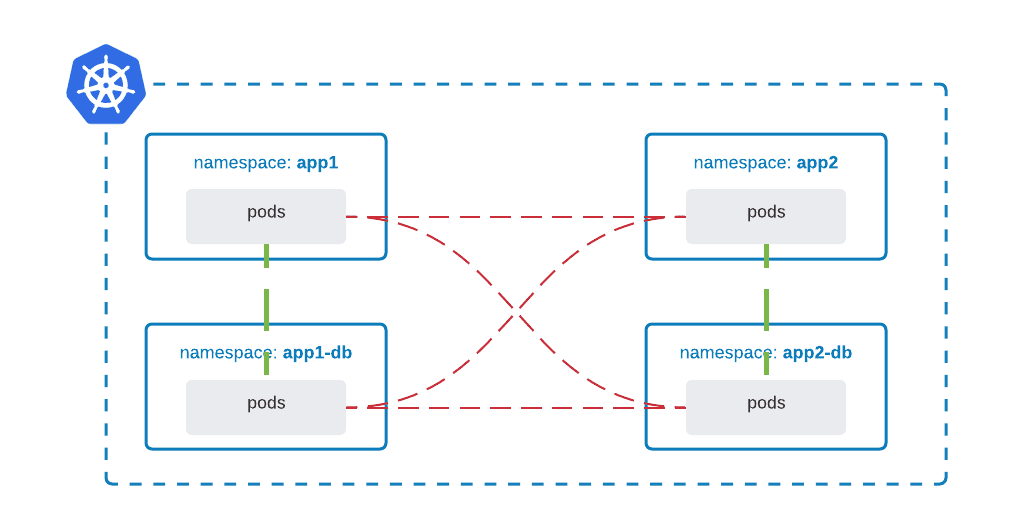
Most Container Network Interface (CNI) plugins support the implementation of network policies, however, if they don’t and NetworkPolicy is created, the resource is silently ignored. For example, AWS CNI does not support network policies, but AWS EKS can run Calico CNI which does.
It is a good approach to follow the least privilege approach, whereby default traffic is denied and access is granted granularly:
|
1 2 3 4 5 6 7 8 9 |
apiVersion: networking.k8s.io/v1 kind: NetworkPolicy metadata: name: default-deny-ingress namespace: app1-db spec: podSelector: {} policyTypes: - Ingress |
Allow traffic from Pods in namespace app1 to namespace app1-db:
|
1 2 3 4 5 6 7 8 9 10 11 12 13 14 |
apiVersion: networking.k8s.io/v1 kind: NetworkPolicy metadata: name: default-deny-ingress namespace: app1-db spec: podSelector: {} ingress: - from: - namespaceSelector: matchLabels: name: app1 policyTypes: - Ingress |
In a multi-tenant environment, policy enforcement plays a key role. Policy enforcement ensures that k8s objects pass the required quality gates set by administrators/teams. Some examples of policy enforcement could be:
The K8s ecosystem offers a wide range of options to achieve this. Some of them are listed below:
Percona Operator for MySQL and Percona Operator for PostgreSQL both support cluster-wide mode which allows single Operator to deploy and manage databases across multiple namespaces (support for cluster-wide mode in Percona Operator for MongoDB is on the roadmap). Is also possible to have an Operator per namespace:
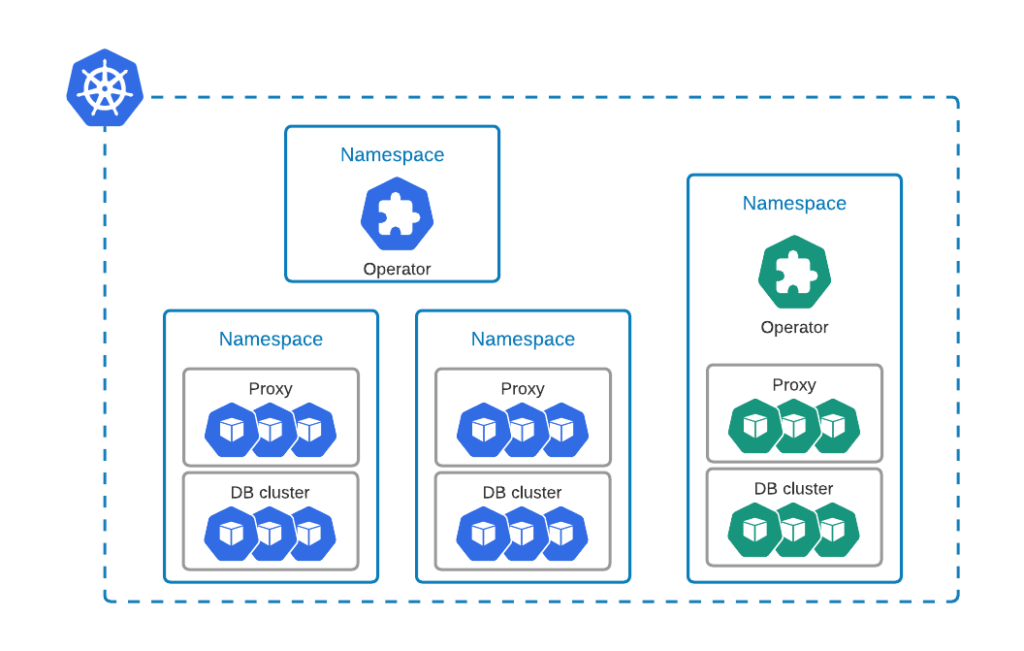
For example, a single deployment of Percona Operator for MySQL can monitor multiple namespaces in cluster-wide mode. The use can specify them in WATCH_NAMESPACE environment variable in the cw-bundle.yaml file:
|
1 2 3 4 5 6 7 |
spec: containers: - command: - percona-xtradb-cluster-operator env: - name: WATCH_NAMESPACE value: "namespace-a, namespace-b" |
In a multi-tenant environment, it depends on the amount of freedom you want to give to the tenants. Usually when the tenants are highly trusted (for instance internal teams), then it is fine to choose namespace-scoped deployment, where each team can deploy and manage the Operator themselves.
It is important to remember that Kubernetes is not a multi-tenant system out of the box. Various levels of isolation were described in this blog post that would help you to run your applications and databases securely and ensure operational stability.
We encourage you to try out our Operators:
CONTRIBUTING.md in every repository is there for those of you who want to contribute your ideas, code, and docs.
For general questions please raise the topic in the community forum.




