

Often users come to us with incidents of database crashes due to OOM Killer. The Out Of Memory killer terminates PostgreSQL processes and remains the top reason for most of the PostgreSQL database crashes reported to us. There could be multiple reasons why a host machine could run out of memory, and the most common problems are:
Even though we used to assist in tuning both host machines and databases, we do not always take the time to explain how and why HugePages are important and justify it with data. Thanks to repeated probing by my friend and colleague Fernando, I couldn’t resist doing so this time.
Let me explain the problem with a testable and repeatable case. This might be helpful if anyone wants to test the case in their own way.
The test machine is equipped with 40 CPU cores (80 vCPUs) and 192 GB of installed memory. I don’t want to overload this server with too many connections, so only 80 connections are used for the test. Yes, just 80 connections, which we should expect in any environment and is very realistic. Transparent HugePages (THP) is disabled. I don’t want to divert the topic by explaining why it is not a good idea to have THP for a database server, but I commit that I will prepare another blog.
In order to have a relatively persistent connection, just like the ones from application side poolers (or even from external connection poolers), pgBouncer is used for making all the 80 connections persistent throughout the tests. The following is the pgBouncer configuration used:
|
1 2 3 4 5 6 7 8 9 10 11 12 13 14 |
[databases] sbtest2 = host=localhost port=5432 dbname=sbtest2 [pgbouncer] listen_port = 6432 listen_addr = * auth_type = md5 auth_file = /etc/pgbouncer/userlist.txt logfile = /tmp/pgbouncer.log pidfile = /tmp/pgbouncer.pid admin_users = postgres default_pool_size=100 min_pool_size=80 server_lifetime=432000 |
As we can see, the server_lifetime parameter is specified to a high value not to destroy the connection from the pooler to PostgreSQL. Following PostgreSQL, parameter modifications are incorporated to mimic some of the common customer environment settings.
|
1 2 3 4 5 6 7 |
logging_collector = 'on' max_connections = '1000' work_mem = '32MB' checkpoint_timeout = '30min' checkpoint_completion_target = '0.92' shared_buffers = '138GB' shared_preload_libraries = 'pg_stat_statements' |
The test load is created using sysbench
|
1 |
sysbench /usr/share/sysbench/oltp_point_select.lua --db-driver=pgsql --pgsql-host=localhost --pgsql-port=6432 --pgsql-db=sbtest2 --pgsql-user=postgres --pgsql-password=vagrant --threads=80 --report-interval=1 --tables=100 --table-size=37000000 prepare |
and then
|
1 |
sysbench /usr/share/sysbench/oltp_point_select.lua --db-driver=pgsql --pgsql-host=localhost --pgsql-port=6432 --pgsql-db=sbtest2 --pgsql-user=postgres --pgsql-password=vagrant --threads=80 --report-interval=1 --time=86400 --tables=80 --table-size=37000000 run |
The first prepare stage puts a write load on the server and the second one read-only load.
I am not attempting to explain the theory and concepts behind HugePages, but concentrate on the impact analysis. Please refer to the LWN article: Five-Level Page Tables and Andres Freund’s blog post Measuring the Memory Overhead of a Postgres Connection for understanding some of the concepts.
During the test, memory consumption was checked using the Linux free utility command. When making use of the regular pool of memory pages, the consumption started with a really low value. But it was under steady increase (please see the screenshot below). The “Available” memory is depleted at a faster rate.
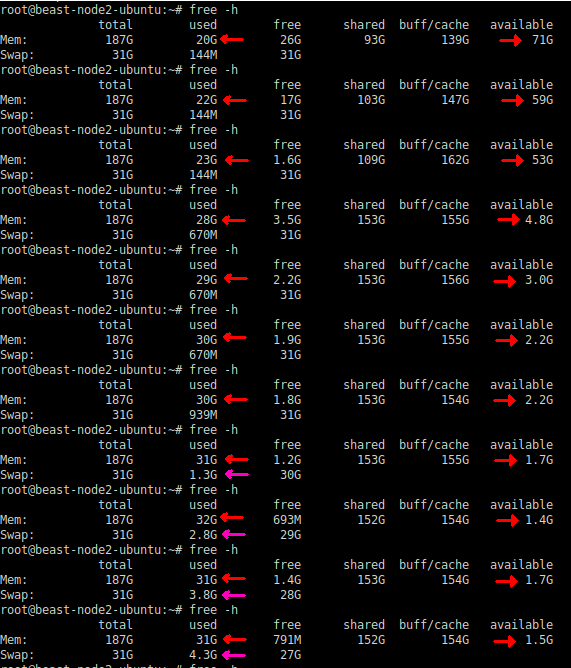
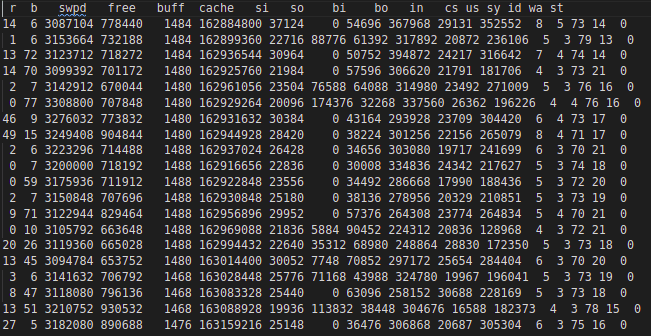
Towards the end, it started swap activity also. Swap activity is captured in vmstat output below:
Information from the /proc/meminfo reveals that the Total Page Table size has grown to more than 25+GB from the initial 45MB
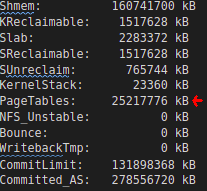
This is not just memory wastage; this is a huge overhead impacting the overall execution of the program and operating system. This size is the Total of Lower PageTable entries of the 80+ PostgreSQL processes.
The same can be verified by checking each PostgreSQL Process. Following is a sample

So the Total PageTable size (25GB) should be approximately this value * 80 (connections). Since this synthetic benchmark sends an almost similar workload through all connections, All individual processes are having very close values to what was captured above.
The following shell line can be used for checking the Pss (Proportional set size). Since PostgreSQL uses Linux shared memory, focusing on Rss won’t be meaningful.
|
1 |
for PID in $(pgrep "postgres|postmaster") ; do awk '/Pss/ {PSS+=$2} END{getline cmd < "/proc/'$PID'/cmdline"; sub("", " ", cmd);printf "%.0f --> %s (%s)\n", PSS, cmd, '$PID'}' /proc/$PID/smaps ; done|sort -n |
Without Pss information, there is no easy method to understand the memory responsibility per process.
In a typical database system where we have considerable DML load, the background processes of PostgreSQL such as Checkpointer, Background Writer, or Autovaccum workers will be touching more pages in the shared memory. Corresponding Pss will be higher for those processes.
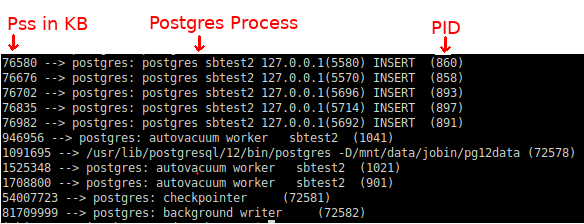
This should explain why Checkpointer, Background worker, or even the Postmaster often becomes the usual victim/target of an OOM Killer very often. As we can see above, they carry the biggest responsibility of the shared memory.
After several hours of execution, the individual session touched more shared memory pages. As a consequence per process, Pss values were rearranged: Checkpointer is responsible for less as other sessions shared the responsibility.
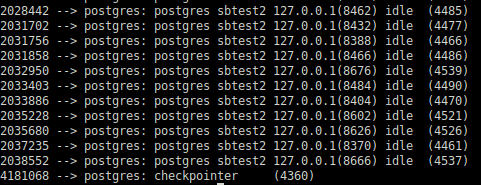
However, checkpointer retains the highest share.
Even though it is not important for this test, it will be worth mentioning that this kind of load pattern is specific to synthetic benchmarking because every session does pretty much the same job. That is not a good approximation to typical application load, where we usually see checkpointer and background writers carry the major responsibility.
The solution for such bloated page tables and associated problems is to make use of HugePages instead. We can figure out how much memory should be allocated to HugePages by checking the VmPeak of the postmaster process. For example, if 4357 is the PID of the postmaster:
|
1 |
grep ^VmPeak /proc/4357/status |
This gives the amount of memory required in KB:
|
1 |
VmPeak: 148392404 kB |
This much needs to be fitting into huge pages. Converting this value into 2MB pages:
|
1 2 3 4 5 |
postgres=# select 148392404/1024/2; ?column? ---------- 72457 (1 row) |
Specify this value in /etc/sysctl.conf for vm.nr_hugepages, for example:
|
1 |
vm.nr_hugepages = 72457 |
Now shutdown PostgreSQL instance and execute:
|
1 |
sysctl -p |
We shall verify whether the requested number of huge pages are created or not:
|
1 2 3 4 5 6 7 |
grep ^Huge /proc/meminfo HugePages_Total: 72457 HugePages_Free: 72457 HugePages_Rsvd: 0 HugePages_Surp: 0 Hugepagesize: 2048 kB Hugetlb: 148391936 kB |
If we start up the PostgreSQL at this stage, we could see that the HugePages_Rsvd is allocated.
|
1 2 3 4 5 6 7 |
$ grep ^Huge /proc/meminfo HugePages_Total: 72457 HugePages_Free: 70919 HugePages_Rsvd: 70833 HugePages_Surp: 0 Hugepagesize: 2048 kB Hugetlb: 148391936 kB |
If everything is fine, I would prefer to make sure that PostgreSQL always uses HugePages. because I would prefer a failure of startup of PostgreSQL rather than problems/crashes later.
|
1 |
postgres=# ALTER SYSTEM SET huge_pages = on; |
The above change needs a restart of the PostgreSQL instance.
The HugePages are created in advance even before the PostgreSQL startup. PostgreSQL just allocates them and uses them. So there won’t be even any noticeable change in the free output before and after the startup. PostgreSQL allocates its shared memory into these HugePages if they are already available. PostgreSQL’s shared_buffers is the biggest occupant of this shared memory.
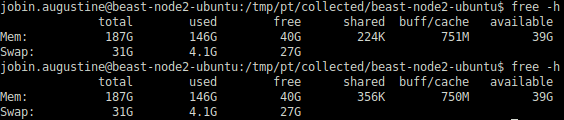
The first output of free -h in the above screenshot is generated before the PostgreSQL startup and the second one after the PostgreSQL startup. As we can see, there is no noticeable change
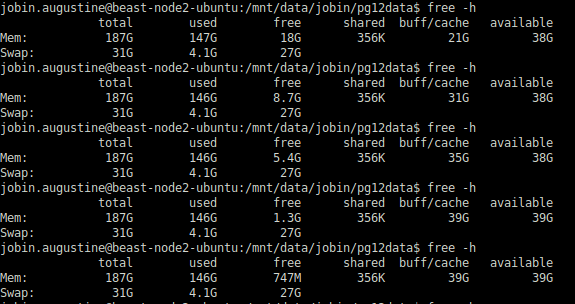
I have done the same test which ran for several hours and there wasn’t any change; the only noticeable change even after many hours of run is the shift of “free” memory to filesystem cache which is expected and what we want to achieve. The total “available” memory remained pretty much constant as we can see in the following screenshot.
Total Page Tables size remained pretty much the same :

As we can see the difference is huge: Just 61MB with HugePages instead of 25+GB previously. Pss per session also reduced drastically:
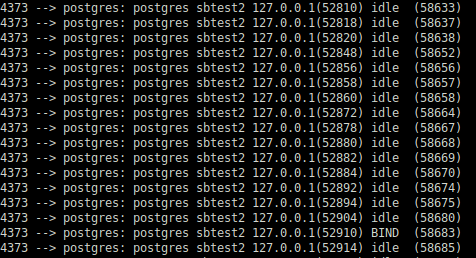
The biggest advantage I could observe is that CheckPointer or Background Writer is no longer accountable for several GBs of RAM.
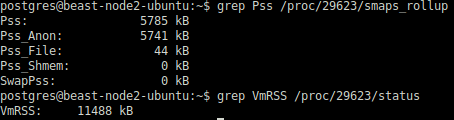
Instead, they are accountable only for a few MBs of consumption. Obviously, they won’t be a candidate victim for the OOM Killer anymore.
In this blog post, we discussed how Linux Huge Pages can potentially save the database server from OOM Killers and associated crashes. We could see two improvements:
These improvements can potentially save the system if it is on the brink of OOM condition, but I don’t want to make any claim that this will protect the database from all OOM conditions forever.
HugePage (hugetlbfs) originally landed in Linux Kernel in 2002 for addressing the requirement of database systems that need to address a large amount of memory. I could see that the design goals are still valid.
There are other additional indirect benefits of using HugePages:
Note: The HugePages discussed in this blog post are about fixed size (2MB) huge pages.
Additionally, as a side note, I want to mention that there are a lot of improvements in Transparent HugePages (THP) over the years which allows applications to use HugePages without any code modification. THP is often considered as a replacement for regular HugePages (hugetlbfs) for a generic workload. However, usage of THP is discouraged on database systems as it can lead to memory fragmentation and increased delays. I want to cover that topic in another post and just want mention that these are not PostgreSQL specific problem, but affects every database systems. For example,
As more companies look at migrating away from Oracle or implementing new databases alongside their applications, PostgreSQL is often the best option for those who want to run on open source databases.
Read Our New White Paper:
Resources
RELATED POSTS





I have a small correction for your one-liner “for loop” in the “Test Observation” section, I’m guessing it was a copy/paste error with whatever WYSIWYG editor you’re using. Character 153 needs to be escaped or the output is all run together.
This
(%s)n”,
should be this
(%s)\n”,
Thank you @Mark,
Its the damage caused by the WYSIWYG editor in wordpress. I didn’t notice it. Corrected it. If we add summary also, it will be as follows
for PID in $(pgrep "postgres|postmaster") ; do awk '/Pss/ {PSS+=$2} END{getline cmd < "/proc/'$PID'/cmdline"; sub("\0", " ", cmd);printf "%.0f --> %s (%s)\n", PSS, cmd, '$PID'}' /proc/$PID/smaps ; done|sort -n | tee /dev/tty | awk -F'-->' '{sum+=$1;} END{print "--------------\n TOTAL MEMORY IN KB ==> "sum;}'
Nice article. I have used huge pages on Oracle and SAP sybase. Found to be useful for performance reasons. Do you have any similar benchmarks/observations on MySQL?
I don’t have much knowledge about MySQL. If there is a performance gain due to HugePages pages, it would be just an additional factor. What I tried to cover in this blog is how HugePages and very critical for stability and reliability.
I could not get: why this happened?
“With HugePages enabled, PostgreSQL background processes are not accounted for a large amount of shared memory.”
Thank you for commenting. I lost track after sometime and revisiting the blog due to another comment. Sorry about that and delayed reply.
The point you raised is a very important one. But that requires bit of detailed explanation.
The short answer is: hugetlbfs pages bypass the regular RSS accounting path entirely
Bit more details : When PostgreSQL is started with
huge_pages=on, the shared memory segment is created withSHM_HUGETLB(orMAP_HUGETLBfor mmap). Those VMAs are flaggedVM_HUGETLB, and their page-fault path ishugetlb_fault()rather thanhandle_pte_fault(). That code path does not update themm->rss_statcounters that feedVmRSSAnother factor is : The pages are pre-reserved. So the process don’t have to really allocate when a process writes to a page (CoW).If an allocation need to happen it will be added to the process’s page table and bumbs the RSS of that process. Same is the case if another process touches the same page.
There are lot more factors affecting this. may be a good content for another blog 🙂