

In this blog post, we’ll look at how to migrate to Amazon RDS using Percona XtraBackup.
Until recently, there was only one way to migrate your data from an existing MySQL instance into a new RDS MySQL instance: take and restore a logical backup with mysqldump or mydumper. This can be slow and error-prone. When Amazon introduced Amazon Aurora MySQL, you could use Percona XtraBackup to take an online physical backup of your database and restore that into a new Aurora instance. This feature is now available for RDS MySQL as well. Using Percona XtraBackup instead of a logical backup can save a lot of time, especially with a large dataset.
If those limitations don’t apply to your use case, read on to learn how to migrate to Amazon RDS using Percona XtraBackup and restoring it into RDS.
For this demonstration, I created a Percona Server for MySQL 5.6 instance on EC2 with the sakila sample database and an extra InnoDB table. I filled the table with junk data to make the total data size about 13.5 GB. Then I installed the latest percona-xtrabackup-24 (2.3 would also have worked) and the AWS CLI tools. I took a backup from the EC2 instance with this command, using gzip to create a compressed backup:
|
1 |
sudo xtrabackup --backup --stream=tar | gzip -c > /data/backups/xtrabackup.tar.gz |
Note that Amazon prepares the backup, so there’s no need to run xtrabackup --prepare yourself.
For comparison, I took a mysqldump backup as well:
|
1 |
mysqldump --all-databases --triggers --events --routines --master-data=1 --single-transaction | gzip -c > /data/backups/mysqldump.sql.gz |
I could have used mydumper to make this process multi-threaded, but to reduce complexity I did not. I then uploaded the backup to an S3 bucket (setting up credentials beforehand):
|
1 |
sudo aws s3 cp /data/backups/xtrabackup.tar.gz s3://dankow/ |
Launch DB Instance, I clicked Restore from S3. After that, the process is almost identical to creating a normal RDS MySQL or Amazon Aurora MySQL instance, with the addition of this box on Step 2:
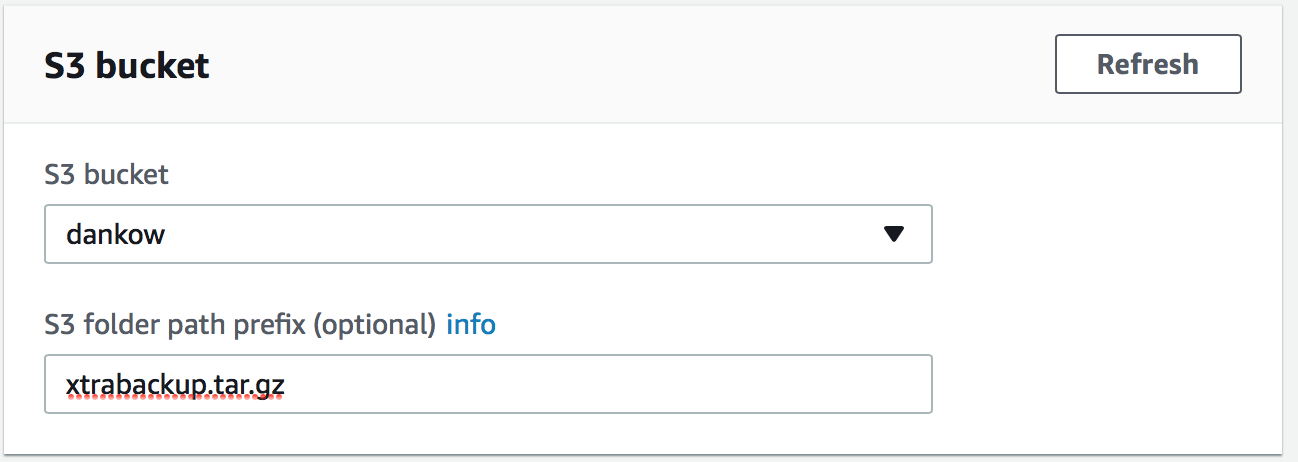
I chose a db.m4.xlarge instance with 1000 Provisioned IOPS for this test. After I configured all the other options, I clicked “Launch DB Instance” and waited for my backup to decompress, prepare and restore into a new RDS instance.
For time comparison, I imported the backup I took with mysqldump, ignoring all the expected errors about privileges because they don’t affect the tables that we’re really interested in:
|
1 |
gunzip -c /data/backups/mysqldump.sql.gz | mysql --defaults-file=rds.cnf --force |
xtrabackup_binlog_info (RDS does not support master_auto_position with GTID replication), and use them as arguments to the RDS external replication stored procedures, like this:|
1 2 3 4 5 6 7 8 9 10 11 |
CALL mysql.rds_set_external_master ( "<host_name>", <host_port>, "<replication_user_name", "replication_password", "<mysql_binary_log_file_name>", mysql_binary_log_file_position, 0 ); CALL mysql.rds_start_replication; |
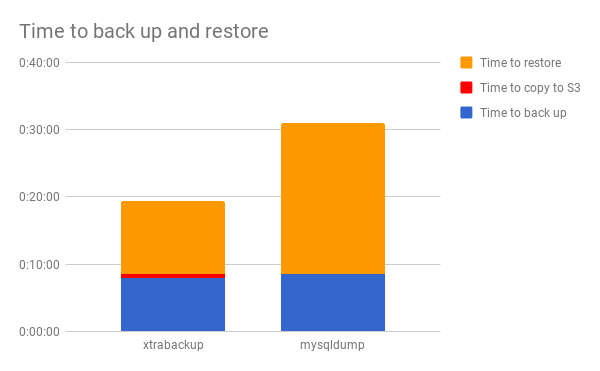
Although my test dataset was small (13.5 GB) compared to most production databases, it was large enough to show a significant difference between physical (Percona XtraBackup) and logical (mysqldump) backups. The XtraBackup method was about 60% faster than mysqldump. If your dataset is larger, you will see even more of a difference.
When you migrate to Amazon RDS using a physical backup, it can be much faster than using a logical backup — but it’s not the right option for every use case. If your InnoDB tablespaces have significant fragmentation, or if you’re not currently using innodb_file_per_table, you may want to perform a logical migration to fix those issues. If you normally create RDS instances programmatically, the AWS CLI does not currently support creating an RDS instance from a physical backup. Any corruption in the InnoDB files transfers over to the RDS instance if you use a physical backup, but a logical backup will fail and allow you to fix the corruption before it gets to RDS.
For many use cases, however, building an RDS instance from Percona XtraBackup is a convenient way to get your data into RDS MySQL or Aurora relatively quickly. In this one small-scale test, migrating using XtraBackup was 60% faster than using mysqldump.
Amazon RDS offers a breadth of database products to choose from, including Aurora and RDS MySQL. If your business is mulling a migration to Amazon RDS but is undecided about key details, our blog When Should I Use Amazon Aurora and When Should I use RDS MySQL? can provide added insight to help inform your decision. In our blog, Percona Senior MySQL DBA Ananias Tsalouchidis compares Aurora and RDS MySQL and details which environments are best suited for them. Data migration is an important tool to keep up with advancements in technology and industry standards. Let Percona help make the process as seamless as possible.

Resources
RELATED POSTS





Hello Daniel,
Thanks for the great write up and comparison. We’re trying using the xtraback method but are running into the following error:
ERROR 1227 (42000) at line 72: Access denied; you need (at least one of) the SUPER privilege(s) for this operation
Hi Danny,
In which stage of the process are you getting that error? If you’re getting it while taking the backup, make sure that xtrabackup is using a MySQL user with appropriate privileges (in particular the SUPER privilege). The credentials can be specified in a defaults file, or with the –user and –password options to xtrabackup.
-Daniel