

This blog post is another in the series on the Percona Server for MongoDB 3.4 bundle release. In this blog, we’ll look at the new LDAP authentication plugin.
Hear ye, hear ye, hear ye… With the arrival of version 3.4, Percona has included an LDAP plugin in Percona Server for MongoDB. Authentication is an essential part in client communication with the database backend.
LDAP stands for Lightweight Directory Access Protocol. It’s a centralized environment containing information on users or services. This information can be objects like passwords, roles or other meta information. Typically when connecting to the MongoDB server, you simply have to authenticate with the MongoDB servers local credential lists. Using an external authentication method like the one included in Percona Server for MongoDB, you can poll an external service. External authentication allows the MongoDB server to verify the client’s username and password against a separate service, such as OpenLDAP or Active Directory.
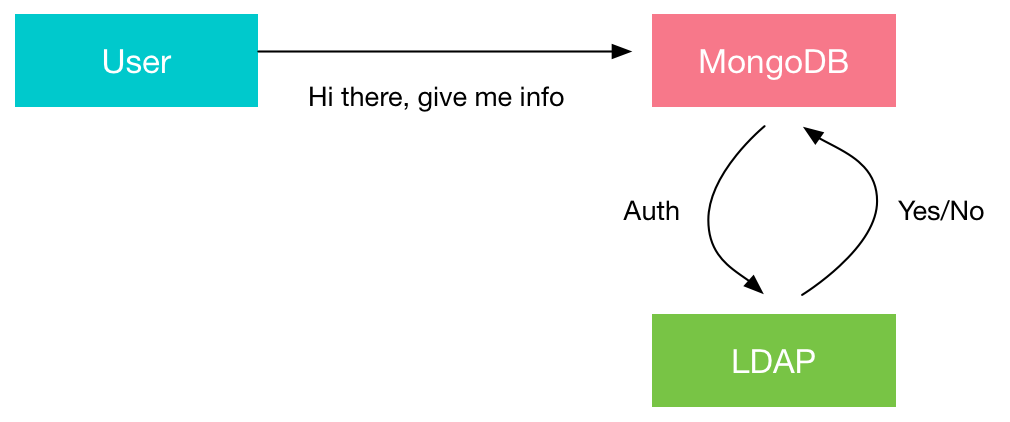
Having a centralized LDAP offers you the ability to rely on one single “truth” for authentication and authorization. LDAP is essential in large organizations where maintaining users on a big infrastructure becomes troublesome.
In ideal situations, you would use your LDAP authentication for multiple MongoDB servers, and even other database solutions like MySQL. The idea is that you only need to modify the passwords or accounts centrally, so you can manage entries without having to modify them locally on each MongoDB instance.
Having a centralized authentication repository is often a requirement when managing highly sensitive information (due to compliancy requirements). A central repository for user information, like an LDAP server, solves the problem of a central source for authentication. When a user with database level privileges leaves the organization, simply shutting off the one central LDAP account will prevent access to all databases that use it as a source. If local accounts were created without being tied back to a central user repository, then the likelihood of an access revocation getting missed is far greater. This is why many security standards require accounts to be created with an LDAP/Active Directory type of service.
If you want to visualize it in a figure:
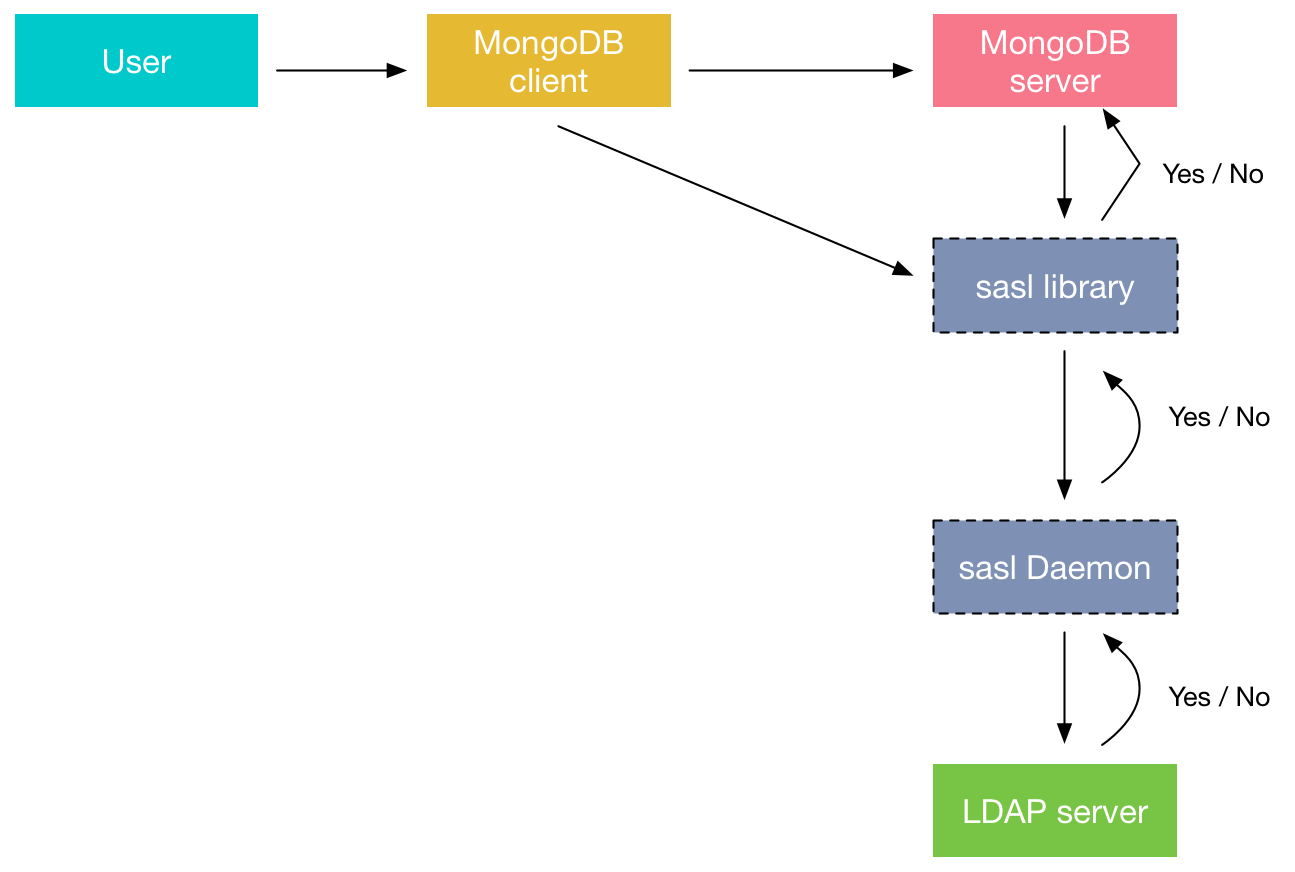
An authentication session uses the following sequence:
Below a visualisation of the authentication path using the LDAP connector
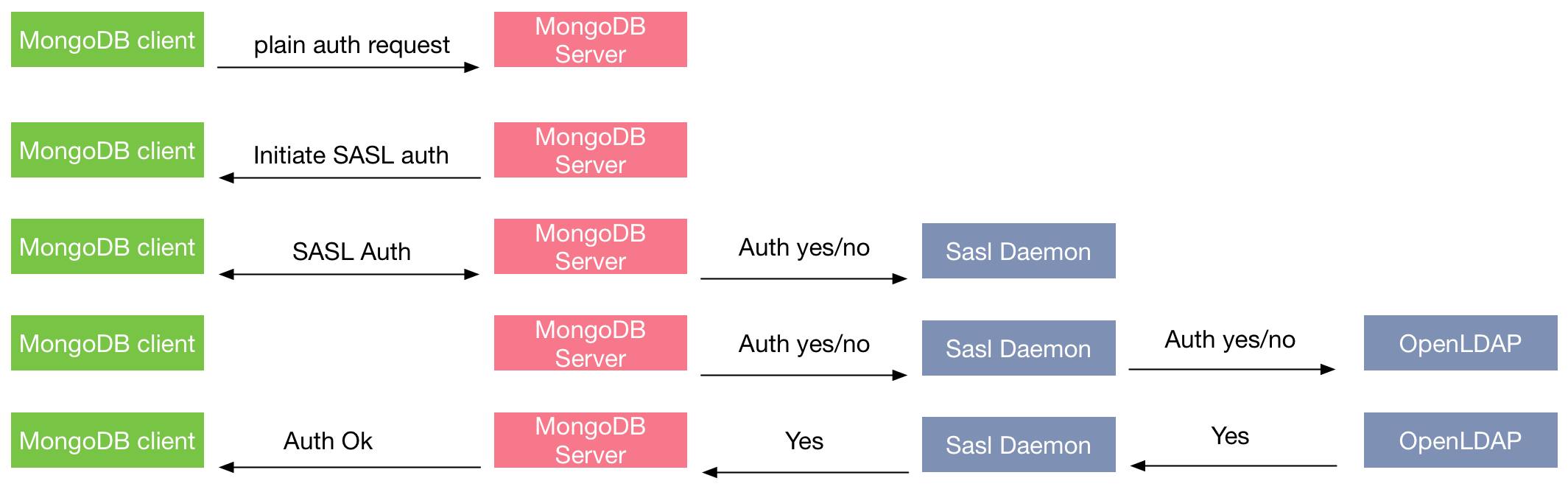
The mongod server is running with the added option:
|
1 2 3 4 |
cat /etc/default/mongod OPTIONS="-f /etc/mongod.conf --auth --setParameter authenticationMechanisms=PLAIN,SCRAM-SHA-1" STDOUT="/var/log/mongodb/mongod.stdout" STDERR="/var/log/mongodb/mongod.stderr" First let's make a user in MongoDB, I've created an Organisational Unit and associated user with password on LDAP > db.getSiblingDB("$external").createUser({ ... user : 'dim0', ... roles: [ {role : "read", db: 'percona'} ] ... }) Successfully added user: { "user" : "utest", "roles" : [ { "role" : "read", "db" : "percona" } ] } |
At this point the user is correctly added on MongoDB.
Let’s try and perform a read query on the database “percona”:
Now let’s try and write something in it:
|
1 2 |
db.foo.insert({x : 5}) WriteResult({ "writeError" : { "code" : 13, "errmsg" : "not authorized on percona to execute command { insert: "foo", documents: [ { _id: ObjectId('58b3e97f2343c5da97a2256e'), x: 5.0 } ], ordered: true }" } }) |
This is logical behavior, as we only allowed read interaction on the percona database.
After a correct login, you will find the following in the mongod.log:
|
1 |
2017-02-27T08:55:19.612+0000 I ACCESS [conn2] Successfully authenticated as principal dim0 on $external |
If an incorrect login happens, the following entry will appear in the mongod.log:
|
1 |
2017-02-27T09:10:55.297+0000 I ACCESS [conn4] PLAIN authentication failed for dim0 on $external from client 127.0.0.1:34812 ; OperationFailed: SASL step did not complete: (authentication failure) |
Percona Server for MongoDB has an easy way of integrating correctly with SASL authd. If you are looking for an option of centrally managing the users of your MongoDB environments, look no further. Keep in mind, however, that if you don’t need a centrally managed environment adding this functionality creates additional complexity to your infrastructure. You can find additional information on the LDAP plugin in our documentation at https://www.percona.com/doc/percona-server-for-mongodb/ext_authentication/index.html.





Would it work with Secure Active directory ?
if so, would you please provide saslauthd for seccure ldaps.