

Recently I had a customer ask me about loading two huge files into InnoDB with LOAD DATA INFILE. The goal was to load this data on many servers without putting it into the binary log. While this is generally a fast way to load data (especially if you disable unique key checks and foreign key checks), I recommended against this. There are several problems with the very large transaction caused by the single statement. We didn’t want to split the file into pieces for the load for various reasons. However, I found a way to load the single file in chunks as though it were many small files, which avoided splitting the file and let us load with many transactions instead of one huge transaction.
The smaller file is 4.1GB and has 260M lines in it; each row is just two bigints. The bigger file was about 20GB and had wider rows with textual data and about 60M lines (as I recall).
When InnoDB loads the file, it creates one big transaction with a lot of undo log entries. This has a lot of costs. To name a few:
Most seriously, if something should happen and the load needs to roll back, it will take a Very Long Time to do — I hate to think how long. I’m sure it would be faster to just shut everything down and re-clone the machine from another, which takes about 10 or 12 hours. InnoDB is not optimized for rollbacks, it’s optimized for transactions that succeed and commit. Rollback can take an order of magnitude longer to do.
For that reason, we decided to load the file in chunks of a million rows each. (InnoDB internally does operations such as ALTER TABLE in 10k row chunks, by the way; I chose 1M because the rows were small). But how to do this without splitting the file? The answer lies in the Unix fifo. I created a script that reads lines out of the huge file and prints them to a fifo. Then we could use LOAD DATA INFILE on the fifo. Every million lines, the script prints an EOF character to the fifo, closes it and removes it, then re-creates it and keeps printing more lines. If you ‘cat’ the fifo file, you get a million lines at a time from it. The code is pretty simple and I’ve included it in Maatkit just for fun. (It’s unreleased as of yet, but you can get it with the following command: “wget http://www.maatkit.org/trunk/fifo”).
So how did it work? Did it speed up the load?
Not appreciably. There actually was a tiny speed up, but it’s statistically insignificant IMO. I tested this first on an otherwise idle machine with the same hardware as the production machines. First, I did it in one big 4.1GB transaction, then I did it 1 million rows at a time. Here’s the CREATE TABLE:
|
1 2 3 4 5 6 |
CREATE TABLE load_test ( col1 bigint(20) NOT NULL, col2 bigint(20) default NULL, key(col1), key(col2) ) ENGINE=InnoDB DEFAULT CHARSET=utf8 |
Here’s the result of loading the entire 4GB file in one chunk:
|
1 2 3 4 5 |
time mysql -e "set foreign_key_checks=0; set sql_log_bin=0; set unique_checks=0; load data local infile 'infile.txt' into table load_test fields terminated by 't' lines terminated by 'n' (col1, col2);" real 234m53.228s user 0m1.098s sys 0m5.959s |
While this ran, I captured vmstat output every 5 seconds and logged it to a file; I also captured the output of “mysqladmin ext -ri5 | grep Handler_write” and logged that to a file.
To load the file in chunks, I split my screen session in two and then ran (approximately — edited for clarity) the following in one terminal:
|
1 |
perl mk-fifo-split infile.txt --fifo /tmp/my-fifo --lines 1000000 |
And this in the other terminal:
|
1 2 3 4 |
while [ -e /tmp/my-fifo ]; do time mysql -e "set foreign_key_checks=0; set sql_log_bin=0; set unique_checks=0; load data local infile '/tmp/my-fifo' into table load_test fields terminated by 't' lines terminated by 'n' (col1, col2);" sleep 1; done |
Note that the file mentioned in LOAD DATA INFILE is /tmp/my-fifo, not infile.txt!
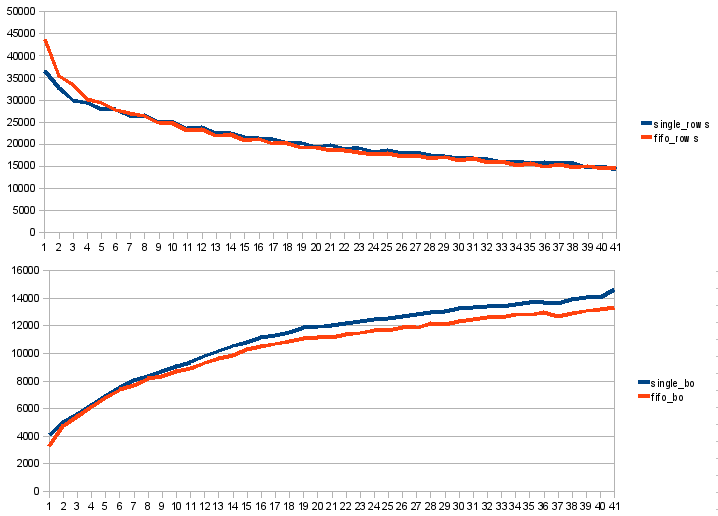
After I was done, I ran a quick Perl script on the vmstat and mysqladmin log files to grab out the disk activity and rows-per-second to see what the progress was. Here are some graphs. This one is the rows per second from mysqladmin, and the blocks written out per second from vmstat.
And this one is the bytes/sec from Cacti running against this machine. This is only the bytes out per second; for some reason, Cacti didn’t seem to be capturing the bytes in per second.
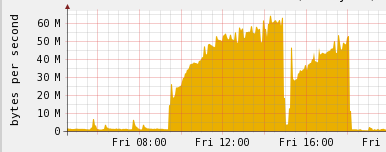
You can see how the curves are roughly logarithmic, which is what you should expect for B-Tree indexes. The two curves on the Cacti graph actually show both files being loaded. It might seem counter-intuitive, but the second (smaller) curve is actually the larger file. It has fewer rows and that’s why it causes less I/O overall.
I also used ‘time’ to run the Perl fifo script, and it used a few minutes of CPU time during the loads. So not very much at all.
Some interesting things to note: the load was probably mostly CPU-bound. vmstat showed from 1% to 3% I/O wait during this time. (I didn’t think to use iostat to see how much the device was actually used, so this isn’t a scientific measurement of how much the load was really waiting for I/O). The single-file load showed about 1 or 2 percent higher I/O wait, and you can see the single-file load uses more blocks per row; I can only speculate that this is the undo log entries being written to disk. (Peter arrived at the same guess independently.)
Unfortunately, I didn’t think to log the “cool-down period” after the load ended. It would be fun to see that. Cacti seemed to show no cool-down period — as soon as the load was done it looked like things went back to normal. I suspect that’s not completely true since the buffer pool must have been overly full with this table’s data.
Next time I do something like this I’ll try smaller chunks, such as 10k rows; and I’ll try to collect more stats. It would also be interesting to try this on an I/O-bound server and see what the performance impact is, especially on other transactions running at the same time.





Hi Baron,
could you tell us the specification of the idle server where you did a single transaction test?
Thanks in advance,
Baron,
Indeed after load is completed you should have significant portion of buffer pool dirty which should take some time to be flushed to the disk.
What I would also like to highlight is the slowdown in the log formula happens as data well fits in memory, otherwise you would see number of inserts/sec to drop off through the cliff
Pedro,
It’s a client’s machine so I’m not quite sure all the details; but it’s an 8-core Intel Xeon L5535 @ 2GHz, 32GB RAM, RAID 10 on 15k SAS drives (I think).
Interesting article. However, isn’t “control-d signals EOF” only applicable to terminal devices? If it worked for binary files how could you ever write x04 to a file?
I’m sure you are right Timo. I didn’t think it was a signal but I didn’t think much about it anyway!
I found your article and thought it is very interesting – Thanks.
As result of your test, do you have recommendation or method of efficiently loading very large file?
BTW – I am NOT heavy DB programmer and don’t know much about DB. If you don’t mine I would like to seek your advice and help.
I have about 120,000 rows – rec size 130 bytes with about 13 fields (Avg 15 GB), which need to be inserted into InnoDB table every min.
I am using LOAD command to accomplish this but in some occasion , the LOAD command takes longer than 1 min. When this happened, the following LOAD file get bigger and bigger and eventually, I get DB gone away error and the program abort.
Any suggestions.
Kye Lee
I would suggest breaking it into smaller pieces, but it sounds like you have other problems and need a completely different approach — perhaps the problem is that you even need these bulk loads. Beyond that, I won’t say; this is what we do for a living 🙂
Please send me the private email with contact info.
Thanks
Kye Lee
Hi Kye,
Please use the Contact Us form on our website https://www.percona.com, as this goes into our ticketing system.
What’s the best way to load lots of large and small files for full text indexing? Which database engine is best suited for FTI? of large files?
Only MyISAM supports full-text indexing in MySQL. If you have a lot of content to index (bigger than your available memory) and you need high performance, you probably need an external solution such as Sphinx or Lucene. Sphinx has a storage engine for easy integration with MySQL.
Some comments – while the fifo as facility works, it is not obvious from the page that in the loop, the load command must reference the fifo file and NOT the original. it actually says – mysql -e “….. same as above…. ” which is misleading.
I suggest putting together a step-by-step directions for this page, including a bold comment about which file to use in the load.
chrz
Hi Gadi, thanks for your comment. I’ve updated the incorrect code listing and added a bold comment below it.
Baron,
Thanks for the blog as always. I was wondering if this suggests a solution to my problem, namely the shared tablespace (ibdata) file growing even when i have file_per_table and indeed all my tables are created correctly as separate files.
when i occasionally do ‘insert into new_bigtable select * from bigtable’… i notice that the ibdata file grows huge (unfortunately i haven’t run controlled experiements given i only notice this for really large tables 100GB+). i think this also happens when i do a ‘load data infile’ again we’re talking 100GB+ files.
Can I make sure I understand your two points above, namely:
>> lots of undo log entries collect in the tablespace…
from here (http://dev.mysql.com/doc/refman/5.1/en/multiple-tablespaces.html) i see that the undo log entries are kept in the shared tablespace (i’m not sure if you meant that in (1) it wasn’t clear to me)
so basically if i conduct a transaction on 100GB of data, the ibdata file will necessarily grow to be approximately this size just because i’m doing this as a transaction. once the transaction commits, the undo logs will be ‘discarded’ but the ibdata file will remain at 100GB. and now i have no way of shrinking this back (unless i do a mysqldump and load which for a large db is prohibitively expensive). as i understand it i can’t just copy my .ibd / .frm files and then put them on a new mysql instance.
is there any way of avoiding the ibdata file from growing to be as large as the largest transaction effectively? for me the largest transactions would be a data load which would be huge and that means ibdata would be swallowing 20% or more of my disk.
Nishant
Nishant, I would suspect that you’re seeing the tablespace grow because of the insert buffer. This can be controlled in Percona-patched versions of InnoDB, and in XtraDB.
Hi,
I have run into a little problem with this
i have create a bash script to allow me to pass in table name a file to load in data with, this works fine, but if i use the replace option on the load data infile, i get errors of duplicates
ERROR 1062 (23000) at line 1: Duplicate entry ‘85694e353d34b4ab284970f22e3bcd66’ for key ‘idx_code’
any pointers would be really helpful
John
That’s better to ask on the forum, so here’s a pointer to the forum 🙂 http://forum.percona.com
Old post, but very helpful. We were doing an ignore into load which caused a lot of issues on our production transactions. By splitting up the import into chunks, it eliminated the impact on our production load.
Thanks! Please test with the latest version of Percona Toolkit and file a bug on Launchpad if the issue still exists.
What’s needed is a COMMIT EVERY number ROWS WITH LOGGING clause in LOAD DATA.
That, combined with IGNORE number LINES would keep the undo logs small, eliminate eternal rollbacks and allow for quick restartability.
Good to see a healthy thread spread across a good number of years. Thanks Baron!
As I was reading the part about replication, can you help re-affirm this statement about replication? I’ve observed things differently in MySQL 5.5 (vanilla version).
“The big LOAD DATA INFILE clogs the binary log and slows replication down. If the load takes 4 hours on the master, it will cause the slave to fall 4 hours behind.”
Yes, I agree the command will take a long time to run at the source and it’s probably a good idea to turn off the session’s binary log in general. But if it’s left on, the replication logic only replicates that “command” across the slaves, not the actual imported data. If the INFILE data file is missing from the slave boxes, then the LOAD DATA command will fail silently, allowing replication to proceed as if nothing has happened.
I’ve confirmed it with a production setup that I have, with one slave having the data file in the same directory as master, and another without the file.
This is a great strategy if you wish to load up huge chunks of data in the slave(s) first and then run it on master (BEWARE: you should make sure to delete the INFILE from the slave’s filesystem).
e.g. To reiterate this, make sure ‘/tmp/data.out’ does not exist in any of the slaves when you run this on master
LOAD DATA INFILE ‘/tmp/data.out’ INTO TABLE some_data_table;
Using this strategy, replication continues to happen without a hitch and the LOAD DATA can happen asynchronously on all boxes. Yes, it’s a pain, but it’s better than replication clogging up for hours!
Jack,
The LOAD DATA INFILE command isn’t replicated verbatim. The file that’s loaded on the master is actually inlined into the binary log, and the replica writes out a copy of the file into the directory indicated by slave_load_tmpdir. Then the LOAD DATA INFILE command is executed with the resulting file.
Hi Baron,
I understand that the insights to the binlog would likely show what you’ve said and I do agree that turning off session binlog is the right strategy to go with.
But can you explain why I’m witnessing the LOAD DATA INFILE command being replicated in verbatim on our master / slave pairs?
To reiterate, are you suggesting that the actual data would be transferred across the slaves via replication when LOAD DATA INFILE command is executed on master? (cuz that’s not what I’m seeing on our systems, with binlog left on at master when the command is issued)
I’m not suggesting to turn off the binary log. I think you have some assumptions that you may not have validated. The file that’s loaded on the master IS transmitted to replicas, in a number of special binary log events (of type “Load_file” if I recall correctly).
Jack, Baron,
maybe you’re using different replication strategies. I can well imagine that row-based replication will indeed transfer the data, whereas statement-based might send the actual LOAD DATA INFILE command. There may even be differences based on the database engine and/or MySQL version.
Regards,
Stefan
Statement-based replication transfers the file too. It has worked the way I’m describing for a very long time, since at least MySQL 4.1.
Very useful.
I had implemented this in other ways (physically splitting the files) mainly because in my experience, the full buffers
on the MySQL server host might block queries if they are forced to be flushed, as an example, if table file-handles are
closed (when you run out, and need to recycle – we have _many_ tables). This might cause server-wide locks for
minutes if the buffers are very very big. Not allowing delayed index writes, and using this method eliminated all these
problems for us.
This script is very useful, and lets me optimize my existing scripts using fifo’s – good show 🙂
How would you do a sizeable table update without turning off foreign_key_checks ?