

 MySQL 5.7 has been released, and there are some exciting new features now available that I’m going to discuss in this blog — specifically around geographic information system (GIS).
I’ve used GIS features in MySQL for a long time. In my previous blog entries I’ve shown how to create geo-enabled applications with MySQL 5.6 and use MySQL 5.6 geo-spatial functions. In this blog post, I’ll look into what is new in MySQL 5.7 and how we can use those new features in practice for geo-enabled applications.
New in MySQL 5.7
MySQL 5.7 introduces the following major improvements and features for GIS:
This is the great news. The bad news is that except for the st_distance_sphere, all other functions use planar geometry (no change since MySQL 5.6) and do not support Spatial Reference System Identifier (SRID). That means that if I want to calculate the distance of my favorite bike path in miles or kilometers, I’ll still have to use a stored function (see below for an example) or write an application code for that. Native function st_distance will ignore SRID for now and return a value which represents a distance on a planar – not very useful for our purposes (may be useful for order by / compare).
Distance on Sphere
MySQL 5.7 introduces the function st_distance_sphere, which uses a haversine formula to calculate distance. He is the example:
|
1 2 3 4 5 6 7 |
mysql> select st_distance_sphere(point(-78.7698947, 35.890334), point(-122.38657, 37.60954)); +--------------------------------------------------------------------------------+ | st_distance_sphere(point(-78.7698947, 35.890334), point(-122.38657, 37.60954)) | +--------------------------------------------------------------------------------+ | 3855600.7928957273 | +--------------------------------------------------------------------------------+ 1 row in set (0.00 sec) |
The distance is in meters by default (you can also change the radius of the earth to meters using the 3rd optional parameter, default: 6,370,986). Although our earth is represented as an oblate spheroid, all practical applications use the distance on a sphere. The difference between the haversine formula and more precise (and much slower) functions is negligible for our purposes.
The st_distance_sphere is much faster than using stored routines. Here is the artificial benchmark:
|
1 2 3 4 5 6 7 8 9 10 11 12 13 14 15 16 |
mysql> select benchmark(1000000, haversine_distance_sp(37.60954, -122.38657, 35.890334, -78.7698947)); +-----------------------------------------------------------------------------------------+ | benchmark(1000000, haversine_distance_sp(37.60954, -122.38657, 35.890334, -78.7698947)) | +-----------------------------------------------------------------------------------------+ | 0 | +-----------------------------------------------------------------------------------------+ 1 row in set (22.55 sec) mysql> select benchmark(1000000, st_distance_sphere(point(-78.7698947, 35.890334), point(-122.38657, 37.60954))); +----------------------------------------------------------------------------------------------------+ | benchmark(1000000, st_distance_sphere(point(-78.7698947, 35.890334), point(-122.38657, 37.60954))) | +----------------------------------------------------------------------------------------------------+ | 0 | +----------------------------------------------------------------------------------------------------+ 1 row in set (0.77 sec) |
haversine_distance_sp is a stored routine implementation of the same algorithm.
InnoDB GIS example: find 10 restaurants near me
In my previous blog post I’ve demonstrated how to use st_within function to find restaurants inside my zipcode (US postal code) and sort by distance. In MySQL 5.7 there will be 2 changes:
For this example, I’ve converted Open Street Map data to MySQL and then created a new InnoDB table:
|
1 2 3 4 5 6 7 8 9 10 11 12 13 14 15 16 |
CREATE TABLE `points_new` ( `OGR_FID` int(11) NOT NULL AUTO_INCREMENT, `SHAPE` geometry NOT NULL, `osm_id` text, `name` text, `barrier` text, `highway` text, `ref` text, `address` text, `is_in` text, `place` text, `man_made` text, `other_tags` text, UNIQUE KEY `OGR_FID` (`OGR_FID`), SPATIAL KEY `SHAPE` (`SHAPE`) ) ENGINE=InnoDB AUTO_INCREMENT=13660668 DEFAULT CHARSET=latin1 |
SHAPE is declared as geometry (and stores points in this table). We also have SPATIAL KEY SHAPE in the InnoDB table.
The following query will find all cafe or restaurants in Durham, NC (zipcode: 27701):
|
1 2 3 4 5 6 7 |
SELECT osm_id, name, round(st_distance_sphere(shape, st_geomfromtext('POINT (-78.9064543 35.9975194)', 1) ), 2) as dist FROM points_new WHERE st_within(shape, (select shape from zcta.tl_2013_us_zcta510 where zcta5ce10='27701') ) and (other_tags like '%"amenity"=>"cafe"%' or other_tags like '%"amenity"=>"restaurant"%') and name is not null ORDER BY dist asc LIMIT 10; |
Table tl_2013_us_zcta510 stores the shapes of polygons for all US zipcodes. (It needs to be converted to MySQL.) In this example I’m using st_within to filter only the POIs I need, and st_distance_sphere to get the distance from my location (-78.9064543 35.9975194 are the coordinates of Percona’s office in Durham) to the restaurants.
Explain plan:
|
1 2 3 4 5 6 7 8 9 10 11 12 13 14 15 16 17 18 19 20 21 22 23 24 25 26 27 28 29 30 31 32 33 34 35 |
mysql> EXPLAIN -> SELECT osm_id, name, round(st_distance_sphere(shape, st_geomfromtext('POINT (-78.9064543 35.9975194)', 1) ), 2) as dist -> FROM points_new -> WHERE st_within(shape, -> (select shape from zcta.tl_2013_us_zcta510 where zcta5ce10='27701') ) -> and (other_tags like '%"amenity"=>"cafe"%' or other_tags like '%"amenity"=>"restaurant"%') -> and name is not null -> ORDER BY dist asc LIMIT 10G *************************** 1. row *************************** id: 1 select_type: PRIMARY table: points_new partitions: NULL type: range possible_keys: SHAPE key: SHAPE key_len: 34 ref: NULL rows: 21 filtered: 18.89 Extra: Using where; Using filesort *************************** 2. row *************************** id: 2 select_type: SUBQUERY table: tl_2013_us_zcta510 partitions: NULL type: ref possible_keys: zcta5ce10 key: zcta5ce10 key_len: 8 ref: const rows: 1 filtered: 100.00 Extra: NULL 2 rows in set, 1 warning (0.00 sec) |
That looks pretty good: MySQL is using and index on the SHAPE field (even with the subquery, btw).
Results:
|
1 2 3 4 5 6 7 8 9 10 11 12 13 14 15 16 17 18 19 20 21 22 |
mysql> SELECT osm_id, name, round(st_distance_sphere(shape, st_geomfromtext('POINT (-78.9064543 35.9975194)', 1) ), 2) as dist, st_astext(shape) -> FROM points_new -> WHERE st_within(shape, -> (select shape from zcta.tl_2013_us_zcta510 where zcta5ce10='27701') ) -> and (other_tags like '%"amenity"=>"cafe"%' or other_tags like '%"amenity"=>"restaurant"%') -> and name is not null -> ORDER BY dist asc LIMIT 10; +------------+----------------------------+--------+--------------------------------------+ | osm_id | name | dist | st_astext(shape) | +------------+----------------------------+--------+--------------------------------------+ | 880747417 | Pop's | 127.16 | POINT(-78.9071795 35.998501) | | 1520441350 | toast | 240.55 | POINT(-78.9039761 35.9967069) | | 2012463902 | Pizzeria Toro | 256.44 | POINT(-78.9036457 35.997125) | | 398941519 | Parker & Otis | 273.39 | POINT(-78.9088833 35.998997) | | 881029843 | Torero's | 279.96 | POINT(-78.90829140000001 35.9995516) | | 299540833 | Fishmonger's | 300.01 | POINT(-78.90850250000001 35.9996487) | | 1801595418 | Lilly's Pizza | 319.83 | POINT(-78.9094462 35.9990732) | | 1598401100 | Dame's Chicken and Waffles | 323.82 | POINT(-78.9031929 35.9962871) | | 685493947 | El Rodeo | 379.18 | POINT(-78.909865 35.999523) | | 685504784 | Piazza Italia | 389.06 | POINT(-78.9096472 35.9998794) | +------------+----------------------------+--------+--------------------------------------+ 10 rows in set (0.13 sec) |
0.13 seconds response time on AWS t2.medium box sounds reasonable to me. The same query on the MyISAM table shows ~same response time: 0.14 seconds.
GeoJSON feature and Google Maps
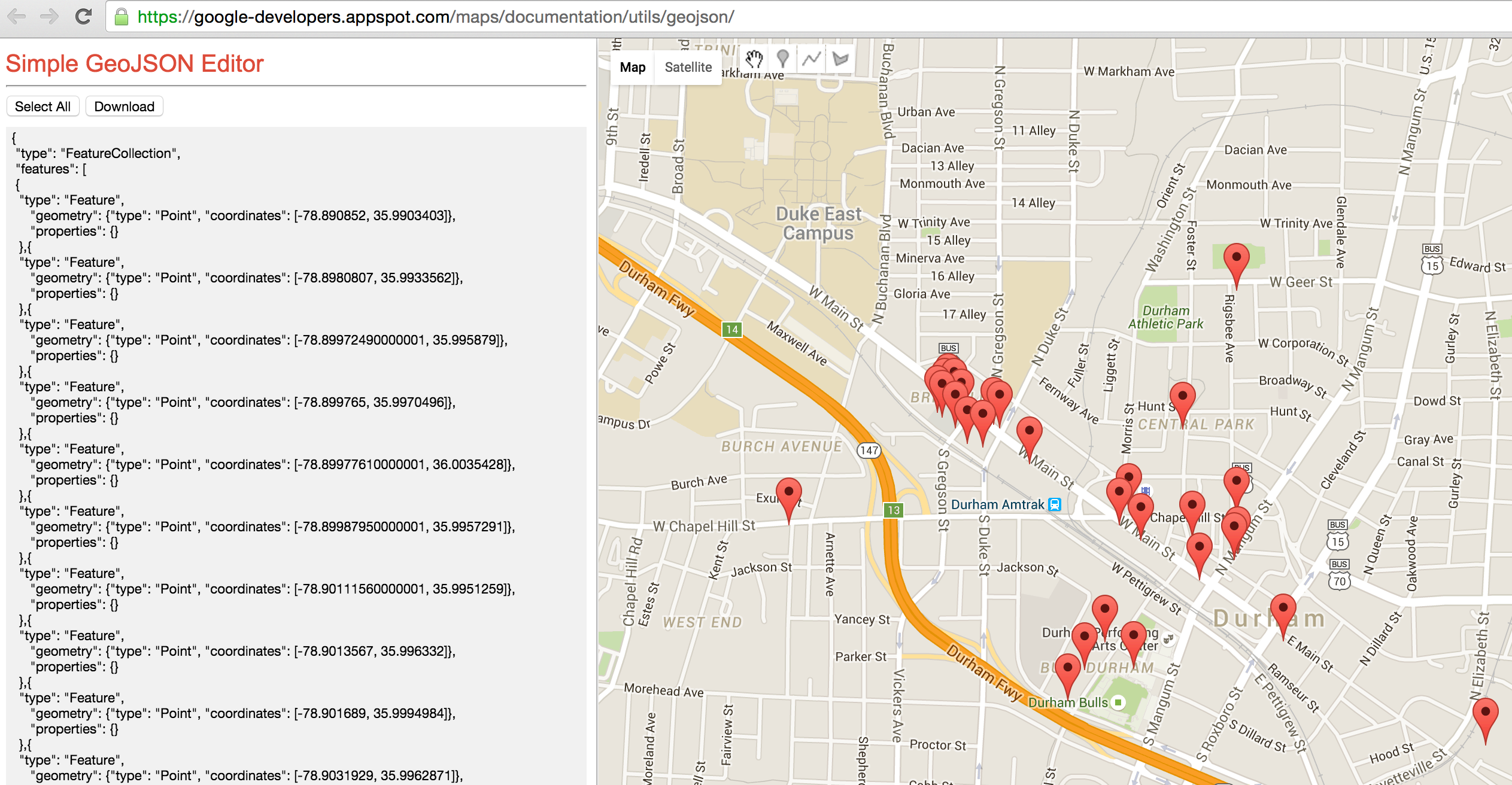
Another nice feature of MySQL 5.7 GIS is GeoJSON function: you can convert your result set to GeoJSON, which can be used with other applications (for example Google Maps API).
Let’s say I want to visualize the above result set on Google Map. As the API requires a specific format, I can use concat / group_concat to apply the format inside the SQL:
|
1 2 3 4 5 6 7 8 9 10 11 12 13 14 15 16 |
SELECT CONCAT('{ "type": "FeatureCollection", "features": [ ', GROUP_CONCAT('{ "type": "Feature", "geometry": ', ST_AsGeoJSON(shape), ', "properties": {} }'), '] }') as j FROM points_new WHERE st_within(shape, (select shape from zcta.tl_2013_us_zcta510 where zcta5ce10='27701') ) and (other_tags like '%"amenity"=>"cafe"%' or other_tags like '%"amenity"=>"restaurant"%') and name is not null |
I will get all the restaurants and cafes in zipcode 27701. Here I’m using ST_AsGeoJSON(shape) to convert to GeoJSON, and concat/group_concat to “nest” the whole result into the format suitable for Google Maps.
Result:
|
1 2 3 4 5 6 7 8 9 10 11 12 13 14 15 16 17 18 19 20 21 22 23 24 25 26 27 28 29 30 31 32 33 34 35 36 37 38 39 40 41 42 43 44 45 46 |
mysql> set group_concat_max_len = 1000000; Query OK, 0 rows affected (0.00 sec) mysql> SELECT CONCAT('{ '> "type": "FeatureCollection", '> "features": [ '> ', -> GROUP_CONCAT('{ '> "type": "Feature", '> "geometry": ', ST_AsGeoJSON(shape), ', '> "properties": {} '> }'), -> '] '> }') as j -> FROM points_new -> WHERE st_within(shape, -> (select shape from zcta.tl_2013_us_zcta510 where zcta5ce10='27701') ) -> and (other_tags like '%"amenity"=>"cafe"%' or other_tags like '%"amenity"=>"restaurant"%') -> and name is not null *************************** 1. row *************************** j: { "type": "FeatureCollection", "features": [ { "type": "Feature", "geometry": {"type": "Point", "coordinates": [-78.890852, 35.9903403]}, "properties": {} },{ "type": "Feature", "geometry": {"type": "Point", "coordinates": [-78.8980807, 35.9933562]}, "properties": {} },{ "type": "Feature", "geometry": {"type": "Point", "coordinates": [-78.89972490000001, 35.995879]}, "properties": {} } ... ,{ "type": "Feature", "geometry": {"type": "Point", "coordinates": [-78.9103211, 35.9998494]}, "properties": {} },{ "type": "Feature", "geometry": {"type": "Point", "coordinates": [-78.9158326, 35.9967114]}, "properties": {} }] } 1 row in set (0.14 sec) |
I did not include the full result set for the lack of space; I also had to change the group concat max length, otherwise MySQL will cut the result of the group_concat function.
Now I can visualize it:
Example: Find the longest bike path
MySQL 5.7 (as well as the older versions) supports st_length function to calculate a length of a linestring. However, even in MySQL 5.7 st_length can’t calculate the distance on earth. To find the distance of a linestring I’ve created a very simple stored procedure:
|
1 2 3 4 5 6 7 8 9 10 11 12 13 14 15 16 17 18 19 |
DELIMITER // CREATE DEFINER=CURRENT_USER() FUNCTION `ls_distance_sphere`(ls GEOMETRY) RETURNS DECIMAL(20,8) DETERMINISTIC BEGIN DECLARE i, n INT DEFAULT 0; DECLARE len DECIMAL(20,8) DEFAULT 0; SET i = 1; SET n = ST_NumPoints(ls); WHILE i < n DO SET len = len + st_distance_sphere(st_pointN(ls, i), st_pointN(ls, i+1)); SET i = i + 2; END WHILE; RETURN len; END // DELIMITER ; |
As the Open Street Map data has the information about roads in North America, we can use this function to calculate the length (in meters) for every road it stores:
|
1 2 3 4 5 6 7 8 9 10 11 12 13 14 15 16 |
mysql> select name, ls_distance_sphere(shape) from lines_new where highway = 'cycleway' and name is not null limit 10; +---------------------------------------+---------------------------+ | name | ls_distance_sphere(shape) | +---------------------------------------+---------------------------+ | Highbury Park Drive Bypass | 0.97386664 | | Ygnacio Canal Trail | 0.86093199 | | South Marion Parkway | 1.06723424 | | New River Greenway | 1.65705401 | | Northern Diversion Trail | 2.08269808 | | Gary L. Haller Trail;Mill Creek Trail | 2.09988209 | | Loop 1 | 2.05297129 | | Bay Farm Island Bicycle Bridge | 2.51141623 | | Burrard Street | 1.84810259 | | West 8th Avenue | 1.76338236 | +---------------------------------------+---------------------------+ 10 rows in set (0.00 sec) |
Index the polygon/area distance using MySQL 5.7 virtual fields
To really answer the question “what is the longest bikepath (cyclepath) in North America?” we will have to order by stored function result. This will cause a full table scan and a filestort, which will be extremely slow for 30 millions of rows. The standard way to fix this is to materialize this road distance: add an additional field to the table and store the distance there.
In MySQL 5.7 we can actually use Generated (Virtual) Columns feature:
|
1 2 3 4 5 6 7 8 9 10 11 12 13 14 15 16 17 |
CREATE TABLE `lines_new` ( `OGR_FID` int(11) NOT NULL AUTO_INCREMENT, `SHAPE` geometry NOT NULL, `osm_id` int(11) DEFAULT NULL, `name` varchar(255) DEFAULT NULL, `highway` varchar(60) DEFAULT NULL, `waterway` text, `aerialway` text, `barrier` text, `man_made` text, `other_tags` text, `linestring_length` decimal(15,8) GENERATED ALWAYS AS (st_length(shape)) VIRTUAL, PRIMARY KEY (`OGR_FID`), SPATIAL KEY `SHAPE` (`SHAPE`), KEY `linestring_length` (`linestring_length`), KEY `highway_len` (`highway`,`linestring_length`) ) ENGINE=InnoDB AUTO_INCREMENT=27077492 DEFAULT CHARSET=latin1 |
Unfortunately, MySQL 5.7 does not support non-native functions (stored procedures or UDF) in generated columns, so I have to use st_length in this example. Ordering by value of st_length may be OK though:
|
1 2 3 4 5 6 7 8 9 10 11 12 13 14 15 16 |
mysql> select name, ls_distance_sphere(shape) from lines_new where highway = 'cycleway' and name is not null order by linestring_length desc limit 10; +-----------------------------+---------------------------+ | name | ls_distance_sphere(shape) | +-----------------------------+---------------------------+ | Confederation Trail | 55086.92572725 | | Cowboy Trail | 43432.06768706 | | Down East Sunrise Trail | 42347.39791330 | | Confederation Trail | 29844.91038542 | | Confederation Trail | 26141.04655981 | | Longleaf Trace | 29527.66063726 | | Cardinal Greenway | 30613.24487294 | | Lincoln Prairie Grass Trail | 19648.26787218 | | Ghost Town Trail | 25610.52158647 | | Confederation Trail | 27086.54829531 | +-----------------------------+---------------------------+ 10 rows in set (0.02 sec) |
The query is very fast as it uses an index on both highway and linestring:
|
1 2 3 4 5 6 7 8 9 10 11 12 13 14 15 |
mysql> explain select name, ls_distance_sphere(shape) from lines_new where highway = 'cycleway' and name is not null order by linestring_length desc limit 10G *************************** 1. row *************************** id: 1 select_type: SIMPLE table: lines_new partitions: NULL type: ref possible_keys: highway_len key: highway_len key_len: 63 ref: const rows: 119392 filtered: 90.00 Extra: Using where 1 row in set, 1 warning (0.00 sec) |
Conclusion
MySQL 5.7 contains a great set of features to work with geospatial data. Finally, spatial indexes are supported in InnoDB; st_distance_sphere as a native function is very useful. Unfortunately, other spatial functions only work with planar coordinates and do not support SRID. I hope this will be fixed in the new releases.
Resources
RELATED POSTS





Alex,
I wonder if we can get some GIS benchmark script for Sysbench, might be do some benchmarks.
One thing I’m missing for GIS is some easy to reference numbers. If I’m to do GIS lookup to find 50 restaurants within 10 mile distance, how many such lookups we can handle ?
Peter, with LUA we can script “select” or “call to stored proc” and use it in sysbench
Thank you for this great article. Hopefully MySQL GIS will be as good as PostGIS
Is there any compare result for this?
How can I add data to the points_new table? COuld you please share a dump?
Have you tried with coordinates close to the limits?
I have tried the following and got error:
-12.2730911,179.9946179
-12.273021,-179.9963346
+- 1000m
mysql> select st_distance_sphere(point(-12.2730911, 179.9946179), point(-12.273021,-179.9963346));
ERROR 1210 (HY000): Incorrect arguments to st_distance_sphere
Sorry, after reading this: https://dev.mysql.com/doc/refman/5.7/en/spatial-convenience-functions.html
I realized I’ve inverted lon and lat.
Now it worked perfectly:
mysql> select st_distance_sphere(point(179.9946179,-12.2730911), point(-179.9963346,-12.273021));
+————————————————————————————+
| st_distance_sphere(point(179.9946179,-12.2730911), point(-179.9963346,-12.273021)) |
+————————————————————————————+
| 983.0725362589525 |
+————————————————————————————+
1 row in set (0.00 sec)
Thank you.
what is the test result for 10000 result for nearest cafe bench mark result for the myql and the postgres gis?
Is there any compare result for this?
Thanks for this update. The google street maps integration is particularily interesting. I also appreciate your older post showing how to get the data into MySQL using ogr2ogr.
Have you tried using ogr2ogr to load the data to a MySQL 5.7 instance? I keep getting segmentation fault: 11 when loading the Canadian or U.S. postal code data. Here are the commands I’m trying:
ogr2ogr -progress -f “MySQL” MySQL:”dbname,host=localhost,user=usr,password=pw,port=3306″ gfsa000b11a_e/gfsa000b11a_e.shp -nln “GEO_CANADA” -update -overwrite -lco engine=InnoDB
ogr2ogr -progress -f “MySQL” MySQL:”dbname,host=localhost,user=usr,password=pw,port=3306″ tl_2016_us_zcta510/tl_2016_us_zcta510.shp -nln “GEO_US_POSTAL_CD” -update -overwrite -lco engine=InnoDB
I’m on OS X 10.12.3, running gdal 1.11.5_1, installed with “brew install gdal –enable-unsupported –with-mysql”
I was able to get this working on ubuntu without any problems. Looks like spatial operations might be broken for the mysql driver in the gdal on osx.
hello thanks for your post.it’s very useful.
i have 2 question.
1: how can we put this query in a string in my php page and use mysqli_query function with that
SELECT CONCAT(‘{
“type”: “FeatureCollection”,
“features”: [
‘,
GROUP_CONCAT(‘{
“type”: “Feature”,
“geometry”: ‘, ST_AsGeoJSON(shape), ‘,
“properties”: {}
}’),
‘]
}’)
2: i have to show my points on googlemap with this : map.data.loadGeoJson(data);
but it’s forbidden and i get error 403 from my localhost how can i bypass this error