

Recently, a client of ours, Duolingo, was using Aurora was reaching the max connection limit of 16,000 (that is Aurora’s hard limit for all instance classes). In this case, Percona recommended implementing ProxySQL to manage connections (now their max connections only peak to 6000!).
Duolingo’s main application is run in AWS ECS (Elastic Container Service) so they decided to attach ProxySQL as a sidecar container to the main application container.
The sidecar design concept consists of a main application container plus a second container running a service to support, enhance, or extend the main container. The second container is “attached” to the main container, much like a sidecar attaches to a motorcycle.
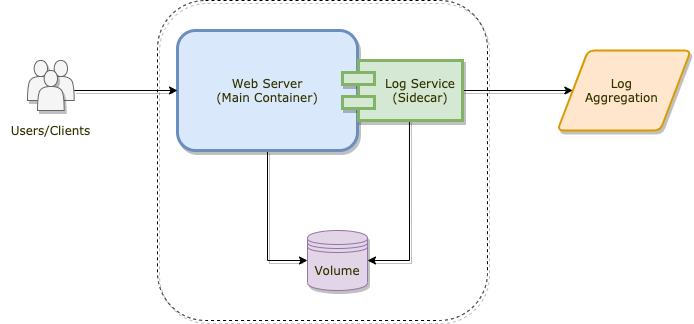
The most common example you’ll likely find is a web server plus a log forwarding service (pictured above). The web server is the main container, the log forwarder is the sidecar, and in this case they actually share data (the volume is mounted to both containers). The web server writes the data, while the log forwarder just reads and sends it along (perhaps to some aggregation service like Splunk).
Sidecars don’t have to just be logs. It could be for monitoring or even a MySQL proxy…
Let’s set up a WordPress container (our main container) and a ProxySQL 2 sidecar with an Aurora cluster backend.
|
1 2 3 4 5 |
mysql> CREATE USER 'monitor'@'%' IDENTIFIED BY 'MonPass123^'; mysql> GRANT REPLICATION CLIENT ON *.* TO 'monitor'@'%'; mysql> CREATE USER 'wordpress'@'%' IDENTIFIED BY 'WPPass123^'; mysql> GRANT SELECT, INSERT, UPDATE, DELETE, CREATE ON wordpress.* TO 'wordpress'@'%'; |
|
1 |
mysql> CREATE DATABASE wordpress; |
1. Create a project directory and change into it.
|
1 |
$ mkdir wordpress ; cd $_ |
2. Create a Dockerfile to build our sidecar.
|
1 2 3 4 5 6 7 8 9 10 11 |
$ vim Dockerfile FROM debian:buster-slim RUN apt-get update ; apt-get -y install lsb-release gnupg2 curl RUN curl -L 'https://repo.proxysql.com/ProxySQL/repo_pub_key' | apt-key add - && echo deb https://repo.proxysql.com/ProxySQL/proxysql-2.0.x/$(lsb_release -sc)/ ./ | tee /etc/apt/sources.list.d/proxysql.list RUN apt-get update ; apt-get -y install proxysql COPY proxysql.cnf /etc/proxysql.cnf |
3. Create our ProxySQL configuration file.
|
1 2 3 4 5 6 7 8 9 10 11 12 13 14 15 16 17 18 19 20 21 22 23 24 25 26 27 28 29 30 31 32 33 34 35 36 37 38 39 40 41 |
$ vim proxysql.cnf datadir="/var/lib/proxysql" errorlog="/var/lib/proxysql/proxysql.log" admin_variables={ admin_credentials="admin:admin" mysql_ifaces="0.0.0.0:6032" } mysql_variables={ monitor_username="monitor" monitor_password="MonPass123^" monitor_read_only_timeout=60000 monitor_connect_timeout=60000 monitor_ping_timeout=60000 mysql_ping_timeout_server=500 } mysql_servers=({ hostname="my-aurora-instance-endpoint-1.zzzzg1gfxyo9.us-west-2.rds.amazonaws.com" port=3306 hostgroup=1 },{ hostname="my-aurora-instance-endpoint-2.zzzzg1gfxyo9.us-west-2.rds.amazonaws.com" port=3306 hostgroup=2 }) mysql_users=({ username="wordpress" password="WPPass123^" default_hostgroup=1 }) mysql_replication_hostgroups=({ writer_hostgroup=1 reader_hostgroup=2 check_type="innodb_read_only" comment="Aurora Wordpress" }) |
4. Create our Docker Compose file to bring it all together.
|
1 2 3 4 5 6 7 8 9 10 11 12 13 14 15 16 17 18 19 20 21 22 23 24 25 26 27 28 29 30 31 32 33 |
$ vim docker-compose.yml version: '3' services: wordpress: image: wordpress:latest container_name: wordpress depends_on: - proxysql ports: - "8080:80" volumes: - wordpress:/var/www/html - proxysql:/var/lib/proxysql environment: WORDPRESS_DB_HOST: proxysql:6033 WORDPRESS_DB_USER: wordpress WORDPRESS_DB_PASSWORD: WPPass123^ WORDPRESS_DB_NAME: wordpress restart: always proxysql: build: . container_name: proxysql volumes: - proxysql:/var/lib/proxysql restart: always command: ["proxysql", "-f", "-D", "/var/lib/proxysql", "-c", "/etc/proxysql.cnf"] volumes: wordpress: proxysql: |
5. Now we’re ready to bring up the containers. This will take several minutes as Docker needs to download and build our images.
|
1 2 3 4 5 |
$ docker-compose up -d ... Creating network "wordpress_default" with the default driver Creating proxysql ... done Creating wordpress ... done |
Once finished, check that the containers are up.
|
1 2 3 4 |
$ docker ps -a CONTAINER ID IMAGE COMMAND CREATED STATUS PORTS NAMES 79babc5c1c0e wordpress:latest "docker-entrypoint.s…" 23 seconds ago Up 21 seconds 0.0.0.0:8080->80/tcp wordpress d8ea54cc02e5 wordpress_proxysql "proxysql -f -D /var…" 24 seconds ago Up 22 seconds proxysql |
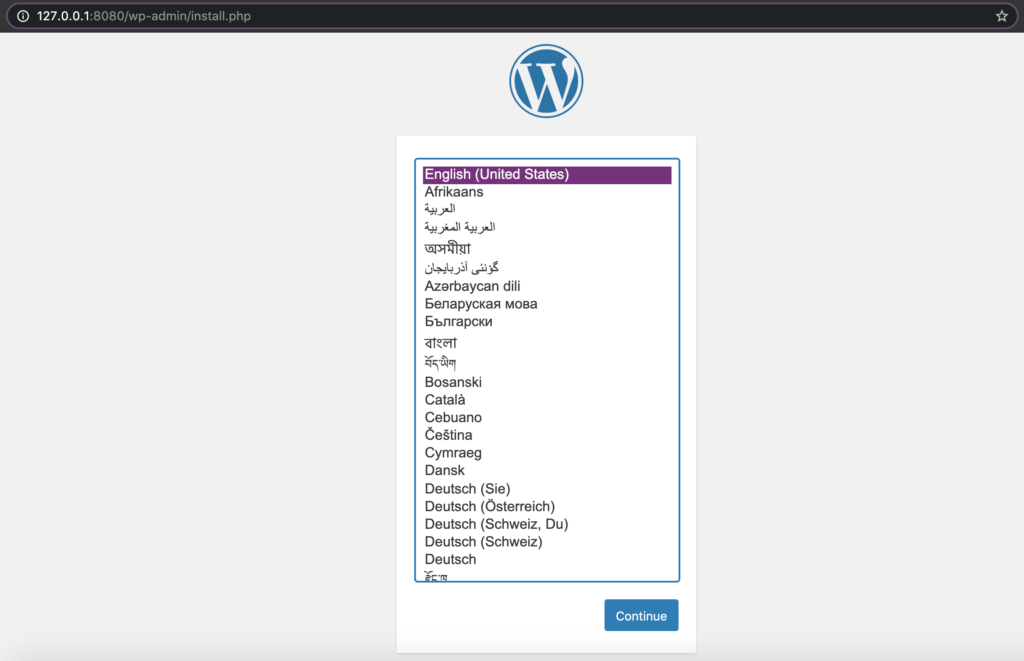
Then visit your WordPress site! http://127.0.0.1:8080/
The sidecar design pattern is an easy solution to SPOF (single point of failure) because each application container gets its very own ProxySQL. For applications that are already containerized this is a simple and effective approach. Using Kubernetes? You can launch a sidecar container into the same pod as your application container.
Lastly, there is an official ProxySQL Docker image on Docker Hub you can pull instead of building your own!
Duolingo is the most popular language-learning platform worldwide, with over 300 million total learners. Their mission is to make education free and accessible to everyone. They offer 94 total courses across 38 distinct languages, from the world’s top most-spoken languages to endangered languages like Hawaiian, Navajo, and Scottish Gaelic. Duolingo is available on iOS, Android and web at www.duolingo.com.





ProxySQL is poster child for a use case for the ambassador design pattern sidecar.
How do you end managing proxySQL configuration?
Hi JZ,
The ProxySQL configuration file can be kept with the application container files/application repository (rather than kept with ProxySQL). This allows you to keep service specific ProxySQL configs with that application. Then, when building the Dockerfile, the correct proxysql.cnf is mounted.
The proxysql.cnf (and all application files) can be kept in git for version control.
Can we create give a read only privilege for monitor user? or does it need write access? I already have a read only user so want to make use of it instead of creating new users. Pls let me know. TIA
Yes, the minimum privilege for the monitor user is just “USAGE” if you’re not checking replication lag. Take a look at the “mysql-monitor_username” variable description in https://proxysql.com/documentation/monitor-module/
We don’t actually have a replication setup. Its just a single node RDS instance without replication and other features enabled.