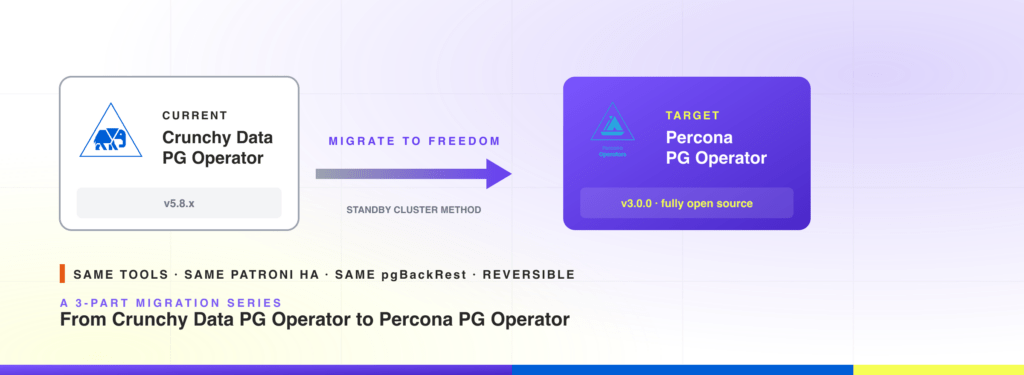
A Crunchy to Percona PostgreSQL migration is more straightforward than most cross-operator moves on Kubernetes, because the Percona PostgreSQL Operator is a hard fork of the Crunchy Data PostgreSQL Operator. Same Patroni HA, same pgBackRest backups, same overall CRD shape. This post walks through the safest of the three migration paths: a standby cluster method with near-zero downtime.
This is part 2 of a 3-part series on running PostgreSQL on Kubernetes with a fully open-source operator. Part 1 walked through the changing open-source landscape and announced the hard fork of the Crunchy Data PostgreSQL Operator into the fully independent Percona PostgreSQL Operator v3.0.0.
This post is the first practical playbook of the series. It covers the standby cluster method, the safest migration path when the downtime budget is tight. Part 3 will cover two simpler paths: backup-and-restore and persistent-volume reuse.
If you are landing here without context on why you might want to migrate at all, start with part 1. The rest of this post assumes you have already decided to move and want a tested playbook.
The Percona PostgreSQL Kubernetes Operator is a hard fork of the Crunchy Data PostgreSQL Kubernetes Operator, which simplifies the migration paths considerably: the same underlying tools (Patroni, pgBackRest, PgBouncer) and the same overall design are used in both operators. All three migration paths in this series are reversible: because Percona’s operator is fully open source and remains compatible with the same backup format, the move back to Crunchy is also possible if your team decides to walk it
All examples in this guide use an in-cluster SeaweedFS instance as the pgBackRest S3 repository. SeaweedFS is Apache-2.0 licensed, actively maintained, and a clean drop-in replacement for the role MinIO used to fill in this stack. Any other S3-compatible storage works just as well: AWS S3, Google Cloud Storage (via HMAC keys), Ceph RadosGW, Cloudflare R2, and so on. For non-SeaweedFS endpoints, remove repo1-s3-uri-style: path and repo1-s3-verify-tls: “n” from the pgBackRest configuration and replace the endpoint with your provider’s URL.
To keep scope honest:
| Component | Version |
| Crunchy Data PostgreSQL Kubernetes Operator | v5.8.x (tested on v5.8.7) |
| Percona PostgreSQL Kubernetes Operator | v3.x.x (tested on v3.0.0) |
| PostgreSQL | 18 (must match between source and target) |
| Object storage | SeaweedFS (Apache-2.0), or any other S3-compatible service accessible from all cluster pods |
| Tools | kubectl, helm (v3), yq |
Different versions may differ slightly in CR fields or behavior. Always consult the official documentation for the operator and PostgreSQL version you are running.
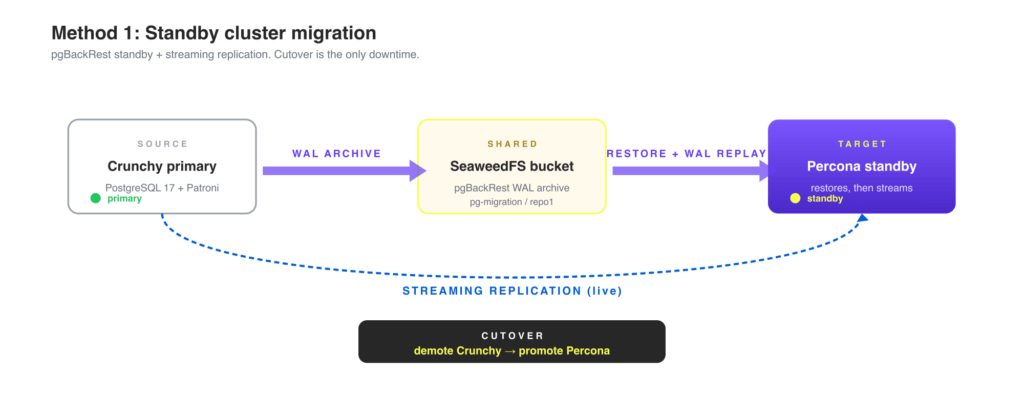
This is the safest method when the downtime budget is tight. The Percona cluster is brought up as a standby of the Crunchy primary, catches up via pgBackRest plus streaming replication, and is promoted at cutover. The only downtime is the cutover step itself.
You can wire the standby in two ways, and combining both gives you maximum safety:
Set the target namespace once. Every command in this guide reads from this variable, so you can change it in a single place:
|
1 2 |
export MIGRATION_NS=postgres-migration kubectl create namespace $MIGRATION_NS |
Skip this step if you already have an S3-compatible repository (AWS S3, GCS, Ceph). Update the endpoint and credentials in the YAML examples accordingly.
SeaweedFS provides an S3-compatible object store that runs inside Kubernetes. Both operators will use it as the shared pgBackRest WAL archive.
TLS is required. pgBackRest always connects to S3 endpoints over HTTPS, even when repo1-s3-verify-tls: “n” is set (that flag skips certificate verification, it does not fall back to HTTP). The steps below generate a self-signed certificate and pass it to SeaweedFS via Helm values.
|
1 2 3 4 5 6 7 8 9 10 11 12 13 14 15 16 17 18 |
# Generate a self-signed TLS certificate for SeaweedFS S3 openssl req -x509 -nodes -days 3650 -newkey rsa:2048 \ -keyout /tmp/seaweedfs.key \ -out /tmp/seaweedfs.crt \ -subj "/CN=seaweedfs-all-in-one" kubectl -n $MIGRATION_NS create secret tls seaweedfs-s3-tls \ --cert=/tmp/seaweedfs.crt \ --key=/tmp/seaweedfs.key helm repo add seaweedfs https://seaweedfs.github.io/seaweedfs/helm helm repo update helm install seaweedfs seaweedfs/seaweedfs \ --namespace $MIGRATION_NS \ --version 4.23.0 \ -f https://raw.githubusercontent.com/percona/percona-postgresql-operator/refs/heads/migration-from-crunchy-guide/e2e-tests/tests/migration-from-crunchy-standby/examples/seaweedfs-values.yaml \ --wait |
The Helm values file in the repo creates the pg-migration bucket on first start, so no separate aws s3 mb step is needed.
Both operators need credentials to read and write the shared SeaweedFS bucket. Apply the secrets from examples/01-pgbackrest-secret.yaml after filling in your access key and secret key:
|
1 2 3 4 |
# Copy and edit the file first to set your credentials. kubectl apply -n $MIGRATION_NS \ -f https://raw.githubusercontent.com/percona/percona-postgresql-operator/refs/heads/migration-from-crunchy-guide/e2e-tests/tests/migration-from-crunchy-standby/examples/01-pgbackrest-secret.yaml |
Both secrets contain the same SeaweedFS credentials (pgmigration / pgmigration123). For AWS S3, replace those with your IAM access key ID and secret access key.
If you already have a running Crunchy cluster, ensure its pgBackRest repo1 points at the shared bucket and path. The repo1-path value must be identical in both cluster specs. Mismatched paths will prevent the Percona standby from finding the WAL archive.
The Helm install below is shown only as a quick way to reproduce this blog post’s example. The migration steps in the rest of this post do not depend on how you deployed the source operator.
Optional: deploy a Crunchy operator to test the migration end to end:
|
1 2 3 4 5 6 |
helm install pgo \ oci://registry.developers.crunchydata.com/crunchydata/pgo \ -n $MIGRATION_NS \ --version 5.8.7 \ --set singleNamespace=true \ --wait |
Apply examples/02-crunchy-source-cluster.yaml (or adapt your existing cluster’s pgBackRest config):
|
1 2 |
kubectl apply -n $MIGRATION_NS \ -f https://raw.githubusercontent.com/percona/percona-postgresql-operator/refs/heads/migration-from-crunchy-guide/e2e-tests/tests/migration-from-crunchy-standby/examples/02-crunchy-source-cluster.yaml |
The key pgBackRest settings in the example:
|
1 2 3 4 5 6 7 8 9 10 |
global: repo1-path: /crunchy-to-percona/repo1 # shared path, must match Percona side repo1-s3-uri-style: path # required for path-style S3 endpoints (SeaweedFS, MinIO) repo1-s3-verify-tls: "n" # skip TLS verification for self-signed cert; remove for AWS S3 repos: - name: repo1 s3: bucket: pg-migration endpoint: seaweedfs-all-in-one.postgres-migration.svc.cluster.local:8443 region: us-east-1 |
Wait for the cluster to be ready:
|
1 2 3 4 5 |
kubectl wait pod \ --selector postgres-operator.crunchydata.com/cluster=crunchy-source,postgres-operator.crunchydata.com/data=postgres \ --namespace $MIGRATION_NS \ --for=condition=Ready \ --timeout=300s |
Wait for the pgBackRest stanza to be created:
|
1 2 3 4 |
kubectl wait postgrescluster/crunchy-source \ -n $MIGRATION_NS \ --for=jsonpath='{.status.pgbackrest.repos[0].stanzaCreated}'=true \ --timeout=300s |
Take a full backup before creating the Percona standby. This gives the standby a recent base to restore from, so it only needs to replay a small amount of WAL to catch up. This matches the realistic production migration pattern.
|
1 2 3 |
kubectl annotate postgrescluster crunchy-source \ --namespace $MIGRATION_NS \ postgres-operator.crunchydata.com/pgbackrest-backup="$(date +%s)" |
Wait for the backup job to complete:
|
1 2 3 4 5 |
kubectl wait job \ -l postgres-operator.crunchydata.com/pgbackrest-backup=manual,postgres-operator.crunchydata.com/cluster=crunchy-source \ -n $MIGRATION_NS \ --for=condition=Complete \ --timeout=600s |
If the Percona cluster is in a different namespace from the Crunchy cluster, copy the Crunchy TLS secrets to the Percona namespace. These allow mutual TLS authentication during streaming replication:
|
1 2 3 4 5 6 |
for secret in crunchy-source-cluster-cert crunchy-source-replication-cert; do kubectl get secret "${secret}" -n <CRUNCHY_NS> -o json | \ yq '{"apiVersion": .apiVersion, "kind": .kind, "data": .data, "metadata": {"name": .metadata.name}, "type": .type}' -o yaml | \ kubectl -n $MIGRATION_NS apply -f - done |
If both clusters are in the same namespace, skip this step. The secrets are already accessible.
The Crunchy PGO operator can stay in the same or a different namespace.
|
1 2 |
kubectl apply -n $MIGRATION_NS --server-side \ -f https://raw.githubusercontent.com/percona/percona-postgresql-operator/refs/tags/v3.0.0/deploy/bundle.yaml |
Wait until the operator deployment is ready:
|
1 2 3 4 |
kubectl wait deployment percona-postgresql-operator \ -n $MIGRATION_NS \ --for=condition=Available \ --timeout=120s |
Note: The kubectl apply below pulls the CR manifest from the migration-from-crunchy-guide branch of the operator repo, which is the source for this guide’s examples. For production deployments, follow the official Percona Operator for PostgreSQL installation documentation and pin to a released version tag rather than a feature branch.
Apply examples/03-percona-standby-cluster.yaml:
|
1 2 |
kubectl apply -n $MIGRATION_NS \ -f https://raw.githubusercontent.com/percona/percona-postgresql-operator/refs/heads/migration-from-crunchy-guide/e2e-tests/tests/migration-from-crunchy-standby/examples/03-percona-standby-cluster.yaml |
The key settings that wire the Percona cluster to the Crunchy source:
|
1 2 3 4 5 6 7 8 9 10 11 |
standby: enabled: true repoName: repo1 # restore initial base backup from this repo host: crunchy-source-ha.postgres-migration.svc.cluster.local port: 5432 secrets: customTLSSecret: name: crunchy-source-cluster-cert # Crunchy CA for mutual TLS customReplicationTLSSecret: name: crunchy-source-replication-cert # cert for _crunchyreplication user |
The Percona operator will:
Wait for the cluster to reach the ready state:
|
1 2 3 4 |
kubectl wait perconapgcluster/percona-standby \ -n $MIGRATION_NS \ --for=jsonpath='{.status.state}'=ready \ --timeout=600s |
Verify that data is replicating to the standby:
|
1 2 3 4 5 6 |
STANDBY_POD=$(kubectl get pod -n $MIGRATION_NS \ -l postgres-operator.crunchydata.com/cluster=percona-standby,postgres-operator.crunchydata.com/data=postgres \ -o jsonpath='{.items[0].metadata.name}') kubectl -n $MIGRATION_NS exec "${STANDBY_POD}" -c database -- \ psql -t -c "SELECT pg_is_in_recovery(), pg_last_wal_replay_lsn();" |
Expected output: t (in recovery) and a non-null LSN.
Query the Crunchy primary to confirm the Percona standby has caught up:
|
1 2 3 4 5 6 7 8 9 10 11 12 13 14 15 16 |
CRUNCHY_PRIMARY=$(kubectl get pod \ -l postgres-operator.crunchydata.com/cluster=crunchy-source,postgres-operator.crunchydata.com/role=master \ -n $MIGRATION_NS \ -o jsonpath='{.items[0].metadata.name}') kubectl -n $MIGRATION_NS exec "${CRUNCHY_PRIMARY}" -c database -- \ psql -c " SELECT client_addr, state, pg_wal_lsn_diff(sent_lsn, replay_lsn) AS byte_lag, write_lag, flush_lag, replay_lag FROM pg_stat_replication; " |
Proceed to the next step only when write_lag and replay_lag are NULL or under a few seconds.
This is the only step that causes downtime. Stop accepting writes on the application side, then patch the Crunchy cluster into standby mode. Patroni steps down and archives the final WAL.
|
1 2 3 4 |
kubectl patch postgrescluster crunchy-source \ -n $MIGRATION_NS \ --type=merge \ -p '{"spec": {"standby": {"enabled": true, "repoName": "repo1"}}}' |
Verify demotion (poll until pg_is_in_recovery() returns t):
|
1 2 |
kubectl -n $MIGRATION_NS exec "${CRUNCHY_PRIMARY}" -c database -- \ psql -t -c "SELECT pg_is_in_recovery();" |
Once the Percona standby has replayed all WAL, shut down the Crunchy cluster to prevent split-brain:
|
1 2 3 4 5 6 7 8 9 10 |
kubectl patch postgrescluster crunchy-source \ -n $MIGRATION_NS \ --type=merge \ -p '{"spec": {"shutdown": true}}' kubectl wait pod \ -l postgres-operator.crunchydata.com/cluster=crunchy-source,postgres-operator.crunchydata.com/data=postgres \ -n $MIGRATION_NS \ --for=delete \ --timeout=120s || true |
Confirm that the Percona standby has finished replaying all WAL (the LSN stops advancing):
|
1 2 |
kubectl -n $MIGRATION_NS exec "${STANDBY_POD}" -c database -- \ psql -t -c "SELECT pg_last_wal_replay_lsn();" |
Run this a few times. When the LSN is stable, replay is complete.
|
1 2 3 4 |
kubectl patch perconapgcluster percona-standby \ -n $MIGRATION_NS \ --type=merge \ -p '{"spec": {"standby": {"enabled": false}}}' |
Wait for the cluster to become ready and confirm it is writable:
|
1 2 3 4 5 6 7 8 9 10 11 |
kubectl wait perconapgcluster/percona-standby \ -n $MIGRATION_NS \ --for=jsonpath='{.status.state}'=ready \ --timeout=480s PERCONA_PRIMARY=$(kubectl get pod -n $MIGRATION_NS \ -l postgres-operator.crunchydata.com/cluster=percona-standby,postgres-operator.crunchydata.com/role=primary \ -o jsonpath='{.items[0].metadata.name}') kubectl -n $MIGRATION_NS exec "${PERCONA_PRIMARY}" -c database -- \ psql -t -c "SELECT pg_is_in_recovery();" |
Expected output: f (the cluster is now the primary and accepts writes).
|
1 2 3 4 |
kubectl wait perconapgcluster/percona-standby \ -n $MIGRATION_NS \ --for=jsonpath='{.status.pgbackrest.repos[0].stanzaCreated}'=true \ --timeout=300s |
Apply examples/04-post-migration-backup.yaml:
|
1 2 3 4 5 6 7 |
kubectl apply -n $MIGRATION_NS \ -f https://raw.githubusercontent.com/percona/percona-postgresql-operator/refs/heads/migration-from-crunchy-guide/e2e-tests/tests/migration-from-crunchy-standby/examples/04-post-migration-backup.yaml kubectl wait perconapgbackup/post-migration-backup \ -n $MIGRATION_NS \ --for=jsonpath='{.status.state}'=Succeeded \ --timeout=600s |
This creates a clean recovery point on the new timeline. All future PITR restores will use this backup as their starting point, independent of the old Crunchy WAL archive.
Update your application’s connection string to point at the Percona cluster’s pgBouncer service:
|
1 2 |
kubectl get service -n $MIGRATION_NS \ -l postgres-operator.crunchydata.com/cluster=percona-standby,postgres-operator.crunchydata.com/role=pgbouncer |
This migration path works almost entirely out of the box. For users coming from the Crunchy Data PostgreSQL Operator, this method feels familiar because it leverages the same standby/replica mechanisms used for HA and disaster recovery. The key difference is that you can now use this familiar mechanism to migrate safely to the Percona PostgreSQL Operator, a fully open-source alternative running on a fully open-source storage layer.
The standby method is the most rollback-friendly of the three. Until you take the post-migration backup, the Crunchy cluster still holds the original timeline. To roll back:
After Step 11 (post-migration backup), the timelines have diverged. From that point, the rollback story is the same as a fresh restore, and you should treat the Crunchy cluster as a historical reference, not a live target.
Percona standby not connecting to the Crunchy primary. Verify the crunchy-source-ha service resolves from within the Percona pod:
|
1 2 |
kubectl -n $MIGRATION_NS exec "${STANDBY_POD}" -c database -- \ bash -c "getent hosts crunchy-source-ha.${MIGRATION_NS}.svc.cluster.local" |
Replication authentication errors. The Percona standby authenticates as the _crunchyreplication PostgreSQL user using the certificate in crunchy-source-replication-cert. Verify the secret exists and matches what the Crunchy operator generated:
|
1 |
kubectl get secret crunchy-source-replication-cert -n $MIGRATION_NS |
pgBackRest restore fails. Confirm both secrets contain identical credentials and that repo1-path is the same in both cluster specs (/crunchy-to-percona/repo1 in this guide). Mismatched paths cause an archive.info missing error. Verify the bucket is reachable:
|
1 2 3 4 5 6 7 8 9 10 11 12 |
kubectl run -i --rm s3-check \ --image=perconalab/awscli \ --restart=Never \ -n $MIGRATION_NS \ -- bash -c " AWS_ACCESS_KEY_ID=pgmigration \ AWS_SECRET_ACCESS_KEY=pgmigration123 \ AWS_DEFAULT_REGION=us-east-1 \ aws --endpoint-url https://seaweedfs-all-in-one.${MIGRATION_NS}.svc.cluster.local:8443 \ --no-verify-ssl \ s3 ls s3://pg-migration " |
Timeline history file (00000002.history) missing after promotion. This is a known issue with Crunchy PGO’s async archive mode. After promotion, push the history file synchronously:
|
1 2 3 4 5 |
kubectl -n $MIGRATION_NS exec "${PERCONA_PRIMARY}" -c database -- \ bash -c " pgbackrest --stanza=db --no-archive-async \ archive-push \"\${PGDATA}/pg_wal/00000002.history\" || true " |
This was the safest migration path. Part 3 will cover two simpler options:
Pick the method that fits your downtime budget, data size, and storage layout.
This post covers basic deployment patterns and simplified configuration examples. If your environment is more complex, uses custom images, includes Crunchy enterprise features like TDE, or otherwise needs tailored migration steps, contact the Percona team and we will help you plan and execute the move.
Resources
RELATED POSTS