

Having a separate DR cluster for production databases is a modern day requirement or necessity for tech and other related businesses that rely heavily on their database systems. Setting up such a [DC -> DR] topology for Percona XtraDB Cluster (PXC), which is a virtually- synchronous cluster, can be a bit challenging in a complex Kubernetes environment.
Here, Percona Operator for MySQL comes in handy, with a minimal number of steps to configure such a topology, which ensures a remote side backup or a disaster recovery solution.
So without taking much time, let’s see how the overall setup and configurations look from a practical standpoint.
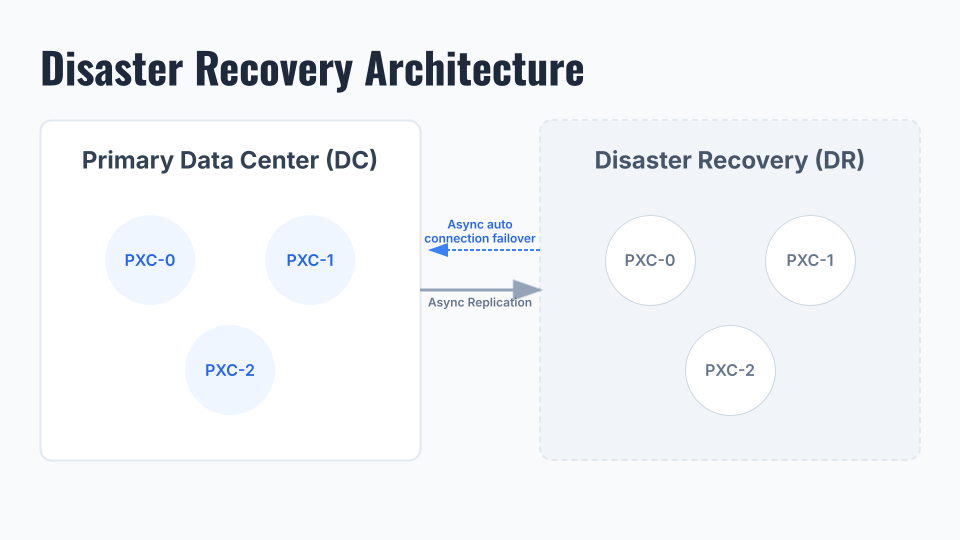
1) Here we have a three-node PXC cluster running on the DC side.
|
1 2 3 4 5 6 7 8 9 10 11 |
shell> kubectl get pods -n pxc NAME READY STATUS RESTARTS AGE cluster1-haproxy-0 2/2 Running 0 23h cluster1-haproxy-1 2/2 Running 0 23h cluster1-haproxy-2 2/2 Running 0 23h cluster1-pxc-0 3/3 Running 0 23h cluster1-pxc-1 3/3 Running 0 7h37m cluster1-pxc-2 3/3 Running 0 7h18m percona-xtradb-cluster-operator-6756dbf588-vxjxt 1/1 Running 0 24h xb-backup1-hlz2p 0/1 Completed 0 21h xb-cron-cluster1-fs-pvc-2026480026-372f8-2gfhr 0/1 Completed 0 13h |
2) There are some configuration options which have to be enabled in a custom resource file[cr.yaml] to allow cross-site replication.
|
1 2 3 |
expose: enabled: true Type: LoadBalancer |
|
1 2 3 |
replicationChannels: - name: pxc1_to_pxc2 isSource: true |
|
1 |
shell> kubectl apply -f cr.yaml |
3) Now we will notice some “EXTERNAL IP” details for each PXC node. This is the endpoint that DR node [cluster1-pxc-0] will use to connect to DC.
|
1 2 3 4 5 6 7 8 9 10 |
shell> kubectl get svc NAME TYPE CLUSTER-IP EXTERNAL-IP PORT(S) AGE cluster1-haproxy ClusterIP 34.118.227.249 <none> 3306/TCP,3309/TCP,33062/TCP,33060/TCP,8404/TCP 4h1m cluster1-haproxy-replicas ClusterIP 34.118.225.41 <none> 3306/TCP 4h1m cluster1-pxc ClusterIP None <none> 3306/TCP,33062/TCP,33060/TCP 4h1m cluster1-pxc-0 LoadBalancer 34.118.234.140 34.29.145.138 3306:30425/TCP 4h1m cluster1-pxc-1 LoadBalancer 34.118.239.132 34.30.233.0 3306:31340/TCP 4h1m cluster1-pxc-2 LoadBalancer 34.118.236.64 35.225.0.19 3306:30642/TCP 4h1m cluster1-pxc-unready ClusterIP None <none> 3306/TCP,33062/TCP,33060/TCP 4h1m percona-xtradb-cluster-operator ClusterIP 34.118.235.168 <none> 443/TCP 4h11m |
At this point, we are done with the DC setup. Next, we will take a backup from Source which we later used to build the DR.
|
1 |
cat backup-secret-s3.yaml |
|
1 2 3 4 5 6 7 8 |
apiVersion: v1 kind: Secret metadata: name: my-cluster-name-backup-s3 type: Opaque data: AWS_ACCESS_KEY_ID: <KEY> AWS_SECRET_ACCESS_KEY: <SECRET> |
|
1 2 3 4 5 6 7 8 9 10 11 12 |
backup: storages: s3-us-west: type: s3 verifyTLS: true s3: bucket: <bucket> credentialsSecret: my-cluster-name-backup-s3 region: us-west-2 endpointUrl: https://storage.googleapis.com |
…
|
1 |
shell> kubectl apply -f cr.yaml |
|
1 2 3 4 5 6 7 8 9 |
apiVersion: pxc.percona.com/v1 kind: PerconaXtraDBClusterBackup metadata: # finalizers: # - percona.com/delete-backup name: backup1 spec: pxcCluster: cluster1 storageName: s3-us-west |
…
|
1 |
shell> kubectl apply -f cr.yaml |
|
1 2 3 |
kubectl get pxc-backup NAME CLUSTER STORAGE DESTINATION STATUS COMPLETED AGE backup1 cluster1 s3-us-west s3://<bucket>/cluster1-2026-04-07-15:55:46-full Succeeded 125m 127m |
As the backup is also ready, we can now move to the DR setup part.
Below we have a similar PXC setup as having in DC in a separate Node/ K8s Cluster.
|
1 2 3 4 5 6 7 8 9 10 11 12 13 |
kubectl get pods -n pxc-dr NAME READY STATUS RESTARTS AGE cluster1-haproxy-0 2/2 Running 0 35h cluster1-haproxy-1 2/2 Running 0 35h cluster1-haproxy-2 2/2 Running 0 35h cluster1-pxc-0 3/3 Running 0 35h cluster1-pxc-1 3/3 Running 0 35h cluster1-pxc-2 3/3 Running 0 35h percona-xtradb-cluster-operator-6756dbf588-2wc5m 1/1 Running 0 38h prepare-job-restore1-cluster1-8h4vn 0/1 Completed 0 35h restore-job-restore1-cluster1-trfg6 0/1 Completed 0 35h xb-cron-cluster1-fs-pvc-2026480025-372f8-wv6bt 0/1 Completed 0 28h xb-cron-cluster1-fs-pvc-2026490025-372f8-gxd59 0/1 Completed 0 4h48m |
First, we need to restore the backup on the DR server.
|
1 2 3 4 5 6 7 8 |
apiVersion: v1 kind: Secret metadata: name: my-cluster-name-backup-s3 type: Opaque data: AWS_ACCESS_KEY_ID: <KEY> AWS_SECRET_ACCESS_KEY: <SECRET> |
…
|
1 |
shell> kubectl apply -f backup-secret-s3.yaml |
|
1 2 3 4 5 6 7 8 9 10 11 12 13 14 15 |
apiVersion: pxc.percona.com/v1 kind: PerconaXtraDBClusterRestore metadata: name: restore1 # annotations: # percona.com/headless-service: "true" spec: pxcCluster: cluster1 backupSource: # verifyTLS: true destination: s3://<bucket>/cluster1-2026-04-07-15:55:46-full s3: bucket: <bucket> credentialsSecret: my-cluster-name-backup-s3 endpointUrl: https://storage.googleapis.com/ |
…
|
1 |
shell> kubectl apply -f restore.yaml |
|
1 2 3 |
shell> kubectl get pxc-restore NAME CLUSTER STATUS COMPLETED AGE restore1 cluster1 Succeeded 27m |
Now we can do the remaining DR changes in the custom resource file [cr.yaml]. Basically, we need to add the replication channel and all source EXTERNAL-IPs. This cross-DC replication supports Automatic Asynchronous Replication Connection Failover feature, so in case any of the DC node is down, the Replica can connect and resume from other available DC nodes.
|
1 2 3 4 5 6 7 8 9 10 11 12 13 14 15 |
replicationChannels: - name: pxc1_to_pxc2 isSource: false sourcesList: - host: 34.29.145.138 port: 3306 weight: 100 - host: 34.30.233.0 port: 3306 weight: 100 - host: 35.225.0.19 port: 3306 weight: 100 |
…
|
1 |
shell> kubectl apply -f cr.yaml |
For backup and restoration on the PXC operator, the manuals below can be referenced further.
- https://docs.percona.com/percona-operator-for-mysql/pxc/backups-ondemand.html
- https://docs.percona.com/percona-operator-for-mysql/pxc/backups-restore-to-new-cluster.html
Initially, when we check the replication status, we can notice the following error. This is because with [caching_sha2_password] authentication, it should be a secure SSL/TLS communication, or else we can use SOURCE_PUBLIC_KEY_PATH/GET_SOURCE_PUBLIC_KEY which basicaly enables the RSA key pair-based password exchange by requesting the public key from the source.
|
1 2 |
shell> kubectl exec -it cluster1-pxc-0 -- sh shell> mysql -uroot -p |
|
1 2 3 4 5 6 7 8 9 10 11 12 13 14 15 |
mysql> show replica status\G; *************************** 1. row *************************** Replica_IO_State: Connecting to source Source_Host: 35.225.0.19 Source_User: replication Source_Port: 3306 Connect_Retry: 60 Source_Log_File: Read_Source_Log_Pos: 4 Relay_Log_File: cluster1-pxc-0-relay-bin-pxc1_to_pxc2.000001 Relay_Log_Pos: 4 Relay_Source_Log_File: Replica_IO_Running: Connecting Replica_SQL_Running: Yes ... |
|
1 |
Last_IO_Error: Error connecting to source '[email protected]:3306'. This was attempt 2/3, with a delay of 60 seconds between attempts. Message: Access denied for user 'replication'@'35.225.0.19.' (using password: YES) |
Once we passed “GET_SOURCE_PUBLIC_KEY” in the “CHANGE REPLICATION” command the error is resolved and DR successfully able to communicate with the DC.
|
1 2 3 4 |
mysql> STOP REPLICA; mysql> STOP REPLICA IO_THREAD FOR CHANNEL 'pxc1_to_pxc2'; mysql> CHANGE REPLICATION SOURCE TO SOURCE_USER='replication', SOURCE_PASSWORD='password', GET_SOURCE_PUBLIC_KEY=1 FOR CHANNEL 'pxc1_to_pxc2'; mysql> START REPLICA; |
|
1 |
shell> kubectl get secret cluster1-secrets -o jsonpath="{.data.replication}" | base64 --decode |
|
1 2 3 4 5 6 7 8 9 10 11 12 13 14 15 |
mysql> show replica status\G; *************************** 1. row *************************** Replica_IO_State: Waiting for source to send event Source_Host: 35.225.0.19 Source_User: replication Source_Port: 3306 Connect_Retry: 60 Source_Log_File: binlog.000006 Read_Source_Log_Pos: 3047027 Relay_Log_File: cluster1-pxc-0-relay-bin-pxc1_to_pxc2.000001 Relay_Log_Pos: 150132 Relay_Source_Log_File: binlog.000006 Replica_IO_Running: Yes Replica_SQL_Running: Yes ... |
The other PXC DR nodes will sync as usual with the Galera Synchronous replication process.
The asynchronous connection failover is already enabled on the DR as we defined initially in the custom resource file. The “External IPs” shows different here because they changed in this testing scenario.
|
1 2 3 4 5 6 7 8 9 |
mysql> select * from performance_schema.replication_asynchronous_connection_failover; +--------------+---------------+------+-------------------+--------+--------------+ | CHANNEL_NAME | HOST | PORT | NETWORK_NAMESPACE | WEIGHT | MANAGED_NAME | +--------------+---------------+------+-------------------+--------+--------------+ | pxc1_to_pxc2 | 34.29.145.138 | 3306 | | 100 | | | pxc1_to_pxc2 | 34.45.151.96 | 3306 | | 100 | | | pxc1_to_pxc2 | 34.71.57.38 | 3306 | | 100 | | +--------------+---------------+------+-------------------+--------+--------------+ 3 rows in set (0.00 sec) |
Now, in case the existing Source DC[cluster1-pxc-2] is down, the DR will connect to one of the other available DC nodes based on the “Weight” and chronological order [pxc-2, pxc-1, pxc-0 etc].
|
1 2 3 4 5 6 7 8 9 10 11 12 |
kubectl get pods -n pxc NAME READY STATUS RESTARTS AGE cluster1-haproxy-0 2/2 Running 0 2d3h cluster1-haproxy-1 2/2 Running 0 2d3h cluster1-haproxy-2 2/2 Running 0 2d3h cluster1-pxc-0 3/3 Running 0 2d3h cluster1-pxc-1 3/3 Running 0 35h cluster1-pxc-2 2/3 Running 1 (6s ago) 34h percona-xtradb-cluster-operator-6756dbf588-vxjxt 1/1 Running 0 2d3h xb-backup1-hlz2p 0/1 Completed 0 2d1h xb-cron-cluster1-fs-pvc-2026480026-372f8-2gfhr 0/1 Completed 0 41h xb-cron-cluster1-fs-pvc-2026490026-372f8-mgfpv 0/1 Completed 0 17h |
|
1 2 3 4 5 6 7 8 9 10 11 12 13 14 15 16 17 18 19 20 21 22 23 24 25 26 27 28 29 30 31 32 33 34 35 36 37 38 |
mysql> show replica status\G; *************************** 1. row *************************** Replica_IO_State: Reconnecting after a failed source event read Source_Host: 34.71.57.38 Source_User: replication Source_Port: 3306 Connect_Retry: 60 Source_Log_File: binlog.000012 Read_Source_Log_Pos: 198 Relay_Log_File: cluster1-pxc-0-relay-bin-pxc1_to_pxc2.000002 Relay_Log_Pos: 369 Relay_Source_Log_File: binlog.000012 Replica_IO_Running: Connecting Replica_SQL_Running: Yes Replicate_Do_DB: Replicate_Ignore_DB: Replicate_Do_Table: Replicate_Ignore_Table: Replicate_Wild_Do_Table: Replicate_Wild_Ignore_Table: Last_Errno: 0 Last_Error: Skip_Counter: 0 Exec_Source_Log_Pos: 198 Relay_Log_Space: 602 Until_Condition: None Until_Log_File: Until_Log_Pos: 0 Source_SSL_Allowed: No Source_SSL_CA_File: Source_SSL_CA_Path: Source_SSL_Cert: Source_SSL_Cipher: Source_SSL_Key: Seconds_Behind_Source: NULL Source_SSL_Verify_Server_Cert: Yes Last_IO_Errno: 2003 Last_IO_Error: Error reconnecting to source '[email protected]:3306'. This was attempt 2/3, with a delay of 60 seconds between attempts. Message: Can't connect to MySQL server on '34.71.57.38:3306' (111) |
|
1 2 3 4 5 6 7 8 9 10 11 12 13 14 15 |
mysql> show replica status\G; *************************** 1. row *************************** Replica_IO_State: Waiting for source to send event Source_Host: 34.45.151.96 Source_User: replication Source_Port: 3306 Connect_Retry: 60 Source_Log_File: binlog.000007 Read_Source_Log_Pos: 198 Relay_Log_File: cluster1-pxc-0-relay-bin-pxc1_to_pxc2.000003 Relay_Log_Pos: 369 Relay_Source_Log_File: binlog.000007 Replica_IO_Running: Yes Replica_SQL_Running: Yes ... |
In this blog post, we walk through the steps to configure Cross-Site Replication in the Percona PXC operator. Although we have used the operator native Xtrabackup to feed the data to the DR via the restore process, we can also use logical backup options like (mysqldump, mydumper, etc.) to accomplish the same goals.
Using an “Asynchronous Replication” process to sync DR could lead to delays or replication lag due to its flow, or, more importantly, when working across data centres, where network latency is a big factor. However, adding a DR(PXC) cluster to DC(PXC) directly via synchronous replication could be more impactful or lead to flow control issues if any of the DR nodes struggle or experience performance/saturation issues. So, it’s equally important to consider all aspects or challenges before deploying in production.
Resources
RELATED POSTS




